At Home with Tech

Unlock the power of all your technology and learn how to master your photography, computers and smartphone.

Month: August, 2014

Cure the Cause of Your Computer’s Crippling Coma

Does your Mac get a headache keeping up with all the programs you’re running? It’s time to dial it back. Activity Monitor can help you decide which programs to close down.

Does your Mac get a headache keeping up with all the programs you’re running? It’s time to dial it back. Activity Monitor can help you decide which programs to shut down.

My iMac has been slowing down lately.
Slowwwwww…

Its spinning beach ball shows up whenever you click on the simplest task…
And then you’ve got to wait around like it’s 1999.
You look up…stare into space.
Yup…
The moon’s still there.

Suddenly, you hear the whir of the computer’s fan grow louder.
It really shouldn’t be working this hard.

Hmmm.
Well, my Mac is a few years old…

So I wondered if it was time to think about a new one.
But it’s got 4 GB of RAM and the i7 processor.
It shouldn’t be hurting that badly.

Doctor Barrett… what’s the problem?!

Activate Repair Disk Permissions
One good maintenance check is to run ‘Repair Disk Permissions’ in Disk Utility.
That can speed things up a bit.

Unfortunately, that fix didn’t improve the health of my panting processor this time.

Of course, the big question is…

  • How much software do you have running simultaneously?

No computer is a bottomless bottle of beer.
So I sat down with my Mac and we began some self-reflection.

Billions and Billions of Programs
Well, first off… I often use Adobe Lightroom to edit and organize all my photos.
(Everyone talks about what a memory hog that program is.)

Then, you might recall I added Backblaze a while back for automatic cloud backup, in addition to my Time Machine drive.
(You can never be too careful.)

Do I have lots of Safari windows open?
Guilty as charged.

Plus I see, Dropbox, Word, Outlook….

Already, it’s getting to be a pretty large list.

Maybe I’ve been maxing out my Mac after all.
(And I haven’t even mentioned iTunes or Final Cut Pro.)

So how are you supposed to know how much weight your Mac can bench press?

X-ray Vision into Your Computer
Yes, Apple has, of course, thought of that.
The answer comes in the form of a little utility called Activity Monitor.

It lists all of your open programs, charts the drain and graphically displays the ‘memory pressure’ your poor computer is enduring.

There’s lots tech jargon to consume, but it’s immediately clear which programs are depleting your digital companion.

And then you can close down the particular offenders directly in Activity Monitor.

Time to Tidy Up
I’ve opened Activity Monitor before, but it was more out of curiosity than need.

This time, I went in and saw some Safari pages ‘not responding’ and putting a pretty big drain on the system.

Click…. See you guys later!

That seemed to do the trick… but then I didn’t close out of my nifty new window into my Mac’s brain.

I left it open and positioned it in the top left corner of my screen.
And that was a few weeks ago…

Now, it’s always there to help me see what’s going on and which hungry programs are grabbing more than their fair share.

Yes, a newer Mac or more RAM would also solve the problem, but really, how many programs do you need to have open simultaneously?

When I was a kid at home, my mom always pestered me to turn off all the lights in the room I just left.

“That’s just wasting electricity,” she’d say knowingly.

Decades later, I finally get it…

Happy Computer, Happy Human
…What’s that, you say?
And how much memory does it taken to run Activity Monitor 24/7?
Good question…

Could this reveal a circular logic flaw…?

As I write this, Activity Monitor is sipping a miniscule 14.7 MB.
By comparison, Word is consuming 148.3 MB.
And my cloud backup is gulping 698.3 MB.

The price we sometimes pay for peace of mind…

By comparison, Activity Monitor is a welcome dose of aspirin to clear up your headache and keep your computer focused on what really matters in the moment.
How to Take a Picture Every 30 Seconds of the Rest of Your Life

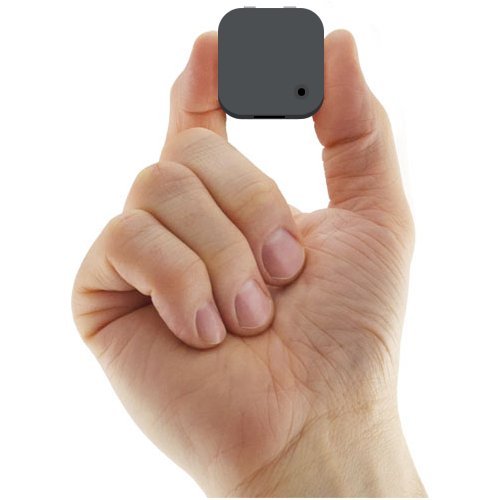
A Narrative Clip wearable camera may be the perfect way to help tell your life story. But before you put your photo-taking on auto pilot, you might want to think twice about the little details…

A Narrative Clip wearable camera may be the perfect way to help tell your life story. But before you put your photo-taking on auto pilot, you might want to think twice about the little details…

I’ve got a friend who has a couple of young kids my son enjoys playing with.
So we sometimes talk about interesting tech the kids could ‘theoretically’ use.
Or said another way… a few test subjects we need for some new tech we want to try out.

Do You Want to Own Your Own Narrative?
Our latest discussion has focused around this cool little wearable camera called the Narrative Clip.

You clip it on your shirt or hat, and it snaps a photo every 30 seconds.
It stores 6,000 pictures and can go for two days on a charge.
It uploads your resulting mass of photos to the Narrative cloud, which you can access with the Narrative app.

Imagine all the found photographic moments you’d capture without even trying!

We could pop it on one of the kid’s shirts and see what happens over the course of an afternoon.

Now, if that’s not fun, I don’t know what is…
(Disclaimer: The wives were not consulted on this plan.)

Digitize Your Life
Then, I started thinking about the whole scenario a little more.

It reminded me of a movie…
Remember “The Truman Show” with Jim Carrey?

Huh…

So theoretically, I could pop a Narrative Clip on my four-year-old’s shirt, plop down on my barcalounger for a decade and watch his entire youth unfold.
(Of course, I really wouldn’t do that… I don’t own a barcalounger.)

Then, it started to feel a little weird surreptitiously capturing someone’s life.
And even if the subject were aware of the ‘experiment,’ everyone else wouldn’t be.

So we start to enter privacy questions… à la Google Glass.

Find the Small Moments that ‘Matter the Most’
But, I know I’m taking the use of this tech into the outer limits of possibility.

I think most people would use a Narrative Clip to capture a specific event or activity.

Then, you could free yourself up to fully immerse yourself in the moment as opposed to remaining preoccupied with having to snap some good pics for posterity.
(guilty as charged)

Plus you might catch some magic moments you might not otherwise have seen.

So I’ve got to admit… at its core, the Narrative Clip is quite the clever product…

My creative self is impressed.

Don’t Ignore the Data Management Challenge
But then my prickly practical side takes over…

It says, “Barrett, when are you going to have the time to go through all those hundreds and thousands of photos? And where are you going to put them all?”

The photo management question can blow your mind.

Sure, they’re all up in Narrative’s cloud. (‘unlimited’ storage)
But how would you feel about having all these unfiltered life moments stored in someone else’s cloud?

And sure, you can download them to your computer. A Narrative Clip’s got 8GB of onboard memory.
(But how much more local storage are you going to need over the years?)

This Plan Will Self-Destruct in Ten Seconds
Suddenly, I can’t see the effortless magic of Narrative anymore.
I just see all the work it’s going to give me.

You may say, “What work? All those photos are right there on your smartphone to enjoy!”
Sure, that’s fine for a while, but after a few events or days, wouldn’t it feel overwhelming?
Hasn’t someone ever wanted to show you a picture on his smartphone and then taken a couple of minutes to furiously scroll through so many other photos to get to the one he wanted?

Multiply that by the power of gazillion.

The thought of it all kind of makes me want to run away…

The Price Tag
“Posh,” you might say.
“Surely you exaggerate.”

Maybe.

So let’s forget my little tech tirade for a moment.
Let’s assume you’re a believer.

How’s your wallet feeling?

A Narrative costs:

  • $229 with a 3-month cloud subscription
  • $279 with a 12-month subscription

And then it’s $9/month after that.

I can handle the sub-$300 price tag… a figure I’m usually comfortable with when shopping for a point-and-shoot camera. But over the course of a couple more years… that’s when this device really gets pricey.

This Lifelogging Plan Only Works on Paper
Plus, here’s the $100,000 question…
Is my son going to be a cooperative test subject and let a Narrative just sit attached to his shirt?

Of course not.
He’s going to want to take it off and then take it apart.

Son of At Home with Tech.
(I love him!)

Yeah, I don’t think there’s a Narrative Clip in my immediate future.

Until then, I’m going to have to continue shooting my own narrative the old fashioned way.

That said, for those of you out there successfully lifelogging with your Narrative Clip, I salute you!