Miss summer already? You don’t have to let it totally slip away. Here’s a little photo exercise that can help you keep all those good summertime vibes going.
Labor Day isn’t quite here yet, marking the official end of summer. But realistically, it’s already over. Do you feel the energy shift too? It’s unavoidable.
When I wake up, it’s dark out now. I chat with work colleagues in other states whose kids are already back to school. Everyone I run into asks me if I had a good summer.
Well, did I? Did you?
Sure, it’s easy to call out the fun vacation, weekend at the beach or summer BBQ. But what happened across all those other days and weekends? Can you remember the highlights? Or is it already starting to slip into a cloudy past as the fall season approaches.
Let Your Photos Jog Your Summer Memories When faced with this moment, I find it useful to take a little stroll down memory lane via my summer photo collection.
It’s not just the big moments I’ve documented. It’s the little ones that matter too.
Only then can you take it all in and authentically say, “Yeah, I had a good summer.”
I just performed that photo review for myself, and here are a few images that reflect some of my own summer’s story.
Taking in Norwalk’s Memorial Day Parade from My Lawn Chair
That’s my city’s mayor leading the parade (Norwalk Mayor Harry Rilling). On this bright, young summer day, I felt part of a timeless tradition. The moment could easily have been from a 1925 parade (wardrobe evolution aside).
Flying My Drone in Cape Porpoise, Maine
I barely knew how to get my new drone in the air, but I knew enough to drag myself out of bed at the crack of dawn and hoof it to the empty beach. Nature’s stunning beauty did the rest of the work for me.
Eating Dinner by The Last Taco StandDuring Sunset
My wife and I enjoyed a few tacos from this special food trailer by the water as the sun set over the Norwalk Cove Marina. It was perfection in a parking lot.
Watching The Boston Symphony Orchestra Perform at Tanglewood
It’s Tanglewood. Enough said.
Experiencing the Music of AJR at Jones Beach Theater
Our 15-year-old son’s musical tastes led us to this amazing experience, As the full moon rose behind the outdoor stage, I knew this concert would be locked into our memories forever.
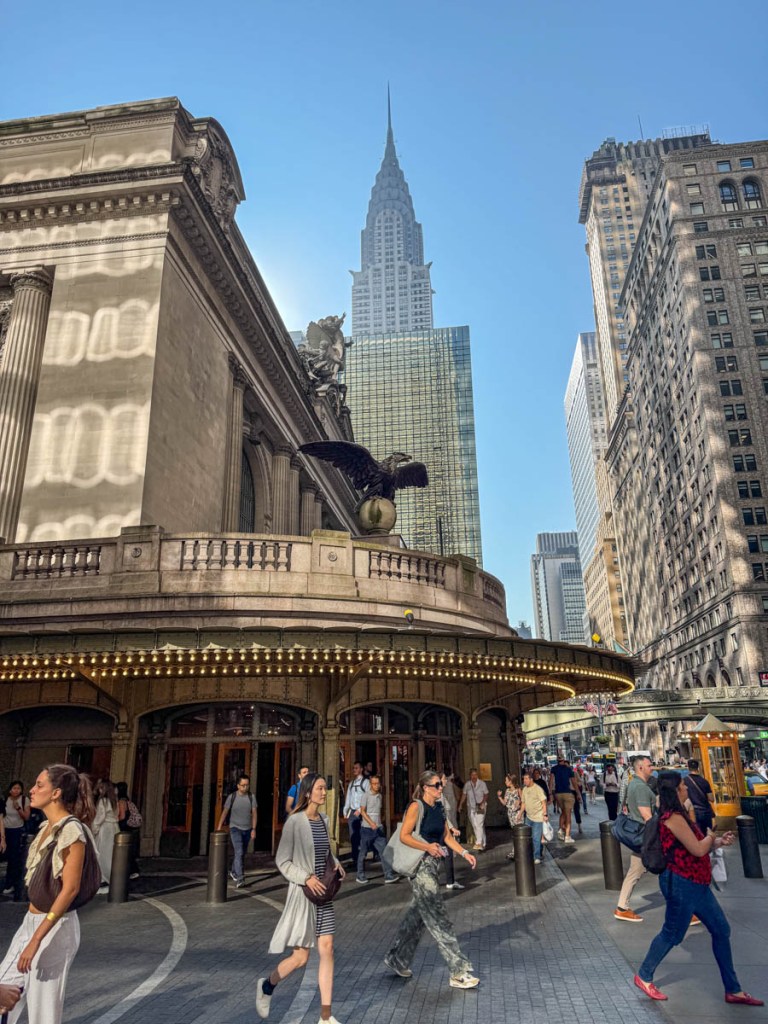
Walking to Work from Grand Central Terminal on a Hot August Morning
Even the most boring of summer moments like a commute can be turned into a photo exploration. And that’s never hard to find in New York City.
Doing Nothing but Watching the Flames from Our Solo Stove
For someone who’s always on the go, I find that slowing down to stare at a fire’s glow is essential for any summer.
Your Photos are Your Secret Portal Back to Summertime Though I’ve shared some of my own pictures here, creating this type of photo collection is more for the creator than anyone else. This little portfolio reflects a larger set of stories, because of what’s behind each photo. Only the photographer can know them.
And each image doesn’t have to be stunning. It should simply bring back the experience of your happy memory.
I highly recommend trying this photo exercise as you wrap up your own summer.
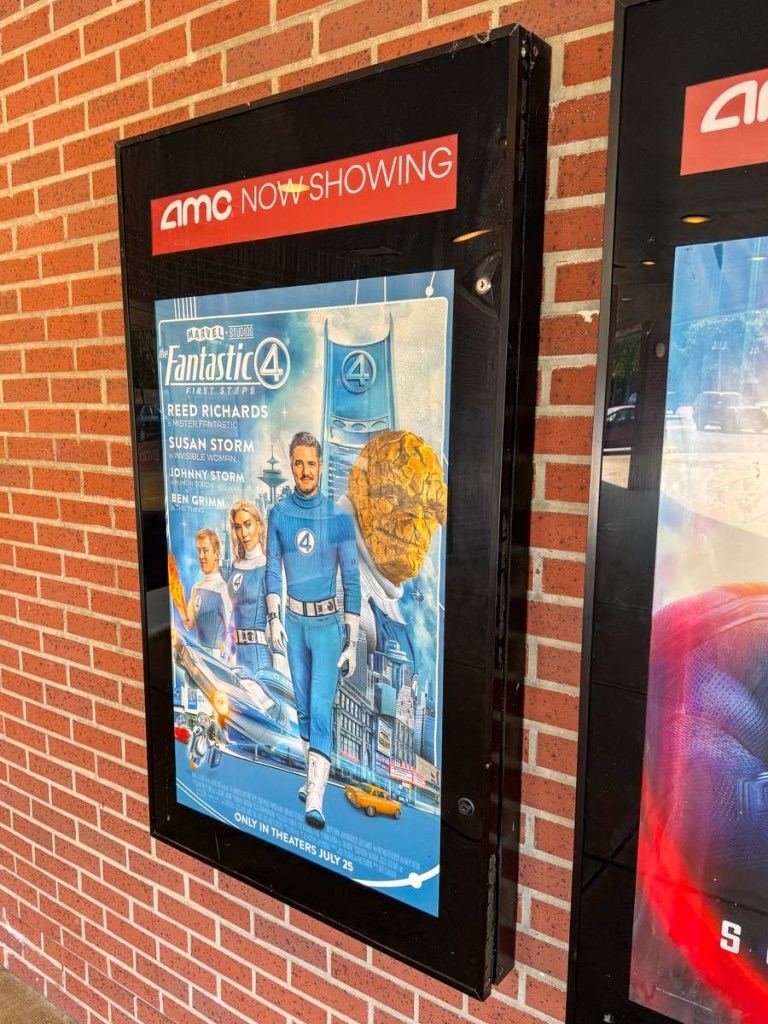
This Marvel movie about a superhero family from an alternate, retro-future Earth had all the right ingredients but was still doomed to underperform. Here’s my review.
My son and I went out to the movies to see “The Fantastic Four: First Steps” shortly after the box office turned against it. (Ticket sales plunged 67% during its second weekend in the theaters.) What looked like a big hit was proving to be just a moderate success. It received great reviews. So, what went wrong?
After the post-credit scene, my son looked at me and asked if I liked the movie. I half-heartedly said, “Yes.” He agreed in a similar tone. Clearly, neither of us were enthusiastic. I think we both wanted to enjoy the movie more than we did. (He eventually admitted he liked “Thunderbolts*” much more.)
Not that I’m an ‘official’ movie reviewer (although if you know me, I’ve been chasing that dream since I was in college), but I think I know what’s going on here.
The Alternate Reality of Earth-828 If you’re a Marvel fan, then you’re hoping for a hit, just like me. (It’s been something of a dry spell.) We all wanted “The Fantastic Four” to succeed.
And there’s a lot to like about it. It’s fresh. It’s different. It’s retro futuristic.
But while the 1960s design choice is visually appealing, it also creates an energetic void that limits the movie.
Our main characters are effectively stuck in a type of “WandaVision” faux reality. The movie is so intent on setting up its alternate universe for this Earth-828, it takes up more screen time than it should. We even get to see fictional Saturday morning “Fantastic Four” cartoons, as if this cements the connection.
We get it.
Blast Off to Yesterday’s Tomorrow This movie works hard to remind us of a ‘better,’ more optimistic and wholesome time in our history. And this nostalgic hook does have some payoffs.
For me, one of the best moments comes during the rocket launch sequence. As we get a beautiful Apollo-type liftoff, complete with rousing music (by Michael Giacchino), we can spot “United States” etched in the ship’s frame and perfectly positioned in the shot.
Yes, I felt a little jolt of adrenaline as the cool ship ascended from its hip New York City launch pad.
Many parts of this movie are designed with a bright, optimistic feel. And to a certain extent, it works.
Family Friendly Directed by Matt Shakman, “The Fantastic Four: First Steps” looks fantastic. But it plays too much like an after-school TV special.
The overall theme is about ‘family’ (though it’s actually more about parenting). There’s a layer of connection and warmth that permeates through the entire film. (Even the spectacle of our heroes’ superpowers is more of an afterthought for much of the movie.)
But that also takes the edge off… just about everything. (Sure, the world may end, but gosh darn it, we’re all going to stick together, right?)
I feel the best scenes occur off world where we’re not reminded of the ‘good-old-days’ era of Earth-828. Deep in the cosmos, our characters are finally allowed to react more authentically to the dangers that confront them.
Where’s the Conflict? Said another way, there’s just not enough tension in this story. Our Fantastic Four family barely argues. Pedro Pascal’s Reed Richards just worries a lot. Joseph Quinn’s Johnny Storm is way too nice for his brash character. Ebon Moss-Bachrach’s ‘Thing’ is so polite and sweet, you just want to squeeze him. Even the evil Silver Surfer played by Julia Garner (minor spoiler alert) has a soft spot.
Fortunately, Vanessa Kirby’s Sue Storm powers the movie’s major themes. The story orbits her struggles.
This is really a movie about motherhood and doing anything for your children. And it’s beautiful. The movie’s high points all surround Sue Storm.
But I’m not sure this is enough to be at the center of a Marvel movie.
Too Charming to be Believable A family of superheroes without disfunction is a different formula, and it’s not one that’s powered Marvel’s biggest hits.
Our favorite Marvel characters are flawed. They’re often funny. Sometimes inappropriate.
Chris Evans’ Captain America was the obvious exception. But his character was always a fish out of water, and that was the storytelling strategy. And it worked.
These Fantastic Four are pretty-darned perfect and live on an easy-breezy Earth-828 with analog tech from the 1960s that can somehow power a spaceship faster than the speed of light.
It’s simply fantastic (and skews dangerously close to fantasy).
It’s just not realistic. I know this is science fiction, but good storytelling needs to be grounded in a reality you can believe in and relate to.
Moms, Assemble! I think parents (especially mothers) will connect most to this movie. And those old enough to remember the good vibes of the ‘60s.
And that’s simply not Marvel’s core target audience. For my 15-year-old’s generation, this movie must be culturally confusing. It doesn’t really feel like a Marvel movie.
To be a blockbuster, “The Fantastic Four: First Steps” needs to connect with just about everyone.
First Steps was Bound to Stumble “The Fantastic Four: First Steps” is not a bad movie. It’s good. Just not fantastic.
And in an era of declining box office returns and growing fatigue with mediocre Marvel films, it’s no surprise “The Fantastic Four: First Steps” underperformed.
Silver Lining Here’s the good news: If you’re generally not a big Marvel movie fan, because there’s too much violence, or you’ve lost track of the extended storyline that links all the films together, then this is the perfect Marvel flick for you.
It’s a standalone story in its own corner of the multiverse and doesn’t even deserve its PG-13 rating (maybe it’s a bit intense here and there).
“The Fantastic Four: First Steps” is a solid summer movie for someone who doesn’t like the typical sci-fi blockbuster.
The 1960s Never Looked So Good The movie’s earnest energy and gee-wiz sense of wonder may not totally wow everyone, but Earth-828 in the MCU is still swell and groovy.
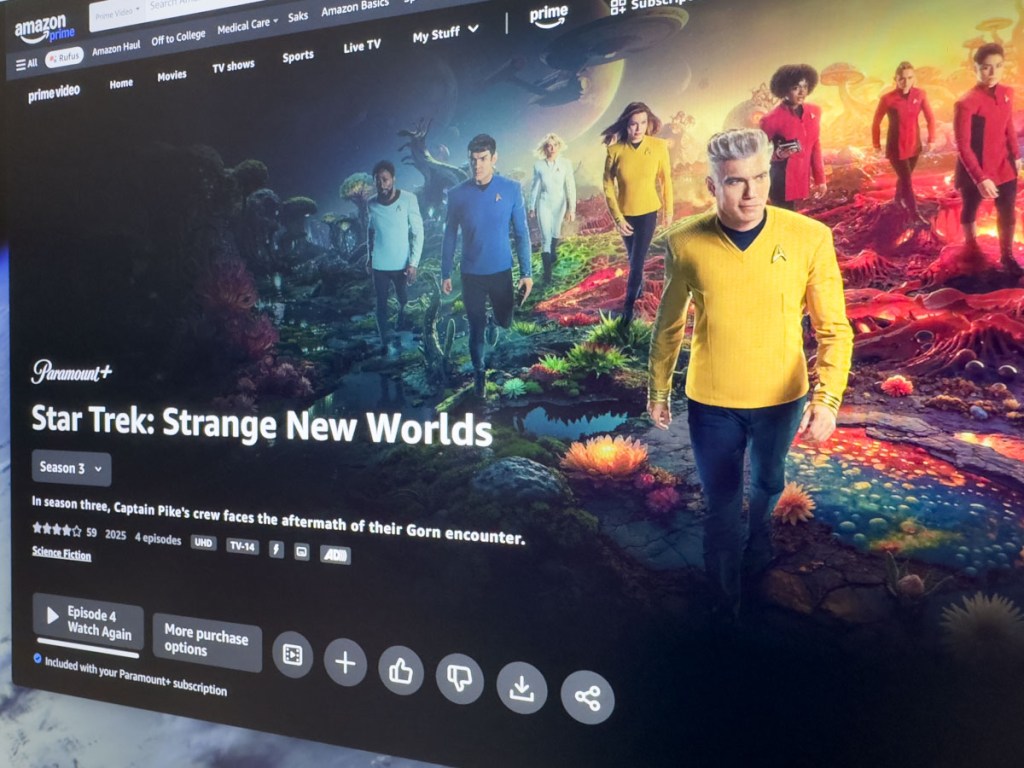
These new voyages of the Starship Enterprise still delight. Here’s my Trekkie review.
The crew of the Starship Enterprise is back! After what feels like a century-long break, season 3 of “Star Trek: Strange New Worlds” has finally arrived on Paramount+. I’m not sure why the producers waited so long (season 4 is already in production), but I couldn’t be happier. Putting the Band Back Together If you’ve been stuck somewhere in the Guardian of Forever, you may not know that “Strange New Worlds” is the Back to the Future of Star Trek. It chronicles the voyages of the Enterprise immediately before the saga of Captain Kirk and his crew. This crew is led by Captain Christopher Pike (played by Anson Mount), but we already know many of the characters.
Ethan Peck is Spock. Celia Rose Gooding plays Nyota Uhura. Rebecca Romijn is Number One (originally seen in 1966’s “The Menagerie” episode). Jess Bush plays Christine Chapel, and Babs Olusanmokun is Dr. M’Benga (who was in two episodes of the original series).
There are also new characters on the bridge, including La’an Noonien-Singh (Christina Chong) and Erica Ortegas (Melissa Navia).
And some familiar characters have joined the series along the way: Martin Quinn as Scotty and Paul Wesley as Lt. James T. Kirk.
Returning to the 23rd Century Never Felt So Cool “Strange New Worlds” is inevitably bound by Star Trek canon but does a remarkable job not being incumbered by that limitation. In so many ways, the show embraces its roots. Sure, the writers (and designers) push the canon edges a bit, but not so much that a Trekkie would cry foul.
Of course, the bridge of the Enterprise looks more high tech, but the same floor plan is still in place. Of course, the CGI shots of the ship look significantly different than the five analog shots we repeatedly saw during the original series. There must be a team of talented art directors for “Strange New Worlds” regularly declaring, “You think that shot of our NCC-1701 was cool? Well, take a look at this!” They’re clearly having way too much fun.
No Dystopian Future Here And fun is the key ingredient that permeates throughout this entire prequel series. The writers have also given a lot of time to the ensemble cast, and the series is stronger for that reason.
“Strange New Worlds” shines by capturing the optimistic and entrepreneurial spirit of the original series. This success has also enabled the series to take a few really big creative swings. (I’ll leave it at that.)
Fate Fuels this Series But this series is not without its serious side. Most significantly, this Captain Pike (minor spoiler) learns his unfortunate fate in the not-too-distant future, and season 1 deals with that theme.
Just as importantly, we know the future for many of these characters. And for the new ones who don’t show up later in the timeline… well that doesn’t necessarily bode well for them. (The series has already killed off one major character.)
There’s already a sense that time is beginning to run out before we get to the end of this beginning. (More on this later.)
Lt. James T. Kirk But happily, we’re not there yet. The series is acutely self-aware of these variables and the writers have clearly embraced the challenge of how to maximize the impact of fate for this show.
But that factor hasn’t limited the writers either. They’ve discovered and explored plenty of storytelling opportunities within the strict limitations of Trek canon. This has been most apparent with the re-introduction of Kirk. The original series makes no reference to Captain Kirk’s adventures with Pike, other than they knew each other. But that’s enough.
Season 3 Starts Strong Enough As I write this, I’m four episodes into season 3. I can’t say I’ve been blown away by the scripts from a science fiction perspective. (Episode 3 was about zombies.) But the series’ existing strengths have sufficiently carried each episode.
Plus, if you’re a Trekkie, there have been some huge additional payoffs.
Season 3, Episode 2 – “Wedding Bell Blues” This is a fun episode, if not a little silly (but also bittersweet).
More significantly, the writers finally answer the question decades in the making whether Trelane (originally seen in 1967’s “The Squire of Gothos” episode and now played by Rhys Darby) is a confirmed Q.
Spoiler: He is.
Season 3, Episode 4 – “A Space Adventure Hour” The plot is effectively a retread of holodeck episodes from “The Next Generation.” But it’s still an instant classic. The opening minutes are simply priceless. It’s a spoof on bad science fiction from the 60’s. And a parody on “Star Trek” itself. And stunningly, it takes a huge jab at William Shatner’s acting. Wesley effectively does his own Shatner impression.
It’s wonderful without being mean-spirited. And this scene definitively answers a lingering fan question why “Strange New Worlds” Jim Kirk hasn’t tried harder to imitate Shatner’s Kirk.
This episode (directed by Jonathan Frakes) also cleverly offers its own commentary on the success and failure of the original “Star Trek.”
Fresh and Confident “Star Trek: Strange New Worlds” is so self-aware. It needs to be. But it hasn’t had to tip toe as it travels uncomfortably close to own predecessor. (successor?) In fact, it charges through this space, both creatively and respectfully.
It knows this story is not about the end. It’s about the journey.
Only a Five-Year Mission But as Paramount+ has announced that we’re only getting five seasons, I can’t help but feel the pressure that the end isn’t far away. This makes each remaining episode that much more important.
“Star Trek: Strange New Worlds” may not live long, but it certainly continues to prosper.









 At Home with Tech