At Home with Tech

Unlock the power of all your technology and learn how to master your photography, computers and smartphone.

The Best Way to Compress a PDF
Have you had the time to figure out how to squeeze your PDF to the perfect size in OS X? Here’s the good news… Now, you can check this nagging challenge off your ‘boring-tech-fix’ to-do list!

Have you had the time to figure out how to squeeze your PDF to the perfect size in OS X? Here’s the good news… Now, you can check this nagging challenge off your ‘boring-tech-fix’ to-do list!

Pop quiz: When was the last time you scanned a multipage document into a PDF on your home printer/scanner and then realized the file size was too large to use? It happens to me at least once a month… I find it’s often a problem when you want to upload the PDF online, and there are upload file limits.

Okay… so you just have to compress the file. No problem… right?
Right…..
(Please note touch of sarcasm.)

How to Compress a PDF in ‘Preview’

In the Apple ecosystem, I’ve found the native PDF compression solution remarkably… unintuitive.

That said, here’s how you do it:

Typically, when you click on your PDF, it opens up in ‘Preview.’ From there, you’ve got two choices:

Export
Go to ‘File’ on the top menu bar and look for ‘Export.’

  • Click on ‘Export.’
  • Make sure ‘Format’ is set to ‘PDF.’
  • Then under ‘Quartz Filter,’ choose ‘Reduce File Size.’
  • And then save as you normally would.

Easy… right?
Yes… but the new file that gets created looks… terrible… barely readable. Sure the file is certainly compressed, but if there’s any small text to read, it’s mostly unrecognizable.

The good news is Apple offers a second method…

Print
That’s right… you’re going to ‘print’ your PDF into a compressed file.
(Don’t ask questions!)

Go to ‘File’ on the top bar and look for ‘Print.’

  • Click on ‘Print.’
  • On the bottom left of the ‘Print’ menu, you’ll see a PDF drop-down box.
  • Click on ‘Compress PDF.’
  • Then save as you normally would.

This method creates a larger compressed file than the ‘Export’ route, and as it turns out… the resulting file looks really good.

So if the new PDF is small enough for your needs… you’re done.

For the record, this ‘Print’ method took a 5.7MB five-page PDF down to 1.5MB.
(The ‘Export’ method crunched my file all the way down to a mushy 451KB.)

But what if you want something in between the massive compression of ‘Export/Reduce File Size’ and the heftier PDFs created by ‘Print/Compress PDF?’

Use Adobe Only as a Paid Solution
If you think using Adobe Reader can help you, don’t bother. You’ve got to pay Adobe to help you with compression.
(Adobe Acrobat)

As it turns out, there are other third-party solutions… and some are free. But I’m not interested in MacGyvering this problem. I’m intentionally limiting today’s exercise to the native software that’s already living on my otherwise wonderful Mac.
(There’s got to be a way!)

ColorSync Utility to the Rescue
And, in fact, there is…

The trick is to create a new compression profile using your native ‘ColorSync’ utility. You can duplicate Apple’s standard ‘Reduce File Size’ filter there and easily tinker with the settings of your new filter.

Here’s how:

  • Open ‘ColorSync Utility,’ which typically lives in Applications/Utilities.
  • Click on ‘Reduce File Size.’
  • When you open up ‘Image Sampling’ and ‘Image Compression,’ you’ll see the main profile is all locked up.
  • So click on little upside-down triangle to the right and then click on ‘Duplicate Filter.’
  • This is the step that creates your own personal filter copy. Now you can monkey around to your heart’s content!

Here are the tweaks I added:
(Although there are an almost infinite number of variations you can apply)

  • I increased ‘Scale’ from 50% to 75%.
  • Then, I increased ‘Max Pixels’ from 512 to 1280.
    (I borrowed these setting suggestions from meyerweb.com.)

Voilà… you’ve just created your own custom Quartz filter!

  • Next, simply open up your original PDF with ColorSync.
    (Use the ‘Open With’ drop down.)
  • Go to the bottom left drop-down ‘Filter’ menu.
  • Select your new custom filter.
  • Click ‘Apply.’
  • Save as you normally would.

Bam!

This new ‘Barrett Compression Setting’ got my 5.7MB PDF down to 900KB…right in the sweet spot between the other two. And the compressed file looked almost as good as the 1.5MB compression…

And that’s all I really needed!

Don’t Forget
So there you have it… two prefab methods and a hidden path to cook up your own compression settings in the OS X environment.

It’s worth noting that much of the online chatter on this topic is years old… so I’m a little late to the party… But on the other hand, what average person is supposed to have this kind of detail readily accessible at their fingertips?
(I hope this post helps.)

In an age where your computer is getting smarter by the minute, shouldn’t a simple compress command with several size settings be readily accessible?

…Just saying.

One Stamp or Two?

Wouldn’t it be great to hold the power of postage decisions in the palm of your hand? And I’m not talking about using your hand as a scale. That’s so 1847…

Wouldn’t it be great to hold the power of postage decisions in the palm of your hand? And I’m not talking about using your hand as a scale. That’s so 1847…

The question has been plaguing me for years… One Forever stamp or two? If you fold more than two letter-sized sheets of paper into a standard envelope with only one stamp, I’ve always felt that all bets are off. Three sheets… you’re pushing it. Four sheets… definitely not.

But I’m not a human scale! How is a person really supposed to lift a letter, raise it up and down in the palm of your hand a few times and somehow figure out if it’s under one ounce?

So inevitably I’d just throw on the extra stamp, just to be sure.

And what happens to your letter if it’s a smidgen over the weight limit? It’s supposed to get returned to you, right? The next day? The next week? The next month?!

It’s like a kindergarten-style ‘time out’ for your letter. That’s a big-time punishment you really want to avoid!

Stop the Madness
And it all feels like such a business model holdover from 1847 when U.S. postage stamps were first issued.
Punishment for trying to mail an extra sheet of paper?!

If you ask me, the United States Postal Service should come up with its own Amazon Prime-style shipping model, where you pay a fee to the government once a year to simplify your letters’ mailing costs. Wouldn’t that be so much easier? But for now, we’re on our own to find a solution.

Technology to the Rescue?
I’ve finally decided this should not continue to be one of the many mysteries in my personal universe…

In an age where technology has made our lives easier on so many fronts,
(and more frustrating on just as many others)
…can’t a little tech help us out here?

Well, thankfully, I’ve already solved the conundrum of keeping up my stock of stamps at home.
(I just order them online…)

Scale Up
I think the obvious next step would be to acquire a scale…

And granted, I know anyone can set themselves up as a mini personal post office, complete with postage printer and large scale. But I don’t need to start my own package delivery company… I just need a tiny scale to handle the occasional letter.

Sure… scales have been around for years…nothing cutting edge about that, but I only require a really small digital one. Something thin that can be stashed away like a book on a shelf.
(I’m not giving up any real estate for permanent desk placement.)

Possible?

The Price is Right
I took a look on Amazon, and of course, there’s a whole selection of postal scales waiting for you to click on them.

The next question is price… Sure, the nagging ‘one or two stamp’ question can end up wasting a 49-cent Forever stamp every now and again. But is it really worth the cost of investing in your own scale?

Well, the good news is you can get a small scale for under twenty bucks.

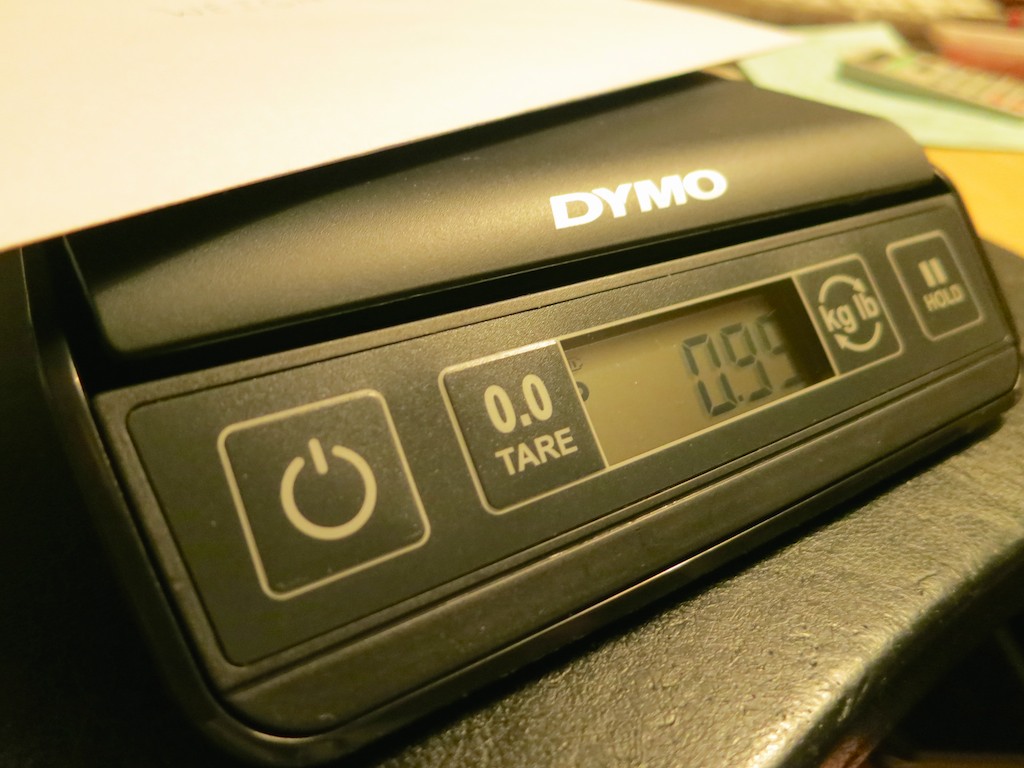
I found this DYMO 3-pound Digital Postal Scale for $18.44.
Its weight is just over a pound, with the svelte dimensions of 9” x 7.8”.

DYMO Digital Postal Scale


…Not bad!

Granted I don’t need it to weigh an object upwards of 3 pounds.
(A couple ounces is all I require.)
Nevertheless…

At this footprint and price point, I think everyone should have a little scale at home. Why not?!

Click.

How Many Sheets Can One Forever Stamp Handle?
Here are a few Forever stamp guidelines I immediately discovered after using my new DYMO scale:

  • 3 sheets of 20 lb 8.5” x 11” paper weighed only .65 oz in a standard envelope and a Forever stamp.
  • 4 sheets were .80 oz.
  • Even 5 sheets made the 1 oz cutoff at only .95 oz.

Who knew all of this can be handled by one Forever stamp?!
(All of those double-stamped envelopes I’ve wasted over the decades!)

I’m sure individual performance might vary… depending on the weight of your envelope and paper stock…

Check It Off Your Bucket List?
People have their own bucket lists. This really shouldn’t be on anyone’s.

That said, there are those nagging day-to-day nuisances that can follow you around your entire life. They’re usually not important enough to spend the time fixing. But when you do, it actually feels unexpectedly sweet.

Case in point:
Now, I’ll have to save a stamp with my new DYMO scale at least 38 times just to break even on the deal…

But the satisfaction I’ll get along the way…

Is Jet an Amazon Killer?

If you’re not a big fan of Amazon these days, you might want to check out Jet.com to save some money… Does that mean Jet can beat Amazon at it’s own game? It depends…

If you’re not a big fan of Amazon these days, you might want to check out Jet.com to save some money… Does that mean Jet can beat Amazon at it’s own game? It depends…

Okay… so Amazon may not be the friendliest place to work. Recently, a few of my friends mentioned to me that after reading The New York Times article on Amazon’s toxic work culture, they’re thinking of ending their Amazon relationship. As I tried to consider my own ethics position on all of this, my conscience was quickly interrupted by the ‘hunting and gathering’ part of my brain…

“Where else is there to shop?!”

First off, I’ve got to admit the irony of my own question, because it was only a few short years ago when I was still dipping my toes into the water of online shopping. I remember calling it,
“The Joy of Shopping at Midnight in your Underwear.”

Now, I simply can’t do without online shopping… day or night. I’ve long ago applied those former brick and mortar shopping hours to other aspects of my busy life.

Married to Amazon
So yes, Amazon has firmly become my go-to online shopping site for quite some time now.

  • It’s simple.
  • There’s always a huge selection.
  • Amazon Prime’s free shipping seems like such a deal even at $99/year.
    (Not to mention the load of other benefits Amazon is piling onto Prime)
  • And Amazon’s pricing usually beats the pants off of brick and mortar stores.

But even without all of the bad press Jeff Bezos has received, I’ve grown a tad uncomfortable with the idea of shopping at only one URL.
(How do you know if the pricing has remained competitive?)

To be fair, I do go to a few other online destinations…

Cheating on Amazon

  • If I’m looking to buy some tech, I usually log on to B&H Photo. The best price is usually there…
  • When my son was still in diapers, I frequented Diapers.com and eventually dropped some coin on its affiliated websites- Wag.com, Soap.com and Yoyo.com. The pricing was sometimes competitive, but the free shipping (if you spent more than $49) always seemed to beat out Amazon’s 2-day Prime delivery.
    (The huge irony here is Amazon has owned Quidsi, the parent company of Diapers.com since 2011. I didn’t know this until I started writing this post.)

I also spend my money with a few specialty online merchants, such as…

…But for the vast majority of my home staples…

  • Paper towels
  • Toilet paper
  • Kleenex
  • Cat food
  • Ziploc sandwich bags
  • Cree LED light bulbs
  • My favorite crackers
  • Toothpaste
  • Batteries
  • Dish Soap
  • Vitamins
  • (As well as an assortment of other items)

…I’ve been hitting up Amazon.

And while the convenience can’t be beat, I really don’t know how good the deals are anymore.
(No, I haven’t yet taken the obvious step of price comparisons at my local supermarket.)

I think it would be nice (and appropriate) if Amazon had a little competition… right?

Well, guess what?…. Hello, Jet.com!

Jet has Landed
Jet launched a couple months back, and it’s clearly looking to undercut Amazon’s pricing.

Co-founded by Marc Lore, who used to run Diapers.com (note the irony), Jet is structured somewhat like an online Costco with a $49.99 annual membership fee. (The first three ‘trial’ months are free, before you have pay up.)

And then you get ‘club-price’ discounts in several ways:

  • The more you spend, the greater the discount.
  • If you waive your right to a free return, you get a little more off.
  • You also get additional discounts for certain payment methods. (like debit cards)

Jet claims its profit model is focused entirely on its membership club fee, which allows it to sell items at the lowest prices.

Taking a Ride on Jet.com
So I signed up for my free trial and took Jet out for a spin…

  • First off, it’s base pricing usually just seemed to match Amazon’s.
    (Burt’s Bees Baby Bee Shampoo and Wash was a price match.)
    Sometimes the pricing hovered a few cents either way.
    (Brown Rice Snaps were slightly more expensive.)
  • Jet gives you an Amazon comparison tool right there on the page.
  • But then, Jet applies an immediate discount, which grows if you order multiples of the same item. And as you put more things in your cart, your overall discount keeps growing.
  • When you’re ready to check out, there’s indeed a significant savings. On my first order I saved $17.54 off the $72.54 subtotal. Plus free shipping. And no tax.
  • I don’t pretend to understand how all the discounting is applied.
    (‘Smart Items’ are supposed to save you more.)
    But at the end of the day, it’s less than shopping on Amazon.
  • And Jet even has a guarantee that if you don’t save at least $49.99 with your membership, they’ll refund the difference.
  • Just like Amazon, Jet sometimes finds your item through another retailer.

So what’s the downside?

  • Selection
    Jet doesn’t have (yet) the same massive selection as Amazon. I couldn’t find everything I wanted… No bags of Caribou Coffee… and Ziploc sandwich bags only in quantities of 500.
  • Delivery speed
    Every order doesn’t get to you in two days. Sometimes the free shipping takes 2-5 days.
    (And that’s fine, as long as you’re not in a huge rush.)

Jet Vs. Amazon
Is Jet an Amazon killer? No, not really.
(Not yet)

But I can’t tell you how happy I am that finally there’s some good, old-fashioned competition to Amazon out there.

And it doesn’t hurt that Jet gives you $10 off your first order (over $35) with a ‘TENBUCKSNOW” discount code.
(That’s on top of the other savings.)

So all this said, will I still continue to use Amazon?

Yep.
(Even though it may be a terrible place to work.)

But now, Jet has immediately become a cost-savings alternative for much of my general online shopping needs…

Am I rooting for the little guy?
Absolutely.

Can Jet beat Amazon at its own game?

We’ll have to wait and see…