At Home with Tech

Unlock the power of all your technology and learn how to master your photography, computers and smartphone.

Avoid this Surprise When Installing Your Google Nest Learning Thermostat Gen 4
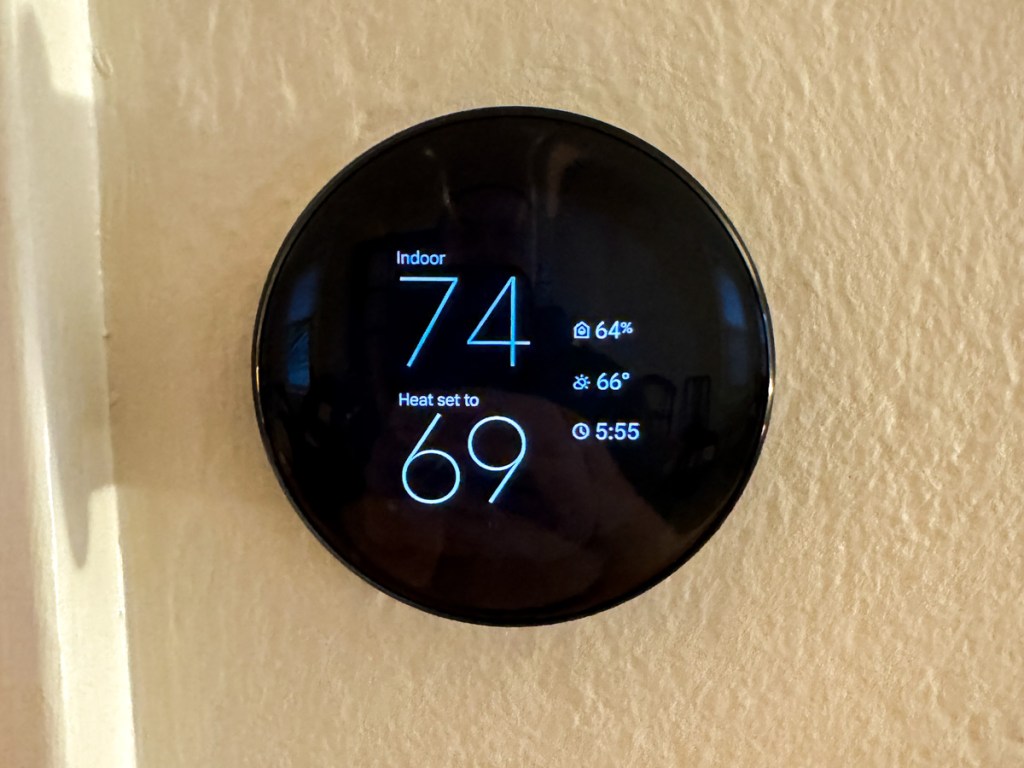
Getting 12 years out of any piece of tech is more than anyone should expect. That said, if it’s still working and doing the job, why would you want to replace it? (Unless you simply need the latest and greatest.) 

Well, you’d pull the plug when the manufacturer forces you to. If the old unit’s tech is so obsolete, it can’t be maintained by the manufacturer’s current standards. And that’s what’s happened to my trusty Nest Learning Thermostat (2nd gen) from 2013.

Goodbye Nest Learning Thermostat Gen 2
In tech years, it’s like a century old. A lot’s happened, including Google buying Nest to enter the smart home market. 

So yes, Google has walked away from its older Nest Learning Thermostat population. The official Google language is “end of support.” What that means is 1st and 2nd-generation models can no longer be reached remotely via the app on your phone as of October 25, 2025. (They’ve been “unpaired and removed” from the Nest app or Home app.) 

Poof.

It’s Time to Buy Gen 4
Yes, you can still operate these ‘relics’ manually, but I’ve always spent more time interfacing with my Nest Learning Thermostat through the app on my iPhone.

Most significantly, these units are no longer supported, which according to Google “may lead to decreased performance with continued use.” So that’s code for… it’s just a matter of time till they stop working altogether.

Look, I get it. No web-connected piece of tech is going to last forever.

So, if you want your Google Nest Learning Thermostat ecosystem to remain reliable and fully operational, you have no choice but to upgrade to the current 4th generation model, which costs $279.99.

Ouch!

Fortunately, Google has softened the blow by offering a $130 discount for current 1st and 2nd gen owners. So that effectively drops the price point to $149.99 plus tax. (Shipping is free.)

Registered owners should have received an emailed discount code towards the purchase of the current 4th gen model.

Three Color Choices
So Barrett went ahead and bought himself an early holiday present with his discount code. (Thank you, Google.) 

My hardest decision was deciding which color to get. I decided on Obsidian with a black base. (I felt it would present a cleaner, unified aesthetic in our living room. (The other choices are silver and gold with a white base.)

My Installation Surprise
Happily, installing my new 4th gen unit was the essentially the same as my old 2nd gen model. 

The only relevant difference was the size of the circular base plate, which you screw onto the wall. (The thermostat clicks onto the base plate.)

Here’s the problem: 

The new base plate is slightly smaller than the old one. And that tiny footprint difference can be a really big deal.
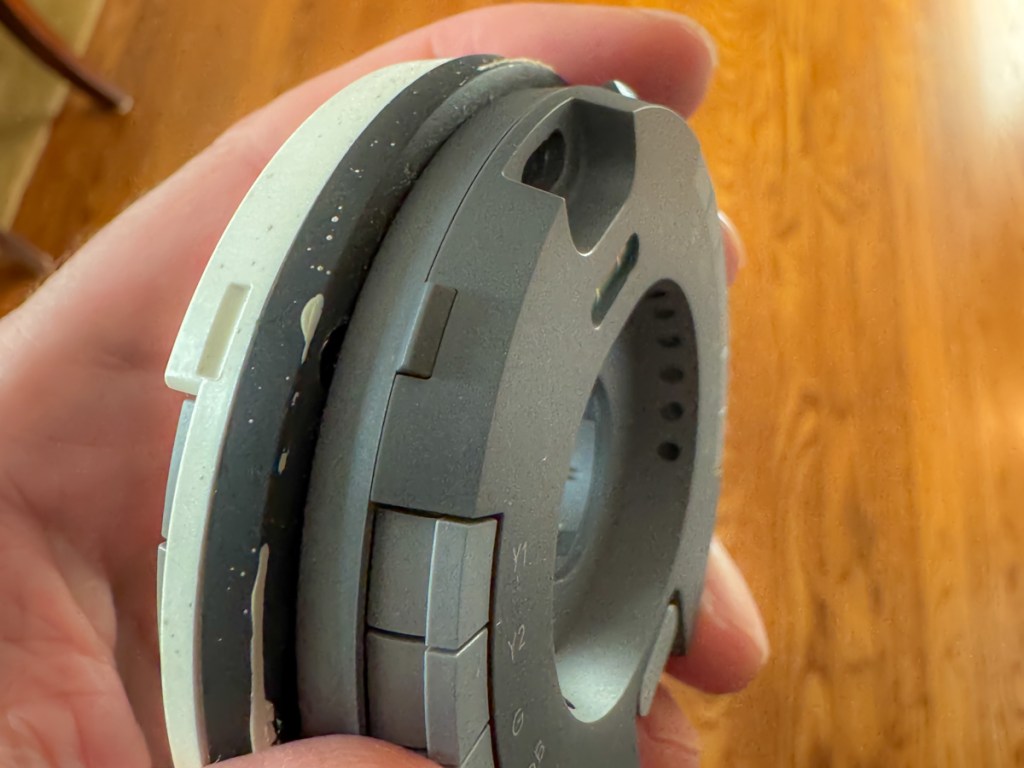
Why? Well, the new base plate will reveal a little more of your wall… 
that might be unpainted!
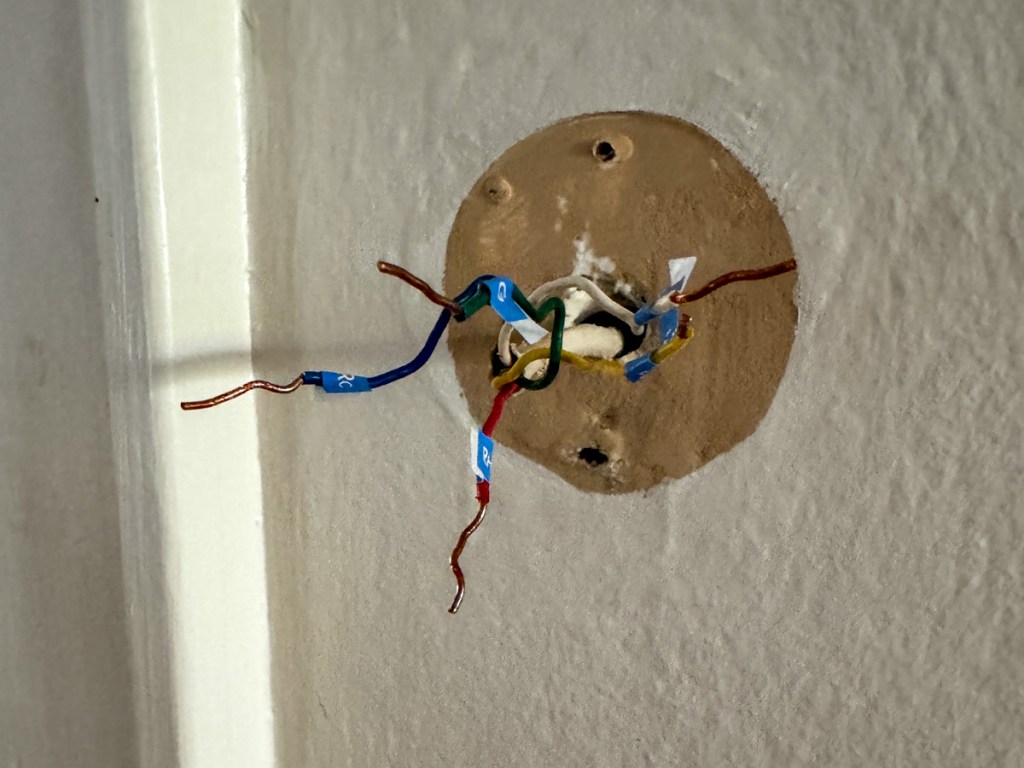
Surprise!

Yes, that’s exactly what happened to me. I realized there would be dark, thin paint ring behind my new, gleaming Google Nest Learning Thermostat that revealed our living room’s paint color from years ago.

Granted, the 4th gen thermostat’s beautiful face is bigger than my gen 2’s screen. It’s plenty big to effectively block the view where the thermostat’s smaller circular ‘neck’ touches the wall.

But I would know, and if you looked from an angle, you’d definitely see the old paint. Ugh! 

Sure, Google has thought of this and provided a white trim plate to use that would cover up this kind of problem.

But I didn’t want to use the trim plate. I liked the clean look of the black, circular orb perfectly protruding from my wall like a futuristic Cylon interface.

I just need to get rid of that thin ring of old paint.

I Had to Put on My Painter’s Hat
So, I hurried downstairs and rummaged through my basement to see if I still had a little bit of our living room’s current paint in a can somewhere. I eventually found it, picked up a brush and performed the paint fix.

This of course delayed my installation process, as I had to wait for the paint to dry before continuing. But it was clearly a step worth taking.

So just remember that you might need to bake that extra time into your own installation plan. 

Cool New Sensor Pucks
If you’ve been living with a 1st or 2nd generation model, you may not know about Google’s little wireless ‘satellite’ temperature-sensing pucks to pair with your main thermostat. (I didn’t.)

These “Nest Temperature Sensors” (now 2nd generation) can be placed throughout your home to help create a more even temperature throughout your rooms (effectively simulating some of the benefits of a multi-zone HVAC system).

When you buy a 4th gen Google Nest Learning Thermostat, it also comes with one Nest Temperature Sensor. (You can purchase more separately.)

With multiple sensors, you can schedule which sensor controls your thermostat at different times of the day. You can always default to the sensor in your base unit. And you can also average between your sensors.

I placed my temperature sensor in our sunroom, which tends to be cooler during the winter months than the rest of our house. Hopefully, the sensor will convince my base unit (in our living room) to keep providing a little more warmth in the early evening when my family tends to hang out in our sunroom. (That’s how I programmed it.)

Upgrade Complete!
I’ve always enjoyed my old Nest Learning Thermostat as the center of my smart home experience. And now that I’ve upgraded, I’m pleased that I’ve refreshed my relationship with Google’s gen 4 model.

I hope it takes me all the way to 2037. But with the pace of change these days, something tells me we may be discussing this again a tad sooner…

Stop Hanging Photos and Begin Framing Stories for Your Walls at Home

I studied the framed European vacation photo hanging on the living room wall as I listened to the story behind it. It was a wonderful picture, but the narrative was even better.

My wife and I were visiting friends recently, and they were sharing their vacation experiences through the framed pictures in their home. I was hooked.

These photos displayed simple moments from their trips. Some featured public activity, but none showed the members of this family. The images were entirely anonymous, but still extremely personal. The key factor was the collection of rich personal stories that accompanied these photos. That’s what brought them to life.

From Snapshots to Stories: Rethinking Your Wall Art
The next day, my wife suggested that we might consider putting up a few more of our own travel photos in our home. She said that I had taken so many great pictures from our trips over the years. Why not pick several more to frame and hang? I agreed.

I said I would review our vacation photos and create a collection for us to choose from. And I did. But I was shocked by what I discovered.

You’re Actually Framing Stories
I found that most of our vacation photos I’ve been taking over the years weren’t going to work. That’s because they fell into two categories. 

  • These pictures either featured me and my family. 
  • Or they were my attempts at iconic shots from these cities (like you might find on a postcard).

Mostly missing was any location imagery that carried a story behind the moment.

As I looked at my pictures, the stories simply weren’t flowing.

Family Vacation Photos Can Quickly Get Dated
Sure, it’s easy to frame vacation photos with family in the shot. Of course, that tethers you to the point in time and location. And yes, I’ve already positioned some of those shots on our walls. But there’s a problem with this strategy.

Your kids grow up quick. So, if your photo is more than a couple years old, it’s going to feel dated. Maybe two or three older pictures on your walls are okay. But I don’t want my house to be a museum focused on a different era. Plus, I don’t think my teenage son appreciates seeing lots of photos showing him half his size. (That’s such an uncool dad thing to do!) 

It’s the Memory that Matters Most
So, if you want to hang up photos from your trips, you’d better take some shots that can stand on their own and contain a story that you’ll remember. (Otherwise, it’s little more than a postcard that simply says you were there.) 

This is how the right photo can reflect real meaning for you in future years and help project the story of your life. 

This may all seem obvious, but it’s often hard to accomplish.  

Conversely, sometimes, these photo opportunities just appear, and you quickly snap the picture without much thought. And then you may not realize that you’ve captured a memorable moment until you get back from your trip and reflect on that photo.

However it happens, these are the special photos to curate. They don’t have to be your ‘best’ photos. But they’re the ones that will carry the most meaning for you across time.

And I think these are the ones to consider showcasing… for yourself and others.

Focus on Snapping Good Photos that Tell a Better Story
As for our own photo-framing project, happily, I did find enough photos to choose from that will work. 

But this exercise was a critical reminder for me that most anyone today can take a good photo with their phone. 

But being a better photographer is always about capturing a memorable story.

Using AI to Bend Reality in My Vacation Photography

I enjoy taking lots of photos of my life. Why exactly? Well, why does anybody?

  • To remember. To reflect. To share. To prove that it happened.
  • Family. Vacation. Adventure. Misadventure. Home. Passion. Life.

But now with a little help from generative AI, you can whip up your own life’s photos without having to actually experience… your life. Now, you can document your imagined life and share this alternate version if you want.

Sure, I know this all sounds rather absurd. But the fact that it’s possible now… easy in fact, should give us all pause. What is real anymore? 

This is, of course, a big topic of discussion on any number of fronts. For the moment, I’m simply directing the focus inward from societal to individual impact.

Google Whisk’s ‘Precise Reference’ Mode
Okay. So, with that set up, here’s how to have some ‘fun’ reinventing your life in pictures.

I’ve been experimenting with Google Whisk (one of several players in this disruptive and quickly evolving digital sandbox). Here’s the game-changing trick I’ve recently learned that turned this AI image generator into a reality-blending tool.

  • Activate ‘Precise Reference’ mode in Settings.

From there you simply need to upload at least one pictures of yourself for Whisk to see. That’s the critical reference point that puts ‘you’ in the new scene.

You can also upload photo backgrounds to help art-direct your shot or create them via text prompts.

Then, everything is ready for you to prompt your new photo into existence…starring you.

And then just click to generate.

Photos from My Vacations Not Taken
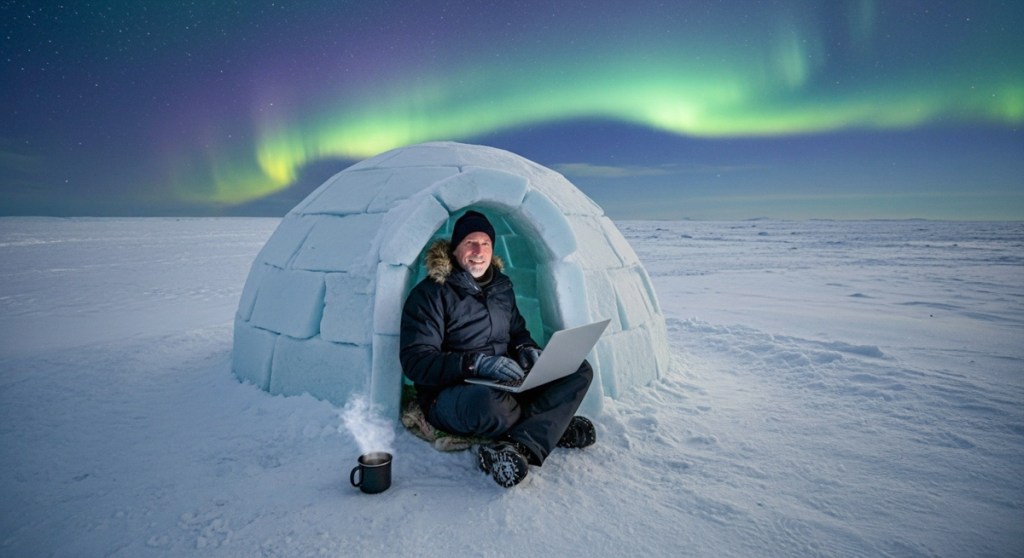
I followed the above steps, and within seconds, I received back each of these vacation photos from my alternate universe.

Sailboat Racing Fun

Seeing is Believing?
Whoa. This other guy sure is having fun. Maybe he should dial it back a bit. No, these AI-generated shots aren’t perfect. But they’re close enough to prove my point.

Creating a fake photo isn’t exactly new. Other tools have been available to do that for years. But it used to take a certain amount of skill and effort. Now, with a couple reference photos, a few clicks and a basic understanding of the process, everyone can access this great power. 

And we all know the line from “Spider-Man.”

Time to Meet Your Doppelgänger
I am fascinated. I am concerned. I am confused. My creative center feels in flux. My very existence can be morphed (as can yours).

But I’m determined to figure out how to properly integrate this AI-led creative revolution into my own reality (as we all should).

To truly understand it, you have to know how to operate within it. This is no time to ignore what’s already happened.

That’s why I’m spending time creating a vacation album from my alternate universe. Yes, it’s been a fun exercise. 

But I couldn’t be more serious.