At Home with Tech

Unlock the power of all your technology and learn how to master your photography, computers and smartphone.

How to Stop your Email from Suggesting an Old Address

Across the years, your library of email addresses inevitably changes. Take a second to help your computer’s email program clear out the past. Here’s how.

Wouldn’t it be nice if everybody had one email address assigned at birth, and that was it for life? How simple would that be? Then, you could easily keep track of all your contacts. No more old email addresses that don’t work. Of course, I know that’s an unrealistic suggestion (or at least a plot device for a science fiction story).

In reality, we need to pay attention to the never-ending task of updating our digital address books. It’s not like we never had to take a pen to the Rolodex when a friend moved to a different city in the analog days. But that felt less frequent than the seemingly constant tweaks required to maintain your data in today’s email-first society.

Many of us change email addresses periodically for any number of reasons (new job, new internet provider, new device, new name).

That’s life. We’ve all got to keep up across the years.

The Risks When Using Auto-Complete Email Suggestions
But even if you’ve been diligent and kept your Contacts app current, you may still have to contend with your email program’s flawless memory and the pesky problem of an old email-address suggestion.

That’s when you type a name into the “To” field of an email and sixteen address options drop down for you to choose from. (I exaggerate only slightly.)

Then, if you’re not careful, you can send off your email to a long-dead address.

Over time, this potential mistake can become a larger risk as you review an ever-growing list of auto-complete choices.

It makes sense to do a little digital spring cleaning.

Clear Out Old Email Addresses
I use Microsoft Outlook for Mac on my iMac. Removing an email suggestion takes just a few seconds.

  • Simply click on the little circled ‘x’ next to the bad email address. And then it simply disappears, ‘poof!’ That’s it.

If you’re working with a PC version of Outlook, you can also clear all entries from your ‘Auto-Complete List’ should you want to start fresh.

Whichever email program you use, it will be advantageous to perform a similar data review.

Help your Computer Let Go of your Past
This may fall under the category of obvious, but if you don’t take the moment to teach your computer where keep up, you’ll eventually feel the weight of old email suggestions slowing you down.

Make sure the email suggestions you’re offered are current. If not, it’s time to clear out the past. That will go a long way to help you stay present!
Why Zoom Meetings will be a Permanent Part of Home Life

It’s probably time to give your imperfect Zoom background another look, because you’re probably going to be using it… forever.

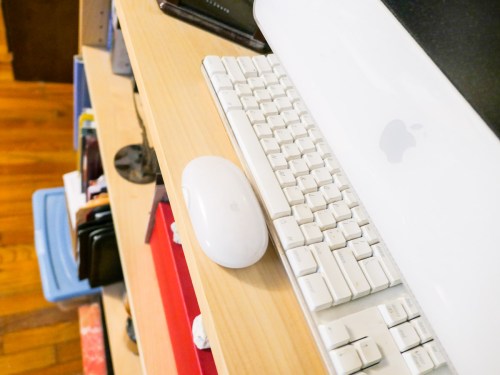
During one of my recent Zoom meetings, I received a comment about the old iMac in my home office. The white computer was sitting sidelined in the background on top of a short bookcase. I retired this 2004 iMac long ago.

But like some of my old tech, I never threw it away. Now, it sits like a museum piece, available for anyone to appreciate (or question) whose wandering eye might be checking out the details of my home office.

What’s That?
Don’t think for a moment that your Zoom-fatigued viewers aren’t looking around your Zoom box. They crave any opportunity to thaw their pandemic-frozen eyes, locked to their computer screen all day.

Anything of interest is an immediate target. And so was my ancient iMac.

It’s actually hard for people not to notice the details of the space you’re in. It’s natural.

Virtual isn’t Real
So, if you feel your room isn’t ready for prime time, should you simply activate a virtual background?

Easy, right?

That’s what many people have been doing during their Zoom meetings. But even though the functionality is there for that exact reason, I think it’s a bad trade-off.

The Value of Authenticity
Sure, it’s a one-click solution to hide your environment that could otherwise use a little more art direction. But it also erases any opportunity for your authentic living space to support your personal brand.

You can only work with what you’ve got. And I think your viewers will understand that. In fact, they’ll appreciate it.

Yes, you should remove any unnecessary clutter in your background. But if there’s an unusual object like an old Mac perched on a shelf, so be it. If you’re lucky, it may become a conversation piece during your next Zoom.

And that can really help to provide some context to your identity, especially when you’re meeting someone for the first time on a two-dimensional computer screen.

It’s Time to Build an Official Zoom Zone
Yes, thanks to Covid-19, our lives have become televised (well… streamed).

And when we eventually return to a post-pandemic existence, I think that new normal will still contain a healthy dose of Zoom meetings. Sorry to break it to you, but that’s not going away… ever.

Sure, you may be free to move about the cabin of life again, but video conferencing from home is an established norm that has taken off.

And this will bring up proactive decorating opportunities for spaces that you’ve designated as your Zoom zones. Perhaps you’ll consider a new framed print or painting on the wall behind you. A different piece of furniture? An arrangement of fresh flowers? A total redesign?

The same way that the family room became the next generation of the living room, I feel it’s inevitable that a Zoom zone or even a ‘Zoom Room’ will become a natural addition to our future homes.

Yes, people can always use a virtual background. But eventually, they’ll move out of their temporary Zoom mindset.

Sharing a more permanent reality is usually a much better long-term solution.

Let your Hands Do the Talking on your Next Zoom

Now’s the ideal time to add your hands into your Zoom conversations. Here’s why.

If you like using your hands when you talk, communicating on Zoom and other video conferencing platforms is the perfect place to apply your style. In fact, this digital ecosystem is an ideal space to apply your non-verbal communications techniques.

I’ve talked before about the importance of using non-verbal face cues during Zoom meetings to generate maximum engagement, but your hands can also play a powerful role in effective Zoom communications.

Unleash the Power of your Hands
Any number of gestures that might feel forced or unnatural during an in-person meeting can work really nicely in the Zoom universe.

  • Giving a thumbs up
  • Raising your index finger to make a point
  • Using one hand to represent an idea or thing
  • Holding up both hands to punctuate an “either/or” explanation
  • Moving a stretched hand diagonally upward to demonstrate success
  • Waving goodbye to make a solid Zoom exit instead of just disappearing

Welcome to the Stage
Your hand gestures can either stand alone or join your spoken words to provide emphasis. You’re essentially following the same rule book as when presenting on a stage.

You may not feel like you’re walking on stage every time you join a Zoom, and many people don’t. But you shouldn’t make the same mistake.

If all the world’s a stage, then so is every Zoom.

And Zoom can be such a hands-friendly place because the medium effectively makes you a presenter every time you talk.

We are Children of TV News
This may seem counterintuitive. You’re probably more focused on Zoom draining your mojo, because you’re feeling unnaturally cramped into a tiny on-screen box.

But that box is a not-so-distant cousin to the all-mighty television screen. And for decades, we’ve been conditioned to apply significance to a singular face that’s talking at you based on the norms of TV news.

Sure, today the market is clearly oversaturated with countless YouTubers in little boxes. And your own circle of contacts might curate an additional few dozen mini faces to regularly stare at.

Open Hailing Frequencies
You may end up feeling like an anonymous face projecting yourself to an often faceless audience. How much of an impact can you really have on a pandemic-numbed and Zoom-fatigued population?

It may be difficult to believe, but for every second that you’re visible on a Zoom, you have the power to move the needle.

Using your hands properly will make you even more effective.

Amplify your Moment
To take advantage of this opportunity, you don’t need to be the official ‘presenter’ who owns the digital floor for an extended period. If you say just one sentence, your viewers will see you as the presenter in that particular moment.

The floor is yours. Use it!

And it doesn’t matter if you’re a little thumbnail image in Gallery View. Then, the movement of your hands can carry even more weight. That’s because your small image makes you more difficult to read. Your non-verbal face cues might be invisible. But a solid hand gesture is hard to miss.

Get your Hands in the Shot
I’m sure you know the importance of setting up your webcam shot to properly display your face. Now you’ve got to make sure there’s room in your Zoom box for your hands to show up.

The trick here is to reduce all of the extra headroom space you probably have in your shot. (That’s the extra area between the top of your head and the top of your shot.) Instead, you want your webcam to show off more of your midsection. That’s the area where your hands live as they rest on your desk.

This technical adjustment is usually easy to make by simply tilting your webcam. That redirects your shot down to just above your desk. Just be sure your shot is wide enough. You don’t want your webcam to cut off your head!

Practice Assertive Communications
After spending so much time on Zoom meetings, everyone should feel like they’re able to successfully contribute to the conversation. And as in any environment, you’ve got to effectively assert yourself.

Yes, that can be especially difficult to do when restricted to a Zoom box. So it’s important to use every technique at your disposal.

Sometimes the answer is to just let your hands do the talking!