At Home with Tech

Unlock the power of all your technology and learn how to master your photography, computers and smartphone.

Category: family

20 PG-13 Movies to Stream with your Family

If you’re looking for a good movie to stream with your family, here are some choices I strongly recommend with your popcorn.

Every Friday, I spend at least 30 minutes scouring through the streaming apps I pay for to see if there are any new movies for my family to watch that night. It’s become an increasingly frustrating experience, as there just aren’t that many new films moving through the pipeline these days.

Yes… I know. There are thousands of hours of available content and nothing to watch. That’s how I feel.

But to be fair, I’m still limiting my search to PG-13 movies. I think one day soon, we’ll cross into ‘R-rated’ territory. Still, finding a movie that successfully threads the needle to meet the interests of my entire family is not easy.

The Usual Suspects
Fun and action-packed is a good combination. “Star Wars,” “Pirates of the Caribbean” and MCU movies of course fit the bill, but we’ve seen them all… multiple times. And it doesn’t help that the only MCU flick this year was “Deadpool and Wolverine.” No, we’re not at all ready for that one yet. (I did enjoy it in the theater with a couple other dads, even though there were a few sloppy timeline and multiversal inconsistencies.)

Look Backwards
So, I think the answer is not to wait for the drip/drip of the next movie to show up on your app, but to look back to see what you might have missed. There are strong options that aren’t on the apps’ top 10 lists.

I’ve been maintaining my own list of movie choices for years. It’s a good reference for my family’s weekly conversation of which film we might stream next.

Here are 10 flicks for your consideration that my family has enjoyed watching together.

10 Older Movies to Watch

  • “Free Guy” (2021)
  • “Red Notice” (2021)
  • “The Adam Project” (2022)
    (Yes, they’re all PG-13 Ryan Reynolds movies that hit the sweet spot for my family.)
  • “Jumanji: Welcome to the Jungle” (2017)
  • “Jumanji: The Next Level” (2019)
    (These are rare movies that are totally funny and border on silly. But silly still works for my 14-year-old son as long as it’s done right. Note: Dwyane Johnson movies are usually appealing.)
  • “The Other Guys” (2010)
    (Entirely goofy misfit cops with Mark Wahlberg and Will Ferrell)
  • “Ready Player One” (2018)
    (Imaginative virtual reality and directed by Steven Spielberg)
  • “Passengers” (2016)
    (Space travel with Chris Pratt and Jennifer Lawrence)
  • “Knives Out” (2019)
  • “Glass Onion: A Knives Out Mystery” (2022)
    (Daniel Criag stars in these clever, funny and offbeat murder mysteries.)

3 Tom Cruise Action Movies

Over the years, Tom Cruise effectively created his own genre of action movies that are suitable for the whole family. So, his films usually show up on my list. Here are just three.

  • “Mission Impossible: Dead Reckoning” (2023)
  • “Top Gun: Maverick” (2022)
    (Arguably better than the first)
  • “Edge of Tomorrow” (2014)
    (Our son really liked the “Groundhog Day” plot device for this intense alien invasion flick.)

2 Holiday Movies for the Family

There’s that time in December when someone says, “Let’s watch a holiday movie!” Well, here are two for you.

  • “Spirited” (2022)
    (Ryan Reynolds and Will Ferrell make magic together. It’s a riff on “A Christmas Carol” that’s nice and just slightly naughty. Plus, it’s a Broadway-quality musical with tons of laughs. Move over “It’s a Wonderful Life.” This is the new standard.)
  • “8-Bit Christmas” (2021)
    (It took me two years to convince my family to watch this. Its trailer doesn’t capture the true warmth of this very silly and satisfying look back at the 80’s. It’s another instant classic to keep on your list of flicks to watch over the holidays.)

5 Movies I’ve Yet to Convince my Family to Watch

Every potential movie goes through a Lester pre-screening process. That always involves watching the trailer. Sometimes the trailers for older movies are unappealingly dated. Other times, the trailer is surprisingly missing on the app. Instead, there’s just a scene included from the movie. That doesn’t cut it at all. And that omission usually spells doom for that flick.

Here are a few of those that we have yet to watch:

  • “Twister” (The original from 1996)
  • “Valerian and the City of a Thousand Planets” (2017)
    (Certainly not as good as “The Fifth Element” from 1997, but still worth watching)
  • “Hellboy” (2004)
  • “Hellboy II: The Golden Army” (2008)
    (Directed by Guillermo del Toro. Need I say more?)
  • “John Carter” (2012)
    (A failed Disney tentpole, but I think still worth checking out. I also must admit that this is a running joke with me and my son, as he’s declined the ongoing option to watch this movie for almost half his life!)

Prepare for your Next Family Movie Night
You can’t expect everyone in a family unit to have the same interests in movies. So, if you’re a curator of options to stream, it helps to have a healthy list of choices to offer. You’ll have a better chance to find consensus on at least one.

And don’t forget to look backwards during your research. Older movies are just as good. And sometimes much better!

How to Master your Zoom Meetings to Increase your Impact at Work

Your webcam can be the most important tool to help you maximize your success at your job. Here’s how to sharpen your pencils for your next remote meeting.

The beginning of the new school year has always held that ‘fresh start’ feel for me. Sure, it’s been a few decades, but now I’m experiencing that vicariously through our son, who’s already in high school. (I just can’t believe it.) During these weeks, I also love the early hints of the cool, crisp feel of New England’s fall season.

It’s all stimuli that activates a deeply encoded message in my brain I learned as a child: “Summer’s over. Now, it’s time to get to work.”

Well, it’s not like I haven’t been working hard over these summer months. Sure, I took some vacation time with the family. (First to Cape Porpoise, Maine. And then to the North Fork of Long Island.) But now… the ramp-up to the end of the calendar year is undeniable.

Winter’s coming. You’d better sharpen your pencils.

Remote Meetings are Important
If you’ve been working from home more during this post-pandemic reality, one way to dust off your lunch box is to tighten up how you show up during your remote meetings on Zoom or Teams. These moments are critical tethers to your work community.

I know we’ve been at this for a few years, but I’ve noticed that some Zoom best-practices haven’t yet become second nature for many of us.

So, here are a few reminders. They will help you master the opportunity to maximize your impact at your job.

You’ve Got to Show Up for your Close Up
If you want to play an active role during a remote meeting, you really need to turn your webcam on. Visual communication is everything.

Sure, your voice is important, but offering all your important visual cues is the best way to connect with everyone else. That’s how to master those moments.

Follow Video Production Best Practices
I know by now you understand the basics of good video production and how they directly correlate to a strong webcam shot.

  • Be sure to have a front-facing light source. (The light from a window works great as long as the sun isn’t directly shining through.)
  • Your webcam should be positioned close to the same level as your face vs. pointing towards the ceiling and looking up your nose. (Yes, that may mean propping your laptop up on a few hardcover books.)
  • Frame your shot to fill the screen with your full head and shoulders. Pointing your webcam too high to just reveal your eyes and the top of your head is silly. (Only showing this incomplete body fragment at the very bottom of your screen is worse than not using your webcam at all.)

Put on a Clean Shirt
Look, I get it. It’s so much easier to keep your pajamas on all day. You may feel that nobody really needs to ‘see’ you. If you’re successfully doing your work, what’s the problem?

The concern is the risk to you slowing devolving into some kind of disconnected ‘chat-bot.’ You’re a human being! That’s supposed to carry some advantages. So, you should really consider showing up as one as much as possible.

Pay for Faster Internet
This has been a tough pill for me to swallow, but your standard internet plan may not offer enough speed for you to properly stream yourself into your Zoom meetings. How many times have you seen others freeze up or their audio feed begin to stutter? That’s because their internet speed is too slow.

It’s happened to me, even though on paper, my internet plan was plenty fast enough. So, I ended up doubling it to a ludicrous speed to fix the problem. What else can you do? (I currently pay for 500 Mbps.)

If you want to show up for your close up, yes… you may have to spend more to do it. I suppose that’s the price you pay for not having to show up in person at the office.

Don’t Disappear
I think success in any career requires staying connected with others. Connection used to be primarily based on in-person interactions. As we drift further away from those norms, I think it’s really easy to eventually disappear in plain sight.

So yes, this is a friendly reminder… and a word of caution. As your new school year begins, remember the importance of your webcam and don’t forget to hang out with your friends.

They really want to SEE you.

Our Computers aren’t Built to Handle so Many Videos and Photos

It’s really simple to create media with our smartphones, and we’ve all become home filmmakers. But it’s becoming increasingly hard to store all the media files. If you’re not worried that you’ll eventually run out of SSD storage space in your Mac, think again. Here’s what you can do about it. (And it won’t take up a lot of desk space.)

A year back, I upgraded from my older 4TB iMac to my new 2TB Mac Studio. My decision to go with only 50% of the internal storage was based on Apple’s more expensive internal SSD drive pricing. (My old iMac had a larger, but slower, spinning hard drive, which is no longer part of the line up.)

I always thought that Apple would forever offer increased internal storage without charging more. (Aren’t we all needing more storage as we document our lives with photos and videos?)

But once Apple moved from HDD spinning drives to next-generation SSD drives, that equation imploded.

  • An Apple Studio with a 4TB SSD costs $1,200 more!
  • You can’t even buy an iMac today with more than 2TB of storage. And that will set you back $600-$800.

Something’s very wrong. We’ve got less to work with and paying more for it.

Still, pricing aside, I successfully deluded myself that didn’t actually need 4TB. (Ha!)

Better Digital Housekeeping?
Sure, I had filled up my old iMac’s 4TB drive, but I told myself that maintaining and transferring all that content from computer to computer was unreasonable. I didn’t need all of it within my internal drive. instead, I would offload much of it to external drives and my G-Technology RAID for long-term storage.

I brainwashed myself that the new 2TB SSD in my Mac Studio should be more than enough once I performed some long-overdue digital housekeeping.

That was just wishful thinking.

Face the Inevitable
Sure, I’ve done some media management, but my goal of a 50% reduction was unobtainable. Within a year, my 2TB internal drive was bursting at the seams. (And we all know that Macs aren’t built to allow you to later upgrade internal storage.)

And Apple hasn’t helped any by continuing to improve its iPhone’s capabilities to generate RAW photos and advanced video codecs (including ProRes files). All this means larger media files.

We’re all filmmakers now with the critical need to house our content libraries somewhere. What did they think was going to happen when we moved these huge files over to our Macs?

iCloud Storage?
Sure, I could export terabytes of my media into Apple’s iCloud ecosystem. But come on… that’s not really a good value proposition.

  • 2TB costs $9.99/month
  • 6TB is $29.99/month

Let’s do the math:
I would have to go with the 6TB plan, which comes out to $360/year. While that is surprisingly competitive with external hard drive pricing, across multiple years… it gets too expensive.

Certainly, $360 x multiple years is more than the one-time cost of buying a companion external drive. I know physical drives won’t last forever, and you’re supposed to upgrade them every few years. So perhaps a future iCloud storage plan could be a reasonable solution… if the pricing comes down.

SSD Drives
But what is today’s answer when your internal drive gets filled up?

Well, that’s simple: You’ve got to buy an external drive and plug it in. (I know I didn’t have to tell you that.)

The real question is what kind of drive?

To match the speed of your internal drive, you’ll want to buy a similar technology. If you’ve got an internal SSD, you should look at getting an external SSD.

So, that’s what I did.

Video Editing
Another question is what you want to do with the drive.

My most demanding task is editing my family videos and personal creative projects, which are all shot in 4K. Many of my video files are generated by my iPhone 15 Pro Max.

Plus, I’ve got:

So, perhaps my video editing needs are more advanced than the average user.

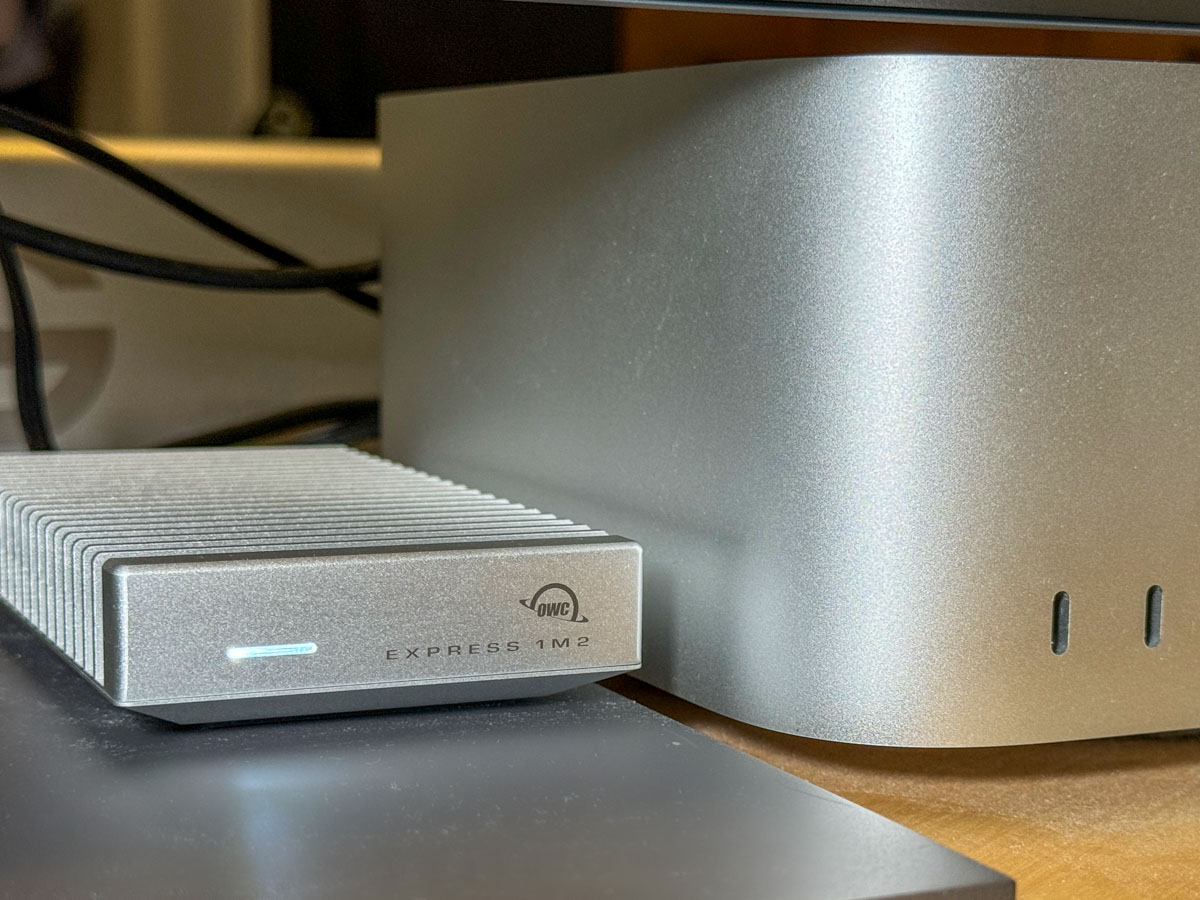
4TB OWC Express 1M2 SSD
All this said, I decided to go with a fast NVMe M.2 SSD. And I wanted to take advantage of the Thunderbolt 4 interface my Mac Studio offers. While there are many Thunderbolt 3 drives on the market, only OWC appears to offer a USB4 drive (same as Thunderbolt 4).

Now, some of you will immediately question my need for such a fast drive, and others will point out that thunderbolt 3 drives are fast enough for my media workflow. I know.

But this is a dizzying choice. So, I figured it’s best to go with a little more oomph than not enough.

So, I landed on the bus-powered 4TB OWC Express 1M2 SSD. (It’s an enclosure with the 4TB NVMe prepopulated.)
This Express 1M2 is blazing-fast, boasting 3200MB/s. It gets positive reviews, it’s compact and so far… it’s working great for me.

The Price for Performance and Peace of Mind
No, it’s not exactly cheap. (Remember, SSD technology is pricy.)

Yes, I could have saved more and bought a less expensive NVMe separately and popped it in an empty OWC 1M2 enclosure. But… I’m a baby.

Really, I just want this thing to work out of the box. Sure, plenty of you may chide me for being so ‘tech-timid.’ But hey… I’m not ‘Mr. At Home with IT.’ I know my limits. I’m not building my drives. I’ll buy them pre-built, thank you very much.

I just want some peace of mind. (Sure, I back up my files, but that’s also a complex equation.)

So, yes, I’m willing to pay a little more.

Build a Big Enough Home for your Files
Let’s review:

  • I bought a new Mac that had 50% of the internal storage of my old Mac
  • I inevitably ran out of space
  • A year later, I spent more money to buy a companion OWC drive for my Mac
  • I plugged it into my Mac Studio via a Thunderbolt 4 port, and I’m back in business

Yes, my story has a happy ending, but I’m not that happy.

Sure, maybe I have more media storage needs than the average bear, but not by that much.

I think today’s new computers simply need more internal storage. The fact that Apple sells its base-level computers with only a 256GB SSD is absolutely silly. (I could choose a stronger word.)

The lesson here is over the years, you’re going to need a bigger hard drive for your computer. And you’re going to pay for it one way or another.

So, plan for the future.