At Home with Tech

Unlock the power of all your technology and learn how to master your photography, computers and smartphone.

Category: family

Do You Know Where the Red Reset Button Is Located?

My home’s furnace quietly stopped working last week. I didn’t notice the specific moment, but it was shortly after dinner. I thought I felt a bit cold, and I stopped what I was doing. My ‘Spidey Sense’ told me something was wrong. 

I turned to glance at a little digital thermostat I keep near my home office desk. The temperature was four degrees cooler than it should have been. 

My new Google Nest Learning Thermostat runs a tight ship. So, I knew something was off. (If I were starring a science fiction movie on a spaceship, the next scene would show a pinhole leak in the hull as oxygen vented out.)

My Furnace Wouldn’t Fire Up
I listened for the normal background hum of our heating system. Nothing (no comforting purr of my warp engines). I hurried down to our basement to check the circuit breakers. All good there.

I rushed backed up to check out my gleaming Nest Learning Thermostat. It knew that it was too cold but reported that my furnace was actually running, and my house would reach its desired temperature in 45 minutes.

Houston, we have a problem. 

My furnace just wasn’t firing up, and it was 38°F out. My family didn’t know the situation yet. But the clock was ticking.

There was only thing I could do. So, I made the call…

The Big Red Button
I called for an emergency repair. Yes, I pay for an annual plan to protect against this specific moment.

Ninety minutes later, the technician showed up.

The first thing he asked me was whether I had pressed the red button.

“The red button?”

“Yes, the big red reset button. Do you know where that is?”

I did not.

The technician opened up the side of my furnace and pointed. I had to look closely. It wasn’t exactly a bright red button, but there it was, red enough to see… if you were looking for it.

Red Alert
I’m not sure how I didn’t know about the red reset button after all these years. There have been plenty of opportunities during the annual maintenance checks of my heating system. But clearly, I wasn’t paying attention. (Or perhaps no one ever told me.)

The technician reached forward and pressed it. The system started to chug to life.
(Really? How embarrassing if this was the simple fix.)

And then my furnace coughed and conked out.

I felt a sigh of relief. At least it wasn’t the red button. (I dodged that reputational bullet.) 

The problem clearly ran deeper.

Warp Power Restored
The good news is twenty minutes later, my Scotty had my warp engines running again. Something about nozzle misalignment and carbon build up. (I processed his explanation as my “dilithium crystals” were out of alignment in their chamber. My Star Trek brain would understand that.)

He was on his way, and my family had heat again.

I walked back into my home office, sat down at my desk and thought about my experience…

Hello, HAL
I felt a bit giddy. I was so happy this little emergency wasn’t somehow my fault. My furnace actually required a repair technician’s attention. Yes, I knew I had been oblivious to the red button fix, but I was worried I had missed another obvious sign, like a circuit breaker. (I hadn’t.)

Plus, as my story demonstrates, pressing the reset button doesn’t always work.

Ultimately, I think this all points to a larger issue. Don’t we all want some mastery over the various technologies that impact our daily lives?

Time to Upskill
Of course we do. But it’s becoming easier every day to allow that equation of control to drift further away from us.

And this certainly extends beyond running the electronics and systems in your own home.

It’s about how you interface with technology in just about every part of your life.

On most days, it’s simply a remarkable partnership. And to maximize that potential, we’ve all got to upskill and learn to use the new, revolutionary AI-fueled interfaces.

But sometimes systems break down, and you’d better know where that red reset button is located.

It’s equally important to remember that the red reset button isn’t always the fix.

Remember Your Backup Plan
So where does that leave us exactly?

Well, life is complicated. Always has been. 

Things don’t always work the way you expect. User error is no excuse. So don’t abdicate your responsibility to understand the basics.

Have a plan. Then, have a back-up plan. The buck always stops with you.

And yes… it never hurts to know where that red button is located.
How to Design a Photo Gallery Memory Wall at Home 

I usually show off family photos at home through my digital screens. (I haven’t bought photo paper in years.) The pictures glow on my little Nixplay digital frames and on my family room screen via my Apple TV interface. For years, I’ve enjoyed the flexibility to rotate countless images through these little memory portals.

What I’ve mostly ignored is the art of analog photo framing where you make a print, place it in a wooden frame and hang it on your wall. That’s so 1925. Plus, you ruin your walls in the process with all those little nail holes.

Well, unless you want to live in a sterile environment with empty walls, you have to accept some damage across the years and include a little patch and paint planning for your home.

So, I recently embarked on a journey to return to this old-school approach and frame more photos to hang.

My goal was to create a memory wall/family history gallery featuring photos from past generations in our hallway.

The Best Archival Photos have Visual Markers
I turned to the collection of pictures from my parents’ old photo albums, many of which I had already digitized. So, I was off to a great start, but I was quickly disappointed with what I found.

Sure, my parents took family photos, but a lot of them simply weren’t that great. Those Kodak moments were turned into soft, mediocre images captured by inferior 20th century consumer tech. (I’m admittedly spoiled by today’s smartphone photography magic.)

More importantly, so many of these images couldn’t stand on their own and reflect a story. The backgrounds were simply too vague.

Visual markers are the key to unlocking the story in any photo. Without them, a photo’s archival value rarely lasts beyond one generation. (Food for thought as you practice your own photography.)

Going back a generation to my grandparents, I had fewer pictures to work with. That said, I could tell my paternal grandmother really enjoyed being photographed. 

I never met her, but her vibrant personality glowed in all the photos she’s featured in.

I have just a couple of pictures of my great grandparents, and that’s it.

Other Factors to Consider
Once you select the best photos to work with, then you’ve got to figure out how they should go together. And that can be much harder than you’d think.

How you position archival family pictures can totally affect the story you want to tell. This is an entirely different skill set than I’m used to. (Remember, I just rotate pictures in digital frames.)

Plus, I was overwhelmed by the challenge to properly position a collage of photo frames on my wall and make it look organized and well designed (as opposed to a mess).

And then finally, the idea of puncturing my wall with lots of little nails almost pushed me over the edge towards inaction.

Display a Story in Groups of Four Photos
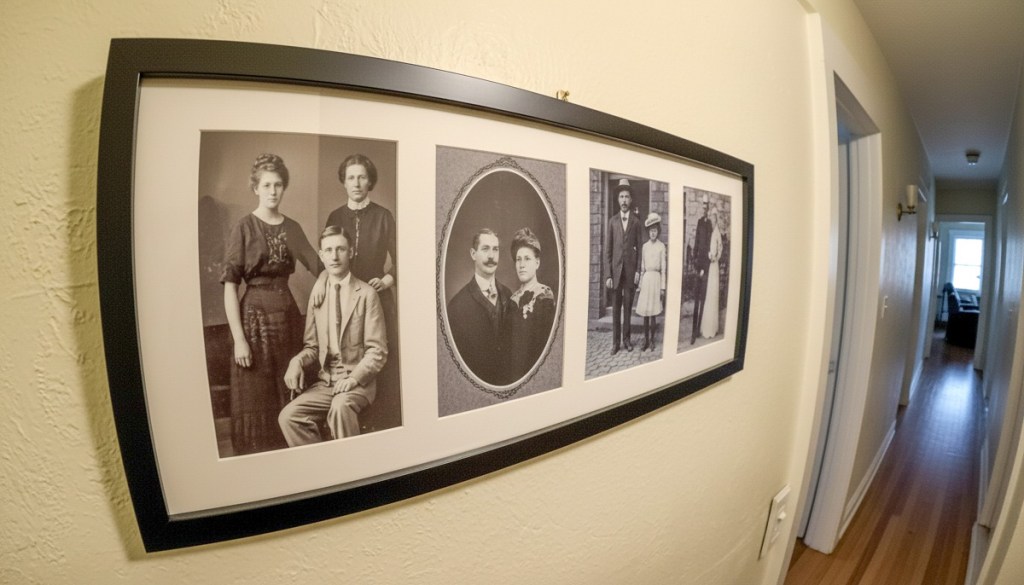
To help reduce my stress and solve for these complexities, I decided to make my photo frames do more of the work. I purchased wall-mountable frames that housed four 5″ x 7” photos each. (I picked up a few 25” x 10” frames from Target.) 

This strategy reduced my clutter concerns by 75% right there.

And it also created a structure for how I would organize my photos. Each group of four pictures needed to represent its own story.

Suddenly, my project became much easier.

  • One group showcased portraits of three generations on my father’s side as well as my maternal grandparents.
  • Another group featured my parents over the years.

Easy, right?

The only functional limitation to this design was I needed to group photos by orientation: portrait or landscape.

Still, I was able to make it work.

A Photo Collection Reflects a Larger Family Narrative
I’m happy to report the grand opening of Barrett’s family history gallery
(7am-6pm weekdays and 9am-1pm on weekends). 

But seriously, it feels great to have a few photos on our wall that display my family’s story. Previously, I’ve had some of these individually framed on shelves throughout our house. But they were effectively hidden from daily view. 

Plus, I like that our son can see this new collection. He knew my dad (who passed in 2022), but he never met my mom.

Yes, there’s more work to do… There’s a whole other family history to reflect on our walls. That comes next.

Simple and Effective Design
How ironic. What’s old is new again. So obvious… yet still requiring me to (re)discover these mini ‘aha’ moments.

Until the day comes when I upgrade my hallway to wall-to-wall digital screens, relying on old-school frames with four photos each is my DIY photo gallery solution.

I’m keeping it simple.

Decoding my Father’s Story through his Vintage Photographs

I’m trying to understand more about my late father through his photography. He passed in 2022, and he passed on a mostly disorganized collection of photos that he snapped across his life. 

My dad fashioned himself a photography enthusiast.

My Father, The Photographer
While I was growing up, I remember he’d proudly carry around his SLR camera with zoom lens throughout New York City like he was some sort of urban Ansel Adams. Before that, he went through his James Bond subminiature Minox phase. While his tiny Minox camera was indeed cool for its time, the resolution of the resulting photos was mediocre at best.

I believe my father’s self-assigned photography projects were frequently more about expressing his own style and experience than the creativity in his photos’ form. (I was aware how much he enjoyed simply playing ‘photographer.’) But as I’ve been reviewing and archiving his old photos and negatives over these past few years, I’ve come to an additional conclusion.

He was also interested in the art of photography… I’ve uncovered some cool photos.

But my dad was limited by the technology of his time and didn’t have any distribution mechanism to reinforce his efforts. (No social media or blogs yet.) The furthest he went was to blow up a few of his favorite photos to frame for our apartment.

He seemed satisfied with this ceiling for his hobby. 

Photo Echoes Between Generations
I’ve been digitizing these photos as part of my ongoing family archiving project, and I’ve recently come across an unexpected phenomenon. I’ve found echoes of my own photo work showing up in some of my father’s photography.

It shouldn’t really be a surprise. New York City has certain iconic photo opportunities that a million others have also snapped. So, the fact that my father and I captured the same shot decades apart is hardly a revelation.

But it’s still made an impact on me.

Same Shot – Decades Apart
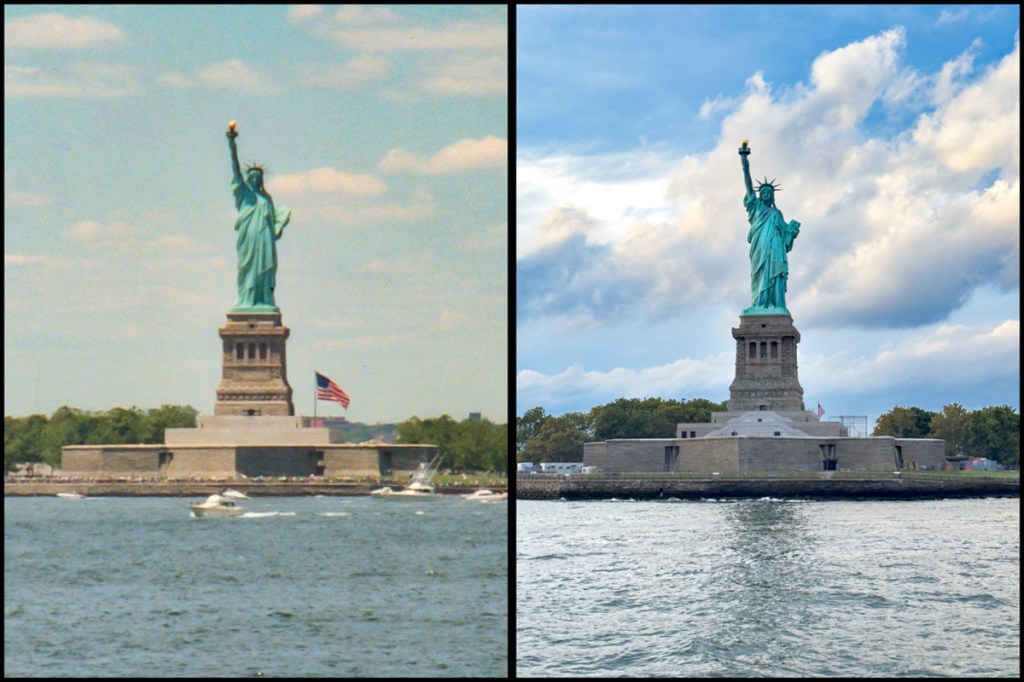
I had the opportunity recently to take a few photos on the water around Manhattan near the Statue of Liberty. After I returned home and reviewed them, I felt a déjà vu like I’d seen these before. Yes, of course… my father’s photos. He’d been on the New York Bay too (multiple times, in fact).

Take a look:

Here’s the southern tip of Manhattan in 1988 and in 2025. (My father’s photo benefited from all the picturesque boats in the harbor. Of course, lots of other differences, including the Twin Towers.)

And here’s the Stature of Liberty, again in 1988 vs 2025.
(I really like that giant American flag in my dad’s shot.)

These are hardly unique photos, But their similarities are striking for me, because they come from two generations of Lesters. And I find that meaningful. 

My Father’s Legacy
I’m still trying to understand my father. I had a complicated relationship with him. 

No, he didn’t really bond with me through his photography and share his hobby as a father would with his son.

But he did buy me a nice Ricoh camera when I was in my early teens. So, it wasn’t as if he entirely missed the connection. (And it’s not lost on me that my own passion for photography still found its roots during this time in my life.)

Decades later, the fact that we gravitated to some of the same photo moments has made me feel a little closer to him. I understand I’ve got a little magical thinking going on. Still, I think there was more to my father that met the eye (or at least I want to think).

And that’s made me consider his legacy a little differently.

What Will I Learn from the Next Photo?
My father’s photos are breadcrumbs that lead to a truth I’ll never completely understand. But they help me soften the rough edges to the story of our lives together.

And that’s part of what drives me to continue archiving his photos.