At Home with Tech

Unlock the power of all your technology and learn how to master your photography, computers and smartphone.

Category: family

Green Bubble Texting Fix if You Use the Messages App on a Mac
The color of your texting bubbles may not matter so much when using your iPhone, but it can be a big problem if you’re using the Messages app on your Mac. Here’s how to erase this pesky issue…

Lately, I’ve been trying to fix a little flaw in my ongoing role as the family photographer. It has to do with what happens after I take my photos…

I bring them back to my iMac, import them into Adobe Lightroom, choose the best ones, tweak and color balance, and then finally I share the few gems with family and friends. Of course, the big problem with my process is it takes time… sometimes lots of time to get to the finish line. It can be a week… sometimes two.

These days, everyone expects almost instantaneous sharing of pics.
Clearly, I need to keep up.

And I’m happy to report that I’m doing better, and here’s why…

Emailing Vs. Texting Photos
Now, I force myself to quickly find the best few pics in a batch and singularly focus on them to get them ready to share. And if I never get to the rest… well, maybe that’s okay, because perhaps all that really matters are those few best photos anyway.
(Are you feeling a disturbance in the Force?)

One other important detail to my evolving photo-management process is how I’m sharing my pics… Usually, I email them about. If I have more than a few to share, I create a Dropbox folder to house them. And then I forward along the Dropbox link in my email.

How easy is that?!

Well, not easy enough…
Because it still requires folks to click on the link and then download the photos.
And that’s takes time.

I’ve noticed that some of my friends prefer to text their photos, and I’ve experienced the simplicity of saving a photo that’s been texted to me directly to my iPhone.

Hmmm…

And while I didn’t want to move my photo sharing process to my iPhone (like the rest of the world), I realized I could take advantage of a texting workflow while still using my iMac…

…by using the ‘Messages’ app.

A Problem with Using the Messages App on Your Mac
You may recall, I’ve recently focused on my son’s 9th birthday and what to get him…
(My gift was a build-your-own computer kit!)

Immediately after his birthday party, I wanted to send out some party pics to our friends, and I figured this was the perfect opportunity to try out my iMac’s Messages app as my distribution method…

But I immediately ran into a roadblock with one of the phone numbers I used…
The photo just didn’t go through!

Huh.

After a moment, I realized my friend wasn’t part of the Apple ecosystem (no iPhone or Mac). So he didn’t have iMessage functionality…
(The blue bubble type)

And my Mac isn’t as clever as my iPhone which can simply convert an iMessage with a photo to a MMS text with a photo.
(The green bubble type)

So now what???

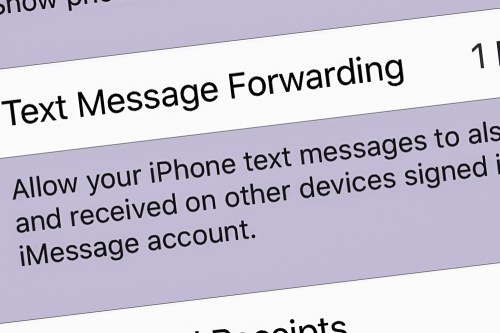
Text Message Forwarding
Well, the fix was to change a buried iPhone setting to better use Messages on my iMac. You simply turn on the ‘Text Message Forwarding’ feature…

Here’s how you do that on an iPhone:

  • Go to ‘Settings’
  • Tap on ‘Messages’
  • Tap on ‘Text Message Forwarding’
  • Then select the device you want to connect (iMac)

And as soon as I made this adjustment, I resent the photo, and it immediately went through.

Problem solved!

Green-Bubble Fix
With my iMac and iPhone now teamed up in this particular way, the path had been cleared for me to freely share my photos without worry using the Messages app on my iMac.

And the result…?

I received almost instant feedback that my pics had been received and were appreciated.
Now that’s satisfaction!

Text Message Forwarding is an easy fix for your green-bubble moments.

I highly recommend activating it…

Piper Vs. Kano Computer Kit as a STEAM Toy Birthday Gift

If you’re not sure what to give your third grader for a birthday present, consider a build-your-own computer kit. There are two choices on the market right now. Here’s my own journey to pick the best one for my son…

I’m sure it’s no surprise to hear that my third grader loves to play in the digital world. Minecraft is his reality of choice during ‘screen time.’ And I’ve got to say it’s pretty impressive what he’s built throughout that amazing universe. He enjoys it so much that he spends his allowance to buy new ‘worlds’ in the Minecraft store. And while I originally bristled at the idea of spending real money on virtual items, I recognize it’s very much the way our tech-infused reality.

What a Nine Year Old Wants for his Birthday
My son’s 9th birthday is coming up, and I’ve got to admit that I’ve struggled a bit with deciding what to get him as ‘the birthday present.’ He’s asked for a whole bunch of Pokémon cards, as that phenomenon is surging throughout his peer circle.

Okay… sure. We’ll get him some cards.

And maybe as a parent, I should just go with what’s top of mind for him. Why would I want to overengineer my decision? Well, I’d prefer to give him a gift that might have a more meaningful impact on his development and future….

My son enjoys reading, and so I’ve already bought him several books that I expect he’ll love. And maybe with them… I’m done. There’s probably no better gift, right?

A few books… some Pokémon cards… He’ll be happy.

Well…

What a Father Wants to Get for his Son’s Birthday
Why am I stressing that somehow this is not enough? So, there’s this idea stuck in my head that I’ve got to get him a ‘bigger/better’ gift.
(My wife has gently pointed this out.)

I recognize that this particular issue for me as a father is likely that it’s just a reflection back on me… when I was a child. (Maybe I didn’t get a ‘great gift’ when I turned nine.)

And perhaps that’s the challenge I’m trying to meet…
I want this gift to be memorable enough so that he will simply remember it.

So, maybe this more about me and ‘legacy.’
Okay… let’s just say guilty as charged… and leave it at that.

I need to keep shopping for gift ideas.

Holding the Line
Screen time on the family iPad is the center of how our son currently interfaces with the digital world. There are some obvious ways that we could take him to the next level with more tech hardware…

  • Is it time for a gaming platform?
  • Perhaps his own ‘tablet?’
  • Maybe we repurpose one of our old iPhones that’s gathering dust.

Not yet.

My wife and I are aligned on holding the line against this inevitable next step and not rushing our boy towards more tech reliance. All in good time…

In Search for the Perfect STEAM Toy
Beyond the joy of building (and coding) in Minecraft, our boy has always enjoyed building in the real world. Whether it’s been with LEGOs, cardboard boxes or rolls of scotch tape and paper… he’s always loved to construct.

So, I began Googling for STEAM toys that he could build. I figured that might be the sweet spot for my search…

And then I came upon a startling concept (for me)…
The idea of children building their own computers and learning about design, circuitry and coding by using them.
(And it’s all based on the wildly successful and inexpensive
Raspberry Pi platform.)

Which Build-Your-Own Computer Kit for a Nine Year Old?
I came upon two choices:

Piper Computer Kit 2
$249.00 on Amazon Prime

Kano Computer Kit Touch
$195.00 on Amazon Prime

Both of these kits have received strong reviews. The major difference between the two is the Piper focuses more on the construction and component-interface experience, and the Kano operates more like an actual computer (tablet) once it’s up and running.

The Kano comes with its own keyboard… while you would need to attach your own to the Piper if you wanted one (though its design doesn’t require it).

Both are programmed to teach kids about coding and use Minecraft as a learning interface. And both are targeted for kids around his age.

Time to Make a Decision
I don’t think you can go wrong with either choice.

That said, I like the idea of the more robust construction phase of the Piper kit. I think our son will really enjoy that. And the learning experience is more ‘hands-on’”

The fact that the Kano may have more long-term value as an actual computer connected to the Internet doesn’t interest me right now. Though you can connect the Piper to WiFi, I’m happy not focusing on that and just having our son tinker with the standalone experience.

Another plus for the Piper is the version 2 can be powered directly with an AC cable as well as its rechargeable battery.
(The Kano Touch relies entirely on the battery pack.)

The Piper is the Better Fit for my Son
The gift of building and coding with your very own computer…
And the journey that goes with that…
Doesn’t that sound cool?
Sure does!

Yep… that’s the gift for my son.

I’ve decided on the Piper Computer Kit 2.
Click.

I know. I know…
Both the Piper and Kano are pricey.
(There are Kano configuration choices that are less expensive, but you need to provide your own screen.)

You’re paying a premium for an experience tailor-made for kids.
That’s the deal… and I’ve bought in.

Time Capsule Birthday Message to be Read in 2059
Hey Bud,
You probably don’t remember what I got you for your 9th birthday.
(Yes, in addition to those Pokémon cards)
It was a make-your-own computer kit.
I know that was an extravagant choice. (Well, it was back then.)
And it may or may not be relevant to the life you’ve grown into as a man.
But as a kid, you loved to build. And I expect you will always be a builder of some sort.
So, I was just trying to tap into that spark and nurture it.
You rock. Always have. Always will!
Happy Birthday.
Love, Dad

Offbeat Photo Moments from our London Vacation

If you’re expecting iconic London photography, there’s nothing more to see here. If you’re hoping for something a little different, well then… I might have something for you. Unique or throwaway? You decide!

My family and I have recently returned from a week’s vacation in London, and yes, I snapped more than a few pictures along the way. As part of my little photographic exercise, I also attempted something a little different…

In addition to finding iconic shots as well as any number of family selfies, I tried to also observe our London experience using a different eye. So, I took a few photos that represented the story of our trip from an alternate perspective… imagery that you might easily miss (as well as a few that were entirely impossible to ignore).

These offbeat moments were right in front of us. I just had to open my eyes a bit wider or turn my head in a different direction to spot them…

Sunrise at Heathrow Airport
When you’re walking off the jetway at 6am after your seven-hour flight, you’re probably not taking the time look out the window towards the airport. Well, you should… a sunrise is beautiful just about anywhere!

Kensington Gardens
As I experienced a little jet lag on our first morning, I stumbled through Kensington Gardens on a cloudy day. Then, suddenly this moment presented itself. My vacation had officially begun!

The Elphin Oak
I found this delightful sculpture filled with fairies, elves and animals at the Diana Princess of Wales Memorial Playground.

British MuseumDon’t forget to look up! This skylight ceiling bathed visitors with blue-cast sunlight seemingly from an alternate reality.

The London EyeWhile everyone else was looking up and over London, this reverse view down was really cool.

Cutty Sark
For me, viewing the hull of this restored 19th century clipper ship from this angle was the true highlight.

Tower of London
Sure, everyone races to see the Crown Jewels. But the Tower of London tour also houses many other treasures, including the opportunity for my third grader to get close to chainmail armor.

Hungry Raven
My son spotted this peculiar moment as this hungry Tower of London guardian tried to figure out how to get inside an already-open Pringles can.

Tower Bridge
I got the complete view by looking up to look down.

Lock Hatters
My father visited this iconic hat store on St. James’s Street 60 years ago and recommended I stop by and ask if they remembered him. While I stopped short of asking the very proper salesman to check their records, I did FaceTime my dad while we were walking through Lock Hatters and facilitated a reunion of sorts.

The View on St. James’s Street
This view had a timeless feel. So I quickly pulled out my iPhone XS Max to capture the image.

Ceiling at King’s Cross Station
The grafting of this ceiling extension using such a modern design onto this old structure is both radical and brilliant.

Chilly Night by the Thames
A hot chocolate street vendor provided some additional heat to help this pop-up café also serve as a warming station.

Silent Disobedience
This doesn’t appear to be much of an accident…

The Tube
Riding the Underground was our total transportation solution. It felt more cushy than NYC’s subway cars, but the space was also a bit tighter and rounder. Mind your head!

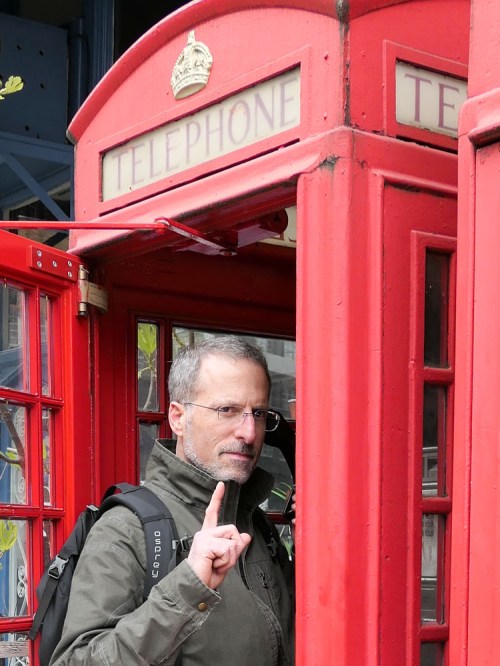
Red Telephone Box
A phonebooth? Still? How quaint.

Sunset over London
Both a sunrise and a sunset during a London trip?! That’s definitely worth calling out. And a nice way to end our little photographic journey across the pond!