At Home with Tech

Unlock the power of all your technology and learn how to master your photography, computers and smartphone.

Category: parenting

How to Design a Photo Gallery Memory Wall at Home 
I usually show off family photos at home through my digital screens. (I haven’t bought photo paper in years.) The pictures glow on my little Nixplay digital frames and on my family room screen via my Apple TV interface. For years, I’ve enjoyed the flexibility to rotate countless images through these little memory portals.

What I’ve mostly ignored is the art of analog photo framing where you make a print, place it in a wooden frame and hang it on your wall. That’s so 1925. Plus, you ruin your walls in the process with all those little nail holes.

Well, unless you want to live in a sterile environment with empty walls, you have to accept some damage across the years and include a little patch and paint planning for your home.

So, I recently embarked on a journey to return to this old-school approach and frame more photos to hang.

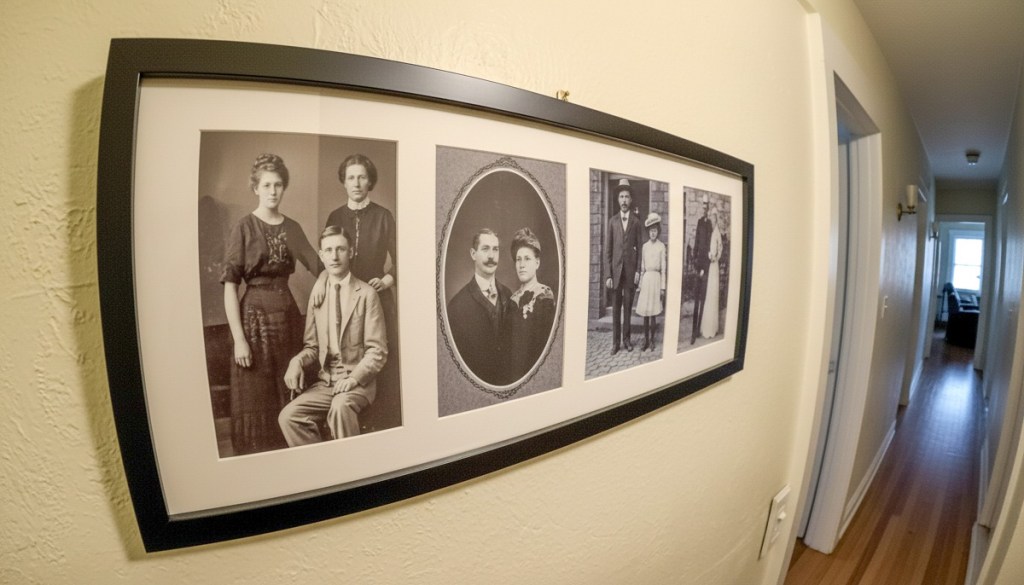
My goal was to create a memory wall/family history gallery featuring photos from past generations in our hallway.

The Best Archival Photos have Visual Markers
I turned to the collection of pictures from my parents’ old photo albums, many of which I had already digitized. So, I was off to a great start, but I was quickly disappointed with what I found.

Sure, my parents took family photos, but a lot of them simply weren’t that great. Those Kodak moments were turned into soft, mediocre images captured by inferior 20th century consumer tech. (I’m admittedly spoiled by today’s smartphone photography magic.)

More importantly, so many of these images couldn’t stand on their own and reflect a story. The backgrounds were simply too vague.

Visual markers are the key to unlocking the story in any photo. Without them, a photo’s archival value rarely lasts beyond one generation. (Food for thought as you practice your own photography.)

Going back a generation to my grandparents, I had fewer pictures to work with. That said, I could tell my paternal grandmother really enjoyed being photographed. 

I never met her, but her vibrant personality glowed in all the photos she’s featured in.

I have just a couple of pictures of my great grandparents, and that’s it.

Other Factors to Consider
Once you select the best photos to work with, then you’ve got to figure out how they should go together. And that can be much harder than you’d think.

How you position archival family pictures can totally affect the story you want to tell. This is an entirely different skill set than I’m used to. (Remember, I just rotate pictures in digital frames.)

Plus, I was overwhelmed by the challenge to properly position a collage of photo frames on my wall and make it look organized and well designed (as opposed to a mess).

And then finally, the idea of puncturing my wall with lots of little nails almost pushed me over the edge towards inaction.

Display a Story in Groups of Four Photos
To help reduce my stress and solve for these complexities, I decided to make my photo frames do more of the work. I purchased wall-mountable frames that housed four 5″ x 7” photos each. (I picked up a few 25” x 10” frames from Target.) 

This strategy reduced my clutter concerns by 75% right there.

And it also created a structure for how I would organize my photos. Each group of four pictures needed to represent its own story.

Suddenly, my project became much easier.

  • One group showcased portraits of three generations on my father’s side as well as my maternal grandparents.
  • Another group featured my parents over the years.

Easy, right?

The only functional limitation to this design was I needed to group photos by orientation: portrait or landscape.

Still, I was able to make it work.

A Photo Collection Reflects a Larger Family Narrative
I’m happy to report the grand opening of Barrett’s family history gallery
(7am-6pm weekdays and 9am-1pm on weekends). 

But seriously, it feels great to have a few photos on our wall that display my family’s story. Previously, I’ve had some of these individually framed on shelves throughout our house. But they were effectively hidden from daily view. 

Plus, I like that our son can see this new collection. He knew my dad (who passed in 2022), but he never met my mom.

Yes, there’s more work to do… There’s a whole other family history to reflect on our walls. That comes next.

Simple and Effective Design
How ironic. What’s old is new again. So obvious… yet still requiring me to (re)discover these mini ‘aha’ moments.

Until the day comes when I upgrade my hallway to wall-to-wall digital screens, relying on old-school frames with four photos each is my DIY photo gallery solution.

I’m keeping it simple.

Four Ways to Showcase your Best Family Photos on your Phone

Are you able to call up any family photo you want on your smartphone? If not, it may be time to update your photo-archiving plan. Here’s what I did.

Our teenage son asked me a question during dinner last week that I had a difficult time answering. He asked if I could show him some pictures from when he was younger. Pictures of when he was younger?! 

I had thousands of photos… tens of thousands from the past fifteen years! But where were they? Could I immediately call up any of these pictures that best represented his earlier years? 

Could I Meet the Moment?
Sure, I could flip though endless photos living in my iPhone. But that would take too long. I started sweating. 

For years, I’d been dutifully curating my family’s photos on my Mac using Adobe Lightroom Classic, but when I received this simple photo request, I wasn’t ready for it.

I took a breath. He kept eating. The opportunity was about to pass. Then, I pulled out my iPhone, opened Apple’s Photos app and quickly went… to my shared albums.

A Shared Photo Album Saves the Day
And yes, there it was… the photo album I had created years ago and shared with my wife that collected some of our Lester adventures. I opened it up, pulled up my chair next to my son and began displaying a few fun pictures from his elementary school years. He smiled, and after a few minutes, we agreed to look at more another time.

After he left, I exhaled. 

Whoa! That was a definite dad moment. And I almost blew it.

Set Up Cloud-Based Photo Albums with Easy Mobile Access
Afterwards, I thought about our exchange and wondered why I had been caught so off guard with this simple request. I’ve spent hundreds of hours working on our family photos over the years. My challenge was more about my phone having easy access to my curated photos from my multiple cameras. 

So, I decided it was time for a little review of my existing photo archiving process and how to give myself better mobile access.   

The obvious way to handle this need is to create cloud-based photos folders/galleries that you can easily view with phone apps. There are plenty of way to do this. But you’ve just got to maintain your plan and keep your albums up to date.

#1
Apple’s Photos App
For an iPhone user, Apple’s Photos app is the built-in solution. The only limitation to shared albums is the pictures are organized in the order you load them in, not in the chronological order of the photos’ time stamp.

A regular (non-shared) album that you set up just for yourself to sync with your iPhone will order the photos in the correct time sequence.

#2
Amazon Photos

Back in 2019, I started using Amazon Photos for my cloud photo archive. The big draw was it was free with unlimited storage of full-res photos… included in the cost of my Amazon Prime membership.

It has an app for my iPhone, and yes, I use it (though I didn’t have a photo album set up with my son’s pics).

The one problem with Amazon Photos is I do worry that one day, Amazon will abandon its interest in photos. And then… poof?

#3
SmugMug

So, I looked for a company with a more photo-centric raison d’être. And I decided to go with SmugMug. I’ve been curating my best photos with this platform across the past few years. 

Also with unlimited, full-res photo uploads, SmugMug has become the platform for my official family archive. But I’m being very ‘precious’ about which photos live there. I think about my SmugMug galleries as an archive that will be handed to the next generation. And I do pay $200+/year to maintain this current strategy.

Yes, of course, I have photos of my son in my SmugMug account, and yes, I have the SmugMug app on my iPhone for immediate access. But I’ve intentionally restricted the photos of my son to ones that more reflect his life’s milestones for future generations to see. (I’m still fine tuning this theoretical goal.)

So, SmugMug is missing a bunch of the fun photos that I’d otherwise want to share with my son today.

#4
Lightroom’s Mobile App
And then it hit me… All the above solutions require me to export selected, edited photos out of Adobe Lightroom Classic’s ecosystem. 

What I had missed was never setting up a syncing solution directly to Lightroom’s Mobile app. I suddenly realized that was the obvious hole in my photo-archiving plan. 

Oops. 

Of course, I already have a great photo collection of our son in Lightroom Classic. So, I loaded the Lightroom app onto my iPhone. Then, with one click, I synced the collection to my iPhone. 

Well, that was an easy fix.

I’m now prepared for my next dinner with my son.

Don’t Fall Behind
It’s important to never let up on any photo archiving strategy. You can see I’ve worked with several solutions over the years. (Part of that is intentional to help protect against unexpected digital-file loss.)

Good photo organization takes a life-long commitment.

If you can’t immediately access the photo you want on your phone, it’s a clue there’s more work to do.

Is your phone ready for your next dinner?

4 Smart Strategies for Buying Tech for Your Teen

A teenager wearing wireless headphones stares out of a window onto a city street.
How to go about buying expensive technology for your teenager can be confusing and often a challenge. Here’s what I do.

We all know how expensive personal tech can be. The price points don’t change for your kids and teens. Tech is tech.

As a parent of a teenager in high school, it’s already been a couple years since I faced the reality that toys are for kids, and he’s not really a kid anymore. When I shop for our son, he wants (and often needs) the same tech as I do.

That said, the gear we all use is often available at a variety of price points. So, when shopping for our teen, yes, I’m inclined to first look at the lower end, but I’m also mindful to get him something ‘good.’ 

I don’t want to fall for ‘a deal’ on a model that’s subpar. A bargain is not always good value in the name of trying to save a buck. Not for me. Not for my boy.

So, I do find it a complex balancing act as a parent, and I must admit I carry some baggage to this shopping equation.

My Father Got Me Used Tech
I recall the moments my own father gifted me the tech I craved when I was a kid… a stereo system for my room and later a cool Sony Walkman. What I also still remember was the stereo was in an already-opened box, and my Walkman had an annoying dent in its metal frame (but it worked fine).

Not to diss my dad, who passed away in 2022, but the memories of these slightly used gifts still kick around the back of my brain. 

Sure, he was probably going through the same questions as I am now as a father. And he made some choices. And just so you know, it wasn’t an affordability question. There are a few other details, but they don’t change the facts. Nor do they blunt these feelings decades later.

Finding a deal for yourself is one thing. Shopping for a discount for someone else’s gift can be entirely different. As we go through this topic, I just wanted to reveal this story as I share my own gifting strategies as a dad.

Of course, I look for reasonable and smart ways to buy tech more affordably for my son. But I also don’t want to repeat the gifting mistakes my father did.

So, all this said, here are four ways I’ve been trying to navigate this tech terrain as a father…

#1
Start at the Entry Level

As any number of tech product categories mature, less expensive versions eventually show up. They’re usually not as good. But sometimes… they’re almost as good and often in the ways that matter most. And that’s where I look for gifting opportunities.

I like this approach especially with the brands we already know and love. Apple’s iPhone SE is a great example, and yep, my son has one. I actually bought it for myself as a ‘transition phone’ after I drowned my old iPhone. (That’s a whole other story.) Later, the SE went to him.

Not every entry level choice is the right move. You’ve got to do some homework.

#2
Shop for Yesterday’s Best

Sometimes, last year’s model at a discount is still a great choice. How much better is the newest version really going to be?  

And most importantly, last year’s great model can be a much better choice than a cheaper model that’s brand new. Shopping for price is only one piece of the equation.

I recently applied this shopping strategy for a pair of noise-cancelling wireless headphones for our son.

I went with the older Bowers & Wilkins Px7 S2 Over-Ear Headphones. They received amazing reviews. But there’s a newer model: the Px7 Se. Yes, that’s the latest-and-greatest (unless you must have the even more expensive Px8).

But the discontinued Px7 S2 was still for sale and at a nicely discounted price. So, I bought it. 

I think the Px7 S2 was a really solid choice. And most importantly, my son loves his new headphones.

Always remember to take a look at yesterday’s best.

#3
Don’t Skimp on the Guts of a Computer

We’re an Apple family. So, of course my son has a MacBook. I got him the MacBook Air. No… not the more expensive MacBook Pro. But I made that choice also because the MacBook Air is so good. And I bought the current model at the time. 

Sure, I could have saved a couple hundred dollars on last year’s model. But in this circumstance, I didn’t follow my ‘yesterday’s-best’ strategy. I applied a different shopping strategy for computers. 

I always like to buy the current model with the newest chip. That choice can help the laptop last at least an extra year or more at the back end of its life cycle.

Same rule for me and our son.

#4
Brand Often Matters

Not every model that a well-known brand sells is going to be good. Again, you’ve got to do your homework. But if you’ve got to put your trust somewhere, I think it’s smart to stick with the brands you already know. 

This may seem like an obvious point when it comes to big-ticket items, but for any number of accessories, you’re going to come across plenty of manufacturers you don’t recognize.

Be careful. I’d say it’s not worth taking the risk to save a few bucks. Sure, there are exceptions, but there’s already a fair amount of playing the odds when you shop. Why not stack the odds in your favor?

Shop Smart
Buying tech for your teen should follow the same smart shopping strategies for any purchase:

  • Identify a quality product.
  • Only get the features you need.
  • Then find a good price.

Of course, there’s always the hand-me-down strategy (like My iPhone SE). Nothing really wrong with that (although teen Barrett would probably have taken issue with it).

But if you’re making a purchase, yesterday’s best is usually the perfect place to start your search.