At Home with Tech

Unlock the power of all your technology and learn how to master your photography, computers and smartphone.

Category: shopping

From Dark Path to Smart Glow: My Quest for Backyard Solar Lights

We’ve set up a small fire pit area in our backyard, complete with a new Solo Stove and Adirondack-style chairs. After trying out our newly created outdoor space at dusk, I discovered a problem. It was too dark while walking out on the gravel path that leads to the back of our property and our Solo Stove. The path, which traverses a small slope in our yard needed a bit of lighting.

This requirement became clear while we were hosting dinner for a few friends on our deck. When we walked down the deck stairs in the near-dark onto the path to fire up the Solo Stove, my friend commented that it was hard to see the path’s surface for that final step down. 

That’s code for, “Someone’s going to break a leg!”

A leap of faith to my fire pit? Maybe tripping and falling down my little hill? No, that’s not what I was going for. So, it was time to illuminate the situation.

Solar Power to the Rescue
The obvious solution was to buy a few solar pathway lights. They charge up during the day in the sun, and then they shine throughout the night. There’s about a trillion of them on the market. They’re relatively inexpensive… some are under ten bucks.

I’m no stranger to this outdoor lighting strategy. I bought eight solar path lights years ago for the front of our house. But I damaged a couple with my lawnmower, and the rest broke or wore down over time. Ultimately, I didn’t replace them, as our landscaping focus moved to other priorities.

While that was a nice-to-have lighting solution, now I had a specific need. So, I began my research anew…

Shopping for Smart Solar Pathway Lighting
Solar landscape lighting tech hasn’t seemingly advanced that much. Some lights make it through the night. Others… not so much.

But that important variable really didn’t address my total need. I wanted more control of my solar lights, beyond set-it-and-forget it. I might choose to turn them on during specific nights or just when we’re hosting a party.

So, yes.. I’m talking about smart solar lighting. And yes, I wanted to control them with an app on my iPhone.

(Cue the tumbleweeds.)

Astonishingly, no company makes that for the consumer market. Well, none that I could find.

Nobody… except for Ring.

Ring Solar Pathlights
Ring appears to be the only manufacturer that’s in the smart outdoor solar lighting market. 

Ring’s Solar Pathlights integrate into Ring’s larger home security ecosystem… doorbells…cameras… alarms. Beyond the pathlights, the one extra piece of Ring gear you need is a Ring Bridge. That’s the Wi-Fi hub that connects these smart pathlights to Ring’s smartphone app.

App-tastic
And the app works great. You can manually turn all your pathlights on and off via the app. You can schedule them. You can let them go all night long.

You can also activate the built-in motion sensor on each Ring Pathlight (which aligns back to Ring’s home security focus).

Pricing
Yes, Ring’s smart solution costs more.

  • Each Solar Pathlight: $34.99 (There’s a 4-pack discounted bundle for $29.99 each.)
  • Ring Bridge: $49.99

So, all in… my 4-Solar Pathlight kit cost $169.91… plus tax.
(Compare that to a fifty buck price point for 4 old-school solar lights.)

But again, as best as I can tell, Ring is the only player in this market. So, I signed up and joined their team!

Set Up
Setting up my four smart pathway lights took a bit of time, but the process was straight forward.

  • Download the app onto my iPhone
  • Set up the Ring Bridge near a window facing my backyard
  • Add each Ring Solar Pathlight into the app (using the QR codes included in each box)

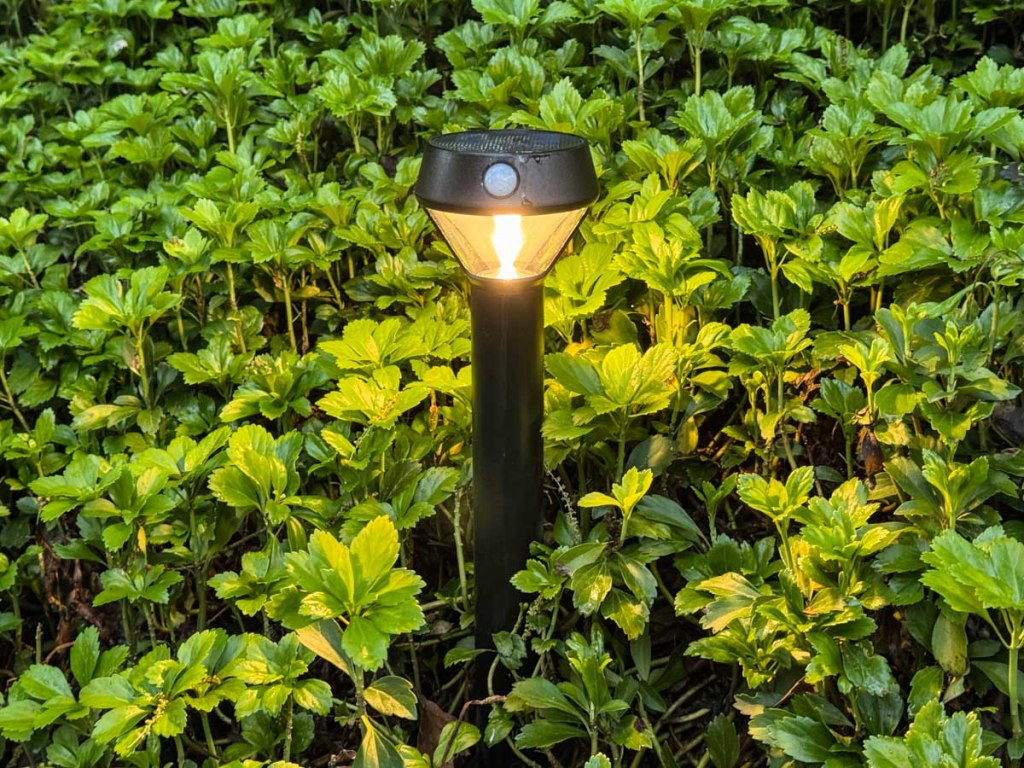
When that was done, I had total control of my new pathway lights, planted in our bed of pachysandra on the edge of the gravel path.

My Experience Using Ring’s Solar Pathlights
My current plan runs these lights from dusk till midnight. Since their positioning doesn’t give them a ton of direct sunlight during the day, I was originally concerned my solar pathlights wouldn’t have enough juice at night. Happily, that hasn’t been a problem. They’ve been operating just fine.

The pathlights’ overnight glow is moderate… not exactly ‘bright.’ But they do have more oomph. You can manually activate brighter settings (up to 80 lumens) for shorter periods or when their motion sensors turn them on. Clearly, their solar batteries can’t handle a 100% brightness load all night long.

That’s okay. Their illumination is sufficient, and I can kick it into a higher gear whenever I want.

What Comes Next
It’s odd this market isn’t more fully built out. But I’m happy with my Ring Solar Pathlight purchase.

No, I don’t own other Ring products. But now that I’m a part of its ecosystem, who knows what might come next… 

The Lester smart home is an always an evolving story.

Why I Bought a Broken Tripod at an Artists’ Open House Event

My mother lived in the Bridgeport area when she was growing up. She eventually left Connecticut and headed to her life in New York City where she would meet my father. And the rest is Lester history. 

My identity is that of a New Yorker, who now resides in Connecticut, but it’s not lost on me that half of my family’s history hails back to Bridgeport.

Today, Bridgeport hosts thriving artist communities. One place you can find that community is in the American Fabrics Arts Building where artists rent their studios. And a couple times a year, there’s the AmFab open studios event where many of the artists display and sell their paintings and art.

My wife and I often enjoy going for a couple hours. And we did just that this past weekend.

Walking through the Early 20th Century
This time, I found myself particularly attracted to the old building itself. It’s a converted mill originally designed for lace manufacturing in the early 20th century. So, I decided to take a few pictures as we walked about.

2008 Movie Set
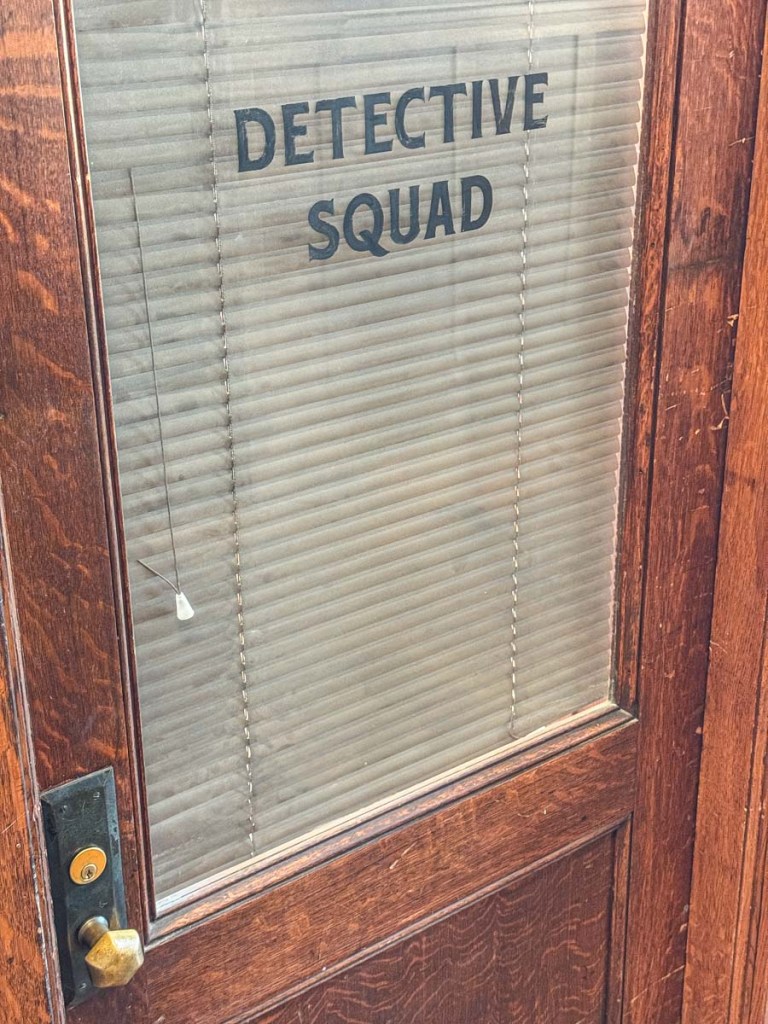
Did you know that scenes from the 2008 film “Righteous Kill” with Robert DeNiro and Al Pacino were filmed here? You can see how these two hallway doors were modified for the movie.

A Camera Tripod with No Name
As we continued our exploration, I turned a corner. Off to the left, I spotted a few old camera tripods on a platform. They first seemed part of an art installation, but as I walked closer, I realized they were all for sale. 

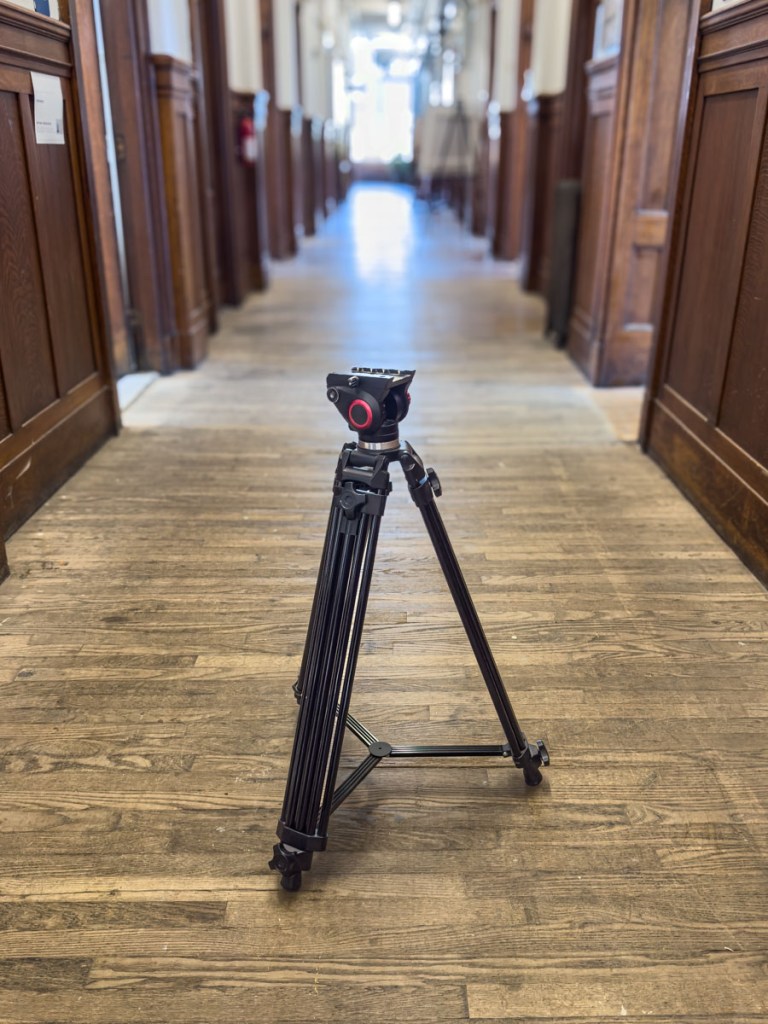
One tripod spoke to me. It was a professional model with a spreader on the legs and nice fluid ball head. 

I pulled it down and tested it out. It had a few cobwebs attached to its frame but was otherwise in good shape. The big drawback was this tripod was missing its quick-release plate that you would need to attach a camera onto it. So, I would have to buy that elsewhere.

But I couldn’t figure out the manufacturer, and the seller didn’t know either. That would require more research. (It’s odd that there wasn’t a company name branded onto the frame.)

So, for the moment, it was an unusable tripod. Not quite broken, but useless for now. 

Second Life?
I own a couple of lighter tripods for my timelapses and videos, but this one was beefier. I could use it.

The price: $20.

Hmmm… That’s certainly a great price. (Tripods like this one start in the hundreds and go up from there.) But there’s a good reason for this ‘bargain.’ It would need some additional, unknown spend.

What were the odds that I would eventually find a solution? 
Maybe 50/50.

But I bought it anyway. I wasn’t initially sure why.

One Person’s Trash is Another Person’s Treasure
Then, I carried this mystery tripod over my shoulder as my wife and I walked about the artists’ studios a little longer. I couldn’t be happier.

I can’t paint. I have no idea how to sculpt, and I don’t draw.  But I can snap a photo or two, and I’m working on evolving my timelapse videos.

As I passed by more artists in their studios, nobody batted an eye. It was as if everyone carried a hulking tripod about their day. And then it struck me. It was so obvious.

A brush and paint can take many forms. This tripod was waiting for me. The universe had offered me a tool to practice more of my own art.My creative spirit was energized. Not bad for a couple hours on a weekend.

Unexpected Saturday Afternoon

My wife and I left the AmFab studios, and as we drove out of Bridgeport, I reflected on this place where my family’s history still remains mostly unknown to me. But that’s another story. 

For now, I felt entirely grateful. And yes, it’s time to get to work fixing my new tripod. If anybody recognizes the manufacturer, please let me know!

4 Smart Strategies for Buying Tech for Your Teen

A teenager wearing wireless headphones stares out of a window onto a city street.
How to go about buying expensive technology for your teenager can be confusing and often a challenge. Here’s what I do.

We all know how expensive personal tech can be. The price points don’t change for your kids and teens. Tech is tech.

As a parent of a teenager in high school, it’s already been a couple years since I faced the reality that toys are for kids, and he’s not really a kid anymore. When I shop for our son, he wants (and often needs) the same tech as I do.

That said, the gear we all use is often available at a variety of price points. So, when shopping for our teen, yes, I’m inclined to first look at the lower end, but I’m also mindful to get him something ‘good.’ 

I don’t want to fall for ‘a deal’ on a model that’s subpar. A bargain is not always good value in the name of trying to save a buck. Not for me. Not for my boy.

So, I do find it a complex balancing act as a parent, and I must admit I carry some baggage to this shopping equation.

My Father Got Me Used Tech
I recall the moments my own father gifted me the tech I craved when I was a kid… a stereo system for my room and later a cool Sony Walkman. What I also still remember was the stereo was in an already-opened box, and my Walkman had an annoying dent in its metal frame (but it worked fine).

Not to diss my dad, who passed away in 2022, but the memories of these slightly used gifts still kick around the back of my brain. 

Sure, he was probably going through the same questions as I am now as a father. And he made some choices. And just so you know, it wasn’t an affordability question. There are a few other details, but they don’t change the facts. Nor do they blunt these feelings decades later.

Finding a deal for yourself is one thing. Shopping for a discount for someone else’s gift can be entirely different. As we go through this topic, I just wanted to reveal this story as I share my own gifting strategies as a dad.

Of course, I look for reasonable and smart ways to buy tech more affordably for my son. But I also don’t want to repeat the gifting mistakes my father did.

So, all this said, here are four ways I’ve been trying to navigate this tech terrain as a father…

#1
Start at the Entry Level

As any number of tech product categories mature, less expensive versions eventually show up. They’re usually not as good. But sometimes… they’re almost as good and often in the ways that matter most. And that’s where I look for gifting opportunities.

I like this approach especially with the brands we already know and love. Apple’s iPhone SE is a great example, and yep, my son has one. I actually bought it for myself as a ‘transition phone’ after I drowned my old iPhone. (That’s a whole other story.) Later, the SE went to him.

Not every entry level choice is the right move. You’ve got to do some homework.

#2
Shop for Yesterday’s Best

Sometimes, last year’s model at a discount is still a great choice. How much better is the newest version really going to be?  

And most importantly, last year’s great model can be a much better choice than a cheaper model that’s brand new. Shopping for price is only one piece of the equation.

I recently applied this shopping strategy for a pair of noise-cancelling wireless headphones for our son.

I went with the older Bowers & Wilkins Px7 S2 Over-Ear Headphones. They received amazing reviews. But there’s a newer model: the Px7 Se. Yes, that’s the latest-and-greatest (unless you must have the even more expensive Px8).

But the discontinued Px7 S2 was still for sale and at a nicely discounted price. So, I bought it. 

I think the Px7 S2 was a really solid choice. And most importantly, my son loves his new headphones.

Always remember to take a look at yesterday’s best.

#3
Don’t Skimp on the Guts of a Computer

We’re an Apple family. So, of course my son has a MacBook. I got him the MacBook Air. No… not the more expensive MacBook Pro. But I made that choice also because the MacBook Air is so good. And I bought the current model at the time. 

Sure, I could have saved a couple hundred dollars on last year’s model. But in this circumstance, I didn’t follow my ‘yesterday’s-best’ strategy. I applied a different shopping strategy for computers. 

I always like to buy the current model with the newest chip. That choice can help the laptop last at least an extra year or more at the back end of its life cycle.

Same rule for me and our son.

#4
Brand Often Matters

Not every model that a well-known brand sells is going to be good. Again, you’ve got to do your homework. But if you’ve got to put your trust somewhere, I think it’s smart to stick with the brands you already know. 

This may seem like an obvious point when it comes to big-ticket items, but for any number of accessories, you’re going to come across plenty of manufacturers you don’t recognize.

Be careful. I’d say it’s not worth taking the risk to save a few bucks. Sure, there are exceptions, but there’s already a fair amount of playing the odds when you shop. Why not stack the odds in your favor?

Shop Smart
Buying tech for your teen should follow the same smart shopping strategies for any purchase:

  • Identify a quality product.
  • Only get the features you need.
  • Then find a good price.

Of course, there’s always the hand-me-down strategy (like My iPhone SE). Nothing really wrong with that (although teen Barrett would probably have taken issue with it).

But if you’re making a purchase, yesterday’s best is usually the perfect place to start your search.