At Home with Tech

Unlock the power of all your technology and learn how to master your photography, computers and smartphone.

Category: Tech Diary

Why It’s Time to Refresh your Digital Clones 

Have you updated your personal online brand lately? It’s also probably time to replace your photos that the world can see. Here’s why.

“Life moves pretty fast. If you don’t stop and look around once in a while, you could miss it.” This quote from the fictional Ferris in the 1986 movie “Ferris Bueller’s Day Off” was spot on. And it applies in so many ways today.

It’s hard enough keeping up. It’s easy to forget or neglect your virtual self. Yes, like it or not, we’ve all created multiple online beacons that represent our lives.

Unless you’re focusing enough time to curate your online presence and stay active on social media, your virtual identity can easily start to fall behind your actual existence.

This divergence of realities can create a time warp of sorts where you will start to simultaneously exist in two separate decades.

Pro tip: Everyone should follow one timeline.

Do You Exist?
It’s always important to keep your personal online brand fresh and accurate. That’s healthy in any number of ways.

I’ve said it before that you really don’t exist if you can’t be found online.

  • Your professional self must have a strong and updated LinkedIn presence.
  • Your personal self should engage in some social media activity, if only to avoid missing out on everything your family and friends are regularly sharing.

Today, we’re all effectively micro media outlets, broadcasting our lives out to the world. It’s unavoidable. Sure, you can debate that statement, if you want. (I’m sure there were people in 1920 who insisted that they didn’t need a landline telephone.)

Even if you don’t feel you have a specific need to update your online identity today, it’s always out there working for you. So, you should keep it current.

Post a Recent Photo of Yourself
Have you updated your LinkedIn photo lately? Has it been more than five years? Maybe a decade? Perhaps… never?

Yes, then it’s definitely time to change it out. Look we’re all getting older, and we do look different. That’s not a bad thing. It’s reality. It’s life.

Embrace your reality. It’s all you have.

But that doesn’t mean you can’t maximize your reality. So, use a new great photo you love. (It doesn’t have to be professionally shot.)

And I suggest you pick a photo of yourself that’s warm and welcoming. It’s effectively your greeting card to the world.

Smile!
I’ve occasionally come across LinkedIn profile pics without smiles, and I’m always confused by that choice. Why would someone actually want to look unfriendly?

Other times, I see photos that are poorly lit or badly framed. Then, there’s the example where the person is clearly part of a group pic (awkwardly cropped in).

I don’t want to be judgmental, but I don’t get it. We all have smartphones with cameras. If someone isn’t around to snap a new photo for you, a selfie can work just fine. (Just make sure you stand in front of a window to ensure you’re brightly lit.)

Time to Update your Digital Clones
I get it. You’re busy. We’re all busy. You might feel it’s not critical today how people ‘experience’ you online.

But I would say you can’t wait until the day it’s suddenly important again. Then, it’s too late. You can never really know the true impact of actively maintaining your personal brand online across the years.

I believe it’s always beneficial to promote your own story. And to check out how well you’re doing, simply Google yourself.

No, this digital snapshot of your life will never be perfect. You can’t create total digital clones (well, not yet),

But it is a partial view of the real you.

So, give your online personal brand what it needs to best represent you.
Today… and always.
Is It Bad to Fully Charge your iPhone Every Night?

With new iPhones, now you have the option to throttle back the battery’s charging limit to just 80%. Is that good? Let’s find out.

Once upon a time, rechargeable batteries, however magical at the time, came with ‘memory’ problems. If you kept topping off your device with a bit electrical juice every day without really using the rechargeable battery, it would ‘forget’ how to fully recharge.

Today, Apple says of its lithium-ion iPhone batteries, “You can charge your iPhone every night even if the battery isn’t fully depleted.”

Well, that’s progress. So, what’s the problem here?

Should You Charge your iPhone to 100% Each Night?
On the one hand, yes, our friends from Apple say it’s okay to charge up your iPhone’s lithium-ion battery every night.

On the other hand, Apple has now offered a new feature in its iPhone 15 line to limit charging to just 80% to help reduce the drain on battery life.

The reality has always been that full-charge cycles accelerate the eventual reduction of an iPhone’s lithium-ion battery’s lifespan.

In fact, fully charging up and completing discharging your iPhone’s battery… that’s actually bad. Charging up to just 80% will, in fact help your battery last longer.

The 80% Solution
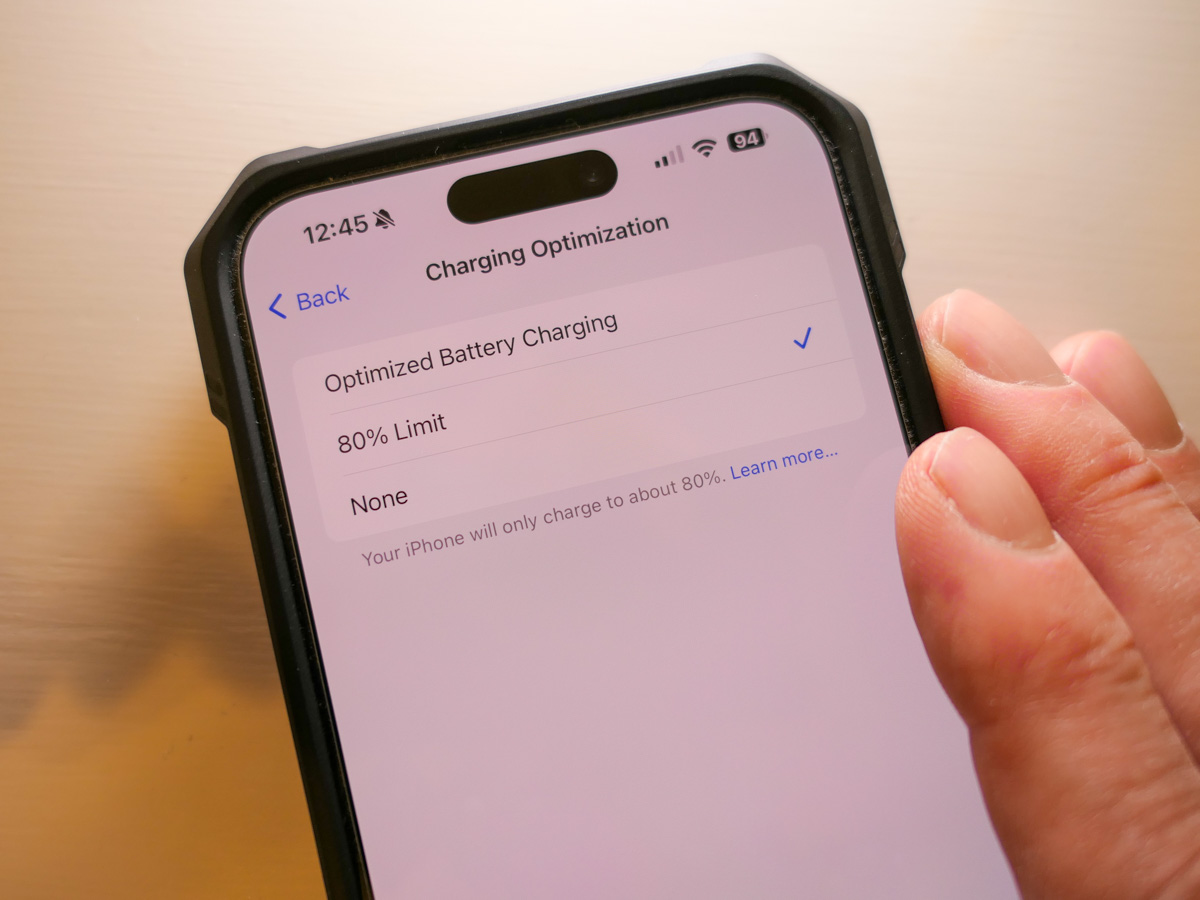
Here’s how you activate the 80% Limit mode:
Click:

  • Settings
  • Battery
  • Battery Health & Charging

Choose between:

  • Optimized Battery Charging
  • 80% Limit (sometimes it still goes to 100%)
  • None

Apple’s default setting is – Optimized Battery Charging

The Value of Optimized Battery Charging
So, yes, you can choose the 80% Limit setting, but Apple also talks a lot on its support pages about how useful the Optimized Battery Charging setting can be to maintain your iPhone battery’s health.

How Optimized Battery Charging actually works… I do find confusing. Something about learning algorithms based on your use. The setting doesn’t always get your iPhone’s charge level back to 100%, and it can delay when the actual charging is happening overnight. (I think there could be some borrowed “Flux Capacitor” or “Borg” tech involved. Who knows.)

But it’s all supposed to be good for your iPhone’s battery. (And that’s all that really matters, right?)

Plus, the name implies it’s the best setting. It’s ‘optimized.’ And it’s the default setting.
What more can you ask for?

80% is Technically Better than 100%
So why is there now the 80% setting? Well, it’s not totally clear to me other than charging up to 100% is simply not optimal for a lithium-ion battery. (Yes, there’s some irony here.)

I imagine the 80% solution is technically best for your phone’s battery, but then you’re constantly denying yourself the dopamine hit when you see that 100% glow to start your day.

Optimized 100% is Better than Regular 100%
So ‘optimized’ charging is designed to minimize the inevitable long-term damage of the 100% solution.

Optimize. Yes. That’s the camp I’m in.

Live your life. Minimize the damage.

As nuanced as all this may feel, what is crystal clear is to never go with the third battery-health option – ‘None.’

Then, you’re just charging up… old school. You’ve got yourself the 100% solution with no benefits from optimization. Your iPhone’s battery will flame out (not literally) more quickly.

Optimize Me!
So where does all of this leave us?

  • Is it bad to charge your iPhone to 100% every night. YES.
  • Can Apple minimize that problem by optimizing it? YES.
  • Should you go ahead and keep charging every night in Optimized Charging mode? YES.
  • Is that better than the 80% Solution? PROBABLY NOT.

But where’s the fun in 80% of anything?
I want 100%!

Plus, I want it to be optimized, even if it’s just a word to make me feel better about making the wrong choice. Well, second best.

Happy charging.

My Biggest Discoveries I Blogged About over the Past Year

Here’s my At Home with Tech year in review. Below are the links to my key learnings and tech discoveries.

So yes, these next few weeks can all be about looking forward. The fresh start. The resolutions. The turning over a new leaf. But I like to think of this time of year as the next chapter that builds on the past. It’s not so much ‘the new’… as ‘the next.’

I try to carry it forward. That way, I can greet these annual cycles with the perspective of my past years’ experiences. Said another way, it’s important to look back as you look forward. Otherwise, a lot can get lost across the years.

That’s why I think it’s critical to package up the story of your past year in an organized photo collection (digital or book) or perhaps an edited video-clips overview.

You might also want to perform a mental review and acknowledgement of your other notable actions and learnings.

Take it in. Then lock it in, or let it go if need be.

At Home with Tech Year in Review

As you know, I document my thoughts on technology and family life each week. So, I’ll follow my own advice and offer this summary of my blog posts that reflect my big learnings across the past year. Please check out the links below that most interest you!

My Growth as a Parent

Working in our Post-Pandemic World

My Journey as the Family Photographer

My Role as the Family Archivist

How a tiny film-to-digital converter brought new life to my father’s old analog slides
How to quickly turn a scanned negative into a positive image on a Mac
How to use SmugMug as a family photo archiving tool
How to prevent your family’s identity from being washed away by time

Maximizing your Family Video Clips

My Family Vacation Tips

Best Practices for your iPhone

My Evolving Understanding of Apple Computers

Here’s to a Prosperous 2024
As always, thank you for reading my blog. I’m looking forward to sharing more with you in the year to come.

Happy New Year!