At Home with Tech

Unlock the power of all your technology and learn how to master your photography, computers and smartphone.

Category: Tech Fixes

Will Your Tech Survive the Next Snowstorm?

You can’t capture cool pictures of winter if your battery is dead. But when the power goes out, your camera may be the least of your problems. I’ve got six ways to give your tech a fighting chance…

A windy snow event or ice storm will likely create stress that you can’t control. Fortunately, if you’re prepared, you can protect your precious tech from getting zapped by a brownout or worse.

Here’s my six-step checklist to prevent ‘techtastrophy’ when a storm plays havoc with the power grid.

#1
Avoid Direct Connections to Wall Outlets
First off, just don’t plug your electronics directly into the wall. If you expect the power to fluctuate, that could also include a power surge. Why take the chance of frying your gear? You should always plug your power supplies and chargers for your delicate tech (smartphones, laptops) into surge-protector power strips.

If you happen to have a whole-house surge protection system, then good for you. Otherwise, invest in a few good power strips with surge protection.

#2
Get a UPS for Your Computer
A power strip isn’t going to cut it if you’re using a desktop computer that requires a constant flow of electricity. Any irregular (dirty) power is bad, but when a blackout hits, you don’t want to be working at your computer without some power backup. So, you’ll need a more advanced solution…

Your desktop should always be plugged into an uninterruptable power supply. A ‘UPS’ is essentially a battery backup unit with surge protection and automatic voltage regulation. So, during bad weather, you can type away in relative peace.

I bought a great UPS for my iMac.
It’s made by CyberPower (model CP 1350PFCLCD) and goes for
$189.95 on Amazon.

#3
Turn Off Your Desktop During Stormy Overnights
Even with a UPS in place, I’d still recommend you turn off your desktop overnight during a big storm instead of just putting your computer into sleep mode.
(Why take any chances?)

#4
Activate Your Portable Power Generator
A battery-powered UPS can only handle your computer for a short while- enough time to finish up what you’re doing and then safely shut down. If you need a more powerful solution, then you’ll have to invest in a portable power generator for your house that can run for hours or days (depending on your fuel reserves).

I own a liquid propane portable generator (which of course, I’ve never had to use since the day I bought it). But I’m happy it’s in place to keep the essentials going during a blackout.

#5
Juice the Backup for Your Smartphone
If you don’t have any beefy power creation solutions in place, then at least invest twenty bucks on a pocket-sized battery power bank. It will give your smartphone an extra charge or two while the rest of your home waits in the dark.

I carry around an Anker Portable Charger.
($25.99 on Amazon)

But a little power stick can’t come to your rescue if it’s not charged! So, make sure it’s juiced up before the snow hits.
(And it wouldn’t hurt to top off your smartphone either)

#6
Keep Your Smartphone Warm
Your particular smartphone model might be water resistant, but its battery is still sensitive to winter. It will drain down faster when exposed to frigid temperatures.
(And that’s why you shouldn’t keep your AA batteries in the refrigerator)

So, if you’re out and about after a storm, try to keep your smartphone as warm as possible. Otherwise, you may find it suddenly needs a recharge.
(Then, please see tip #5!)

Power Up!
Sure, it’s hard to function in the dark. But it’s easier if your critical tech isn’t down for the count. Here’s hoping you successfully weather the next ‘Snowmageddon’ along with your gear!

Should You Buy that Extended Warranty for Your New Camera?

DJI Osmo Pocket in the Wild

Extended warrantees are often wasted money, until you need them. The question is should you buy them for your next camera?

With the exception of my Apple gear, I’ve not been a big fan of extended warranties for my tech. I take good care of my gear, and just haven’t seen the value of spending more money to protect against an improbable scenario.

That said, based on recent events, my perspective requires an update.

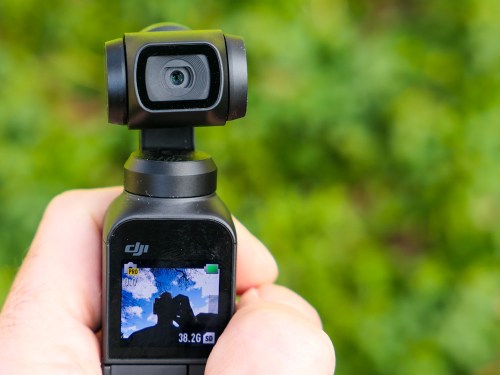
I recently picked up a DJI Osmo Pocket Gimbal, which is a small camera fused to a 3-axis gimbal stabilizer that I’ll be using to improve the smoothness of my action family videos. If I’m moving during a shot, I don’t want the framing to bounce about. And no matter how hard anyone tries to keep a camera in motion steady, there’s going to be some jitter. Gimbals effectively eliminate that. Sure, digital stabilization can help, but gimbals are the real deal.

The Osmo Pocket is tiny… It’s no taller than a pen. So you can easily carry it around with you.

And no, I didn’t buy the extended warranty called “Osmo Shield” when I purchased my Osmo Pocket.

Danger at the Piano Recital
In one of my first tests of my new camera, I took it to a children’s piano recital that my son was participating in. I also brought along my Panasonic Lumix DMC-LX10 which offers a 3x zoom. (The Osmo Pocket has a fixed lens.)

Fortunately, I found an open audience aisle seat, which would allow for a clear shot down the center aisle without head interference.

And then I had this crazy idea…

What if I recorded my son’s performance with both of my cameras? I would position my Osmo Pocket on the floor right next to me to get a great wide shot right down the aisle. And I would also capture a tighter shot with the Lumix in my hand while sitting in my seat. (Then, I would later edit the two clips together on my iMac using Final Cut Pro X.)

The look of a two-camera recording! How cool is that in a family video?!

Yes, it was a solid idea, but I also needed to test out the shot. Fortunately, my son was scheduled to perform in the middle of the recital. So I had a window of opportunity to prep the my Osmo Pocket shot. I moved quickly as the first performance began.

I paired the Osmo Pocket with my iPhone which allowed me to remotely view and control the shot. (Yes, very impressive.) I leaned over and carefully placed my Osmo Pocket on the floor and set up the shot. It was perfect.

But I missed one important detail.

The Center Aisle
I had forgotten that I wasn’t the only parent to see the value of the center aisle. And as I was the only parent to show up with a stealth multi-camera recording solution, the other parents would use a much more intrusive, but apparently acceptable camera-framing solution.

Simply walk down the center aisle with your smartphone and stand there in front of the rest of the audience to get the shot of your own kid playing the piano. (Apparently, that’s how it’s done.)

So, the piece of music ended that I was floor testing. The applause began. And then I sensed motion right behind me as a parent rushed down the center aisle to take her position before her child walked up to the piano. She was moving quickly and not looking down at what might be on the floor in front of her.

Time slowed down for me as I realized in horror what was happening. (There had been no parental intrusion for my test shot, so I had been oblivious to my massive error.)

I glanced down at my tiny, helpless Osmo Pocket.
(There was no rescue opportunity.)

For a split second, I thought her right foot might miss my camera. But no. It was like the perfect football field goal.

Her shoe hit my Osmo Pocket, and my camera went flying down the center aisle. It struck the back of one the front chairs and lay there.

I panicked.

Without thinking and as the applause still continued, I lunged out of my chair and ran to rescue my lifeless gimbal. I scooped it up and quickly walked back to my seat in front of everyone.

I sat down and the recital continued without skipping a beat.

If at First You Don’t Succeed…
I looked down in my hands and saw no heartbeat. The multiple impacts had shut down my Osmo Pocket. The lens looked undamaged and the body and gimbal seemed intact. But would it boot up and actually work?

So I pressed the power button…

And power up it did. The gimbal still functioned. And shot looked okay.

My new Osmo Pocket was remarkably… still working.

I waited for a few moments to allow my own heart beat to stabilize and then considered my next steps. Should I call it a day for my Osmo Pocket or keep going with my clearly dangerous plan?

What do you think?
(Silly Barrett)

So, I waited for the aisle to clear before my boy’s turn. And instead of jumping up and recording the shot from the aisle as I was clearly allowed to do, I returned my Osmo Pocket to the floor and then held my hand high holding my Lumix to get the tighter shot from my seat.

And most importantly, I snatched up my Osmo Pocket in time to avoid the next parental dash down the aisle.

A Second Chance to Make the Right Decision
I brought my footage home and edited the two shots together. Yes, the final edit looked really nice, but I considered the potential cost and all of that drama I had put myself through.

Would I do it again? Absolutely not.

But I realized I did have a second chance at one part of this equation…

Osmo Shield to the Rescue
DJI gives you 30 days to buy the extended 12-month Osmo Shield for the Osmo Pocket, which includes a one-time only ‘Accidental Hardware Damage Coverage.’

Clearly I need that!

As I was still within the 30-day window, I quickly resolved to spend another $33 to protect my shaken DJI device. (You don’t want to tempt fate after dodging that kind of bullet.)

Click.

The Power of Protection
The $33 bought me immediate peace of mind.

No, I’m not suddenly worry-free when using my Osmo Pocket. (Instead, I’m much more aware of any number of potential dangers that threaten the delicate gimbal mechanism when I move about with it.)

And a one-time get-out-of-jail-free card won’t get me very far over the course of the next two years if I cash it in next week.

But it does reverse the strong temptation to protect the Osmo Pocket in my pocket instead of using it in my hand.

History Does Repeat Itself
The next day, I experienced something of a déjà vu. I remembered that this was not the first time I’ve damaged a camera.

There was the “incident” when I was riding my bike, shooting video of my son riding his bike a few years back. I was holding my old Canon S100 pocket camera in one hand and steering with the other. I was following along a little too close, and he braked hard. Before I knew it, I was on the ground.

My right elbow took half of the impact and the camera received the rest of the blunt force against the cement road.

And before that, there was the time I was sitting down and holding that same doomed Canon pocket camera on my lap. And somehow, I accidentally dropped it. (A butterfingers moment)

It couldn’t have been more than a two-foot drop against the wooden floor of the outdoor mini-train ride at the Stepping Stones Museum for Children. But the camera’s articulating lens took the impact, and the lens motor mechanism jammed.

The two-foot drop sent me on a colorful journey to a repair store in New York City.  The repair cost over $100. (My bike crash killed the camera.)

There Will be Future Damage
So, this is actually the third time my flawed human actions have threatened my cameras. I know I’ve contemplated this before, but it’s finally time to take action.

So, I’ve bought the Osmo Shield plan, and now my Osmo Pocket is a camera with two paid-for lives.

Moving forward, I think it’s safe to say that any new camera should absolutely get the extended warranty… if it includes damage protection.

Because… life happens.

Which Bulb Should You Buy for a Porch Light?

If you’re not sure which light bulb you should be using in your outside porch light, you’re not alone. Here’s the story of my journey to a solution…

My house has an porch-light fixture above my front door. The long, cylindrical fixture’s bottom is technically open to the outside elements, but the bulb is protected.

You can spot the bulb if you look deep into the fixture after you ring my doorbell. If I take my time getting to the door, and if you’re a tech geek like me, you might wonder what kind of light bulb I use. Funny you should ask…

Every six months or so for the past ten years, the bulb has burnt out, and I have to replace it. Each time, I’ve found myself faced with the dread of not exactly knowing which one I should be using. And that has usually led me to a moment of self-reflection and uncertainty about my place in the universe.

Because I’ve come this far in life, and I can’t quite figure out what it takes to screw in the proper light bulb. It blew out again last week. So I decided it was finally time to figure this out…

How Many Words Does it Take to Screw In a Light Bulb?
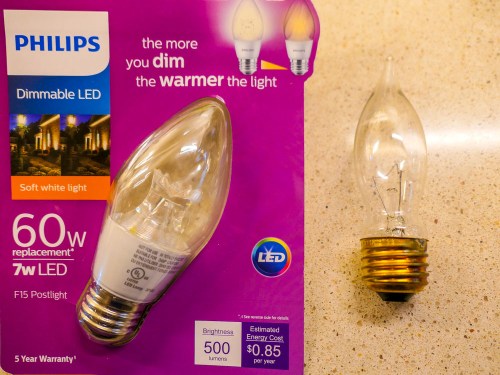
First off, it’s not like I’ve been entirely oblivious in my past attempts to choose the correct bulb. Previously, I’ve used GE outdoor incandescent postlights with bent tips. I’ve assumed that because they’ve carried the name ‘postlight’ they’re designed to weather the outside elements as long as they’re protected from rain. They’ve operated just fine, even though they must get a little damp now and again.
(I hope I’ve not been tempting fate.)

Unfortunately, I can’t find these GE bulbs anymore on Amazon. Plus, they’ve always been difficult to unscrew, because my fixture is so long and I can barely get my fingers in far enough to get a grip on the bulb. So, I’ve always wanted to find a bulb that’s a little taller.

And did I really mention the word ‘incandescent” earlier? What an embarrassment.
Yes, you’re right… I should have found an LED replacement by now.

Amazon Stumbles
So I went back to Amazon and began searching for ‘LED Postlight’ and ‘Porch Light’ bulbs.

Strangely, nothing popped up that talked about outside use or all weather construction.

Frustrated with my inability to use Amazon for immediate gratification on a Saturday morning, I invited my fourth grader to go with me on a light-bulb adventure to our local The Home Depot. And we drove off…

The Value of One-to-One Human Interaction
You can easily find hundreds of conflicting product opinions online for just about anything you’re looking for. Call me old-fashioned, but I still value the opportunity to walk into The Home Depot, find someone wearing an orange smock and ask my question. Over the years, I’ve usually received great advice at The Home Depot. And this time was no different…

I found my expert hovering in the lighting section and told him my story. I held up my burnt-out incandescent bulb and waited for his response.

He stared into space for just a moment and then directed me to a ‘Philips F15 Postlight dimmable LED’ that costs $4.47.

Illuminating
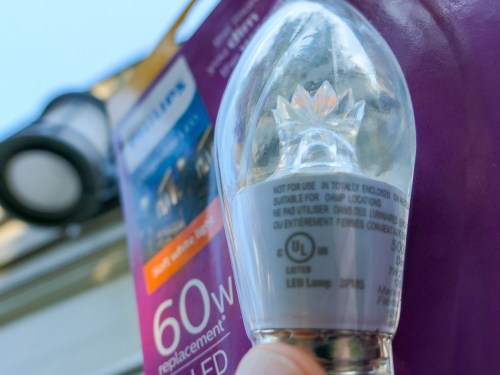
The packaging displayed a picture of a glowing outside lamp post. The fine print said “Do not use where directly exposed to water. Only install in operating environments between -4 degrees and +113 degrees Fahrenheit.”

I figured I was covered…

So, I bought the 7-watt LED, and my son and I drove home. When I installed it, the bulb was much easier to grip, and it powered up just fine. So, what more is there to talk about…?

Well, I wondered why I couldn’t find this Philips LED on Amazon. So jumped back online and typed in “Philips F15 Postlight.”

And there it was…
Philips LED Dimmable F15 Soft White Light Bulb

But the description didn’t promote it as a ’Postlight.’
And the technical details listed “Indoor use only.”

Still, there was that same photo on the packaging with the outdoor light post.

And in the user reviews, several talked about successfully using this bulb as their porch light.

The Fine Print
So what should we make of all of this?

I’m detecting a certain industry ‘hedge’ when it comes to screwing in light bulbs outdoors. No, my Philips LED doesn’t have a “use at your own risk outside” warning label. In fact, on the base of the bulb, the fine print said, “suitable for damp locations.”

So what’s the problem?

Well, Philips still seemingly prefers that you use its ‘postlight’ indoors.

But lamp posts live outside. And so does my porch light.

This Philips LED model number is #9290011822.
I’ll let you know how it goes…