At Home with Tech

Unlock the power of all your technology and learn how to master your photography, computers and smartphone.

Category: Tech Fixes

How to Feed Video to any HDTV with Your iPhone or iPad
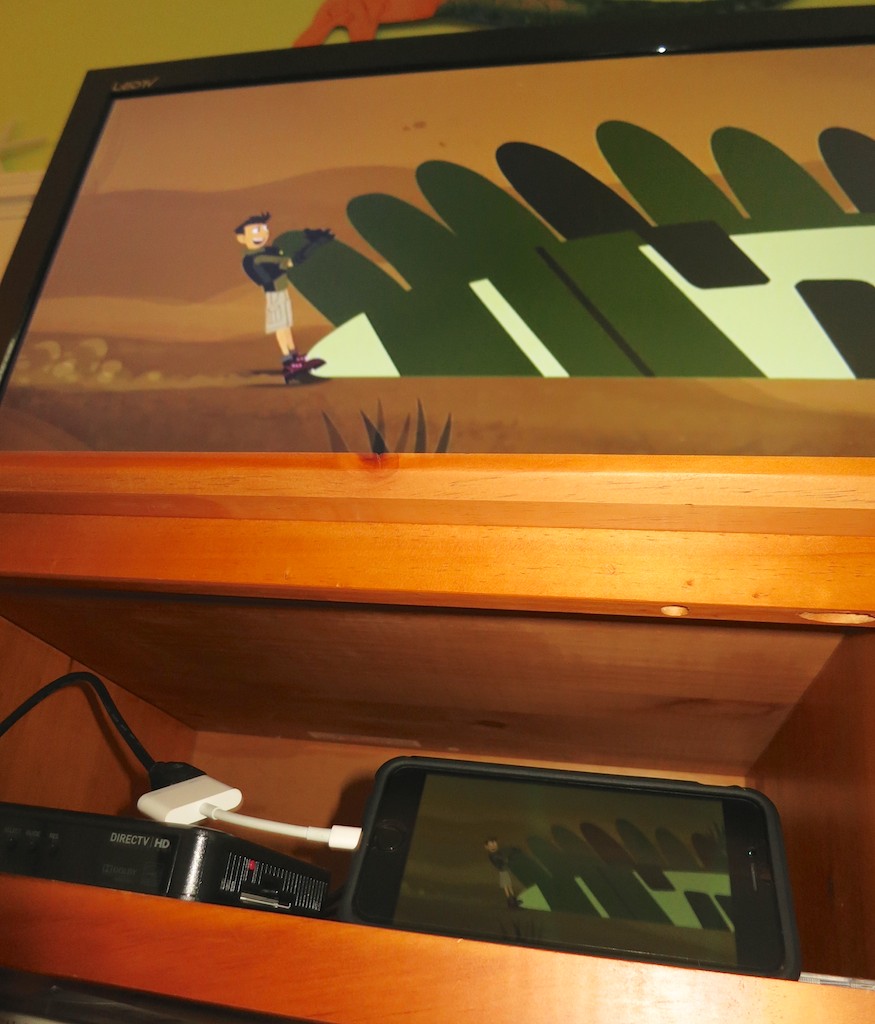
If you want the ability to take over any HDTV in the universe sporting an HDMI connection, your iPhone or iPad can actually do the trick directly without AirPlay mirroring through an Apple TV. Your portable Apple devices just need a little help….

If you want the ability to take over any HDTV in the universe sporting an HDMI connection, your iPhone or iPad can actually do the trick directly without AirPlay mirroring through an Apple TV. Your portable Apple devices just need a little help….

Once upon a time I would go on vacation with a small army of tech gear to create an on-demand multimedia viewing experience for my entire family.
(The irony here is there has never been any demand for this capability. But of course, that hasn’t stopped me.)

First I brought my Panasonic portable DVD player along with 8,012 Lester-documented cable combinations to handle any possible TV configuration in the wild.
(Only slight exaggeration)

When iPads showed up, that made my packing so much easier. Who can argue with bringing a portable TV the size of a book? You just have to make sure it’s preloaded with all the videos you’d need.
(Assuming there’s no local Wi-Fi to stream with)

Problem solved.
(Well, not quite…)

How Many People can Sit in Front of an iPad?
The remaining issue is only one person can comfortably sit in front of an iPad. Maybe two…
(Of course I’d bring an audio splitter for two sets of ear buds, so my wife and I could watch an episode of “Downton Abbey” while our toddler dozed. But in those days, our little guy didn’t really doze, and by the time he got to sleep in a new hotel room, it was time for us to get some Z’s too!)

But recently I was introduced to a more advanced solution by some friends using their own iPad. This family is very much at home with their tech….
(I swear they come from an alternate universe where consumer technology always works.)

Vacationing with the Jetsons
Earlier this summer our two families took a short vacation together at a little beach house in Rhode Island. On the second morning, the adults were busily preparing breakfast.

The kids? Well, they were experiencing some early morning energy ‘bursts.’ They needed some focusing in this new and somewhat compact space. I’m not proud to admit this, but I suggested powering up thirty minutes of Disney Junior programming on my iPad Air 2.

I looked around for the 9.7” screen, knowing it wouldn’t be an ideal solution for our three young viewers.
(two five-year-old boys and a three-year-old girl)

Simultaneously, the other dad reached for a compact case of cables that was conveniently positioned by the large, flat screen TV set in the living room. For a second, I had a flashback to my own monster pile of travelling cables I had long ago abandoned. But it was immediately evident that this moment was about to reveal something entirely different.

A solution that made real sense…

The dad carefully revealed a sleek, white adapter cable. It was barely 4.5”” long. More of a mini adapter box with a short Apple lightning cable attached to it.
(What was this?!)
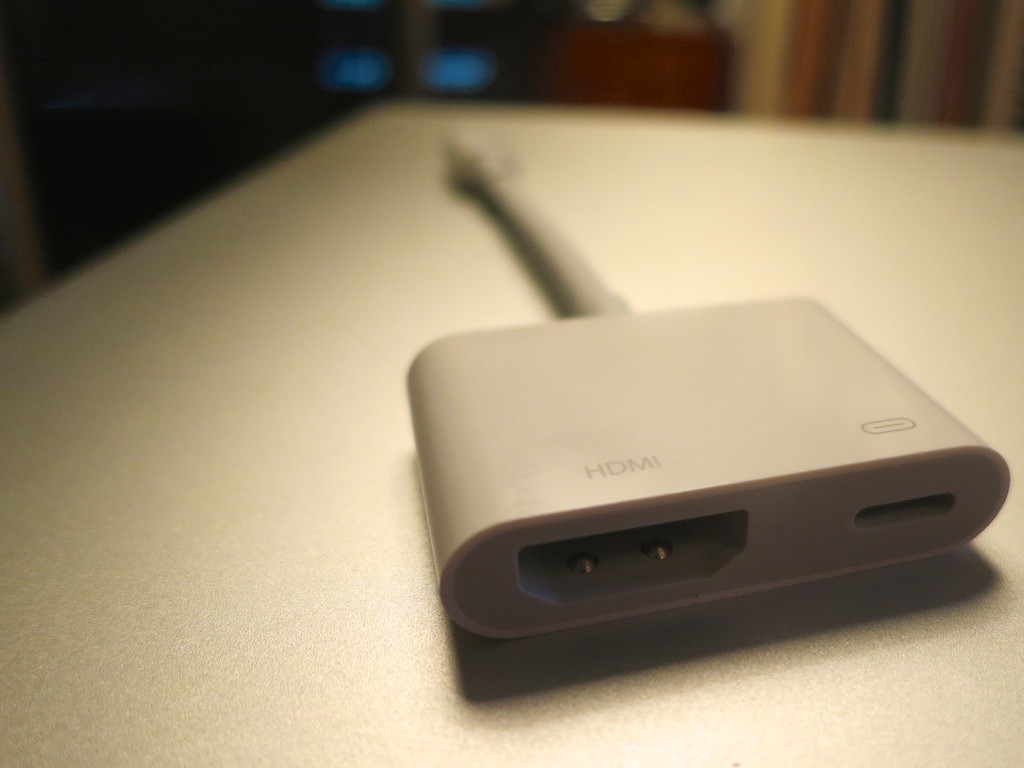
Apple Lightning Digital AV Adapter

It was Apple’s Lightning Digital AV Adapter that allows you to mirror the display and audio from your iPad or iPhone to an HDMI-fed TV or screen.

It looked so simple….
(of course)

It was constructed with a lightning connector on one end for your source Apple device, and a little white rectangle on the other with a hole for a HDMI cable and a hole for a second lighting connector to run power from a plug.
(Keeping your Apple device flush with energy)

I watched as my friend effortlessly performed a little tech surgery, slipping the HDMI cable out of the back of the DIRECTV box and connecting it to his iPad. And then, as if by magic, the iPad took control of the TV.

I think I heard the three children coo simultaneously. They immediately settled in on the couch to watch their favorite Disney show in this newly created movie theater, powered by the iPad… streaming off of the house’s Wi-Fi.

I started to drool….

Late to the Party
Look, this Lightning Digital AV Adapter isn’t especially new.
Deep down, I think I knew it’s been available for the past couple years. I just hadn’t entirely understood how it could help me.

But to see it in action during a live field test…
Brilliant!

In many ways you can think of it as your own portable Apple TV.
(Without the need for AirPlay Mirroring)

Sticker Shock
But this magical convenience comes at a price.

Apple sells it for $49.
(Really? For just a cable…?)

Yup.

Of course, I Googled about, hoping to find another manufacturer with a knock-off at a lower price point.

Nope.
(Not even AmazonBasics)

I did some additional research and came upon the reason…

Apparently, this adapter is doing some really heavy lifting converting the signal from Apple’s native H264 video format to an HDMI signal for your HDTV. Apparently, if you took a buzz saw to the white adapter box, you’d find something that approximates a mini computer inside.

The exact process of the video conversation is something of a mystery, and whether the video quality is entirely maintained is a bit of a debate online.

All I care about is that it works.
And it’s 49 bucks.

To ease the painful price point a bit, B&H Photo has it for less- $44.99.

Click.

Ready for the Next Vacation
So I now own the ability to take over any TV I come across in the universe with my iPhone 6 Plus or iPad.
(An iPod touch with a Lightning connector works too.)

Will I ever actually do that?
Just knowing I can is worth the two Jacksons.

Call me crazy…

Is Your Garden Water Hose Toxic?

I’m pretty sure I watered my vegetable garden last year using a garden hose and attachments that leeched lead and various chemicals of concern. If you’re like me, you need a different solution right now!

I’m pretty sure I watered my vegetable garden last year using a garden hose and attachments that leeched lead and various chemicals of concern. If you’re like me, you need a different solution right now!

Last year, we grew a small vegetable garden on the side of our front lawn. It housed a variety of tomatoes, which my five-year-old son especially enjoyed. And it was so cool watching him walk by it and pop a few cherry tomatoes as he moved through his day.

Such a natural moment for him and a clue to Mr. At Home with Tech how life must have been like in a more agrarian-based society.

For years, I’ve been using common garden hoses from Home Depot to water my lawn. I replaced them as needed as they got old and overly kinky. I never thought much about it.

As I set up the infrastructure to support our vegetable garden this year, I realized I needed a new garden hose splitter for my outside water tap. I needed one water line to feed the hoses for my lawn sprinklers and a separate hose to water the garden.

Before I jumped in my car, I decided I should also probably replace my garden hose sprayer, because it was leaking pretty badly.
(My shirt was getting wetter than the plants!)

There’s Lead in the Brass
My local hardware store salesman proudly showed me the ‘Mercedes Benz’ of sprayers (as he called it) made by Dramm. I then picked up a brass water splitter from Gilmour and was quickly on my way.

Easy.

Fast-forward a few minutes… I was about to screw in the Dramm to my old hose, and I noticed a sticker on the Dramm’s underbelly…

Dramm Revolver has a Problem


It said, “California Proposition 65: WARNING- The brass in this product contains lead, a chemical known to the state of California to cause cancer and birth defects or other reproductive harm. Wash hands after handling.”

Huh?

I immediately took a look at the Gilmour packaging, and I spotted the same message.

Gilmour Warning Message


What?!

I can’t use either of these to water my garden!!
(No, I don’t live in California, but I think everyone should heed the warning of the referenced California Safe Drinking Water and Toxic Enforcement Act of 1986.)

So I promptly returned both sub-par items and pointed out the problem to the salesman, who appeared to be as surprised as I was.
(I’m giving him the benefit of the doubt.)

Now what…?

Contaminated Gardening Water
I went home and booted up my iMac to do a little research. What I found was more than a little disturbing…

A few years back, the Ecology Center issued a study on hazardous chemicals found in a lot of gardening products including garden hoses. Whether it was too much lead in the brass fittings or Phthalates and the toxic chemical BPA leeching from the inside of the hose, the resulting garden water was contaminated.

Believe it or not, brass fittings on garden hoses are not regulated. They don’t have to comply with the Safe Drinking Water Act. So the bottom line is you should never drink from a common garden hose.

Huh.

Okay… I’m not drinking from our garden hose.
(And I’m pretty sure the rest of my family isn’t either.)

But we’re watering our vegetable garden with the same water.

OMG.
(Yes, I freaked out a little.)

Replacements that are Safe for Your Family
After I began breathing normally again, I immediately decommissioned my old hoses and embarked on a little more research.

Old Garden Hoses


I came to the following solutions:

1. Use Drinking-Water-Safe Hoses

Yes, there are a few manufacturers out there that make drinking-water-safe garden hoses.

I zeroed in on a company called Water Right. Their non-toxic-core hoses are made out of polyurethane, and the nickel and chrome fittings don’t leach lead.

Sweet.

The only downside…
These drinking-water-safe hoses are expensive.

A similarly sized garden hose at your local hardware store that’s not drinking-water-safe is a third of the cost.
(But money should be no object when it comes to the health of your family, right?)

Another choice to consider is a potable water hose that folks typically use when camping or for RV use.

The upside is the Flexron is a lot less expensive. The big downside is it’s white, which wouldn’t quite work living on my lawn all summer long.

So I stuck with Water Right, which also was called out by several reviewers, including Gardenista.
(Going with the crowd…)

Click. Click.

2. Find Drinking-Water-Safe Sprayers and Water Splitters
that Don’t Contain Lead

This challenge was more difficult…
Here are the two solutions I went with:

Safe Water Sprayer
$13.31 for Scotts 9-Function Turret Nozzle
(Lead free, Zinc free and drinking water safe)
This screws on the Water Right Coil hose to water the garden.

Water Right Coiled Hose and Scotts Sprayer


An alternate choice is $24.95 for ‘World’s Best Brass Hose Nozzle.’
(99.9% lead-free)

Safe Garden Hose Water Splitter
$14.95 for G&S 2wayz Garden Hose Water Splitter
The splitter allows you to water your lawn and hydrate your growing vegetables at the same time.
(G&S states that the metal in this water splitter is lead-free, but they stopped just short of saying it’s drinking-water-safe. I found a few questions on Amazon directly addressing this, and the well-crafted responses clearly demonstrated some legal dancing.)

2Wayz Water Splitter


But I couldn’t find a better product…

I figured I had nailed the other two choices… this was the only weak link.
(Hopefully, not too weak)

Click.

(Any better ideas out there for a drinking-water-safe garden hose splitter?)

Always Read the Fine Print
Who knew that watering your vegetable garden could be so dangerous?

You’d think this kind of problem would have been handled decades ago.
I suppose it was… you’ve just got to read the fine print…
(And you’ve got to wonder about the quality of the water that is used for the vegetables you normally buy in the supermarket.)

That said, I hope I’ve significantly improved the quality of water that’s feeding our homegrown vegetables.
(And no matter what drinking-water-safe solution you put in place, it’s always best to flush out the old water that’s in the hose before you use it. Contaminants can grow in the warm, standing water.)

Have I done enough?
Well, it’s the best that Farmer Barrett could figure out for this growing season…

Another cautionary tale of trying to live a little greener in the 21st century…

Searching for a Basic Color Printer

Doesn’t anyone make a small color printer anymore? I’m not talking about a multifunction unit. Just something to spit out a few pages at home. My old HP has moved on to the great printer’s gallery in the sky. So the quest begins…

Doesn’t anyone make a small color printer anymore? I’m not talking about a multifunction unit. Just something to spit out a few pages at home. My old HP has moved on to the great printer’s gallery in the sky. So the quest begins…

My old HP Deskjet 6540 printer from 2004 finally jammed itself beyond repair. It somehow ate six sheets of paper, tearing tiny fragments into its innards.
(Actually, I did the tearing myself, trying to remove the bloody jam.)

I stepped back, looked at the mess, glanced at my watch, and then called it…
“End of Life!”
(Remarkable it lasted this long.)

Secretly, I’ve been waiting for five years to replace the darn thing!!
So I was happy to embark on a little shopping expedition for a new printer.

(Spoiler alert: It’s another rabbit hole.)

At Home with Two Printers?
You may recall I also own an Epson Artisan 837 printer to handle my photo-printing needs.
(The Artisan line has since been mostly replaced by Epson’s Expression series.)

So you may be asking, “Why would anyone want a second printer?”
(Heck, many of you are probably wondering why you need a printer at all.)

Well, somehow, this particular family just can’t get it done living in this supposedly paperless world of ours.
(Check back with me in another decade or so…)

Have a Back-Up Plan
Look, it’s not that crazy. My HP simply served as a down-and-dirty printer… just to spit out some hard copies. Mostly for throwaway use.

Also, my five year old often asks me to print out photos of different animals he’s learning about.
(Last week, I printed out four different flying geckos for him.)

These animal photos hang around for a few days, until the new ‘pic du jour’ gets created. So these images don’t need to be stellar representations. The old HP was just fine for this job using everyday paper…

I didn’t want to task the Epson with regularly churning out the animal kingdom, because the process would unnecessary drain down the six (expensive) ink cartridges.

And even though my Epson is considered an ‘all-in-one’ printer, I usually reserve it for higher-end photo printing on photo paper.

The old Deskjet became the workhorse for temporary pages or the backup printer if the Epson had problems.
(Not that it really has… although its predecessor was felled by a carefully inserted penny by my curious boy.)

And of course, in those irritating moments of technology failure, I think you should have a back up plan.

A Small Footprint
So all I wanted, and all I needed… was a simple printer.

  • Not a scanner
  • Not a fax
  • Not a photo creator
  • Not a machine to create hundreds of pages a month

I didn’t need another all-in-one printer.
(I’ve already got one.)

And its footprint should be small.
My old HP Deskjet was 17.75” wide by 14” deep.
(17.5” deep with tray extended)

Well, guess what?
They don’t really make that kind of machine anymore.

Really.

Nobody Makes Just a Printer Anymore!
Most of the choices are either photo creators, or big all-in-one, multifunction printers with a scanner bed on top.

I’ve got to admit there are some multifunction beauties out there if I wanted to move in that direction.
Epson’s got the Workforce Pro WF-4630, which is on sale for $199.99 direct from Epson.

It gets stellar reviews, and I fantasized about starting all over again, and building my office around this gentle giant.

Epson WorkForce Pro WF-4630


Maybe the alternate universe Barrett just pulled the trigger, but not this one.

Plus, my Epson Artisan is just fine… for now.

Laser Printers
One option is to buy a laser printer. I discovered several relatively compact models, and found that the Wirecutter highly recommends the Brother HL-L2340DW.

But the problem with home laser printer models is they print only in black and white.
(I thought we’ve permanently moved beyond black and white decades ago.)

Plus, I expect my son would prefer his animals in full Technicolor… so I continued shopping…

Portable Printers
I then found a small selection of portable printers for people who want to travel with a printing solution and not a broken back.

Here are three portables, all of which are nice and small!

  • Epson WorkForce WF-100
    Epson WorkForce WF-100


  • Canon Pixma iP110
    Canon PIXMA iP110


  • HP Officejet 100
    HP Officejet 100


The problem with this family of printers is they’re relatively expensive.

You’re paying a premium for the portability factor:

Plus, they’re not Wi-Fi enabled.
(Although I could use the USB connection to my Airport Extreme, which is how my old HP was linked to my home Wi-Fi network.)

And their daily printing costs are high.

The HP ends up with the lowest operating costs of the bunch, but this model was released back in 2011.
(I have a hard time buying into new tech that’s already four years old.)

But its footprint is so small… very appealing.
(Think…think…think…)

As much as I like the ‘less is more strategy’, it just didn’t seem like the perfect fit for my needs. I don’t need a portable printer to travel with.

So I moved on…

HP Deskjet 1010
And guess what I finally found…?
Yes, HP does make a basic printer:

…But it’s still bigger than my old HP.
(I thought newer tech is supposed to get smaller.)

HP Deskjet 1010


Pass.

PIXMA iP2820
Canon offers the PIXMA iP2820 at its own ridiculously low price point.
B&H Photo has it for $37.56.

Canon PIXMA iP2820


The iP2820 isn’t Wi-Fi enabled. So you need to cross your fingers and play the “Wireless Printing over USB” dance with your wireless router.

Nor does it have an internal paper tray.
(You place the sheets on its top feeder.)

This PIXMA seems to have mostly gone unnoticed with the ‘experts,” although the Phoblographer gave it a decent review, considering the inexpensive price.

The iP2820’s footprint is 16.8” wide x 9.3” deep x 5.3 high,” which is actually smaller than my deceased HP printer.

And it’s designed with the basic two-ink cartridge structure.
(black and color)

The iP2820 is entirely average, which is what I wanted, right?
(And it’s almost free.)

I guess it fits the bill.
Click.
(You’ve got to provide your own USB cable.)

Good Enough?
If you can’t tell, I’m not too excited with this purchase. And while I’m pleased to have not spent a ton of money, I’m also wary about the long-term health of any inexpensive machine.
(But, heck, there’s really not much of a selection for printer-only models.)

Does anyone have any better ideas?
(With less than $40 invested, I can always pivot to another choice without much guilt.)

Is There Anybody Out There?
I feel like the last nerd on Earth.

Maybe it’s because half of the planet wouldn’t buy a back-up printer to begin with. And the other half doesn’t own a printer at all.

But deep down, I don’t think I’m alone on this.

But the way it’s going, the next time I need a printer-only model, I might have to find it at the bottom of a Cracker Jack box…