At Home with Tech

Unlock the power of all your technology and learn how to master your photography, computers and smartphone.

Category: Tech Fixes

My Life in 30 Seconds

A friend drew this wonderful pencil sketch of my face as the basis for the birthday gift piñata she made for my party. I’ve found that my birthdays have always been a time of reflection. Last year was particularly intense…

With my father’s recent passing, I’ve been thinking a lot about his legacy, which has led me to think a bit more about my own.

And I’ve been reflecting back on my journey to date. I’m talking way back and trying to take in my whole life. What’s my story so far, and how has it evolved?

One way I’ve gone through this exercise is to review the photos I’ve created and collected over the years. They document many of the moments that have helped to define me.

Create a Photo Montage of your Life
Five years ago, I created a little photo project, which I’ve decided to return to and update. It’s been really useful to jog my memories during this time.

The goal is to select just a very few pics that represent my life so far. And then create a photo montage in a short video. The result is inevitably influenced by the chosen group of pictures, which will vary each time I try this.

Still, these photos do represent one way to look at your life. And I’ve enjoyed this exercise to help regain a broader view.

My Life in 10 Seconds?
How many photos do you select? Well, one option is to squeeze down the number to how many can fit into a defined amount of time. Sure, if you don’t want to restrict yourself, the video might last for hours. But what if you just limit yourself to just a fraction of that?

When I first tried this five years back, I held my video to just 10 seconds, and
I explored a few different photo montages at that length.

Okay… That ended up being a little too fast, as my pictures needed to fly by so quickly you could barely register each image. Some of my viewers complained.

So this time, I’m giving myself the luxury of a whopping 30 seconds.

Barrett’s Birthday Photo Montage
Each birthday is a marker in time and one simple way to collect a group of photos to tell a story. So here are my birthdays…

Though birthday pics can look visually similar across the years (mine certainly do), when strung together, the collection acts as a sort of time machine.

For many of these photos, I tried to represent my age by holding up certain fingers. (I eventually gave that up when I ran out digits!)

Barrett’s Life Photo Montage
Without the guard rails of a specific life event to work with, which photos should you choose to represent your life? Yes, that’s a much harder exercise and one that will take more time to figure out.

I created this draft, but it’s hardly ‘finished.’

This montage offers more visual interest as it shows me out-and-about in the world (as opposed to stuck in front of a birthday cake). But it’s still missing a key ingredient in any life.

You’re Not Alone
Of course, it’s all the people you know. Your family and friends are such as important part of your journey. You need to include them in any photo montage that truly reflects your life.

So, happily, I’ve still got a lot of work to do on that front. Until then, my little photo montage is hardly complete.

What Comes Next?
No, 30 seconds is not a lot of time. And hopefully, it’s not enough for anyone to really work with.

If anything, it’s just a taste or an echo of something much larger… and longer.

But I’ve still found it to be a useful exercise to try to hone in on just a few highlights.

And perhaps, it might help focus me on what my next highlights could be.

Time machines can work in both directions.
The Double-Edged Sword of Repeat Deliveries

Amazon’s Subscribe & Save program is a great time saver, but over time it may be more than you need. Here’s why…

Amazon’s Subscribe & Save program originally made me feel like I had been transported to a Star Trek-like future where people could focus on higher-level cognitive challenges as opposed to pondering if they were about to run out of toilet paper.

It was a magical leap forward in shopping design, where you could automatically receive your supplies without worrying that you’d forget to reorder. Plus, you’d get an ongoing discount on these Subscribe & Save orders. How great is that?!

It was set-it-and-forget-it, and your stuff showed up.

What could possibly go wrong?

Too Many Vitamins!
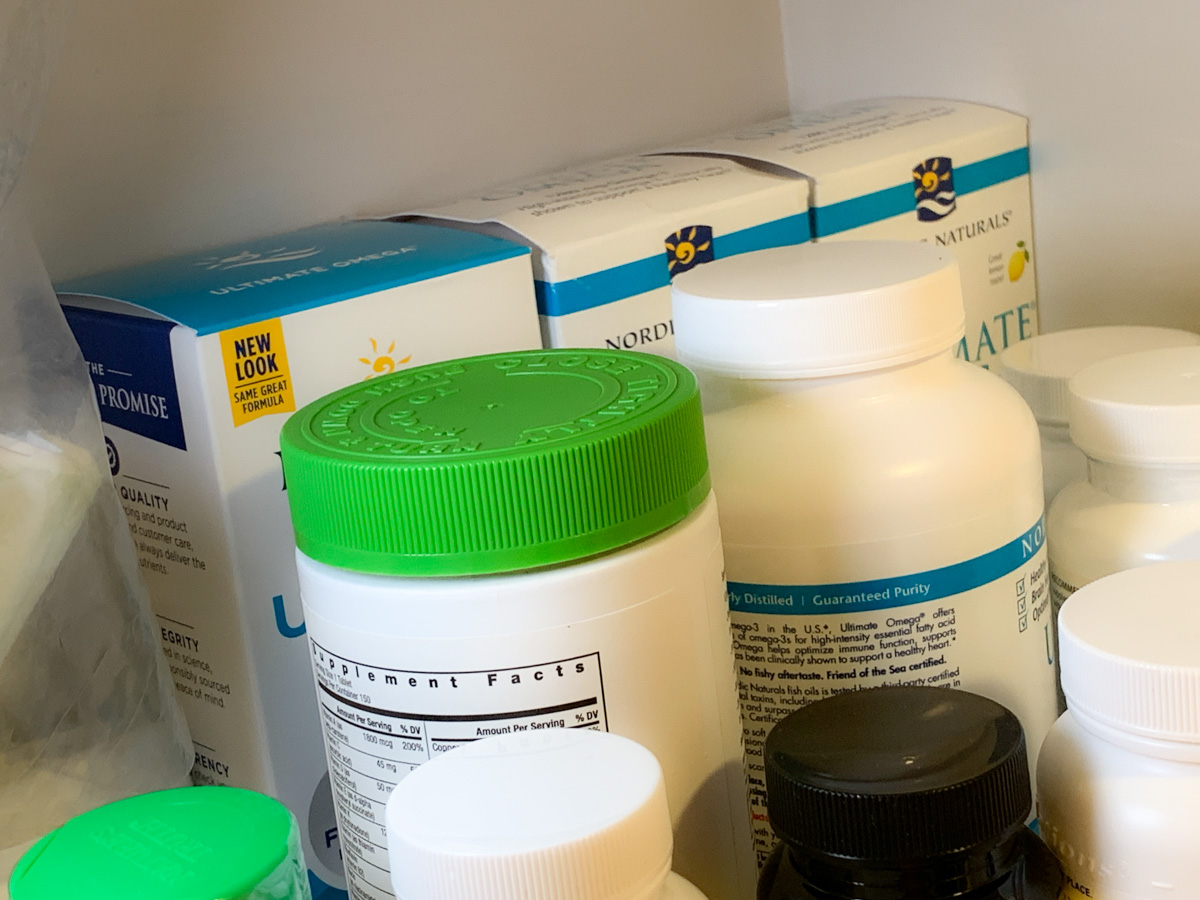
This morning, I woke up, walked downstairs to the kitchen and opened up the cupboard to take some vitamins, including my daily Omega 3 supplement. I grabbed the plastic bottle, unscrewed the top and took out the very last capsule.

I smiled, because I knew I was ready for this moment. There would be another Subscribe & Save bottle in the back of the cupboard ready to go. I peered behind some other vitamin bottles, and I squinted to be sure what I saw. I didn’t see a replacement bottle. I saw three.

Three?

Clearly my family and I weren’t consuming as many Omega 3’s as my subscription was providing. You might say it’s an easy arithmetic equation to figure out. It is, but somehow it had gotten way off balance.

And I hadn’t been paying attention, because it was set-it-and-forget-it.

Inevitable Imbalance
I sat down at my desk with my cup of Joe and finally allowed myself to fully face the other recent clues of imbalance in my shopping utopia from the future.

  • I had collected in my basement an extra year’s supply of AC/furnace air filters.
  • My paper towel subscription for the premium Bounty brand had been inexplicably cancelled and replaced by the less luxurious Brawny.
  • My toothpaste subscription was also cancelled, and I needed to actively replace it, which I didn’t. (I was supposed to “forget it,” right?) Then, I ran out of toothpaste.

The Best Price?
Amazon clearly states that prices go up and down. If you’re looking for the best pricing over time, I’m not sure that repeat deliveries will get you that, even with the subscription discount.

You’ve got to keep track. And that doesn’t align well with the set-and-forget mentality.

The Easy Fix
Yes, the odds are running out of supplies are certainly lower with repeat-delivery subscriptions, although it can happen if your subscriptions get cancelled, and you don’t choose an alternate item (guilty).

But unless your estimated consumption metrics are perfect, you’re likely to over order.

Subscribe & Save will save you shopping time, but over the months, your supplies may start to pile up.

It’s not like I was entirely unaware of this, and it’s easy to fix by going online and adjusting the frequency of the repeat deliveries. But it’s the kind of thing you tell yourself you’ll do tomorrow.

And then tomorrow never comes.

Until you realize you’ve got an extra year’s worth of Omega 3 tablets piling up in your cabinet.

So today, I reviewed all of my subscriptions and made the necessary adjustments.

It’s Time to Wake Up
Amazon would tell me that I regularly receive reminder emails to check and adjust my Subscribe & Save items. And I do.

So why didn’t I just follow their ongoing recommendations to perform a little subscription maintenance?

Because I wanted to set-it-and-forget-it.

Autopilot-mode is nice. But you really shouldn’t disconnect for too long. Otherwise you may wake up one day and realize you’re surprised by what you see.

9 Tricks to Eject Unwelcome Ghosts in the Machine

Do you sometimes get spooked by your tech’s unexpected glitches? Here are a few of the ways I chase away the unwanted ghosts in my gear.

A good day is when all of your tech behaves and operates properly. While it’s sometimes fun to get a little scared during the Halloween season, that feeling should never kick in, simply because your gear starts glitching out on you.

Here are my 9 tricks to help your tech treat you right.

#1
Remove the Pocket Lint from your Smartphone’s Port
Is your smartphone misbehaving and not charging when you plug it in? Or do you have to wiggle the connection until the juice starts flowing? The culprit is likely a fuzzy pocket-lint mass that’s collected inside the phone’s port. Here’s the fix.

#2
Adjust your Camera’s Internal Clock
If maintaining the chronological sequence of your vacation photos is important, and you’re using a second camera on top of your smartphone’s camera, both clocks had better be synced. Otherwise your vacation photos will end up being displayed out of order.

#3
Turn off Portrait Orientation Lock on your iPhone
If you’re trying to watch a video, and your iPhone won’t play it full screen when you rotate it horizontally, the problem is likely the Portrait Orientation Lock. Here’s how to turn it off.

#4
Delete Downloaded Podcasts You’ve Already Listened to
Is your smartphone almost out of storage? Of course it is. Here’s one big way I like to free up badly-needed memory on my iPhone.

#5
Back Up All of your iPad’s Data
Last year, I lost a lot of my son’s photos and videos on our family iPad when we took it to an Apple Store for maintenance. I was devastated by my rookie mistake of not setting up the iPad’s iCloud backup properly.

My son was annoyed, but he quickly moved on and simply took more photos. (And I’m still writing about it.)

#6
Stop your Email Program from Suggesting Old Addresses
Wouldn’t it be nice if everybody had one email address assigned at birth, and that was it for life? How simple would that be? Then, you could easily keep track of all your contacts. No more old email addresses that don’t work.

Until that happens, here’s an easy way to clear out old email addresses from ‘Auto-Complete.’

#7
Do your Software Updates
Keeping all of your digital gear current with software updates is an endless process that requires a fair amount of effort and organization. And following an auto-update strategy can sometimes lead to updates that aren’t ready for prime time. I think it’s best to have your tech remind you about the updates, and then you can manually install them.

#8
Reorganize the Apps on your Smartphone
If you’ve been having difficulty finding certain apps on your smartphone or they’re not where you thought you left them, it’s time to take a few minutes and do a little reorganizing. That can include placing some of your apps into topic folders and perhaps pruning others you haven’t used for a while. (You can always reload them!)

Losing a few long-forgotten apps will also free up memory on your device.

#9
Make Sure You have Enough Wi-Fi Bandwidth at Home
When you’re presenting during a Zoom meeting from your home office, the last thing you want is for someone to interrupt and report that you’ve frozen up. While there’s no bulletproof way to prevent that, you can certainly upgrade your internet plan to improve your odds.

Going old-school and hardwiring your computer to your router may also result in faster streaming speeds.

Boo!
Hopefully these tricks will help prevent your tech from acting naughty and spooking you out!