If you’re trying to figure out which Lifetouch photo package is the best one for you to purchase, you’ve come to the right place. Sure, individual needs will vary, but I’ve got ten tips to share that should lead to satisfaction.
My 2nd grader had his class photo taken at school last week. This is my third round of experiencing “Picture Day” as a parent, and as excited as I am for my son to take his official school photo, I’ve realized that I’ve also become somewhat stressed out in the aftermath. Why?
Well, I can’t figure out the right photo package to buy.
How to Make Lifetouch Work for You
Lifetouch is the company that comes to his school and performs the herculean feat of snapping hundreds of portraits of the students. And though I’ve been satisfied with the quality of the photo prints that Lifetouch has sent home, I’m always left with the feeling of buyer’s remorse that I didn’t order the right combination of prints at the best pricing.
And it doesn’t help that each year, I forget about the details from my last experience.
Who really wants to spend the time figuring this kind of challenge out?
This year, I decided that’s going to be me.
So, I’ve rolled up my sleeves and studied all of the choices and pricing. If you’re about to buy some prints from Lifetouch, here are ten tips to help you get exactly what you want…
#1
Don’t Try to Figure Out the Order Sheet
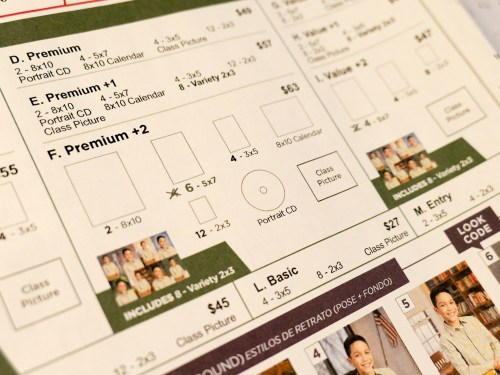
The process begins when your kids show up with a Lifetouch order sheet that documents 13 photo packages to choose between.
The packages range in cost from $19 to $63. Some include the class photo with all of his classmates. Others include a portrait CD with a digital file of your child’s portrait. There’s also an 8×10 calendar as well as multiple print sizes in different combinations.
Confused yet?
Eventually, your eyes will notice some bold lettering on the top of the page…
mylifetouch.com
On the bottom, there’s this helpful message:
“Get more choices and best value when you shop online.”
Okay then.
They don’t really want you to use the order sheet either!
#2
Order Your Lifetouch Photos Online
The good news is your order selection process is easier online.
The bad news is the pricing appears to be exactly the same.
But the overall experience is better online, which is key to helping you make your decisions and getting satisfaction with your purchase.
#3
Don’t Order a Custom Package
If you don’t like being locked into the predetermined number of 8×10’s and 3×5’s in the 13 listed packages, you have the online choice of clicking on ‘Custom Packages.’
I originally thought this was a wonderful idea.
But…
Even though custom packages allow you to choose your own combination of print sizes, some of them are also pre-grouped… like four 3×5’s or two 5×7’s.
Also, don’t expect to really save money this way.
You could save a few bucks, but you lose on the overall value compared to comparably priced regular packages.
That’s because the custom-package pricing starts at $41 for three items.
If you’re getting a CD containing digital files (and you should), that only leaves you room for two varieties of photo prints.
Ultimately, if you choose the least expensive option, you’re only saving $8 compared to the Premium Package, which gives you a much bigger bang for your buck.
#4
Buy the Premium Package for $49
Speaking of the Premium Package, I’ve decided that after some intense focus on all of the choices, it’s became clear to me that the Premium Package is the way to go.
(And I bet it will handle the needs of many of you parents out there.)
For $49, you get-
- Two 8x10s
- Four 5x7s
- Four 3x5s
- Twelve 2x3s (in groupings of 8 and 4)
- Portrait CD
- 8×10 Calendar
- Class Picture
#5
The CD is the Key to Getting the Most Value
Ultimately, all I really need are the hi-res digital files of my son’s portrait. I’d be just fine only buying the CD. With my trusty Epson printer, I could do the rest of the work.
That said, I understand that not everyone wants to do their own printing.
(And I can imagine the business model here is based on making a profit on the prints.)
Plus, there’s nothing wrong with having some prints delivered and ready to hand out.
(And printing your own photos costs money too.)
But the real problem if you don’t order prints is you don’t get the opportunity to select different ‘looks.’
#6
Choose as Many Looks as You Can… Because They All Go on the CD!
I case you aren’t aware, when your child’s photo is snapped, the actual background is a pop-up backdrop with a generic color that’s eventually digitally replaced with different ‘looks.’ There are a whole bunch to choose from, and it’s almost as confusing as selecting your package.
(More on the best looks later.)
And here’s a little-known detail regarding ‘looks’ that I uncovered in my research:
All of the looks that you choose for your prints also end up as digital files on the CD you order!
Sure, you’re supposed to choose only one portrait look for the CD, but, if you go with the Premium Package and select as many looks as the package allows… that will give you eight different looks on the CD.
(Cool!)
Remember, each look uses the same image of your child, except that some of the looks use the original wide shot while other looks crop the shot tighter. I recommend you include both versions in your selections.
#7
The 8 Best ‘Looks’ to Use as Backgrounds
So, this of course is entirely subjective, but these are the looks I like:
School Days
Granted, these are all digitally inserted backgrounds. But this is a school photo, right?
It’s nice to give it context as opposed to choosing some generic background.
- Looks #49 (blackboard/map) and #63 (library) for vertical wide
- Looks #65 (school hallway) for vertical tight
My Grade
Perhaps it’s a tab obvious to weave the grade information boldly onto the background. On the other hand, why not? If it’s his 2nd grade photo, that’s kind of the point here.
- Look #96 (blackboard) for tighter shot
- Look #113 (blackboard) for wider shot
Traditional
If you do need a generic background that’s not school related, I’d stick with an easy-going color.
- Look #13 (blue background) and tight shot.
Modern
This is a brighter option for a simple color background.
- Look #27 (light blue background) and tight shot
Most Versatile Option
If you want a generic background plus a nod to a school environment, I like:
- Look #51 (grey background)
It’s a wide shot using a few books as props.
(If you would ever think of getting just one digital file, this would be a great choice, because you can easily crop it in different ways.)
#8
Forget the Extras
I wouldn’t spend the extra money to have the name and date included on the bottom of your pictures.
You can write all of that on the back.
And I don’t think you need to retouch photos of 2nd graders. Aren’t they perfect just the way they are?
#9
Never Order Add-On Prints
You can also order individual prints through yet a different menu, but this is the most expensive way to go.
(So, don’t do that!)
For example:
- One 8×10 – $13
- Two 5x7s- $13
- Four 3x5s- $13
- Class Picture- $13
Ridiculous.
#10
Best Digital-Only Choice
Okay, remember when I said all I needed are the digital files?
Well you could actually go this way:
- Five-Image Digital Special Offer- $35
Thirty-five bucks gets you five high-res portraits.
(With five different backgrounds)
And then you do the printing.
…Not a terrible way to go
There’s No Perfect Choice
But I’m still recommending the Premium Package for $49. It really comes down to knowing how you’re going to use your photos.
Will you really give away all of those tiny wallet photos?
(A billion smartphones just shuddered at the very idea.)
But if you can use most of what’s in the Premium Package, it’s still a solid deal.
The Details of My Order
Okay…
If you’re interested in one person’s opinion on how to best navigate all of the Lifetouch choices, here’s what I bought:
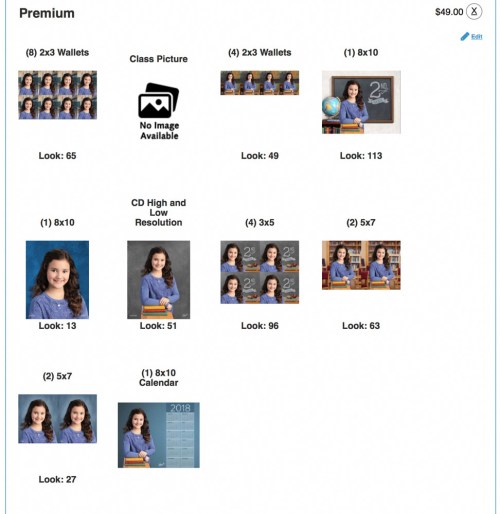
Premium Package
Using 8 different Looks for each of the 8 choices-
- CD High and Low Resolution
Look #51 (grey background with books used as props/wide shot)
Again, this background is the most versatile if you want to crop the shot yourself.
And remember, you’re going to also get the other seven looks on the CD too!
- Eight 2×3 Wallets
Look #65 (school hallway/tight shot)
- Four 2×3 Wallets
Look #49 (classroom blackboard and map/wide shot)
- One 8×10
Look #113 (classroom blackboard with 2nd grade/wide shot)
- One 8×10
Look #13 (traditional blue background/tight shot)
- Four 3x5s
Look #96 (classroom blackboard with 2nd grade/tight shot)
- Two 5x7s
Look #63 (library background with chairs and bookshelves/wide shot)
- Two 5x7s
Look #27 (modern blue background/tight shot)
- One 8×10 Calendar
(Default calendar background, which you don’t get to choose. But it’s similar to Look #27.)
- One Class Picture
I’m Exhausted
Holy cow.
I feel like I just explained how to assemble a Star Trek warp-drive engine.
(All right… maybe only a warp-5 engine.)
But I feel better.
I’ve got the best deal I could figure out.
And I’m not going to think about this ever again.
(Next year, I’m just going to refer to this post!)
You can also call Lifetouch customer service at 1-800-736-4753.
They were quite helpful answering my questions.
(Maybe, don’t mention my name.)
I hope this has been useful.
Good luck with your own orders!

 At Home with Tech