At Home with Tech

Unlock the power of all your technology and learn how to master your photography, computers and smartphone.

Category: Tech in the News

Six Tech Tips to Save You Time

Every second of your day counts.  Especially when you want to collect additional minutes to do more of what really matters.  Wait… did you hear that?  Yes… technology to the rescue!

Every second of your day counts. Especially when you want to collect additional minutes to do more of what really matters. Wait… did you hear that? Yes… technology to the rescue!

I don’t know about you, but there never seems to be enough time.
Maybe it’s simply because I’m a busy parent of a four year old.
Perhaps I should also acknowledge that maintaining a blog can be a time suck. (writer’s choice)

Time for regular TV viewing?
Ha!
I barely touch the national average of 2.8 hours/day.
(according to a recent American Time Use Survey)

I’m lucky to squeeze in an episode of “Mad Men.”

But remember what Ferris Bueller said…
“Life moves pretty fast. If you don’t stop and look around once in a while, you could miss it.”

Really, you do want to protect your available free time, especially those ‘quality’ moments. And thankfully, technology can help you squeeze precious minutes back into this favorite bucket of your day.

So here are six tech tips to help you focus more of your life into that happy zone:

#1
Order Stamps Online
Why would you ever choose to waste a fraction of your existence in the post office buying stamps?
The lines are endless. It’s like Purgatory in there.
Even the stamp-dispensing square autobot will drain your life force.
Why not simply purchase your stamps from your home computer?
It’s wicked quick…

#2
Withdraw More Cash from the ATM
Yes, there was a time before time when there wasn’t easy money on almost every corner. But today’s 24/7 access to an ATM is a mixed blessing.
Who wants to always be thinking about where the nearest one is when you need twenty bucks?

I know this idea may not appear like a fiscally responsible suggestion, but if you can control your spending urges, I think you should withdraw more cash than you think you want.

Here’s the trick:

  • Visit your favorite ‘magic money box ‘ less frequently… say once a week. Take out enough cash to get you through this interval and pledge not to return for another seven days.

Rationing the use of this tech will save you time and can prevent you from going to the well more than your budget dictates.

#3
Shop for Your Groceries Online
I know… it goes against your hunting-gathering instincts.
And there’s a delivery fee.
But not having to go to the supermarket,
then not struggling with that damaged cart,
and not having to wait on a long line at the checkout…
Isn’t that worth a few bucks?

#4
Avoid Greeting Card Aisles
You shouldn’t feel anymore like you have to troll for greeting cards at the local CVS or Walgreens.
You know what I mean… searching up and down that forest of disorganized generic thoughts. Finding that perfect card, only to realize there’s no matching envelope, and having to start all over again.

It’s no longer a badge of honor to say to your loved one… “I spent an hour looking for the perfect card!”
(My mom used to like to say that.)

There’s got to be a better way!
Well, of course there is…
Go to Touchnote, Paper Culture, or even Hallmark online.

These websites contain virtually all the greeting cards you could ever want.
Plus they’ll mail them for you!
Whoah…. Now that’s really a paradigm shift.

#5
Don’t Wait On Line to Pay for Parking. Go Online!
Remember how you felt right after you missed that train, because you first had to wait online to pay for parking?
Let’s erase that recurring stomachache from your life.
Use an app and pay on your smartphone.
I use PayByPhone.
Brilliant…

#6
E-ZPass or Bust
All right, who here doesn’t have E-ZPass yet?
Please stand up and walk upstairs.
Now go to bed…. There’s no dinner for you.

And the rest of you should go get a good night’s sleep too!
Before you start your snooze, you should probably check in on your E-ZPass account just to make sure it’s current.
You don’t want E-ZPass to list the car you owned a decade ago.

Bonus Summertime Tech Tip
Repurpose ideas from your old blog posts to quickly generate a new list of tech tips to share.
(You hadn’t noticed?)

Now, you’ve got time to prepare to go camping with your family!

See ya…!
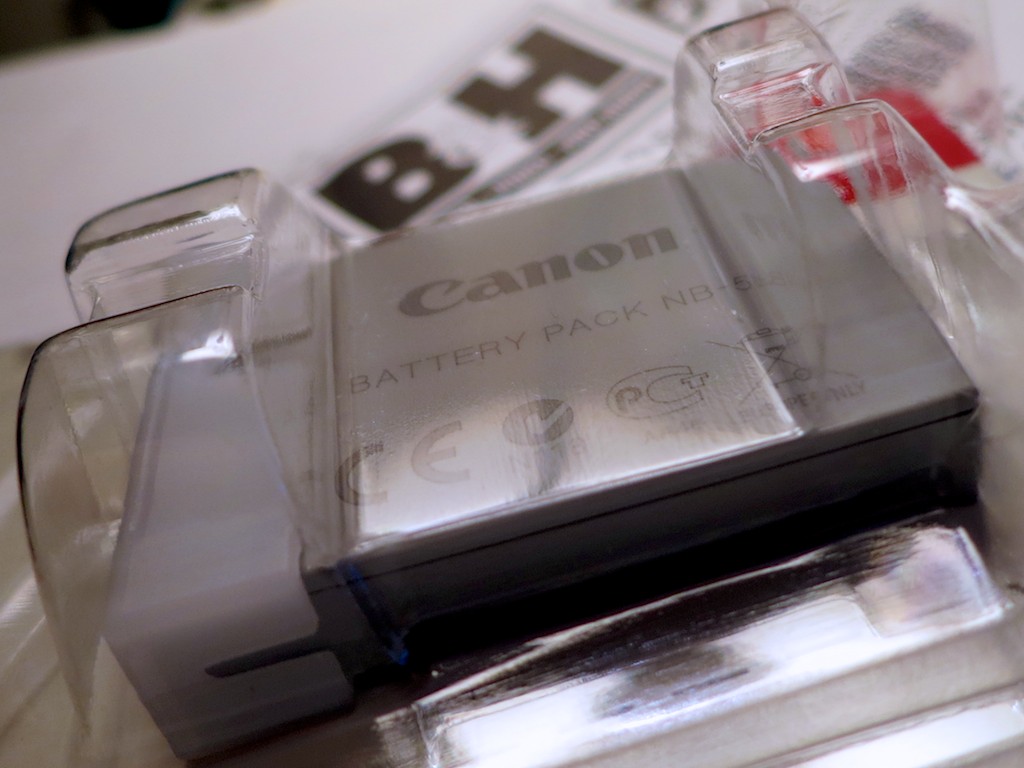
Buying a Counterfeit Camera Battery Can Be Dangerous

Getting a deal on a replacement battery for your camera is always nice. Finding a price that’s too good to be true probably mean it’s a counterfeit battery. And how bad is that? Canon says it can lead to incendiary results.

Getting a deal on a replacement battery for your camera is always nice. Finding a price that’s too good to be true probably mean it’s a counterfeit battery. And how bad is that? Canon says it can lead to incendiary results!

I’ve been preparing for the seasonal uptick in the number of family photos I’ll be snapping over the next couple of months. And I decided to finally replace my old Canon back-up battery for my point-and-shoot camera.

My ‘NB-5L’ is three years old and can’t hold its charge anymore. After taking a few pictures powered by this aging battery, my camera starts to freak out and then shuts down rather pathetically.

That’s code for…
Get a new battery!

  • At Home with Tech Tip:
    Always carry a spare battery with your camera.
    You don’t want to run out of juice trying to capture that magic moment…

So I decided to go online and order one of these tiny, mighty power squares…

An Unclear Choice
The problem was I discovered a vast disparity in pricing options:

From Canon: $59.99

From B&H Photo: $44.99

From Amazon (sold by EXCELSHOTS): $28.95
(unclear if it’s a genuine Canon product)

From Amazon (sold by Blue Nook): $8.99
(Wasabi Power Lithium-ion replacement battery)

So should I spend $60?
Or should I pay $9?

Hmmmmm…

The Blue Pill or the Red Pill?
Well, Wasabi Power’s battery certainly has the attractive price.
But I don’t really expect an inexpensive third-party battery to perform at the same level as a Canon battery.

Pass.

The $29 battery from EXELSHOTS appears to be a genuine Canon product, but it’s eleven bucks cheaper than B&H Photo’s deal.
And as we all know, it’s hard to beat B&H.

So does that mean it’s a counterfeit battery?
Possibly.

Even though Canon puts a hologram label on their battery pack packaging, you still may have a hard time telling the difference between the real deal and a counterfeit product.

And how bad would that be?

According to Canon…. Really bad.

Danger, Will Robinson!!
Canon says it’s usually difficult to spot a counterfeit battery and…
(here comes the scary part)
…Counterfeits can destroy your camera!
(and it gets worse…)
You could be collateral damage!!

Call 1-855-46-Canon to Report the Counterfeiter
In addition to their clever video on the dangers of using counterfeit batteries, Canon’s got a number to call so you can turn in your neighbor or anyone else who’s fueling this illegal problem.

Yes, comrade…consider yourself deputized.

Look, I get that counterfeit camera accessories are bad for Canon’s bottom line.
(And so are official third-party batteries)
But counterfeits fraudulently use someone else’s logo.
And you have absolutely no idea who’s manufacturing the tech.

But how dire is all this really for the health of your camera?
And should you consider the risks as any more than a ‘Play it Safe’ marketing campaign for Canon’s own products?

Warning: Buy Genuine or Else
Canon suggests the existence of the following ‘inferior product performance’ examples when using counterfeit batteries:

  • Abnormal heat generation
  • Leakage
  • Ignition
  • Rupture
  • And other ‘malfunctions’

And the recently released results from their Anti-Counterfeit Study say that 18% of you have already unknowingly bought counterfeit consumer electronics in 2013.

So the question is…
Are you the one in five who’s been using this dangerous counterfeit gear?
And can you be sure your camera isn’t about to explode?!!

Well, buying direct from Canon would help mitigate any potential camera ‘malfunctions.’  Or purchasing from a reputable dealer like B&H Photo.

Going with Amazon is a little iffy in this situation, especially if the price is 25% cheaper.  And even with Prime, Amazon is still using a third-party dealer you don’t know.

Exploding Cameras Not Allowed Here
So I think the decision tree is pretty straightforward.
Buy from a Canon dealer you know and trust.

Will your camera self-destruct if you don’t?
And are you probably safe ignoring Canon’s marketing-drenched warnings, which are likely a well-designed mixture of propaganda and the truth?

Let me ask you another question…
Is it worth finding out just to save a few bucks?

Exactly.

Hello B&H.
I’m playing it safe…

Click.

How to Get Your Digital Download of “Frozen”

This disc shouldn’t greet you when you open up your new “Frozen Collector’s Edition” case.  If there aren’t eleven alphanumeric characters slipped into the insert tab, you can’t get the digital download.  But there is another way…

This disc shouldn’t greet you when you open up your new “Frozen Collector’s Edition” case. If there aren’t eleven alphanumeric characters slipped into the insert tab, you can’t get the digital download. But there is another way…

A few weeks back, my four-year-old son spontaneously started singing the Oscar winning, hit song “Let it Go” from the Disney movie blockbuster “Frozen.”

It was a something of a curiosity, because he’d not seen the movie.
(He must have heard the music somewhere.)

So I downloaded the peppy tune in iTunes while he was in the other room and conducted a little experiment…

I began playing it loud enough for him to hear, and sure enough, I heard him begin to sing along…

“Let it go…! Let it go…”

Yep… he really liked that song.

So I decided to buy the whole movie for him.
It felt like an obvious next step.
Plus, it won the Oscar for best animated feature film and
has become the top-grossing animated film in box office history.

(All that said, I was still a little concerned about “Frozen’s” PG rating.
Though I figured… hey, it’s Disney.
Plus, I’d screen it myself first…)

He hadn’t seen it when it came out in the theaters last year, because he wasn’t quite old enough yet to hit the movie multiplex.
(We’ll probably ease into that multimedia milestone with him later this year.)

Say “Yay!” for Digital Downloads
I still like buying Blu-ray Discs that also provide a digital download option from iTunes. That gives me lots of flexibility in choosing how I (we) watch the flick, and I’m willing to pay a little more for the packaged deal.

The problem is the movie studios are making it increasingly difficult to ‘own’ your digital copy and house the file within the confines of your physical kingdom.

Instead, they’d much prefer you park it in their ‘cloud.’
So they’ve developed their own cloud-based streaming services like UltraViolet.

I ran into this problem a while back when I was looking to buy
“The Dark Knight Returns.”

I didn’t want to open up a whole new complicated relationship with UltraViolet.
I just wanted to have “The Dark Night Returns” in iTunes and be done with it…

(I eventually abandoned my quest for a disc and just downloaded the movie on iTunes.)

Supersize My Movie
But when shopping for “Frozen” on Amazon, I noticed deep in the small print a vague ‘mention’ of iTunes as a download option.

I scoured the photo of the Blu-ray Disc box and saw no mention of UltraViolet.
(though there is ‘Disney Movies Anywhere’)

So I figured Disney hadn’t gone completely over to the Dark Side, even though they now totally own it.

So I took a chance…
I bought the “Frozen Collector’s Edition” on Amazon for 25 bucks.
Not such a great bargain… but at least it contained the Blu-ray Disc, a DVD, plus the coveted digital copy…

The file would also come in handy for pre-screening in bits and pieces while on the go.
(Not sure I would have 102 minutes to commit to this task all at once)

Where’s my Digital Copy of “Frozen?”
“Frozen” arrived in its non-descript Amazon brown box, and I eagerly slit it open, ready to extract the magic of Disney from the corporeal disc into my iTunes library.

Next, I snapped open the plastic case….

Inside, I saw an insert promoting the wonders of DisneyMovieRewards.com and how to get the original motion picture soundtrack for only $7 with the attached Magic Code.
(Okay… a little ‘upselling’… nothing wrong with that.)

I kept looking.
But it was not there.

There was no code for the digital download!
That insert was missing.

What?!
(That’s a real bummer.)

Hey, Disney…
How did that little detail get missed?!
For me, that’s as bad as forgetting to put the disc in the case!

Let it go?
NO WAY…!!

In Search of the Missing Code
You’re supposed to go to Disney’s Digital Copy Plus site to redeem your code.
So I figured there must be a help section somewhere.
And indeed I found an email address to send along my complaint and a specific page documenting what I needed to provide to receive a replacement code.
(I guess I’m not the first to encounter this problem.)

And believe me…It was no small task finding all the requested numbers tattooed all over the box and disc.
Here’s what you need to provide to legitimize your request for a code:

  • 6-digit stock number
  • -Disc artwork number
  • -UPC number

So I wrote down all the digits, checked it all twice and sent off my cry for help to Disney…

“We are Happy to Assist You”
The next day I received what seemed to be an automated response.
“Thank You For Contacting Walt Disney Studios Home Entertainment!”
The email was so perky, I half-expected Mickey Mouse to jump out of my screen…

But buried deep in Disney’s message were eleven random alphanumeric characters.

That was it!
MY CODE!!

But my joy was tempered by the next paragraph:

“Since Digital Copy activation codes are subject to expiration, we highly suggest using the above code as soon as possible.”

Understood.
Disney has giveth.
And Disney may taketh away…

I took the warning to heart.
No dillydallying…

Enter the Code
So I copied and pasted the code into the yellow box and waited.
I watched the next URL seemingly struggle to load.
It was as if I had activated some massive back-end protection protocol to ensure I was not scamming Disney.
I thought I sensed a black ops chopper hovering overhead and a thermal scan permeating the room.
(No, it was just the cat purring in the corner.)

But I had the code.
Disney gave me the code!!
This should be straightforward, right?

Guess what?
It was.

The next page finally loaded…
“Success! Your code has been redeemed.”

I was then directed to iTunes and “Frozen” began to download.
(deep sigh)

Don’t Let It Go!
The freeze had ended.
Order was restored in the Lester household.
(though nobody else really knew there was a problem)

And it was finally time to watch the movie!

I will say as annoyed I was with having to go through this unnecessary dance, Disney was pretty quick to resolve the problem.

And coincidentally, the closing lyrics to “Let It Go” seem a fitting end to today’s adventure at home with tech…

“Here I stand
In the light of day
Let the storm rage on…”