At Home with Tech

Unlock the power of all your technology and learn how to master your photography, computers and smartphone.

Category: Tech in the News

Why Face Masks and AirPods can Make a Dangerous Pair

If you’ve returned to your commute, you may need to consider how to properly arrange what you wear on your face and ears. Here’s why.

I’ve been enjoying my new AirPods 3 on my Metro North commute to Grand Central Terminal.

Not only am I a new AirPods user, but I’m also a new subscriber to Apple Music. (I took advantage of the six-month free trial membership offer I received as part of my AirPods purchase.)

So as you might imagine, my commute has become a more immersive experience of motion with music.

Walking with AirPods
That said, I’ve been a real baby about walking through the streets of New York City while wearing my AirPods. Why? I’m worried that one of my wireless wonders will drop out as I weave my way to work.

I know that’s silly, especially as I pass hundreds of people every day happily sporting their own AirPods.

If you’re wondering, I deliberately did not buy the more securely-fitting AirPods Pro, because I didn’t like the way they felt when I tried on a test pair at the Apple Store a couple years back.

But I’ve been studying the faces I pass, and plenty are not wearing the Pro model.

And I don’t believe there’s an epidemic of people dropping their AirPods on New York sidewalks and lunging about to rescue them.

So, after a couple of weeks on training wheels, I decided it was finally time to do a proper test drive.

Losing my Left AirPod
Of course walking with them in my ears was fine. Until it wasn’t. That’s because there’s one variable that AirPods were not designed to handle.

Face masks.

When I arrived to work and walked out of the elevator, I simultaneously reached up to remove my mask. It’s become something of an automatic gesture that I don’t think about anymore. Plus, I was rushing.

And that’s a mistake.

An AirPod didn’t just drop out. I did better than that. I literally launched one out of my left ear.

My mask’s cord caught the AirPod and transformed into a rubber band catapult.

My AirPod became a little projectile and ricocheted like a pinball onto the marble floor of the elevator hallway. The sound was excruciating.

I lunged after my AirPod as another elevator door was about to open… possibly releasing a crowd of crushing feet. (I had a flashback to that “Indiana Jones and the Temple of Doom” scene where the little antidote bottle was kicked about the dance floor.)

I finally caught up with my AirPod and jammed it back in my ear. (No, I didn’t consider the hygienic consequences.)

I stood up and looked around. The elevator hallway was still vacant.

Nothing to see here.

And then I walked away.

Damaging my AirPod
Of course I tested my naughty AirPod when I arrived at my desk. Thankfully, it worked fine.

But the next morning on my commute, it was completely silent. Yes, it had juice. Was it dead?

In a bit of panic, I researched the problem on my iPhone, and Apple suggested I reconnect my AirPods and charging case to my iPhone. So, I quickly did that Bluetooth reset.

…and my left AirPod came back to life.

Hmmm.

So did I damage my left AirPod? It can’t be a coincidence that it needed to be reconnected the very next day following the ‘incident.’

Well, it’s been working fine for the past couple of weeks. Perhaps it’s out of the woods.

AppleCare to the Rescue
If you sometimes wonder if you need to buy the extended warrantee on your tech, my advice is to always get it when it comes to Apple products. That’s because they’re mostly moving about with you. And life happens.

Yes, of course I bought AppleCare for my new AirPods. I may be clumsy, but I’m not oblivious.

Learning to Adapt
And that’s my cautionary tale. File it under ‘the art of wearing your face mask.’

Sure, it’s a no brainer being more careful when removing a mask while wearing AirPods. Clearly, I just have to master that little maneuver.

Unfortunately, I don’t think the need to wear face masks is going away any time soon.
Why I Must Put the Wireless White Sticks in my Ears

I wouldn’t describe my recent AirPods purchase as a joyous moment. Not exactly. It was more a feeling of satisfaction when you check a box on a decision you’ve long delayed. Here’s why.

The morning after Apple’s latest event, I powered up my iMac at 5:30am with my strong cup of Joe and calmly ordered a pair of the newly released third generation AirPods. Usually, my tech purchasing process is more labored with detailed research and spec comparisons. But this experience felt oddly straight forward, probably because my decision to finally buy a pair of wireless earbuds had been simmering for the past five years.

A Sea of Little White Sticks
Over that time, I’ve watched a major percentage of humanity on the streets of New York City grow little white sticks out of their ears. There were so many modified ears out there, it began to feel like my own were lacking. (Talk about herd mentality.) But as I considered augmenting my own ears’ capabilities, I also worried that a precious AirPod could drop out as I hurried about, crossing a street to beat a light.

The Wrong Fit
Of course the AirPods Pro were released to address this specific concern (among many other upgrades). I did visit the Apple Store in Grand Central Terminal a couple years back to try on a pair, eager to finally join the world of wireless earbud users.

But the AirPods Pro simply weren’t comfortable. I know it may take time to get used to the fit, or perhaps I needed a different-sized ear tip. But I turned around and walked down the stairs, empty handed, disappointed and uncertain about what to do next.

I started researching other options from different manufacturers. I went down the rabbit hole of reviews and price comparisons. I procrastinated some more.

Then, Covid hit. My focus shifted. And the next 18 months evaporated.

Better Late than Never
But the patterns of my former life have recently reemerged, and like many commuters, I have finally come out of forced hibernation. I’m back on my Metro North commuter train and walking on the streets of New York.

Immediately, I saw it all again. The sea of little white sticks.

And I wanted to swim in this ocean that surrounded me. I wanted to taste this experience.

So, I decided it was finally time. Time to get a pair of the white sticks. I’d go with the regular AirPods that wouldn’t squeeze into my ears like a Borg attachment. And if one dropped out and escaped forever, that’s life, baby.

I knew an updated model of AirPods were due. So, I just had to wait a little longer for the announcement. Soon, I would finally answer the question of what life would be like without the complexity of wires running into my ears.

An Upgrade to my Experience
The AirPods 3 have spatial audio. That’s great. And they’re water resistant. Excellent. They’re supposed to fit better. I like that.

Sure, I’m pleased that I’ll have the latest and greatest model, but I know I’m hardly an early adopter.

I do expect a better audio experience as I wirelessly tether to my iPhone, though I must admit I’m not an audiophile who must stream the best quality audio into my brain.

What I’m really hoping for is an upgrade to my physical experience as I move through my day and interface with my iPhone. No more messy wires to untangle and plug in.

Wireless is Inevitable
But are wires really so bad? Sure, they eventually fray and need to be replaced. I can’t tell you how many wired Apple EarPods I’ve had to buy over the years… but they’re just twenty bucks a pop. The rechargeable batteries in my new AirPods won’t last forever, and AirPods have an extra zero in their price point.

Today… everything is going wireless. Sure, it’s convenient, offering a clutter-free feng shui in your home. But it’s more expensive. And wireless tech needs to be recharged… and then eventually replaced.

Do you see the clever business cycle here?

A Case for Wires
We’re living in a world that increasingly distains wires. But wired connections, though messy, do tend to be more reliable.

I’m not saying that I don’t expect my new AirPods to perform perfectly. They simply fall outside of the ‘set-it-and-forget-it’ technical mindset.

I know my little AirPods come with a nifty charging case that can juice them up three times. After some use, I’ll need to figure out a charging schedule for the case so it doesn’t run dry when I’m on the go.

Last Man on Earth
My AirPods arrive next week, and once I join the crowd, I’d hate it if my AirPods pooped out (while still popped in). Sure, I’d still look good, but someone would figure it out.

Donald Sutherland would walk up to me and point. And then I’d hear his alien shriek.

What would I do? Perhaps pull out my retired Bose noise-cancelling wired headsets (with the wrong connector) from my Road Warrior 1.0 days.

Whoa! Then, I’d really be in trouble.

This Visual Upgrade will Instantly Improve your Experience Working from Home

It may be finally time to build out a multiscreen home office work space. Here’s what I did.

Ironically, working from home during the pandemic has contained some silver linings. But not having access to a fully decked-out office computer station with multiple monitors can be limiting.

So, I bought myself a new second monitor for my home office. It paired up with my work PC laptop’s screen to provide more room for all of the open windows that collect throughout the work day.

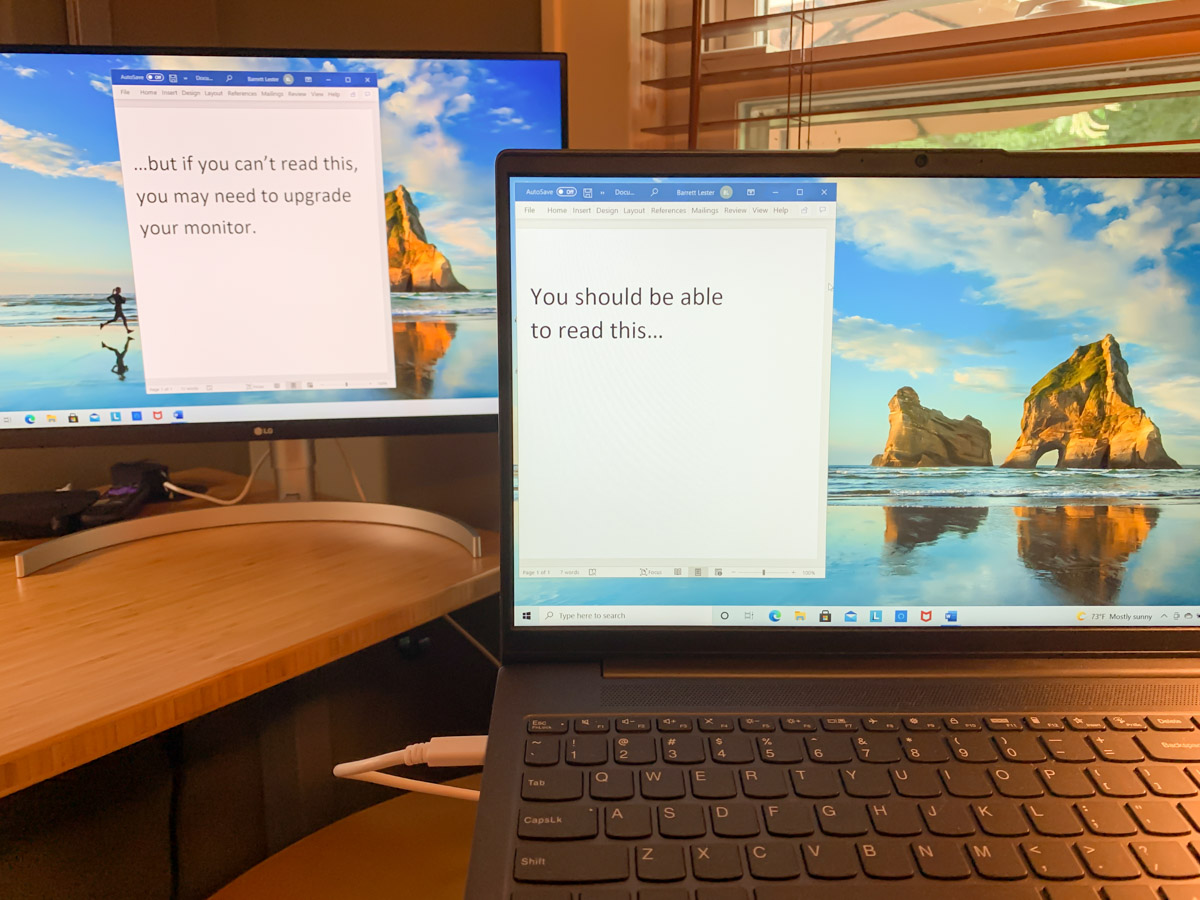
During the early months of the pandemic, I repurposed my old Sony 21” LCD TV and connected it to my laptop via an HDMI cable. I thought I was so clever MacGyvering it, but its non-HD resolution wasn’t doing me any favors. Sure, I could extend my laptop’s screen, but the clarity on the Sony wasn’t there. If I came across small text, I often had to move it over to my laptop screen to be able to read it.

Favoring one screen over another adds unnecessary complexity.

Though I did eventually have another monitor solution temporarily in place, it was clearly time to upgrade my own gear. Not to mention a long-overdue reset surrounding my mindset over these many months.

Post Pandemic Mindset
The pandemic forced me and so many others to instantly adapt to a 100% work-from-home lifestyle. There were inevitable compromises where functionality trumped form.

  • Were you connected?
  • Did you have a comfortable location to do your home video conferencing?
  • Could you simply get your work done?

It wasn’t perfect, but it didn’t matter. My laptop’s second screen wasn’t great, but I didn’t feel it was an important enough limitation. (So I needed to squint a little.)

But thankfully, we’re moving away from that bunker mentality as life begins to return to normal in the US. Coming back to the office is on the horizon for many. But it’s going to be different.

Band-Aid Solutions No Longer Needed
Hybrid work will include working from home as a new norm as opposed to an occasional convenience. Even though remote work existed long before the pandemic, I think many of us viewed it as an infrequent arrangement that didn’t require fully-built-out technical solutions. Again, function over form.

But the pandemic forcibly evolved the very concept of working from home as a new standard. New hybrid work schedules are on the horizon. So, if you haven’t already done so, it’s probably time to finally focus on form over function when working from home.

For me, that meant upgrading my second screen for today and into the future.

The Power of a USB-C Connection
My first thought was to simply purchase a computer monitor with 1080 HD resolution and connect it via HDMI. That’s a cost-effective strategy to get the job done. But it’s based on older tech.

Newer computer monitors include a USB-C connection. Sure, that makes the screen more expensive, but it opens up a huge opportunity for your computer.

Laptops are notorious for not having enough outputs for peripherals. But if there’s a UBB-C port, that connection can do much more than simply connect to a monitor.

You can multipurpose one USB-C connection:

  • Feed your second computer screen
  • Power your laptop through that same USB-C feed
  • Connect an external keyboard and mouse via the monitor’s USB-A ports

It’s a no-brainer.

After I came to that conclusion, my next challenge was figuring out which monitor to buy.

Billions of Choices
I’d like to say that I combed through every option on the market. I didn’t. That’s an overwhelming exercise. Instead, I called B&H and asked for some help. And I got it. The affable sales consultant and I agreed on these specs:

-27” screen size (based on my own workspace)
-4K (Future-proofing choice)
-USB-C input (the golden connection)

Then, he offered me a few options, and we quickly landed on this LG 27” 4K screen:

The LG had everything I needed, and I liked it because it has built-in speakers. (The B&H consultant also mentioned he was partial to LG monitors.)

I said, “Let’s do it!”

And my new LG screen arrived two days later.

You’ve Got to Have Some Trust
Now, I know what you’re thinking. Barrett blindly took a salesman’s recommendation. Ha!

Well, not entirely. The LG does get good reviews. But yes, I followed the salesman’s lead.

You can’t be an expert on everything. There’s simply not enough time. Instead you’ve got to find some trusted support systems to help you along with certain decisions.

B&H has always offered me great advice and customer service. I’ve been buying my tech there for years. I trust their recommendations.

Multi-screen Home Office for your Hybrid Future
Adding the right monitor for a multiple-screen setup instantly creates a more effective home office workstation.

After I plugged in my new 27” LG computer monitor and connected it via the USB-C port, I felt like I had just bought a new pair of glasses.

Perhaps it’s also time for you to have a larger and clearer digital canvas to work on at home, even if your new hybrid work schedule means it won’t be used every day.

Not to repeat the term, but consider all of this as part of the new normal.