At Home with Tech

Unlock the power of all your technology and learn how to master your photography, computers and smartphone.

Category: Tech Trends

See How Technology has Fused into Your Landscape

If you allow yourself a few minutes on the way to work to actually see what’s in front of you, it might surprise you.

I did exactly that and realized that technology has not only consumed some people as they walk the streets of New York City…
(Not entirely unexpected)

But you can find technology fused into the landscape in places where you wouldn’t expect.

Or maybe we’ve just stopped paying attention…

Time to reverse that.

So last week, I documented a little walk with my iPhone from Grand Central Terminal to the office and snapped a few pics.

Here are the images I discovered…

metro-north-travelers
grand-central-platform
old-and-new
grand-central-escalator
citibike-landscape
walking-with-smartphone
another-walking-with-smartphone

How to Take Your Apple TV on the Road

Why would anyone want to take their Apple TV on vacation? Think about it… You’re welcome. Now just don’t forget about one important detail…

Why would anyone want to take their Apple TV on vacation? Think about it… You’re welcome. Now just don’t forget about one important detail…

My family and I stayed at an inn in Massachusetts a couple of months back, and I was surprised to find an Apple TV connected to our room’s television. I stared at it for a moment, and it was as if I were one of those guerillas at the beginning of “2001: A Space Odyssey.”

I reached out to touch it, but instead, I picked up the cute Apple TV remote and logged myself in with my Apple ID.

BAM!
There was all of my media (and my six year old’s favorite shows).

Wow. What a concept…

  • No more having to bring your visual media with you
  • No more having to think about it in advance
  • You have access to everything… right there

I like that.

Of course, the only rub is you’ve got to remember to log out before you check out. Otherwise, you might find a whole bunch of movie rentals on your Apple bill in the coming weeks.

I guess that could bring new meaning to the term, ‘pay it forward.’

The Curse of the Aging HDTV
So… ubiquitous public Apple TVs in every corner of the world may not exactly be coming soon to a life near you.

But it got me thinking…

What if I were to travel about on vacations with my own Apple TV?
It’s certainly small enough.

You’d just have to plug it in and attach its HDMI cable to the ‘guest’ TV. Then simply join the local Wi-Fi, and you’re ready for action.
Easy, right?

Well, not if the guest TV doesn’t have an HDMI input. And if you’re staying in hotel rooms or bed and breakfasts, you never know what you’re going to find. You’re probably not always going to have access to the latest and greatest TVs.

Time to Remember What ‘Component’ Means
I know… it must seem incomprehensible that there are still HDTVs out there without a single HDMI input.

Well, trust me… there are…

I’ve just returned from a family beach vacation to the North Fork of Long Island.
You may recall, I proudly declared it a tech-free week.

Well, truth be told… that’s because I couldn’t plug in my Apple TV to the old HDTV.

That darned TV was a massive HD screen.
(It was a beaut for its time.)

The only problem is it only had component inputs. No HDMI connections.

Do you even remember what ‘component’ plugs are? They were used at the dawn of HDTV, when you had three separate RCA connectors (not just one for a ‘composite’ signal) to handle the video feed…

  • Red
  • Green
  • Blue

‘RGB’
(Technically, I think it’s YPbPr)

And then… two separate audio cables.

In total, that’s five cables, which are typically bundled together to carry the ‘component’ signal. That’s a lot to keep track of!
(Thank goodness, nobody uses them anymore. Except for…)

HDMI to Component Cable Converter
So what I really needed was an HDMI to component cable converter or adapter for my Apple TV to connect to this older HDTV.
They must make those, right?

Sure they do…

When I got home, I decided I would be better prepared next time. To ensure my Apple TV would be able to hook up to an older HDTV, I would need one of these adapters at the ready to be part of my vacation travel kit…

So guess what?
Let’s go shopping!

Have You Heard of the Portta?
First off, a simple cable with an HDMI connector on one end and the five RCA connectors on the other isn’t going to do the trick. You must also convert the signal from digital in the HDMI plug to analog that the five RCA connectors need to carry!

A little 1 x 5 box with the right electronics inside is supposed to get it done…

In my research into ‘HDMI to Component Converters,’ I found that ‘Portta’ is a manufacturer that has a strong presence on Amazon.

I zeroed in on:
The Portta HDMI to Component and R/L Audio Converter, which goes for $27.88.

It has the right specs and receives good reviews on Amazon. (4.4 stars)

For comparison, it’s worth noting that B&H Photo sells a similar-looking model made by company named Kanex…
It’s the KanexPro HDMI to Component Converter with Audio, and it costs $59.00… more than twice as much as the Portta.
(Amazon’s got it for $29.99.)

Honestly, I’m not familiar with either Portta or Kanex.
(For all I know, they could both be alien species in the upcoming
“Star Trek: Discovery” TV series.”)

On the one hand, I’d have more confidence in the manufacturer that B&H sells.
But it’s double the cost!

Hmmm…..
Many others on Amazon seem happy with their Portta converter.
(Plus Prime offers free returns if something goes horribly wrong.)

Okay…

Click.

The Choice is Yours
Bathing suit… Check.
Suntan spray… Roger that.
Waterproof camera… Good thinking.
Apple TV with HDMI to Component Converter…?

Okay… to be clear, I’m not suggesting that you should definitely take your Apple TV with you on vacation.
(That’s clearly a debatable point!)

I’m just saying that if you wanted to, you’ll be really disappointed when you find there’s no compatible TV to connect to. So you simply need to prepared.
Nothing wrong with that. Right?

Or maybe you just convert into a vacation mode on a higher plane that doesn’t allow for silly tech distractions.

Unless you’re MacGyver…

Then, I say, “Go for it!”

The Best GPS for Your Car

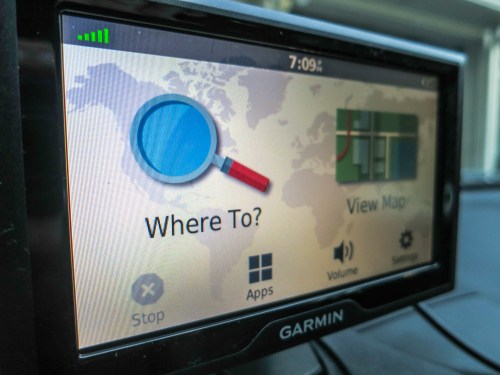
What a difference a week makes! If you think this is the same photo as last time, look again. This new GPS interface is sweet…

What a difference a week makes! If you think this is the same photo as last time, look again. This new GPS interface is sweet…

Yes, I’ve apparently gone against the general flow of the rest of the planet, and I’ve decided to buy another car GPS to replace my old Garmin. Sure, a smartphone can often handle your navigation. (But not always)

And with social-enhanced traffic and navigation apps like Waze, your phone can suddenly possess a ‘Borg’-like awareness from the “Star Trek” universe.

But I’ve got my six reasons to remain a stick in the mud.
And I’m sticking to them…

I know many of you may already have a GPS bolted into your car’s dashboard. So you’re essentially stuck with what you’ve got.

For the rest of you, let’s go shopping!

Go Garmin
Acknowledging the “Better with the Devil You Know” strategy, I decided to focus on another Garmin…
(By most accounts, Garmin is the leader in this category… so you really can’t go wrong.)

The current Garmin choices divide up mostly between the “DriveSmart” and “Drive” model lines. And then you’ve got to choose between 5, 6 or 7” screens.

DriveSmart
Though this is not Garmin’s top of the line, it’s more expensive than the Drive models. For sixty dollars more, you’re essentially getting:

  • Bluetooth hands-free calling
  • Voice Activate navigation
  • Pinch to zoom display

For my needs…

  • I already have a Bluetooth connection from my iPhone to my RAV4’s sound system.
  • Voice navigation sounds exceptionally cool, but I don’t believe it’s so agile that you can speak an entire address. I think it’s more like saying… “Gas Station!”
    (If I’m wrong on that, someone please let me know…)
  • And pinch to zoom is also not a ‘must.’

Drive
The Drive model line hits the sweet spot for me.

The base 5” model is a ‘reasonable’ $129.99. For that…you’re getting all that you really need to get you where you’re going. You don’t have to ask it where the nearest cappuccino is!
(Though you can still tap in your restaurant urges.)

Lifetime Map and Traffic Alert Updates
Garmin also packages in some after-purchase subscription services into the pricing of their units. Where as once upon a time you had to buy your map updates or shell out more money each year for Garmin’s traffic-alert service, now you only have to pay a ‘little’ more when you buy the GPS.

I highly recommend you take advantage of this packaging.

The hard part is figuring out the acronyms attached to the model names.
Here’s how it works…

It’s Lifetime Maps and Traffic.

So LM = Lifetime Maps
And LMT = Lifetime Maps and Traffic

Okay, maybe that’s not so complicated!

Garmin Drive 50LMT
The last time around, I was wooed by some of the optional features and then didn’t end up using them.
So think about what you’ll actually use…

Considering all of above, the Garmin Drive 50LMT really stood out for me.

It doesn’t have the extras that may be ‘cutting edge,’ but I probably won’t use.
And it does come with the lifetime maps map updates and traffic.

Plus it’s got Foursquare functionality baked in to help my wife and me find a good restaurant for dinner when we’re driving back from a day trip.

This Garmin Drive sports a 5” screen, which is actually a tad larger than my old Nuvi’s 4.3” screen.

It lists for $169.99 at Garmin’s site.

And Amazon’s got it at the same price point… $169.99.

For an extra ten bucks, you can also get Canadian maps integrated into the unit’s memory.
(Can you say family road trip?!)

What’s not to like?

Click.

The Right Choice for Me
For those of you out there who still think I’m crazy for spending so much, remember
the base Garmin Drive 50 model goes for only $129.99 on Amazon. No you don’t get any lifetime updates… but you’re if you’re into living in the moment, you’ll be in really good shape… for a while.

And don’t forget…“Lifetime” is a relative term in the technology world. It’s certainly not forever, but if you get three to four years out of it, I say you’re doing okay…
(My old Garmin lasted a lot longer than that.)

But other than the “LMT” upgrade, I think I held the line pretty well this time around.

“Best” doesn’t always mean having the “most.”

For me, this is the best Garmin GPS unit available today.