At Home with Tech

Unlock the power of all your technology and learn how to master your photography, computers and smartphone.

Category: Tech Trends

Four Ways to Showcase your Best Family Photos on your Phone

Are you able to call up any family photo you want on your smartphone? If not, it may be time to update your photo-archiving plan. Here’s what I did.

Our teenage son asked me a question during dinner last week that I had a difficult time answering. He asked if I could show him some pictures from when he was younger. Pictures of when he was younger?! 

I had thousands of photos… tens of thousands from the past fifteen years! But where were they? Could I immediately call up any of these pictures that best represented his earlier years? 

Could I Meet the Moment?
Sure, I could flip though endless photos living in my iPhone. But that would take too long. I started sweating. 

For years, I’d been dutifully curating my family’s photos on my Mac using Adobe Lightroom Classic, but when I received this simple photo request, I wasn’t ready for it.

I took a breath. He kept eating. The opportunity was about to pass. Then, I pulled out my iPhone, opened Apple’s Photos app and quickly went… to my shared albums.

A Shared Photo Album Saves the Day
And yes, there it was… the photo album I had created years ago and shared with my wife that collected some of our Lester adventures. I opened it up, pulled up my chair next to my son and began displaying a few fun pictures from his elementary school years. He smiled, and after a few minutes, we agreed to look at more another time.

After he left, I exhaled. 

Whoa! That was a definite dad moment. And I almost blew it.

Set Up Cloud-Based Photo Albums with Easy Mobile Access
Afterwards, I thought about our exchange and wondered why I had been caught so off guard with this simple request. I’ve spent hundreds of hours working on our family photos over the years. My challenge was more about my phone having easy access to my curated photos from my multiple cameras. 

So, I decided it was time for a little review of my existing photo archiving process and how to give myself better mobile access.   

The obvious way to handle this need is to create cloud-based photos folders/galleries that you can easily view with phone apps. There are plenty of way to do this. But you’ve just got to maintain your plan and keep your albums up to date.

#1
Apple’s Photos App
For an iPhone user, Apple’s Photos app is the built-in solution. The only limitation to shared albums is the pictures are organized in the order you load them in, not in the chronological order of the photos’ time stamp.

A regular (non-shared) album that you set up just for yourself to sync with your iPhone will order the photos in the correct time sequence.

#2
Amazon Photos

Back in 2019, I started using Amazon Photos for my cloud photo archive. The big draw was it was free with unlimited storage of full-res photos… included in the cost of my Amazon Prime membership.

It has an app for my iPhone, and yes, I use it (though I didn’t have a photo album set up with my son’s pics).

The one problem with Amazon Photos is I do worry that one day, Amazon will abandon its interest in photos. And then… poof?

#3
SmugMug

So, I looked for a company with a more photo-centric raison d’être. And I decided to go with SmugMug. I’ve been curating my best photos with this platform across the past few years. 

Also with unlimited, full-res photo uploads, SmugMug has become the platform for my official family archive. But I’m being very ‘precious’ about which photos live there. I think about my SmugMug galleries as an archive that will be handed to the next generation. And I do pay $200+/year to maintain this current strategy.

Yes, of course, I have photos of my son in my SmugMug account, and yes, I have the SmugMug app on my iPhone for immediate access. But I’ve intentionally restricted the photos of my son to ones that more reflect his life’s milestones for future generations to see. (I’m still fine tuning this theoretical goal.)

So, SmugMug is missing a bunch of the fun photos that I’d otherwise want to share with my son today.

#4
Lightroom’s Mobile App
And then it hit me… All the above solutions require me to export selected, edited photos out of Adobe Lightroom Classic’s ecosystem. 

What I had missed was never setting up a syncing solution directly to Lightroom’s Mobile app. I suddenly realized that was the obvious hole in my photo-archiving plan. 

Oops. 

Of course, I already have a great photo collection of our son in Lightroom Classic. So, I loaded the Lightroom app onto my iPhone. Then, with one click, I synced the collection to my iPhone. 

Well, that was an easy fix.

I’m now prepared for my next dinner with my son.

Don’t Fall Behind
It’s important to never let up on any photo archiving strategy. You can see I’ve worked with several solutions over the years. (Part of that is intentional to help protect against unexpected digital-file loss.)

Good photo organization takes a life-long commitment.

If you can’t immediately access the photo you want on your phone, it’s a clue there’s more work to do.

Is your phone ready for your next dinner?
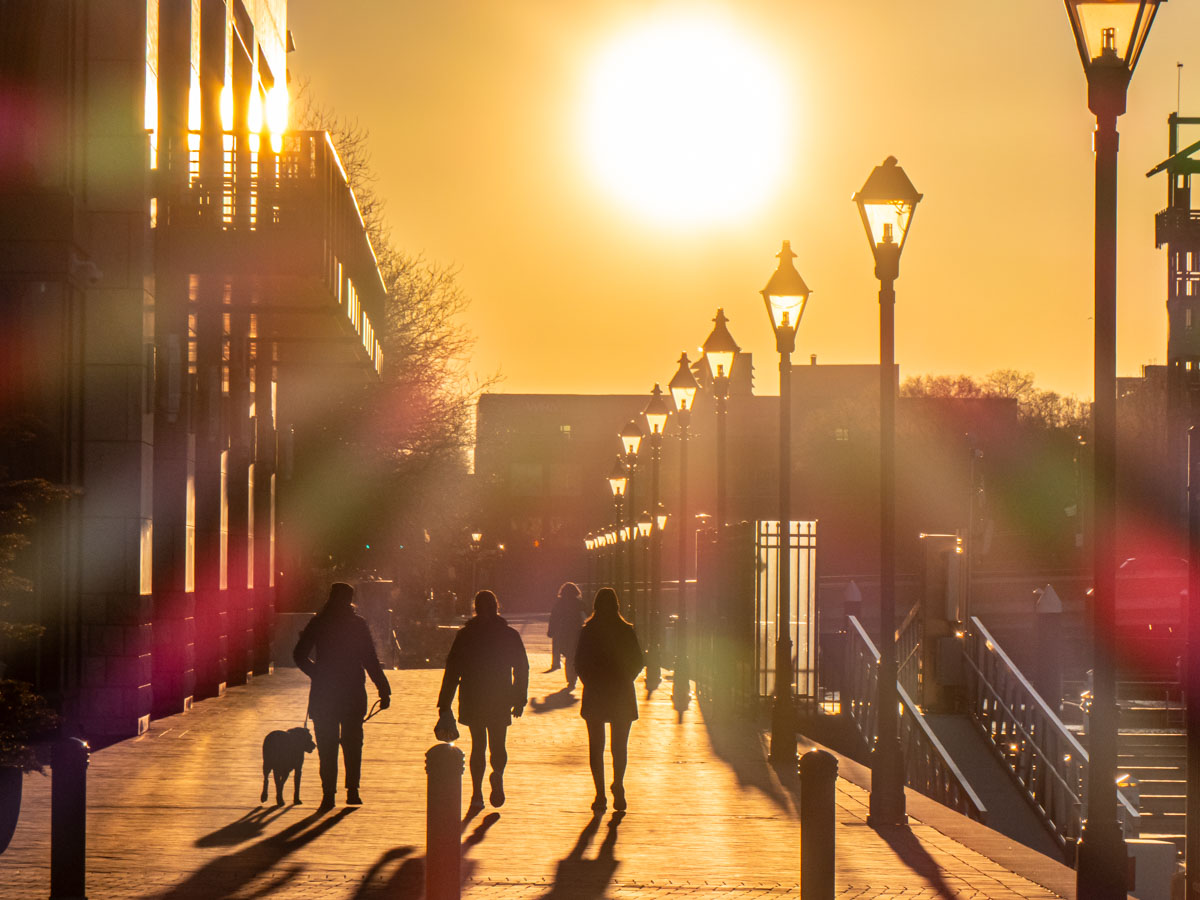
Searching for Silhouettes on a City Street at Sunrise

People walking in Baltimore's Harbor East neighborhood at sunrise

The orange glow of the sun that floods the landscape at sunrise or sunset is a great time to photograph silhouettes and shadows. Here’s how I maximize that opportunity.

If you’re lucky enough to be walking on a city street facing due east or west when the sun is low in the sky, it’s time to take out your camera. That’s when you can easily find magical silhouettes and the shadows of people bathed in sunlight.

Your eyes may only sense a blinding fog of bright orange. But your camera can likely peer through that optical interference and capture enough detail to be later optimized in post.

When editing these photos, I find it ideal to focus on deepening the silhouette effect in a targeted fashion. I accomplish that using Adobe Lightroom with the AI-powered Masking/Objects tool. That allows me to easily select the silhouetted images in the foreground to darken them further without affecting the rest of the photo.

Here are a few examples.

Baltimore, Maryland’s Harbor East (2025)
I snapped this sunrise shot as two men walked to work by the marina.
Two men walk to work in Baltimore's Harbor East neighborhood at sunrise

Facing East at Grand Central Terminal (2012)
Though not technically a street, the Main Concourse at Grand Central channeled the morning’s rays onto New York City commuters as they rushed to their jobs. (I think some of these folks may already be late, as you can tell from the clock.)
Commuters rush through Grand Central Terminal in the morning

Facing West on a Street in Barcelona (2008)
These two women were enjoying their sunset stroll.
Two women walk on a street in Barcelona at sunset

Morning Stretch in Hong Kong (2005)
I captured this quiet moment as I explored the neighborhood during a work trip. Even if the sun isn’t in the perfect position, a shaded space with a bright background can offer your camera a similar silhouette effect.
Man's morning stretch in Hong Kong
The Power of a Good Silhouette
Whether you have your smartphone or a mirrorless camera to compose your photo (I used my Panasonic Lumix DC-ZS200D for my Baltimore pictures), sunrise and sunset are perfect times to capture the landscape.

If you can frame the bright sun in your shot, that’s great. But for me, I’m often more interested in the dark shadows.

I’m Going Mad Trying to Find a Mystery Sound in my Kitchen

Happy ghosts float in a kitchen

I used to recognize every sound throughout our house. Then, a faint digital tone began pinging. I can’t locate this ghost in our kitchen, and it’s challenged my very existence.

I grew up in an apartment in Manhattan. The background roar of New York City flowed through me day and night. Our apartment building also echoed the nosy lives of dozens of people living around us. Strange creaks, bangs, bumps and even occasional screams were just a normal part of existence. I mostly tuned it out, but every so often, a new alien-like sound would pique my interest.

Then I moved out of the city, and throughout most of my adulthood, I’ve lived in houses in suburban neighborhoods. Though not exactly the wilderness, there was always enough quiet ambience that allowed me to mentally catalogue the origins of every sound my home made.

  • The click of the furnace kicking into gear
  • The low rumble of our garage door opening
  • The high-pitch whoosh of water flowing to hydrate our lawn
  • The happy tune from our LG washer machine when it’s done with its cycle
  • The thump of the cat jumping off our LG dryer
  • The three pings from my new Behmor Brazen Plus 3.0 coffee maker after brewing

I knew our house’s every mechanical, digital and biologic whisper and where it came from.

Until one day recently… I didn’t.

Smoke Detector Madness
The only problem I’ve previously had with noises in my house was tracking down the annoying cry of my smoke detector looking for fresh batteries. Sure, I’ve got a more advanced Google Nest Protect monitoring the second floor by our bedrooms, but our first floor and basement still host old-school First Alert models.

And honestly, I could never tell which sibling puck was in distress. So, I had to painfully wait in front of one of them for 90 seconds until the next piercing chirp. And of course, that always happened after I’d been rudely awakened by this cruel (but necessary) warning at 2am.

Fortunately, even these basic smoke detectors have evolved over time, and the most recent First Alert model I’ve installed has a 10-year lithium battery sealed into the unit. So hopefully, my excruciating dead-of-night searches won’t be so frequent.

You Can’t Find Me
But recently, a ghost ping has cropped up in my house, and it is completely unknown. The sound is faint and just one ping. I hear the digital note only every few days, and there is no pattern to it.

It’s entirely infuriating, and I feel this brief tone is taunting me.

Sure, I could ignore It. (This innocuous accent isn’t loud enough to wake me up at night.)

But its existence challenges my control… my authority… my human dominance over our little kingdom.

The Digital Ghost in our Kitchen
The best I can tell, this evil ping comes from somewhere in our kitchen. The faint digital heartbeat doesn’t give me enough information, because it’s too infrequent. (I can’t stand around for a day waiting for the next one.)

Logic tells me the culprit is one of our newer devices… my Brazen coffee maker or perhaps our Instant Pot.

They’re both usually plugged in. Perhaps this is just a little friendly reminder that one is unnecessarily sucking energy in standby mode.

So, what’s the big deal?

Open the Pod-Bay Doors, HAL
Well, I can’t stop thinking about this silly audio ping that currently remains outside my control. I consider it a form of defiance.

As I’ve worked hard over the years to make our home ‘smarter,’ that also means I’ve bolted in more tech to track. Most of it is ‘set-it-and-forget-it.’ But that can’t last forever. So, isn’t this a problem just waiting to happen down the line?

Eventually, your home may take on a life of its own. It can start with a little mystery ping. But it probably won’t end there.

Life isn’t set-and-forget. Your tech shouldn’t be either. And now we’ve got AI to improve everything. See where I’m going?

Don’t Lose the Manual
I’m no Luddite. But it’s clear to me that as we continue to embrace technology in every part of our existence, we must pay attention and not lose too much control. AI is allowed to occasionally hallucinate, but we can’t afford to do that even once. (Humanity doesn’t come with that disclaimer.)

If you think my concern is only worth considering as a screenplay plot device for your next Sci-Fi blockbuster, please considering offering me a screen credit.

Otherwise, I’d recommend you always track down that next digital phantom that crops up in your house. Sure, it may just be an innocent ping.

But when your home talks to you, it’s always best to understand what it’s saying.