At Home with Tech

Unlock the power of all your technology and learn how to master your photography, computers and smartphone.

Category: Technology

Why You Shouldn’t Ignore Your Webcam During Conference Calls

Do you often forget about your computer’s webcam during a video conference call? Or do you prefer to hide in the shadows of audio-only mode? Here’s why you really can’t avoid this collaboration tool at work…

The forward march of technology has finally enabled video to become a standard collaboration tool in the workplace. Sure, the phone is still an option when joining a conference call, but I find that many folks are using their computers… and their webcams.

Once upon a time, lots of people used to shy away from group video chats (and granted, many still do). But now, video conferencing from anywhere there’s Wi-Fi is suddenly the norm! And it feels like hardly anybody cares that they’re streaming 30-60 minutes of their every move to a certain population of viewers. Have they forgotten that the camera has placed them in the center of a crowded virtual room?

It would seem so…

People are Watching You
It’s hard not to look at these little squares of humans as if you’re getting some sort of secret-agent view into their lives. And I’m not referring to people who have the floor…

I’m talking about everyone else! Those are the shots that can be strangely interesting to observe… sometimes more interesting than who’s talking.
(And if you notice that someone is working from home, don’t tell me you’ve never graded their home-decorating skills!)

Multitasking in Plain Sight
I’ve observed a variety of people from different work environments and cultures, and my impression is… those who aren’t actively engaged in the group conversation are generally doing one of two things… either staying focused on the topic… or pursuing some level of distraction.

Most provide the general illusion of normal, but occasionally you could observe something rather unusual. Once, I was surprised to see someone actively participating in a video call while driving. And I mean I was watching him drive, because his smartphone was pointed right at him!

Practicing Video Production 101
I’m befuddled that so many people either forget or no longer care that a part of the world is anonymously watching them…

It’s really difficult for me to understand, because with my background creating corporate video content, I can’t help but think about how my shot looks when I’m doing a video conference… Is the lighting good? Is the angle level? Am I centered? Does the background look uncluttered?

If I’m not feeling the shot is right, or I can’t give 100% focus on the video call, I turn off my webcam.

You Can’t Hide for Much Longer
All this said, I do recognize that not everyone is ignoring the power of their webcams. I do observe colleagues intentionally using their webcams to maximize their participation in a video conference. A good shot can simulate sitting at the head of the virtual table. Good for them!

If you were to combine the percentage of folks who passively use their webcams along with those who are maximizing their shots, I would say that easily represents a majority of video-enabled conference-call attendees. And that percentage will only keep growing. So if you’ve been sitting on the sidelines as an audio-only participant, you going to need to jump into the pool…

Give Your Face More Light
Don’t panic. There’s plenty of time to prep your shot for prime time (if that’s your concern).

One tip that will help dramatically improve how you look is to bathe your face with a source of soft lighting. That will help remove any harsh shadows. One option is to simply position yourself and your laptop next to a window (as long as you’re not in direct sunlight).

If there’s no window nearby, you can use a portable light and position it in front of you. A really inexpensive option is to use a round, hanging paper lantern.

This 17 ¾” diameter shade made by Ikea is a good choice.
It sells on Amazon for $12.22.

Then, you attach the shade to a bulb mount and power cord.
This one on Amazon costs $11.99. It’s 20 feet long and sports an on/off switch.

It’s a really simple solution, and it’s actually used as a remarkable lighting hack by some professional TV and video lighting gaffers I’ve worked with.

Full Attendance is Required
If you’re not powering up your webcam, I say your time has run out. I think soon… the cultural norm will be for all participants to use their webcams when virtually attending work meetings.
(That’s such a big shift from not so long ago…)

So, instead of being able to catch up on email during video conference calls, you’re going to have to attend with your ‘smiling face.’

Breathe.
There’s a silver lining here…

If everyone is required to fully ‘show up’ to every video conference they’re invited to, that will put pressure against a workplace trend we’d all like to trim back… too many meetings!

…a conversation for another day.

At Home with Nature

If you’re wondering what’s happened to my weekly musings about the challenges of technology, you should first consider my weekend experience in ‘the wild’… as a father.

I’ve just returned from an overnight Cub Scout camping trip in Redding, Connecticut with my nine-year-old son. Well, let me tell you, it was almost a perfect experience, including a three-mile hike in the woods and great weather.
(Though it was slightly marred by a chorus of snorers interrupting my sleep at 4am. My son power-slept through.)

Overall, he had a blast… learned some life skills and enjoyed camping with his daddy.

For me, it was a top ten weekend as a father…
Mostly because it was uninterrupted quality time spent with my son.

But I think there was something else going on… inside of me.

Barrett as a Boy
I’m a born and bred New Yorker who grew up in Manhattan in the 1970’s. I was a city boy who as a kid never learned to pitch a tent… let alone sleep in one (except for one time in high school).

Sure, I went to sleepaway camp…so I did spend some time in the great outdoors.
But I never had to learn self-reliance out there.

And as I grew up, I gravitated to the lure of technology rather than the life of a Boy Scout.

Barrett as a Man
And though I eventually moved to the suburbs as an adult and figured out how to mow a lawn and push a snow blower, I wouldn’t exactly say I learned to be at home with nature… beyond going on a full-day hike.

Yes, in fact, my family and I have done a few 4,000 footers in New Hampshire over the past couple of years, though I would attribute the spirit that led to those accomplishments to my better half…

Barrett as a Father
My wife loves to camp and really introduced me to the camping experience. Over the past few years, we’ve brought our son along, and he’s really enjoyed it. So, I think it would be fair to say we’re a camping family.

But this time, it was just my son and me camping with the Cub Scouts…

Barrett Pitches His Tent
I must admit, I was worried that I wouldn’t remember how to put up our REI Kingdom 4 tent.

No, I didn’t want to take the time to do a test run in our back yard. Yes, I did Google it and found a few videos that helped me to remember the order of constructing the exoskeleton.

The trick is to put the middle pole in first through the material, and then you attach the two poles with ‘arms’ that connect together on top of the middle pole. And then you pitch the tent.

The fact that I just wrote this down without cheating is a good indicator of how I performed in the field…

I successfully pitched my Kingdom 4 tent… all by myself. I looked like I knew what I was doing, and I even had the brain space to invite my son into the construction process.

To be honest… for this city kid, it was a big moment. And perhaps more importantly, I enjoyed doing it… much like I enjoy figuring out a tech problem like how to install a new WiFi system in our house.

I know I’ve talked about my camping adventures before, but only as it relates to bringing along technology to maintain a tether to the rest of my tech-infused life.

This time was different. This joy connected to something at my core that I don’t usually pay attention to…

Barrett Becomes Slightly More Self Aware
I would say only a small percentage of us are truly at home with nature. Sure, many may enjoy long walks in the woods or weekend camping in a beautiful location. But that’s still somewhat of a ‘protected’ experience. Yes, it could hail out there or a big bear could walk along, but you normally expect to make it out of your ‘wilderness’ experience in one piece.

That’s not quite the same as being teleported into the wild with no civilization in reach for days. Yes, some could handle that just fine. And I think the rest of us probably covet that lost skill deep down, even though we don’t acknowledge it.

Today, much of the world relies on technology to keep a roof over our heads and food on our tables. And in so many ways, technology ‘enhances’ our experience as we go about our lives. It can feel like a natural extension that supports our individual happiness.

But I realized during my camping weekend that my focus has been somewhat askew.

Previously, I was always the guy with the solar panels to charge up your portable battery. Or the one with an extra battery to spare. I made sure I could maintain an extension of civilization through technology.

But I could never quite enjoy just letting it all go…

Barrett Continues on His Journey
Yes, this time I still brought along my tech to our Cub Scout camping trip.
(What? You thought this was all about me living for a weekend off of the grid? Hardly…)

But the fact that I stuck the landing on building our tent and enjoyed doing it is what really tickled me this time around. That’s what I remember…
(Not how many bars of power I was able to maintain)

And that’s a new behavior.

No, I’m not at home with nature.
Not really.
Not yet.

But I’m getting more comfortable…

#progress

Green Bubble Texting Fix if You Use the Messages App on a Mac

The color of your texting bubbles may not matter so much when using your iPhone, but it can be a big problem if you’re using the Messages app on your Mac. Here’s how to erase this pesky issue…

Lately, I’ve been trying to fix a little flaw in my ongoing role as the family photographer. It has to do with what happens after I take my photos…

I bring them back to my iMac, import them into Adobe Lightroom, choose the best ones, tweak and color balance, and then finally I share the few gems with family and friends. Of course, the big problem with my process is it takes time… sometimes lots of time to get to the finish line. It can be a week… sometimes two.

These days, everyone expects almost instantaneous sharing of pics.
Clearly, I need to keep up.

And I’m happy to report that I’m doing better, and here’s why…

Emailing Vs. Texting Photos
Now, I force myself to quickly find the best few pics in a batch and singularly focus on them to get them ready to share. And if I never get to the rest… well, maybe that’s okay, because perhaps all that really matters are those few best photos anyway.
(Are you feeling a disturbance in the Force?)

One other important detail to my evolving photo-management process is how I’m sharing my pics… Usually, I email them about. If I have more than a few to share, I create a Dropbox folder to house them. And then I forward along the Dropbox link in my email.

How easy is that?!

Well, not easy enough…
Because it still requires folks to click on the link and then download the photos.
And that’s takes time.

I’ve noticed that some of my friends prefer to text their photos, and I’ve experienced the simplicity of saving a photo that’s been texted to me directly to my iPhone.

Hmmm…

And while I didn’t want to move my photo sharing process to my iPhone (like the rest of the world), I realized I could take advantage of a texting workflow while still using my iMac…

…by using the ‘Messages’ app.

A Problem with Using the Messages App on Your Mac
You may recall, I’ve recently focused on my son’s 9th birthday and what to get him…
(My gift was a build-your-own computer kit!)

Immediately after his birthday party, I wanted to send out some party pics to our friends, and I figured this was the perfect opportunity to try out my iMac’s Messages app as my distribution method…

But I immediately ran into a roadblock with one of the phone numbers I used…
The photo just didn’t go through!

Huh.

After a moment, I realized my friend wasn’t part of the Apple ecosystem (no iPhone or Mac). So he didn’t have iMessage functionality…
(The blue bubble type)

And my Mac isn’t as clever as my iPhone which can simply convert an iMessage with a photo to a MMS text with a photo.
(The green bubble type)

So now what???

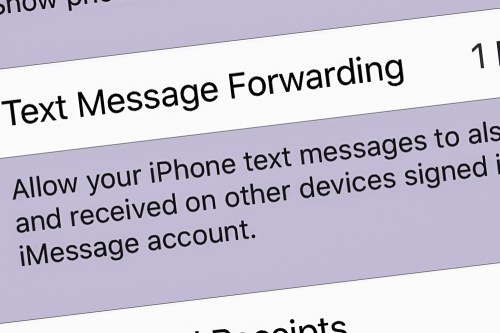
Text Message Forwarding
Well, the fix was to change a buried iPhone setting to better use Messages on my iMac. You simply turn on the ‘Text Message Forwarding’ feature…

Here’s how you do that on an iPhone:

  • Go to ‘Settings’
  • Tap on ‘Messages’
  • Tap on ‘Text Message Forwarding’
  • Then select the device you want to connect (iMac)

And as soon as I made this adjustment, I resent the photo, and it immediately went through.

Problem solved!

Green-Bubble Fix
With my iMac and iPhone now teamed up in this particular way, the path had been cleared for me to freely share my photos without worry using the Messages app on my iMac.

And the result…?

I received almost instant feedback that my pics had been received and were appreciated.
Now that’s satisfaction!

Text Message Forwarding is an easy fix for your green-bubble moments.

I highly recommend activating it…