At Home with Tech

Unlock the power of all your technology and learn how to master your photography, computers and smartphone.

Category: video

Why Do We Love Slow Motion Video?

Wanting to capture a moment in slow motion is often born from our cultural fascination with the cinematic experience. Better understanding the ‘why’ will help direct your quest for more successful slow-mo shots.

Just about anyone can create slow-motion video clips these days. With a smartphone and a little help from a consumer-grade handheld gimbal or even a little digital image stabilization, it’s not that hard to generate a buttery-smooth cinematic shot… in slow motion.

And if you’re working with more advanced production gear from my world that many in corporate video production are using today, the results can be even more impressive. With a digital cinema camera, fast lens, and the right lighting, you can create amazing slow-motion shots at reasonable price points that were unimaginable five years ago.

But why am I and so many others obsessed in the quest to generate slow motion shots (for both personal and professional use)?

Learning about Slow Motion at the Movies
It’s not like viewing our reality in slow motion is natural. Sure, certain people talk about their surroundings slowing down right before an emergency. But that’s more about cognitively processing versus actually watching something move slowly.

Slow motion is essentially a special effect born out of the technology of movie making.

We only understand slow motion as part of our learned understanding of the cinematic viewing experience. We all grew up watching slow motion at the movies, on TV and now… online.

Slowing Down Sports Action
At a basic level, slow motion is a magical way to visually dissect an important moment that simply happens too quickly. It generates more time for us to actually process what’s happening.

Its use during sports TV coverage is an obvious example. That home run or touchdown is always better shot in slow motion. And the value of slow-mo in televised sports also applies when you shoot your family backyard touch-football highlight.

The Emotional Rush
But I’m often more interested in the use of slow motion as a visual tool that offers an emotional point of view. When a particular moment in a movie suddenly slows down, it often represents an emotional turn in visual storytelling.

And when that slow-motion shot is paired with a low audio rumble or ominous violin strings, experiencing that moment flicks a switch in our brains. We’ve been trained like Pavlov’s dogs to have a conditioned response… in this case, an emotional surge.

You know that feeling, right? The one that sends a tingle down your spine or involuntarily squeezes those muscles behind your ears.

In short, we feel something of a rush.

A great movie moment can easily do that to you. And slow motion is one of the ways to complete that circuit.

As a visual storyteller in my career and also at home as the self-appointed family documentarian, I’m always looking for opportunities to create this kind of moment… that same rush for my viewers.

Slow motion isn’t the only way to get it done. But when strong artistic execution is married with good slow motion and the right narrative moment, it’s undeniably a holy-grail moment for any creative.

Warning!
But if you’re also a digital content creator, I’ve got a warning…

Don’t go crazy with slow-mo. Just like any creative tool, we should have a clear reason to use it and not simply treat it like some kind of cheap trick. Because that’s exactly what it would become.

Plus, pointless slow motion is just… slow.

Also, when considering using a b-roll clip as part of your editing process, don’t slow the clip down simply to extend it to ‘fit’ in your editing timeline gap. (This is possible only if your footage was originally shot at a high frame rate.)

I believe that ‘filling in the gap’ is a misuse of slow motion. It’s never the best way to intentionally use slow-mo… mostly because it’s not intentional… it’s just convenient.

Find the Meaning in your Slow Motion
Barrett Juggles in Slow Motion
Sure, having a little fun with slow motion is fine.

Barrett Walks in Slow Motion
And who isn’t flattered having a ‘hero shot’ of them captured every now and again?
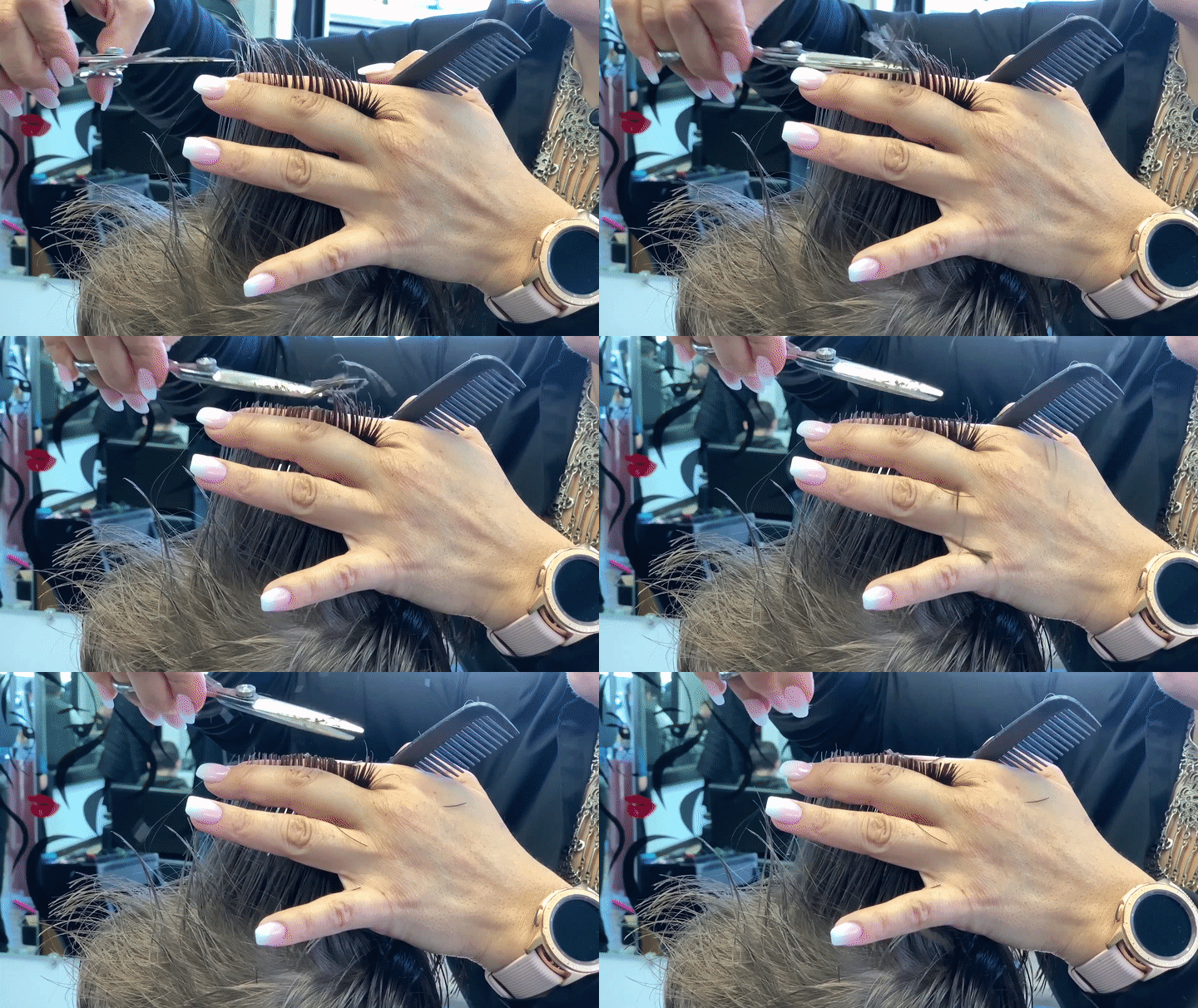
Haircut in Slow Motion
But when we’re offered the opportunity to look for deeper meaning behind slow motion, that’s when it gets interesting.

Where used properly, slow motion will reveal fundamental truths that we may miss at normal speed.

Yes, it’s an entirely unnatural way to experience the world, but one that technology has successfully created for us. The great filmmakers have shown us the visual guidelines for slow motion. Now, with the democratization of slow-mo video creation, it’s up to you and me to respect and apply them.
Bending Reality in the Name of Authentic Video Storytelling

I’ve been on a year-long journey at work to replace the use of stock video b-roll with more authentic imagery of people in our video storytelling projects. And my team has been experimenting with a ‘radical’ idea that’s entirely counterintuitive.

But I’ve found it has its place as a strategy to consider and does a lot more that simply bend reality…

If you wouldn’t mind making the extra click, please read my story
here in this LinkedIn article I’ve published.

Thanks!

How to Record Better Field Audio When Shooting iPhone Videos

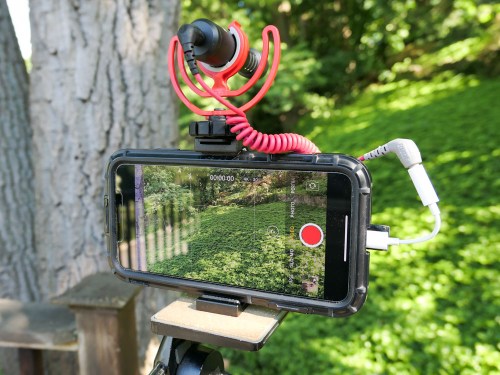
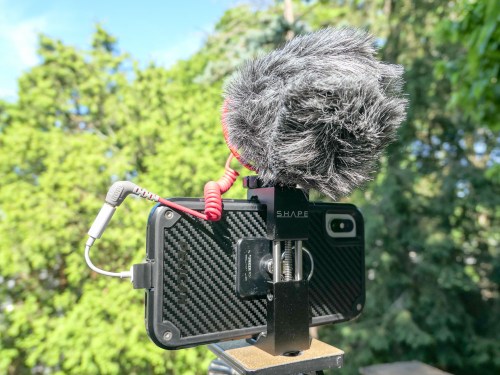
I admit it… I’ve created the Frankenstein iPhone. Why? I simply wanted to enhance its 4K video recording capability with cleaner audio in the field. Here’s how I did it…

Look, I know my iPhone XS Max isn’t a ‘real’ video camera (although it is). And you wouldn’t think it’s supposed to carry the weight of capturing conversation in the not-so-quiet outdoors. But why not?

With the right lighting conditions, an iPhone XS Max can capture beautiful 4K video. And its multiple onboard microphones do an effective job in many situations. Its only real limitation with field audio is handling windy conditions. And that’s the case with any video camera that doesn’t have an attached directional microphone with a windscreen.

So, why wouldn’t the solution be to simply attach a directional mic and windscreen to my iPhone?

And that’s exactly what I set out to do…

The Price for Better Audio in the Field
Audio production is an expensive business, and you can easily spend more on field audio equipment than the price of an iPhone.
(Seriously)

So I gave myself a budget of $100 to see what was possible…

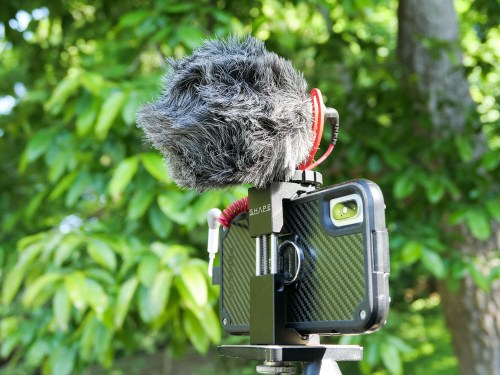
My final ‘creation’ was both hideous and glorious. I’ve truly created a Frankenstein iPhone. I probably should feel ashamed, but I don’t.
Consider yourself warned…

Rode VideoMicro
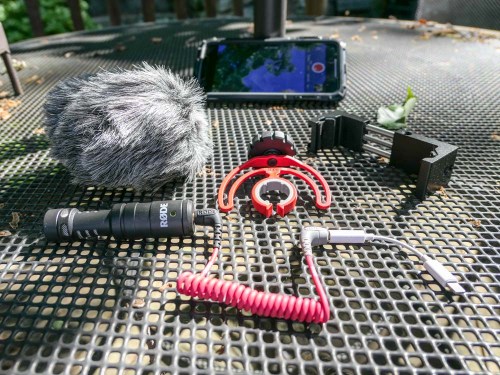
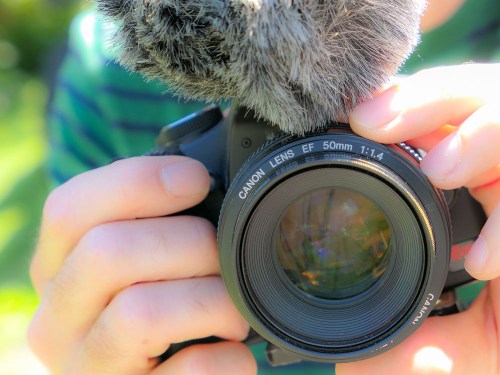
I zeroed in on the Rode VideoMicro compact on-camera microphone. Rode is well regarded in the audio industry, and this inexpensive cardioid condenser microphone that’s marketed to the DSLR market was a prime candidate for my little project.

Cold-Shoe Clamp
But of course, an iPhone isn’t a DSLR with a cold-shoe mount to easily attach a microphone. So you’ve got to somehow anchor a cold shoe mount to the iPhone…
The Shape Smartphone Aluminum Clamp is one solution.

Lightning Dongle
The VideoMicro uses a 3.5mm plug, which won’t plug directly into an iPhone’s Lightning port. So, the next step is to use an Apple Lightning to 3/5mm Headphone Jack Adapter.

TRS to TRRS Cable
And before you can use the VideoMicro with a smartphone, you also need the TRS to TRRS cable (Rode SC7 Cable). That’s instead of the TRS patch cable that comes in the box… which will not work with the iPhone.

Included Accessories
Perhaps most importantly, the VideoMicro comes with a furry windshield (sometimes called a “dead cat”) to handle the outdoors. It also has a nice little shock mount to suspend it in the cold shoe.

Final Price Tag
Altogether, my Frankenstein plan totaled $104.54. There’s nothing simple or elegant about it, but the Rode should immediately come to life when paired with an iPhone…

Click.

Rode Video Mic Me-L is the Runner-Up
I chose the VideoMicro over Rode’s Video Mic Me-L, which plugs directly into the lightning port of a smartphone. Yes, Rode’s design engineers have actually created the exact product I needed, but I didn’t bite…

The deal breaker was the snug fit required by the Video Mic Me-L that most iPhone cases would prevent. I just couldn’t handle the prospect of having to take my iPhone XS Max out of its cozy Pelican case every time to pop on a microphone.

And even though my VideoMicro is a more cumbersome (and expensive) solution with all of its necessary ‘adapters,’ the fact that it lets me keep my iPhone in its case is the more important feature.

Test Results

First off, my Rode VideoMicro works just fine with my iPhone XS Max. I saw some online chatter that it’s incompatible…
NOT TRUE.

I also read an online comment that there’s a slight audio delay when using the Rode VideoMicro and an iPhone…
TRUE!

Many people may not notice the two-frame lag, but if you’re a video editor, it’s pretty obvious.
(I’m not surprised with all the necessary cable Macgyvering.)

But it’s not a deal breaker, as long as you intend to edit your video footage. All you have to do is separate (unlock) the audio track from the video and then slip the audio track forward a couple frames.

It’s a straightforward step when using standard editing software like Final Cut Pro X, though an admittedly unnecessary step if there wasn’t an audio lag to begin with.

The VideoMicro provides clean, crisp sound… though it is a bit thin compared to what the iPhone’s onboard microphones capture in otherwise perfect conditions. So, you might also want to add in a little bass while you’re working with it in your editing software.

Perfection Not Required?
At this point, you should be wondering why anyone would want to use this Rode and go through all of these extra steps.

Well, don’t forget why I Frankensteined my iPhone in the first place… It’s to capture more directional audio that’s not as affected by the windy outdoors.

And it does successfully deliver on that value proposition at a decent price point.

I also must admit that using my iPhone XS Max with the VideoMicro is a still completely imperfect audio upgrade solution, because it doesn’t provide one additional key feature…

You can’t monitor the audio as you’re recording it!
(Don’t forget that the iPhone’s lightning port is already occupied as the microphone input.)

So, if you want to be sure you’ve captured good sound, you need to review your video clips in the moment. And depending on how much time you have, that can be a real drag…

And let’s face it, as much as the VideoMicro can give you better field audio, it’s never going to do the same job of a more expensive shotgun microphone or a lavalier microphone.

Still…

Better iPhone Audio in the Field for $100
When the need presents itself, using the Rode VideoMicro is a clear step in the right direction.
(And if nothing else, the monster you’ve created that was once a sleek iPhone is sure to be a head turner.)

Recording audio has always been the forgotten cousin of video production… and often the Achilles’ heel of any video shoot.

If you’re serious about putting your smartphone to use recording people talking outdoors, you’ll eventually want to invest in some additional audio muscle, especially if you’re shooting in the field with noisy air flow.

For a hundred bucks, Rode’s VideoMicro along with a team of cables and small clamp is a solution that will help get the job done!