At Home with Tech

Unlock the power of all your technology and learn how to master your photography, computers and smartphone.

The Best UPS for Your iMac

"Uninterruptable Power Supply Interrupted." My APC UPS failed its own self-diagnostic… and my iMac began operating without a net. A power net, that is… Time to buy a replacement!

“Uninterruptable Power Supply Interrupted.” My APC UPS failed its own self-diagnostic… and my iMac began operating without a net. A power net, that is… Time to buy a replacement!

A moment of Tech Zen is often a fleeting one… Last week, my Home Zen was shattered by a piercing series of beeps coming from under my desk.

It was my lowly UPS unit… I mean to say my uninterruptable power supply… You know… that big, heavy battery backup box that my iMac plugs into for protection against a power outage.

Computers hate unstable power or the sudden loss of power mid sente

(…just kidding)

Time to Replace My Uninterruptable Power Supply
But seriously, unless you have complete faith in both your electrical grid and Mother Nature, you should expect the occasional brown out or total black out. Providing stable, emergency power for a few minutes, a UPS battery system can really save your computer heartache.

But any battery only lasts for so long, even if you’re not using it. My five-year-old APC UPS (XS 1200) decided it was no longer fit for duty while I was enjoying my morning cup of Joe.

It performed a self-diagnostic and apparently failed the test. That activated a red light in the front and the irritating 30 seconds of its beeping red alert.

Yes, the APC had my attention…

#33
So I jumped onto Amazon to see how much the replacement battery would be.
I tracked down the right model, which was named ‘Battery Cartridge #33.’

#33 was selling for over eighty bucks!

That’s already half the cost of a band new UPS, but many of you would probably still say, “Click” and be done with it.

Not me…
I decided I didn’t want to mess around with tech that’s already a few generations old.
(You know how I get when it comes to reliable power.)

So I began my search for a new UPS.

APC Vs. CyberPower
APC appears to still be the dominant manufacturer of consumer UPS units today, but after a little online research, I found lots of folks talking about how much they liked their CyberPower UPS systems.

So for no rock-solid reason, I decided to go with ‘the other guy.’
(And now all the APC marketing folks are throwing their hands up in disgust with my fickle positioning.)

True Sine Wave Vs. Modified Square Wave
If you’re still reading this paragraph, I congratulate you for your insatiable search for knowledge… or you have my condolences for being such a massive geek…

Either way, you should know, the ‘Sine Wave’ conversation is apparently a controversy in certain tech circles. And it could point to a huge risk in the health of your computer when running off the ‘wrong UPS unit.’

It would be best if you found an electrical engineer to explain,
(Because I barely understand it)
…But here are the basics…

It has to do with the quality of electricity a UPS generates.

Most consumer UPS systems don’t give you a ‘true’ or ‘pure’ sine wave electrical current. They give you something called a simulated sine wave… or a modified square wave… or a stepped-approximation sine wave.
(My body is starting to shudder uncontrollably just trying to type all these words.)

And yes, simulated sine wave UPS systems cost less than the ‘pure’ ones.
(Think of it like organic juice vs. a GMO liquid.)

And that’s fine for lots of computers. Apparently, they can handle the cheaper juice.

However, certain computers use ‘Active Power Factor Correction’ power supplies (Active PFC). And those units are designed to work with true sine wave current.

Active PFC power supplies don’t like the cheap stuff.

Some say those computers audibly buzz as they struggle with the wrong kind of power.
(And that can’t be good.)

Others insist an Active PFC computer won’t run off of a simulated sine wave at all.

But there’s another camp that says not to worry…
Unless you’re planning on running your computer for extended periods on a simulated sine wave UPS, (like with a home media server) there’s no problem. For those few minutes it takes to power down your computer, you’ll be just fine.

So which side should you believe?

Looking for a Sign for the Right Sine
Well, the next question I had was whether my iMac has an Active PFC power supply…

It does.
(gulp)

So I decided to head down to my local Apple Store and speak to the Apple Geniuses. Surely they would have a point of view…

First off, there were no UPS units on sale anywhere in the Apple Store.
(That would have been an easy clue.)

Then, I found an available Apple Genius and posed the question…
A perplexed look slowly spread across his face as if I had asked him about Windows 10.

Can the Apple Genius Save my Sanity?
He did not respond to the words, ‘Active PFC.’ He didn’t chuckle when I mentioned ‘sine wave.’ However, he did act like I might have just teleported over from a different timeline.

Finally, he acknowledged that he didn’t know what I was talking about, but he warned me that some UPS manufacturers have been known to use bad batteries that can expand. So I should be careful…

I looked around for someone to recognize the irony of that comment.
(By the way, my old MacBook Pro’s replacement battery is still behaving and hasn’t grossly expanded like my first one did.)

Am I the only nerd in the universe who wants to buy the proper battery back-up solution for his computer?!
(This shouldn’t be so difficult…)

Pure Sine Wave Creation isn’t Actually that Costly
My original web research suggested that pure sine wave UPS systems cost ‘significantly’ more. But when I came home and sat back down to check out the CyberPower models, the Pure Sinewave Series wasn’t that expensive. Only about $35 more…

Really?

I’d say throwing away thirty-five bucks is worth the peace of mind that I’m feeding my iMac ‘quality’ backup power!

From there, this annoying tech rabbit hole began to quickly disappear…

Choosing my CyberPower
I zeroed in on-

  • CyberPower PFC Sinewave Series CP1350PFCLCD
    1350VA/810W Pure Sine Wave UPS
    $189.95 on Amazon

It’s slightly beefier than my old APC UPS, and it sports 5 battery back-up plugs and 5 surge protection plugs without the back-up power.
(Yes, UPS units are great for surge protection too.)

Depending on how much power you need, there are less expensive choices-

And there are also a couple more models in between these two.

But remember… Reduced power is going to give you less time to maintain and shut down your computer equipment during a blackout…

How Much Power Do You Need?
Of course, the next question is how much juice do you really need…?

I admit that even with a few extra external hard drives and my iMac, I’m supersizing it with the 1350VA/810W model, but you never know what kind of hungry tech might come home in the next five years…
(Plus UPS batteries do lose capacity over time.)

Click.
(I actually did the deal with B&H with the free ‘expedited’ shipping…which is usually next day for me!)

A Smart UPS
I unboxed the UPS, slid it under by desk, plugged it in, and tethered my iMac to it. All done?

Not quite…

When you plug in the included USB cable to your iMac, the CyberPower’s status is automatically recognized by the computer. You can find it in your Energy Saver’s settings in the System Preferences icon on your bottom menu bar.

Without installing any extra software whatsoever, you can schedule when your Mac should sleep or power down while running off of the CyberPower unit.

And if you want, you can choose to show the UPS’s battery status in your top menu bar.

Sweet!

Suddenly this UPS had become more than a soon-to-be forgotten troglodyte battery gathering dust by my feet. Now, it had become an integrated member of my desk’s tech team.

Drum Roll Please
So it was time to do a test. I unplugged my new UPS… and as soon as I di

.

.

(…kidding again)

iMac UPS Alerrt


Everything was fine.

  • My iMac warned me that it was running on battery back up.
  • The remaining battery time popped up on the UPS’s front LED panel.
  • And the battery percentage indicator on my iMac’s top menu gave me oodles of confidence that my digital companion was in good hands with its new CyberPower friend.

CyberPower in Action


The Sound of Silence
I plugged my CyberPower UPS back in, sat in my chair, and took a deep breath…

  • I looked around
  • Listened for any unusual sounds
  • I cleared my mind…

Tech Zen restored.

…And then my printer ran out of ink.

D’oh!
How to Feed Video to any HDTV with Your iPhone or iPad

If you want the ability to take over any HDTV in the universe sporting an HDMI connection, your iPhone or iPad can actually do the trick directly without AirPlay mirroring through an Apple TV. Your portable Apple devices just need a little help….

If you want the ability to take over any HDTV in the universe sporting an HDMI connection, your iPhone or iPad can actually do the trick directly without AirPlay mirroring through an Apple TV. Your portable Apple devices just need a little help….

Once upon a time I would go on vacation with a small army of tech gear to create an on-demand multimedia viewing experience for my entire family.
(The irony here is there has never been any demand for this capability. But of course, that hasn’t stopped me.)

First I brought my Panasonic portable DVD player along with 8,012 Lester-documented cable combinations to handle any possible TV configuration in the wild.
(Only slight exaggeration)

When iPads showed up, that made my packing so much easier. Who can argue with bringing a portable TV the size of a book? You just have to make sure it’s preloaded with all the videos you’d need.
(Assuming there’s no local Wi-Fi to stream with)

Problem solved.
(Well, not quite…)

How Many People can Sit in Front of an iPad?
The remaining issue is only one person can comfortably sit in front of an iPad. Maybe two…
(Of course I’d bring an audio splitter for two sets of ear buds, so my wife and I could watch an episode of “Downton Abbey” while our toddler dozed. But in those days, our little guy didn’t really doze, and by the time he got to sleep in a new hotel room, it was time for us to get some Z’s too!)

But recently I was introduced to a more advanced solution by some friends using their own iPad. This family is very much at home with their tech….
(I swear they come from an alternate universe where consumer technology always works.)

Vacationing with the Jetsons
Earlier this summer our two families took a short vacation together at a little beach house in Rhode Island. On the second morning, the adults were busily preparing breakfast.

The kids? Well, they were experiencing some early morning energy ‘bursts.’ They needed some focusing in this new and somewhat compact space. I’m not proud to admit this, but I suggested powering up thirty minutes of Disney Junior programming on my iPad Air 2.

I looked around for the 9.7” screen, knowing it wouldn’t be an ideal solution for our three young viewers.
(two five-year-old boys and a three-year-old girl)

Simultaneously, the other dad reached for a compact case of cables that was conveniently positioned by the large, flat screen TV set in the living room. For a second, I had a flashback to my own monster pile of travelling cables I had long ago abandoned. But it was immediately evident that this moment was about to reveal something entirely different.

A solution that made real sense…

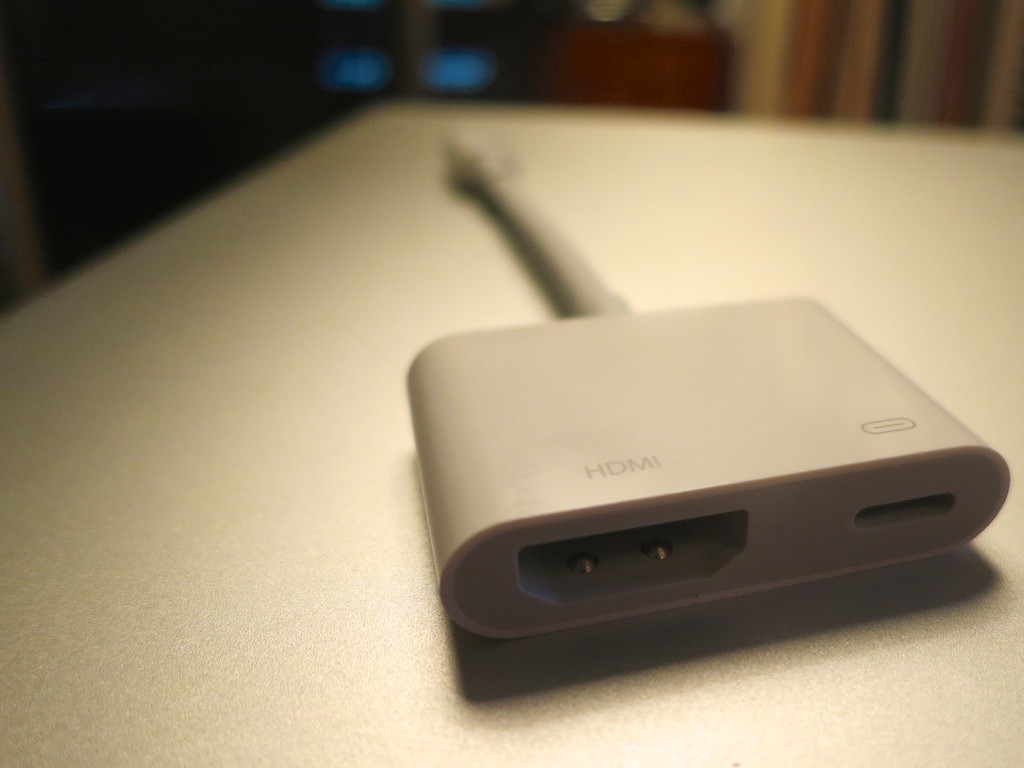
The dad carefully revealed a sleek, white adapter cable. It was barely 4.5”” long. More of a mini adapter box with a short Apple lightning cable attached to it.
(What was this?!)

Apple Lightning Digital AV Adapter

It was Apple’s Lightning Digital AV Adapter that allows you to mirror the display and audio from your iPad or iPhone to an HDMI-fed TV or screen.

It looked so simple….
(of course)

It was constructed with a lightning connector on one end for your source Apple device, and a little white rectangle on the other with a hole for a HDMI cable and a hole for a second lighting connector to run power from a plug.
(Keeping your Apple device flush with energy)

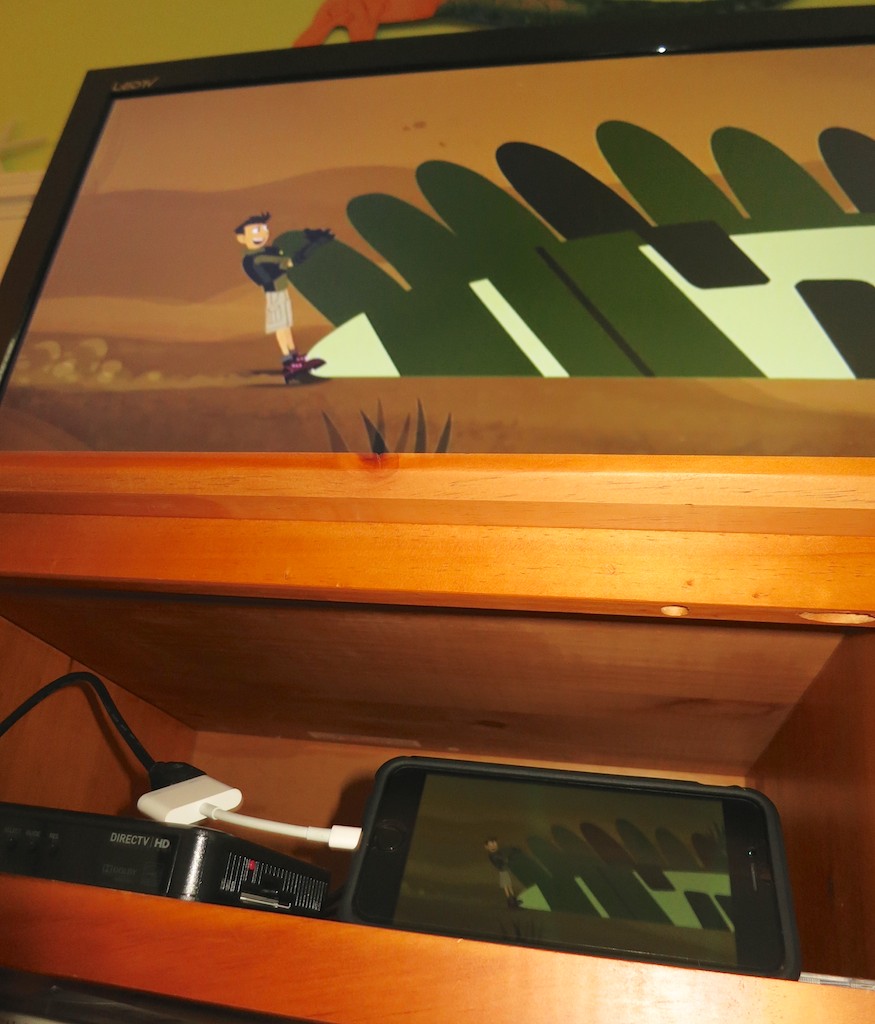
I watched as my friend effortlessly performed a little tech surgery, slipping the HDMI cable out of the back of the DIRECTV box and connecting it to his iPad. And then, as if by magic, the iPad took control of the TV.

I think I heard the three children coo simultaneously. They immediately settled in on the couch to watch their favorite Disney show in this newly created movie theater, powered by the iPad… streaming off of the house’s Wi-Fi.

I started to drool….

Late to the Party
Look, this Lightning Digital AV Adapter isn’t especially new.
Deep down, I think I knew it’s been available for the past couple years. I just hadn’t entirely understood how it could help me.

But to see it in action during a live field test…
Brilliant!

In many ways you can think of it as your own portable Apple TV.
(Without the need for AirPlay Mirroring)

Sticker Shock
But this magical convenience comes at a price.

Apple sells it for $49.
(Really? For just a cable…?)

Yup.

Of course, I Googled about, hoping to find another manufacturer with a knock-off at a lower price point.

Nope.
(Not even AmazonBasics)

I did some additional research and came upon the reason…

Apparently, this adapter is doing some really heavy lifting converting the signal from Apple’s native H264 video format to an HDMI signal for your HDTV. Apparently, if you took a buzz saw to the white adapter box, you’d find something that approximates a mini computer inside.

The exact process of the video conversation is something of a mystery, and whether the video quality is entirely maintained is a bit of a debate online.

All I care about is that it works.
And it’s 49 bucks.

To ease the painful price point a bit, B&H Photo has it for less- $44.99.

Click.

Ready for the Next Vacation
So I now own the ability to take over any TV I come across in the universe with my iPhone 6 Plus or iPad.
(An iPod touch with a Lightning connector works too.)

Will I ever actually do that?
Just knowing I can is worth the two Jacksons.

Call me crazy…

Is Your Garden Water Hose Toxic?

I’m pretty sure I watered my vegetable garden last year using a garden hose and attachments that leeched lead and various chemicals of concern. If you’re like me, you need a different solution right now!

I’m pretty sure I watered my vegetable garden last year using a garden hose and attachments that leeched lead and various chemicals of concern. If you’re like me, you need a different solution right now!

Last year, we grew a small vegetable garden on the side of our front lawn. It housed a variety of tomatoes, which my five-year-old son especially enjoyed. And it was so cool watching him walk by it and pop a few cherry tomatoes as he moved through his day.

Such a natural moment for him and a clue to Mr. At Home with Tech how life must have been like in a more agrarian-based society.

For years, I’ve been using common garden hoses from Home Depot to water my lawn. I replaced them as needed as they got old and overly kinky. I never thought much about it.

As I set up the infrastructure to support our vegetable garden this year, I realized I needed a new garden hose splitter for my outside water tap. I needed one water line to feed the hoses for my lawn sprinklers and a separate hose to water the garden.

Before I jumped in my car, I decided I should also probably replace my garden hose sprayer, because it was leaking pretty badly.
(My shirt was getting wetter than the plants!)

There’s Lead in the Brass
My local hardware store salesman proudly showed me the ‘Mercedes Benz’ of sprayers (as he called it) made by Dramm. I then picked up a brass water splitter from Gilmour and was quickly on my way.

Easy.

Fast-forward a few minutes… I was about to screw in the Dramm to my old hose, and I noticed a sticker on the Dramm’s underbelly…

Dramm Revolver has a Problem


It said, “California Proposition 65: WARNING- The brass in this product contains lead, a chemical known to the state of California to cause cancer and birth defects or other reproductive harm. Wash hands after handling.”

Huh?

I immediately took a look at the Gilmour packaging, and I spotted the same message.

Gilmour Warning Message


What?!

I can’t use either of these to water my garden!!
(No, I don’t live in California, but I think everyone should heed the warning of the referenced California Safe Drinking Water and Toxic Enforcement Act of 1986.)

So I promptly returned both sub-par items and pointed out the problem to the salesman, who appeared to be as surprised as I was.
(I’m giving him the benefit of the doubt.)

Now what…?

Contaminated Gardening Water
I went home and booted up my iMac to do a little research. What I found was more than a little disturbing…

A few years back, the Ecology Center issued a study on hazardous chemicals found in a lot of gardening products including garden hoses. Whether it was too much lead in the brass fittings or Phthalates and the toxic chemical BPA leeching from the inside of the hose, the resulting garden water was contaminated.

Believe it or not, brass fittings on garden hoses are not regulated. They don’t have to comply with the Safe Drinking Water Act. So the bottom line is you should never drink from a common garden hose.

Huh.

Okay… I’m not drinking from our garden hose.
(And I’m pretty sure the rest of my family isn’t either.)

But we’re watering our vegetable garden with the same water.

OMG.
(Yes, I freaked out a little.)

Replacements that are Safe for Your Family
After I began breathing normally again, I immediately decommissioned my old hoses and embarked on a little more research.

Old Garden Hoses


I came to the following solutions:

1. Use Drinking-Water-Safe Hoses

Yes, there are a few manufacturers out there that make drinking-water-safe garden hoses.

I zeroed in on a company called Water Right. Their non-toxic-core hoses are made out of polyurethane, and the nickel and chrome fittings don’t leach lead.

Sweet.

The only downside…
These drinking-water-safe hoses are expensive.

A similarly sized garden hose at your local hardware store that’s not drinking-water-safe is a third of the cost.
(But money should be no object when it comes to the health of your family, right?)

Another choice to consider is a potable water hose that folks typically use when camping or for RV use.

The upside is the Flexron is a lot less expensive. The big downside is it’s white, which wouldn’t quite work living on my lawn all summer long.

So I stuck with Water Right, which also was called out by several reviewers, including Gardenista.
(Going with the crowd…)

Click. Click.

2. Find Drinking-Water-Safe Sprayers and Water Splitters
that Don’t Contain Lead

This challenge was more difficult…
Here are the two solutions I went with:

Safe Water Sprayer
$13.31 for Scotts 9-Function Turret Nozzle
(Lead free, Zinc free and drinking water safe)
This screws on the Water Right Coil hose to water the garden.

Water Right Coiled Hose and Scotts Sprayer


An alternate choice is $24.95 for ‘World’s Best Brass Hose Nozzle.’
(99.9% lead-free)

Safe Garden Hose Water Splitter
$14.95 for G&S 2wayz Garden Hose Water Splitter
The splitter allows you to water your lawn and hydrate your growing vegetables at the same time.
(G&S states that the metal in this water splitter is lead-free, but they stopped just short of saying it’s drinking-water-safe. I found a few questions on Amazon directly addressing this, and the well-crafted responses clearly demonstrated some legal dancing.)

2Wayz Water Splitter


But I couldn’t find a better product…

I figured I had nailed the other two choices… this was the only weak link.
(Hopefully, not too weak)

Click.

(Any better ideas out there for a drinking-water-safe garden hose splitter?)

Always Read the Fine Print
Who knew that watering your vegetable garden could be so dangerous?

You’d think this kind of problem would have been handled decades ago.
I suppose it was… you’ve just got to read the fine print…
(And you’ve got to wonder about the quality of the water that is used for the vegetables you normally buy in the supermarket.)

That said, I hope I’ve significantly improved the quality of water that’s feeding our homegrown vegetables.
(And no matter what drinking-water-safe solution you put in place, it’s always best to flush out the old water that’s in the hose before you use it. Contaminants can grow in the warm, standing water.)

Have I done enough?
Well, it’s the best that Farmer Barrett could figure out for this growing season…

Another cautionary tale of trying to live a little greener in the 21st century…