At Home with Tech

Unlock the power of all your technology and learn how to master your photography, computers and smartphone.

Thunderbolt or USB 3.0? Making the Choice.

Both Thunderbolt and USB 3.0 are faster than FireWire. So which way should you go when buying your next external hard drive? Let the shopping begin!

Both Thunderbolt and USB 3.0 are faster than FireWire. So which way should you go when buying your next external hard drive? Let the shopping begin!

I talked last time about the inevitable need to buy bigger external hard drives to handle the growing beast of media files you’re creating. Now, when you head to the store to upgrade your external storage, you’ll need to decide between two connection choices…

  • Thunderbolt
  • USB 3.0

Thunderbolt_logo

Thunderbolt is Apple’s blazing fast multifunction port that came out in 2011. (developed by Intel)

This format bundles data, video, audio, and power all together in one connection.
(That’s a lot of punch!)
Thunderbolt also supports high-resolution displays.
(Yes, of course there’s an Apple Thunderbolt Display!)

Thunderbolt is up to 12 times faster than the old FireWire 800.
(and up to 20 times faster than USB 2.0)

Thunderbolt Vs. USB 3.0
Sure, you can still buy a FireWire drive, but that’s really burying your head in the sand. You’ll want to be buying into the future, right?

So which way do you go?
Let’s take a look at how the two choices stack up:

Speed

  • Thunderbolt’s transfer speed is 10 Gbps
  • USB 3.0 is 5 Gbps
  • FireWire 800 drags by comparison at 800 Mbps
  • And USB 2.0 crawls along at only 480 Mbps

Actual performance may vary, depending on the speed of the drive you’re using.
Drives spin at either 7200rpm or 5400rpm. (rotations per minute)
7200 rpm is preferable for editing video.

(Faster SSD drives are a conversation for another day.
Drool.
Cha Ching!)

Watt Transfer
What?
No… watt.

  • Thunderbolt feeds up to 10 watts of power to peripherals
  • USB 3.0 only carries 4.8 watts

Daisy Chaining

  • Thunderbolt – Yes (up to 6)
  • USB 3.0 – Not really (need a USB hub)

Backwards Compatibility
Even if your current computer doesn’t have either port, no problem:

Achilles’ Heel

  • Thunderbolt is still wicked expensive
  • USB 3.0 transfers data in packet bursts vs. a continue stream. This could interfere with smooth video editing.

(More on both these points in a moment)

Thunderbolt Dominates. But…
Clearly, Thunderbolt has the advantage over USB 3.0.
But do you really NEED Thunderbolt?

If you’re an early adopter, sure.
But for most uses, you probably don’t.…
Not yet.

That said, you might be in the ‘future proof your tech’ camp.

G-Technology
Remember how much I gushed last time about G-Technology?
Well, their Thunderbolt drives are a little expensive….

Ouch!

Can’t Decide? LaCie Says You Don’t Have To!
LaCie is at the head of the pack with a robust fleet of Thunderbolt drive options.
(Maybe I shouldn’t have given them such a hard time.)

A great option is the LaCie d2 6 TB Thunderbolt 3 and USB 3.1 External Drive.
This drive combines both Thunderbolt 3 and USB 3.1, and gives you a healthy
6 terabytes of storage.

The price on Amazon: $349.94
(Remember… It’s 6 TB.)

Get Your Head Out of the Cloud
So how much are you willing to spend?
Unless you’re making a serious technology investment/upgrade,
you’re probably used to drawing the line somewhere south of $300 right?
(I know… you’re saying $200!!)

So that limit only leaves you with budget portable Thunderbolt drives out there that spin at a slower 5400 rpm.

Achilles 3.0 Wins Most of His Battles
But why all the stress over paying too much for Thunderbolt tech if you feel you really don’t need it?

For much of what you do on your computer, including basic home video editing, USB 3.0 will be just fine. And you shouldn’t really run into problems with the limitations of the dreaded ‘USB data burst’ syndrome.

When you move up to more demanding HD video workflows with higher data rates and multi-cam angles, then the Thunderbolt choice becomes clear.

Until then, let’s see how much softer USB 3.0 is on your wallet:

USB 3.0

USB 3.0 – The Drive for Tech Austerity

G-Technology offers its G-DRIVE USB 3.0

And you can easily drop lower than these already more manageable price points with other manufacturers.

USB 3.0 – Now and Not Forever
The choice is clear.
Go buy yourself a bigger external drive with USB 3.0.

Now don’t get me wrong.
I’m happy to live in the Thunderbolt world.
(That tech is clearly better than USB 3.0.)

Okay… are you already having USB 3.0 buyer’s remorse?
Don’t think of it as the budget-minded runner-up.
The upgrade from FireWire to USB 3.0 drives was such a huge step forward,
It’ll make you feel like you’ve bought a Flux Capacitor.

And if you still can’t make a decision, or if you want your cake and eat it too,
thank you LaCie for taking care of business!
(Will you ever forgive me, LaCie, mon amour?)
You’re Going to Need a Bigger External Hard Drive

Even if you have faith your hard drives can withstand the forces of fate, they’ll eventually weaken under the load of all those home videos you’re shooting.

Even if you have faith your hard drives can withstand the forces of fate, they’ll eventually weaken under the load of all those home videos you’re shooting.

I was at Staples recently, trying to handle a work-related emergency that required the immediate acquisition of a 2 terabyte external hard drive for a video project.

It was such a crisis, I didn’t have the time to schlep to the nearest Apple Store to pick up one of my preferred brands of hard drives. (more on that later)

But I figured the Easy Button shouldn’t be too hard to find.

I just needed a drive to transport some extremely large video files.
The drive wasn’t destined for workhorse service in an edit suite.
So I figured most any brand would probably do.

I mean, most new drives should work for at least a few days, right?
(Heck, they should last for a few years!)
This drive needed to live for twenty-four hours.

After that, it could self-destruct into a gelatinous mass of green ooze.
(It would still be forever known as the drive that saved my project.)

But I couldn’t bring myself to simply grab any drive off the shelf and join the charge of the Light Brigade.

I’ve got the mutant ‘shopping-for-tech’ gene hard-wired into my ‘techdentity.’
So it forced me to review my options in a quick but orderly attempt to identify the best drive available.

Penny Wise and Pound Foolish
I stared through the locked panes of impenetrable plexiglass, guarding the legions of hard drive boxes. I struggled to read the fine print.
(Like when you’re shopping for jewelry… The price tag always frustratingly turned just out of view!)

Then I noticed a guy in his 30’s standing next to me, staring at the same pane of plexi as he gripped a frayed sales circular.

We both spent a few minutes in silent solidarity, confused by the choices in front of us.

He finally picked out a box after Cerberus came by and opened the locked fortress. My fellow nerd held up his new box and stared at it.
I looked at him. He looked at me.

“What do you think?” he asked.

It was a 500 GB drive.

“Why such a small drive?” I responded.

“Well, it’s on sale.”

“You can get a drive four times the size for just a little bit more.”

“I don’t need much. I’ve just got some photos to store.
And this one is on sale. What do you think?”

I didn’t know what to say, because explaining the facts usually takes more than a few minutes when it comes to At Home with Tech.
(inside joke)

He continued his confessional.
“My wife sent me out to get a hard drive, and I’m not sure which one to buy.”

I really felt for the fellow.
He was the family IT guy, and he didn’t even know it.

I smiled and nodded.
“You’ll be fine.”
There was nothing more to do.

He returned the smile, unconsciously recognizing our ‘IT Guy Solidarity’ and walked away.

Like Greek Mythology, All Stories Don’t Have Happy Endings
I hope my friend had good luck with his tiny drive when he got home.
However, I suspect it will eventually turn into a Medusa when it runs out of storage space.
No one ever has just a ‘few’ photos to back up.
(If that were all he really had to worry about, a $9.99 thumb drive would have done very nicely.)

As for me, I made my selection between two lesser known drive manufacturers used by Apple geeks, and then sped off on my rescue mission.

I delivered my precious package in time, but there was one little problem.
Hades must have tried it out first and then returned it.

My shining drive was dead right out of the box.
When plugged in, it was just a hockey puck.
(seriously)

Fortunately, my project ended up surviving this little setback.
It’s a long story, but fate simply gave me a pass that day.
(deus ex machina)

And Staples provided a refund on the hockey puck too.
(I declined the replacement offer.)

One Way or Another, You Will Pay
So what can we learn from these two connected tales of tech woe?
Well, I think we can glean two truths:

  1. Don’t mess around when it comes to buying hard drives to back up your precious digital content. All drives are not created equal.
  2. And don’t think you’re doing yourself a favor saving twenty bucks for a drive on sale. If its storage capacity is so small, nobody else probably wants it.  In time, neither will you.

Video – There’s the Rub
My friend doesn’t know it yet, but he really should have supersized his purchase.
Sure, his 500 GB drive will handle lots of photos, but I predict there will also be some home videos to back up in his future.

Come on…
Everyone takes digital home videos these days.
Smartphones. Digital cameras. Camcorders… they’re everywhere!
I bet one day soon you’ll find a device that can record video in the bottom of a cereal box!!

Even if you only occasionally take videos on your iPhone or Samsung Galaxy, it’s just a matter of time till you’ll need a big hard drive to store them on.

Video files are huge!
And most home tech gadgets today can shoot video in glorious HD.
A short 4K video clip can easily grow larger than 1 gigabyte.

Whenever I shoot some video, I usually shoot several clips ranging from one to three minutes each.
For example:

  • My boy is doing something cute
  • My father tells a story from the old days
  • A family event requires a little documenting

That’s 3 GB right there.
Easy.

A sub-terabyte external hard drive just isn’t going to cut it for long.
You do the math.

“Wait a minute!” you say.
“My computer’s hard drive has plenty of memory to handle my videos.
Why all the fuss?”

Yes, but you’ve got to back them up somewhere, right?
(You do back up your computer’s hard drive. Hmmm?)

Barrett’s Home Tech Rule #1:

No matter how big your external hard drive is right now, you’re always going to need a larger one.

G-Technology or LaCie?
Even though we’re all locked in an inevitable hard drive upgrade cycle, it still makes sense to buy the best drive you can afford.

You don’t want to wake up one day, and all your precious home videos and photos are suddenly trapped in a hockey puck.

There’s no shortage of opinion out there on the best hard drives to buy.
For me, the main criteria for a good hard drive is reliability.

I started buying LaCie hard drives years ago.
I never had one crash on me.
(though one did start acting kind of funky)
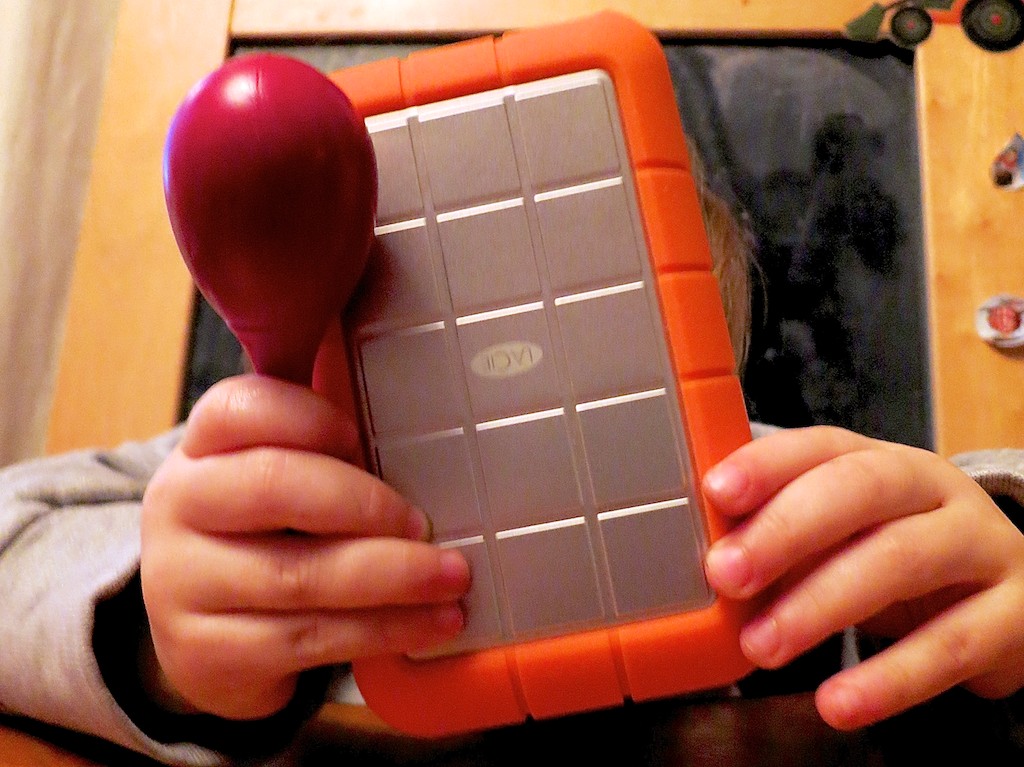
I still happily use my portable LaCie “Rugged” drive with its telltale orange rubber bumper.

But enough video editors I’ve spoken with over the years have shared their LaCie horror stories. Plus the web is filled with angry LaCie owners.

That said, since every hard drive has its own unknown expiration date, you’ll find ugly stories about every drive manufacturer.

Then, I heard a lot of good press on a company called
G-Technology.
Their G-Tech drives are more expensive than LaCie’s, but the consensus
(if one can call it that) is they’re better.
So I made the switch.

Since then I’ve been a G-Tech man.
And I’ve been very happy.

I own a 6 TB G-DRIVE for my Time Machine backups and a G-RAID to store and edit all my home video files.

RAID Drives
Though every hard drive will eventually die on you one day, there’s one general exception.

They’re called RAID drives, which stands for ‘redundant array of independent disks.’
A RAID is essentially one big hard drive made up of linked, smaller disks.

If one of the hard drives in your RAID fails, the others have enough redundant data to maintain the integrity of all your files.
The downside to this solution is it shrinks the effective size of your hard drive with all that duplicated data.

So your overall hard drive ‘unit’ can theoretically live forever.
(Assuming you replace the expired individual drives)

There are many complicated ways a RAID drive can be formatted or ‘striped.’

The one essential rule to remember is RAID 0 doesn’t provide any back up security.
It does give your drive a big performance boost for video editing, but that’s not what we’re looking for right now.

You’ll need at least a RAID 1.
For more detail on RAID technology, this is a good article from Gizmodo.

Be forewarned…
RAID drives are a lot more expensive.
(Are you sitting down?)

The G-Technology 8 TB G-RAID with Thunderbolt 3 (with two drives)
goes for $599 on Amazon.

Ouch!!

But if you could afford it, wouldn’t you pay more for a little peace of mind on the home tech front?

You Don’t Always Need a Bigger Piggy Bank
Of course not everyone will jump at the opportunity to drop six hundred clams on their home video projects.
You could easily go to Staples and buy a basic 8 TB drive for only $199.99.
But it’s an apples and oranges comparison.

The good news is the ongoing forward march of technology makes heartier hard drives cheaper by the day.

Plus, you may never need a RAID.
I needed to raid my piggy bank to buy a RAID, specifically because I wanted it to safely house my ever-bulging collection of HD home video clips.
They would otherwise max out my iMac’s hard drive.

If you’re able to simply store all your video files on your computer’s internal drive and only need a Time Machine back-up drive,
I recommend G-Technology’s ‘G-DRIVE.”

You can pick up a 6 TB G-DRIVE USB 3.0 for just $169.98 on Amazon.

Now, that’s not so painful, is it?

Release the Kraken!
These days, there are any number of ways to summon the wrath of the tech titans.
A hockey puck could be the least of your problems.

If Perseus were around today, I bet he’d have a large G-Tech drive in his bag of tricks.

I Don’t Know Why I Want Ultra HD

Behold the mighty 85” Samsung Ultra HD TV on the floor of this year’s Consumer Electronics Show.  What’s Ultra TV?  Exactly.

Behold the mighty 85” Samsung Ultra HD TV on the floor of this year’s Consumer Electronics Show. What’s Ultra TV? Exactly.

Another CES has come and gone.
If you were following the tech reports from Vegas, you know one of the big technologies on display was cutting edge HDTVs designed to turn the current TV market on its head.

More Star Treky than today’s glistening pinnacle of tech achievement-
The 1080P HDTV?

More Tron-alicious than the 3D technology that was supposed to revolutionize your home entertainment experience two years ago?

Why yes. Better than that.

It’s called Ultra HD.
(cue the angelic chorus)

Welcome Ultra HD
Ultra HD is four times better than regular HD.
Also called 4K, which refers to the number of horizontal pixels on the screen, this nascent TV format is designed to really knock your socks off.

And not to be outdone…
There’s already an 8K Ultra HD TV format designed to kill the 4K revolution before it even begins.

Sharp was the first out of the 8K gate, displaying their 85” proof of concept TV at CES.
Its 8K display was made up of a mere 33 million pixels.
(drool)

There’s one tiny problem.
Virtually no cameras shoot in 8K yet.
And there’s very little commercial TV content currently available in 4K.

But every revolution has to start from somewhere, right?
So today, the commercial evolution of the Ultra HD story is predominantly in the 4K space.

Cha-Ching!
Did you know that 4K Ultra HD TV sets have already been shipping to those of us with a little disposable income…
Sony and LG, respectively, sell their 84” 4K models for a mere $20K and $25K.

What?
You read it right.
That’s twenty thousand.
Dollars.
For a TV that’s sharper than your neighbors.
(And has a great picture)

All Hail Samsung – New King of Ultra HD
AT CES, Samsung introduced their 85″ Ultra HD whopper,
with their ‘S9’ 4K Timeless Gallery TV.
(The S9 UHD TV edges out its 84” competition by 1 inch.
95” and 110” Samsung models are due out by the end of the year.)

And how much does it cost to become the proud owner of the largest Ultra HDTV in the world?

$37,877
(preorder pricing from Korea)

You’re Going to Need a Bigger Piggy Bank
Face it. These massive Ultra HD TVs are going to cost you well into five figures.
And there’s no real programming out there yet in Ultra HDTV.

Hmmm…
(ring ring)
Hello, George Jetson? Is your used hover car still for sale?
(That might give you a bigger bang for your buck.)

Okay. So these first generation Ultra HDTVs aren’t ready for prime time.
But like all new tech, the pricing will eventually drop.

Should You Supersize Your TV?
Assuming you’re not going to spend a ludicrous amount of money on Ultra HD today, the Ultra HD price point will still be expensive in the future when you consider jumping in.

So the three questions you’ll want to ask yourself before going Ultra HD are –

  1. Why do I need to upgrade the size and pixel count of my current flat screen?
  2. Do I really want to pay for it?
  3. And will I be happy with a massive screen in my family room?

Technology is Evolving Faster than People’s Pocketbooks
One problem with the rapid advance of technology is the way it affects the life cycles of home technology.
By the time you get used to your new gadget, the next version is often already on the market!

This phenomenon is juiced by the mega marketing machines out there with their mission to drive you to replace your old, but perfectly functional tech.

Apple, of course, successfully cracked the code on this one.
Their must-have tech devices refresh themselves every year, and their older tech become obsolete within three years.
(Usually due to self-created software incompatibilities)

It’s like a scene out of “Blade Runner.”
Every time I retire an older Apple product into a drawer and look at it for the last time,
I think I see Rutger Hauer, hanging on for dear life as I push it coldly into the darkness of premature obsolescence.

For better or for worse, when I watch “Blade Runner” on my Apple TV,
Roy Batty always dies in the end.

But not every consumer tech company is an Apple.
Certainly no company today that’s known for making TVs.

Unless we’re still talking about Apple and its unannounced, but long rumored, Apple TV that’s actually a TV.
I’m drooling already, and I don’t even know what it can do.
(well, nobody does yet)
But I’m assuming it will be a game changer.

Goodbye Analog. Hello HDTV!
Being a game changer is one way to prompt a purchase.
Another is fear of obsolescence.
The HDTV revolution a few years back was propped up by that concern.

The government’s forced digital transition deadline back in 2009 chained your old analog TV to those crummy analog/digital converters. How humiliating.

That’s real pressure that would have sold the Brooklyn Bridge to anyone!

Plus, the wide screen/flat screen combo punch was hard to ignore.
And you got all that floor space back in your living room.

So in the end, HDTV was a welcome upgrade.

3D, Really?
I love 3D films in the movie theater.
Especially when the 3D is done right.
(“Avatar,” “Prometheus,” “Life of Pi.” )
But seriously, not every movie needs it.

For the past couple of years, I’ve resisted the pressure to buy a premium priced 3D HDTV for my living room.
Sure, 3D is cool, but I can get my fix at my local multiplex.

And those big, expensive, clunky glasses are just going to get lost when my toddler sees me wearing them.

Day 1: Dada, what are those?”
Day 2: “Dada, look at me!”
Day 3: 2D is cool too.

I’m not alone.

The success of 3D HDTVs is somewhat unclear.
Some reports put the technology at 20-30% market penetration.
That’s hardly a tipping point.

But now, the 3D voodoo has begun to trickle down to mid-level TV screens.
So 3D is becoming just another TV feature, vs. the big selling point that drives the TV set’s sole purpose.

A lot more 3D displays will be slipping into living rooms this way.

So 3D may be part of my next TV purchase after all-
As a passive upgrade.
But only after my current model sputters towards complete darkness.

Size Doesn’t Matter Anymore
What, if anything would get me to prematurely retire my beloved 42” Panasonic Plasma?

Yes, my plasma screen is a 720P dinosaur that I’ve owned for the past six years, but its picture looks just fine, thank you very much.

(Before that, I own a 25” Zenith tube monster for over a decade, which was still alive and kicking when I pulled its plug to make room for the HDTV.)

I’ve mused before about how much of my media consumption has recently been handled by my portable screens.
They’re so teeny-tiny by comparison to my plasma display.
So size hasn’t been driving my screens of choice lately.

And I don’t think I need four times the pixels of Ultra HD.
Heck, even now, I’m not even taking advantage of the 1080P standard of HD.

Something revolutionary really has to convince me to upgrade.
I’m sure Utra HD looks stunning.
But, Ultra HD still isn’t it.

How to Make Bigger Better
Now, don’t give up on me, oh mighty marketing machines.
Not so quickly.
Maybe, I’m just playing hard to get.
Maybe you just haven’t found the right hook yet.

Here’s an idea…

What if your Ultra HD TVs got so big, so massive, they become complete walls unto themselves in people’s living rooms?
(You’ve seen it sci-fi movies, where the screens rotate changing window vistas.)

And make them interactive.
And affordable.

Suddenly, it’s something else. Something different. Something I’d really crave.

Parlor Walls – The Must Have Tech for 2023
You can quote me now. I must have one of these.

I’ll gladly ditch all my bookcases and their contents to make space.
(except for my tattered copy of Fahrenheit 451)

If you haven’t already made the connection, I’m salivating over a tech vision that’s sixty years old.

Remember the parlor TV walls in Ray Bradbury’s dystopian novel?
(Yes, the parlor walls represented the addictive and isolating effect of technology, but that’s a conversation for another day.)

My point is… there are plenty as-yet unrealized applications for the evolution of Ultra HD imagery.

Some related ideas have already been conceived by Corning, the glassmaker that brought you Gorilla Glass for your smartphones and tablets.

Their forward thinkers have envisioned quite the future partnering their intelligent glass with companion technologies.

Corning Screen_docsLast year Corning produced their viral YouTube video (almost three-million-views) called –
A Day Made of Glass 2.

This way-cool video imagines the everyday uses for their architectural display, wall format display, and 3D TV display glass technologies.

It’s a remarkable vision.

My credit card is already on the table.
But there’s no one to call.
Yet.

If one little YouTube video can get me this excited, it shouldn’t be that hard to convince me to buy my next TV.

Note to Ultra HD Coalition
There’s a new TV in my future.
That’s better than the one I have.
In ways I care about.
That I can afford.
And I really want.

Now please go make it.

I’ll be waiting in my parlor…