At Home with Tech

Unlock the power of all your technology and learn how to master your photography, computers and smartphone.

Saying “Sleep Tight” from 5,000 Miles Away

Skype will be doing some heavy lifting for me, as I stay connected to my life back home during my trip to South America.

I’m going on a trip.
Far, far away.
I’m flying to Santiago, Chile.

Three worries have dominated my brain space, as I’ve prepared for this little adventure for my job.

  • What shots do I need, so I don’t become Typhoid Mary?
  • What can I eat, so I don’t get Montezuma’s Revenge?
  • And how the heck do I stay in touch with my family without breaking the bank?

The Vaccination Plan
I had to visit the doctor’s office three times to fill up on all the shots I needed.
But I found an unexpected issue you might be interested in.
For all of you out there of a certain age, you probably need a Measles/Mumps/Rubella combo booster shot that apparently few of us got when we were kids. Even if you’re not planning an international trip, you might want to take care of this while here at home.
I’m just saying… Everyone else in America is covered.
I guess that vaccination box fell off the truck back in 1965.
Anyway, now I’m all set.

The Cuisine
We all know- Don’t drink the water. Don’t eat anything uncooked that’s been washed with water. So that means no fruits and vegetables.
What a hardship. I’ll live.

Reach Out and Touch Someone
I don’t have to tell you that using your cell phone internationally is expensive.
I called AT&T last week, and the best wireless international deal they could offer that covers roaming charges is $1.99/minute plus the $6 monthly fee. And that’s just to use the phone. A data plan for email and web is a whole different story that starts at $30/month plus usage fees.

Apparently, some Americans have lost their life savings (slight exaggeration) taking a peek at Facebook on their smartphone overseas. (Come to think of it, there are other ways to lose money with Facebook these days.)

Something for Nothing?
You know, I’m not just interested in racking up big phone charges.
That’s so 1999.

In the good old days, you would just pick up the hotel phone and dial away with a cigarette and blindfold on.

Or, you had your expensive AT&T calling card. Remember that? You just sucked it up and paid big bucks to make a quick call to let mom know you’re still alive.

Or maybe you just disconnected for a week and went cold turkey.
(I shudder at the thought. Wait, I can’t tell if it’s with shock or glee.)

But we now live in more ‘evolved’ times, where technology has supposedly broken through the shackles of the old school wireless titans.

Just Turn It Off
I think the best way to ensure you don’t bleed money with your smart phone is to temporarily hobble it as a cell phone. You just turn off its wireless capability before you step on the plane. For my iPhone, that means activating the airplane mode and blocking the data function.

So what good is it then?
Well, you’ve still got its Wi-Fi functionality.
Turn it back on and use what you’ve got.

With the power of any international hotel’s Wi-Fi network, you can easily check email and surf the web without the assistance of a wireless carrier.
And with my iPhone, I can even do a video FaceTime chat with my wife and son at home before he goes ‘night night.’

Apple’s iMessage will also work over Wi-Fi. So now you’ve got your texting functionality back to communicate with other iMessage users.
No problem.

But if anyone else wants to reach me, especially those who don’t know I’m away, my cell phone number and normal texting functions are trapped in my lobotomized iPhone.

I’m essentially unreachable.
Or am I?

Skype Online Number
I’ve always wondered how Skype does what it does.
Always for free or pennies on the dollar.
All these years, I thought there had to be a catch.
But now, I’m leaving the country, and the only communications lifeline I’m giving myself is Skype.

As you’re probably aware, Skype is best known as a free computer-to-computer voice tool anywhere in the world. That’s really nice. But who spends all their time at their computer? Especially when travelling?

Well, Skype has been busy expanding its offerings, and it now proudly lives on my iPhone. As long as I’m within range of a Wi-Fi network, I can receive calls from anyone back in the States for free. (almost)

Here’s how-

I bought a Skype Online Number, which works like a regular telephone number using the area code of my choice.

As I mentioned earlier, I’ll be turning off the cell part of my iPhone by turning on its Airplane mode. Just to be safe, I’ll also turn off data roaming, which prevents my phone from surfing the web or receiving text messages with big international fees attached.

Now, when someone calls my new Online Number, and as long as my iPhone is active on a Wi-Fi network with Skype running, my phone will be back in business.
If I miss a call, no worries. I’ve also got Skype voicemail.

The cost to set this crazy idea up?
$12.06 for three months.
(Skype is currently running a sale for their Online Numbers.)

But what about the 95% of my contacts who won’t know to call my new number?
Are you ready?

I’ll just forward my regular cell phone number (which won’t work while my phone is in Airplane mode) to my fabulous Online Number.

(thinking)
(thinking)
(Light bubble goes off!)

Genius!

And how do you complete the circuit to call someone back in the States?
Are you sitting down? This sounds even more absurd.

Buy a $2.99/month Unlimited US and Canada plan.
All your Skype calls to a US landline or mobile number are now free.

What?! That sounds impossible.
But I’ve done some research on this, and it seems to hold up.
And yes, this works if you call from anywhere in the world on a Wi-Fi connection.
This is all so simple and inexpensive, and ludicrous!
There’s got to be a catch, right?

I don’t think so.
(And if I’ve missed something, please let me know!)

Of course, remember, you’ve got to be tethered to a Wi-Fi network, which is the only major downside to this very disruptive concept. (I’m expecting several stealth Blackhawk helicopters to be hovering over my house any minute now.)

But I should be fine with my plan, because I’ll be working much of the time and close to the hotel’s Wi-Fi.

Skype WiFi
And when I leave the hotel’s Wi-Fi bubble, I also have another Skype app called Skype WiFi. This app allows you to find public hotspots that partner with Skype for a wicked cheap per-minute connection, which you pay with your Skype Credit.

So if you haven’t guessed, I’m going for it!

Wife IT Support
And after I explained my lengthy, ingenious solution to my wife, she offered me her own airtight plan that she took five nanoseconds to research for me:

When she wants to reach me at night, she will walk to the couch, sit down, and pick up our home phone. She will then call my hotel room using our Optimum Voice international plan, which has a low 17 cent/minute cost to Chile.

Hmmm….
Well… I guess that works too.
(I’m not going to let my overlooking this obvious and very practical strategy spoil my joy.)

Wheels up in less than 8 hours. I’ll let you know how it goes…!
Cancel the Cable TV Mutiny

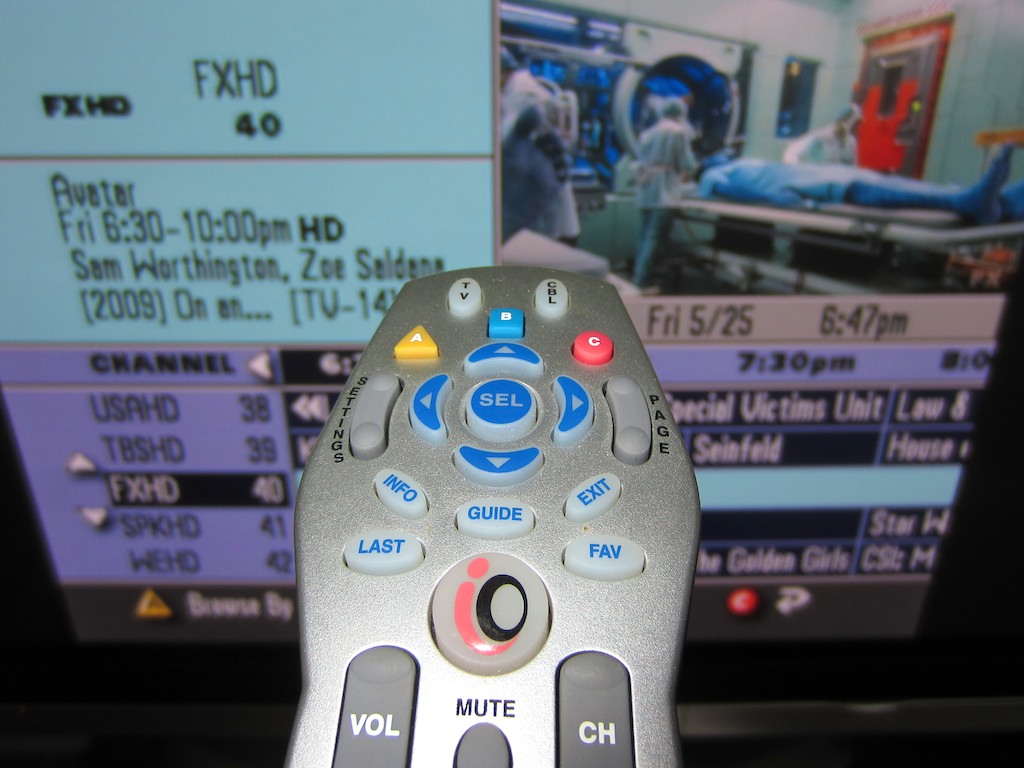
Do I need to hold onto my Cable TV provider just to watch Avatar again for the fifth time? I just might want to, but not to see Pandora. Instead, I’ll be looking for CableWiFi.

Do you love your cable service?

Do you happily write out your check to the cable company every month with the confidence that you’re getting your money’s worth?

Or are you secretly planning a mutiny to move your media consumption to the a-la-carte online world and save a chunk of money?

Before I continue, I need to offer up a disclaimer by saying I was once employed by the cable television industry. So let’s continue…

Time to Cut the Cord?
Yes… I imagine there are many of you out there who think about the specific content you consume on cable and wonder if you could just go out there and pay for it on the web via iTunes, Hulu Plus, or NetFlix. All that other bundled content and channels you never watch on cable…lose it! Break out the digital rabbit ears for live news and you are set!!

Possible?
That depends on what you’re watching, what additional hardware you want to buy to collect the content, how much sports you consume on cable that’s not available elsewhere, and how good the digital airwaves are by your television.

There have been some great articles on this-
pbs.org
nytimes.com
cnet.com

The Cable Paradox
And though a cable-free life does indeed seem to be a viable, more highly evolved step today in your media consumption strategy, there’s one problem.
All of the stories talk about how much a pain in the butt it is to cut the cord.

You’ve got to manage multiple platforms and technologies. And that takes some time and a lot of patience.

No one likes the cable company, but those cable barons sure do make it all so easy. You pick up the remote, move your thumb once, (maybe twice) and you’re watching your favorite show. So far, nothing beats that convenience.
I know. It’s a paradox.

And I think that’s still cable’s big selling point today. When things are working right, it’s so darn easy. We didn’t really understand that dynamic years ago before the web revolution, which face it, is still ‘kinda complicated’ on a day-to-day basis.
(Notice my blog isn’t called At Home with Cable.)

The Big Announcement
So I was pretty psyched when the cable industry announced this week at their big annual NCTA convention that five cable companies including Cablevision, Time Warner Cable, and Comcast are going to start sharing their metro Wi-Fi services throughout the nation, calling it CableWiFi.

Wait a minute. I thought we were talking about cable television, and not their bundled home broadband Internet service.

Well, the cable industry has also been building up a value-added service to their Internet. It’s free roaming Wi-Fi hotspots for their subscribers who are out and about.

I first heard about it a year or so back from Cablevision, my cable provider, but honestly, it didn’t move the needle much for me, because I don’t hang out in my town during the day, as I normally commute into New York City.
(I think I used it once at Dunkin’ Donuts off of Route 1.)

Yes, there’s Wi-Fi on the train platform, but how long is that good for?
(If I make it to the platform with ninety seconds to spare,
I’m having a good day.)
But, if Wi-Fi were on Metro North trains all the way in, I would really dig it.

Anyway, I’ve got my all-you-can-eat legacy data service on my iPhone, which covers most of my email and web surfing needs while I’m mobile.

I think the big gain would come for my family’s Wi-Fi only iPad, which doesn’t travel as much with me, because it’s not connected.

Last weekend, I tried using the iPad on Amtrak’s Wi-Fi service on a trip up to Boston. And quite frankly, it was an amazingly frustrating experience. The connection was way too slow, even just to read simple stories. Nevertheless, the idea of using the iPad on the road really appeals to me. I just didn’t want to pony up for the cellular version with the monthly data service plan with AT&T.

Welcome to My Personal Hot Spot Network
So it’s about scale. If suddenly I had access to a whole bunch of healthy Hot Spots in other places where I actually might spend some time, other than Starbucks, then things would suddenly get a whole lot more interesting.
And we’re talking 50,000 free Hot Spots coast to coast.

I’ve previously talked about the fact that I’m a
mobile media-consuming warrior.
And I think there are more and more of us out there like that.

I once thought that my five-year-old 42” 720P Panasonic Plasma TV would age quickly, and I would quickly covet a 55” 1080P 3D model.
You know, not so much.

Anything that allows me to consume digital content more easily on the road is where my head is focused.

And today, it looks like the cable companies have taken a big step in that direction.
And there’s no additional cost!

Really?

I think I’ll call off the mutiny for another day…

Taming the Evil Work BlackBerry

Pop Quiz- It’s 8:39pm, and there are two fresh emails waiting on your work BlackBerry. What do you do? What do you do?!!

Overuse of your work BlackBerry at home is the seventh most frequently reported reason for marital strife.

Actually, I haven’t a shred of data to support this claim.
I just thought it would grab you to stick around for another few words.

But don’t be too quick to dismiss my claim.
If you use a work BlackBerry at home, you know I’m onto something.

In today’s techno-centric culture, we celebrate the fact that so much work can be done just about anywhere… not at work.
On the beach, on the commuter train, at a restaurant, and of course…at home.
With computer and mobile technologies, you are no longer chained to your offsite desk from 9-5.
Work is flexible. Work is mobile. You’re free! How liberating.

If you’ve been assigned a BlackBerry, your job has also oozed into every orifice of your home life. Work is now 24/7. And your work BlackBerry strapped to your belt buzzes away non-stop.

How are you supposed to deal with that? You’ve got other priorities on the home front that may not react well to your tapping away at the dinner table.
And you’ve got to sleep.

I’ve been using a work BlackBerry for the past seven years, and though I don’t quite call it my CrackBerry, I’ve got a few tips that might help you use this mighty evil to your advantage.

Read the Emails as They Come in
…But don’t go crazy. If you let the emails pile up, getting through them all will get progressively more difficult. And some will eventually get lost underneath the ever-growing stack.

Respond Quickly
If a quick response is sufficient, do it right after you read the email.
It’s very similar to what your mother taught you about desk clutter-
Touch a piece of paper once and do something with it. File it or trash it. Don’t keep picking it up and looking at it and putting it down. That just wastes more time.
The same idea applies to all the hundreds of your digital emails.

Plus, responding quickly keeps you in front of the conversation. And staying in front of the conversation keeps you in control of the dialogue, especially when there are multiple players talking. The power of the BlackBerry allows you to do just that.

Don’t Diss your Kin
If you’re talking or doing an activity with a family member, put the BlackBerry down. Unless, you’re waiting for an important email, it’s downright disrespectful to be tapping away during family time. If you absolutely must check your email at the dinner table, apologize first and then be quick about it.

Everybody Turns into a Pumpkin
Actively choose a time you normally stop responding to emails on weekday nights and weekends. And be consistent about it. Otherwise, people will expect you to always respond to them immediately whenever they reach out.
I tend to move to email silence after I get home from work around 7pm. Unless your job requires it, no one expects you to be in active email mode after dinnertime.

I may check my BlackBerry before turning in, but simple awareness of an email does not mean you’ve got to respond.
And last I checked, just viewing the subject line on your BlackBerry does not activate the big-brother ‘just-read’ alert trap the email may contain.

Similarly, in the morning, I check my BlackBerry around 7am, but I don’t typically respond to emails till I get in to work.
That said, I do take care of important emails that help me move my workflow forward, while I’m commuting in on the train.
The difference here is I’m using the time to get a jump on my own day, as opposed to helping out someone else’s day. There’s a difference. Pay yourself first.

During the weekend, you should be dark for the full 48 hours. I don’t wear my Blackberry on Saturday and Sunday, but I do check it in the morning and at night to stay on top of things.

Is Your Boss an Exception to the Rule?
In one word-
Are-You-Kidding-Me?
Of course!

I learned a long time ago that it doesn’t only matter that you do amazing work on the job. If your boss doesn’t know it, you’re not doing it.
It’s like that ‘tree falling in the forest’ line.

Being responsive to every email your boss sends creates a great foundation for your success. So one of the best ways to show how amazing you are as an employee is to simply reply quickly. And that means as soon as you see the email.
If you’re at home. If you’re out shopping. If you’re getting an ice cream.

Effective communication with your boss is always your job, and your dark BlackBerry is your shining sword in this ongoing quest we all must pursue.
Wield it at home often!

But remember, you don’t have to wear your BlackBerry into the shower in case your boss pings you.
Just don’t be so strict with my earlier pumpkin rule from above.

Don’t Send Huge Attachments
At home, you wouldn’t think twice about sending a big file with pictures or a home movie to a friend or family member. My home email can handle a little data strain now and then.

But work email is a different beast. The IT departments I’ve known over the years have been a little curmudgeonly with how large your email files can get, before you can’t send emails anymore. So you’ve got to pay attention to how full your email is, because I can pretty much predict when you’re going to go over your limit. It’s when you’re at home with only your BlackBerry, and you have to send an email or your world will end. That’s when.

And you can’t just fix the problem by deleting emails on your bulging BlackBerry. That doesn’t clear them off the work server. You’re still dead in the water.

So don’t ruin a work colleague’s night by emailing them a huge file.

Texting VS the BlackBerry
I find a lot of people I work with don’t have BlackBerries. Yes, they send me emails the old fashioned way via a computer, but I find they also like to text me on my personal iPhone. Especially with something that requires a quick and simple response. The irony here is texting is all about speed and immediacy. Nobody thinks twice about responding quickly to a text.
That is, until more work colleagues realize this little sea change and decide to hunt you down with the mighty text.

Lead the Rescue Mission
A lot of the above advice is defensive posturing.
Many of the same tactics can also be used for positive offensive action. If an emergency comes in over the BlackBerry, you can be the hero if you follow the above rules and simply take action quickly. Again, nobody expects you to respond to an email at 3am, unless you’re working with colleagues on the other side of our Mother Earth.

Use Common Sense
Much of this falls under the simple umbrella of setting appropriate limits with people who tend to make your job a little more challenging when they hunt you down outside the normal work day, further cementing the 24/7 work mindset.

So it’s all about setting appropriate limits.

And by the way, there’s no rulebook here. I’m not aware of official BlackBerry etiquette in company handbooks. (But come to think of it, that’s not a bad idea.)

I say it’s okay to set up your own boundaries for when you spend time on your BlackBerry. Just be smart about it. If you’re consistent, you will still appear more responsive than most who use this beastly and wonderful device.

Keeping these common sense suggestions in mind, the BlackBerry can be a force of good in your life, both at work and at home.

Wait, I gotta go. My belt is buzzing…