At Home with Tech

Unlock the power of all your technology and learn how to master your photography, computers and smartphone.

Tag: Apple Watch

Here’s Why Attaching a Bumper to Protect your Apple Watch is a Smart Idea
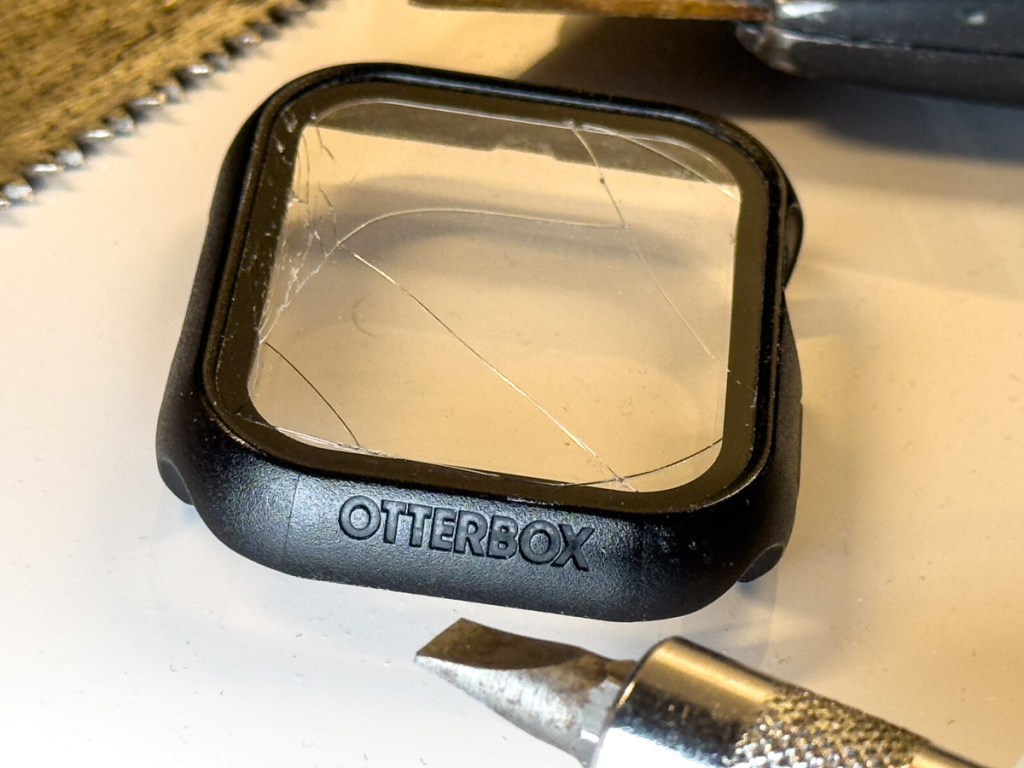
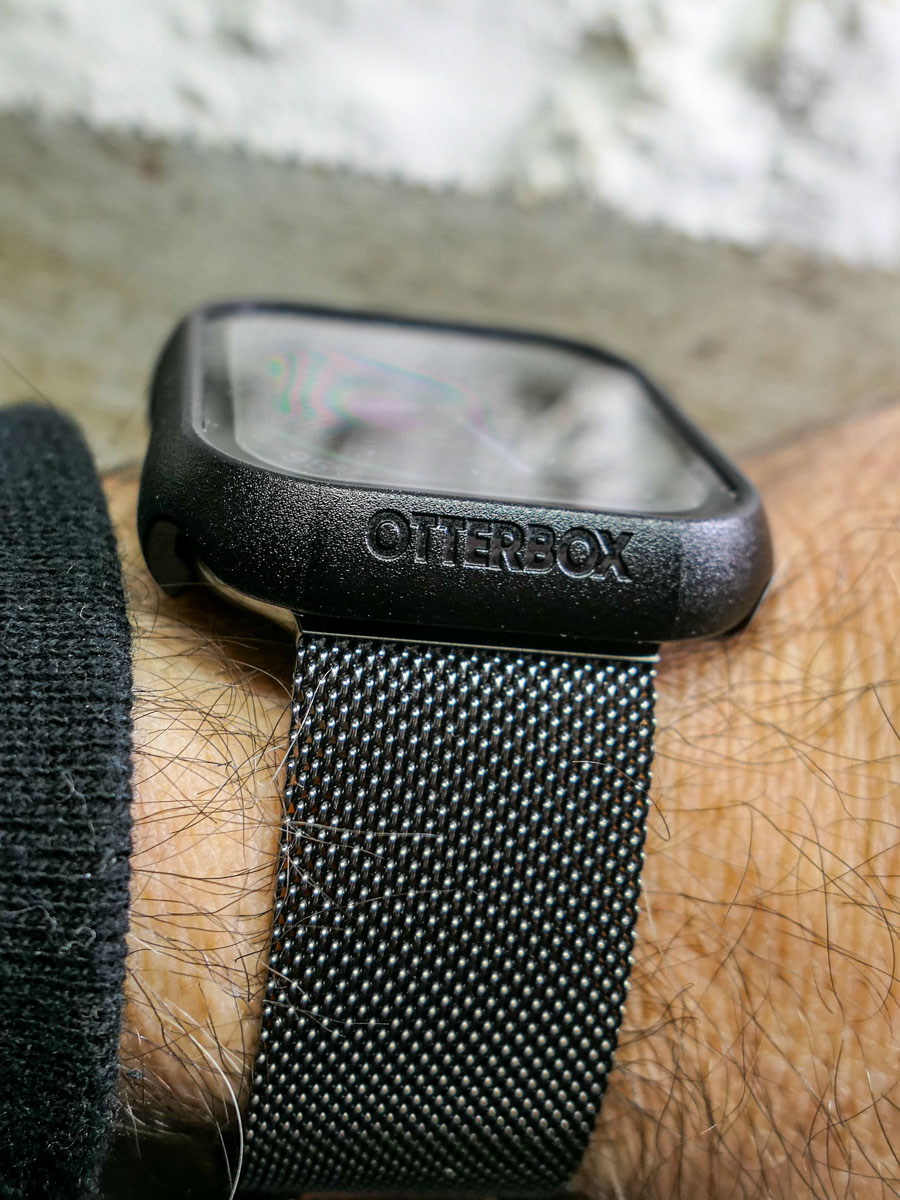
A long, diagonal crack mysteriously appeared on my Apple Watch screen. No, there wasn’t an ‘incident’ or moment of impact that I could recall. Yes, it was shielded by its OtterBox integrated bumper and screen protector. 

I could feel that the crack went deep. But I didn’t know how far down it went and whether it reached the surface of my Apple Watch Series 9.

Yes, I was concerned.

Apple Store ER Visit
So, I visited my neighborhood Apple Store and booked an ‘instant’ appointment with an Apple Genius. (Do they call them that anymore?)

My Genius walked over to me like a doctor entering an examination room. He asked me to take off my OtterBox’s bumper. I quickly realized I couldn’t. It was stuck on. Really stuck (like an alien face-hugging Xenomorph). I asked if he could help. He had trouble too.

It took the Apple Genius a couple minutes, and he needed to use a special Genius ‘tool.’ But eventually, he pried the bumper off. The integrated screen cracked further along the way, but it eventually revealed my Apple Watch’s screen… in perfect condition.

Phew!

But a fair amount of ‘particulate matter’ had accumulated in all the nooks and crannies. My Apple Genius happily polished it up for me and then handed over my Apple Watch. 

Time for Another Bumper?
My naked Apple Watch rested in my palm, gleaming. So now what?

No, Apple doesn’t sell bumpers or screen protectors for Apple Watch.

However, my Apple Genius mentioned how much he liked the OtterBox brand and that I could probably buy a replacement bumper online.

I strapped on my Apple Watch as it was meant to be worn… without any third-party protection. But I must admit… I do occasionally hit my wrist against doors and walls. So, my experience may fall outside of Apple’s definition of ‘normal.’

I walked out of the Apple Store with my next mission: Buy a replacement bumper. 

In Search of a Better Bumper/Screen Protector
I jumped back online and searched OtterBox’s website. I didn’t want to buy the exact same OtterBox ‘Eclipse’ bumper/screen combo. Not because it only lasted for barely more than a year. I didn’t appreciate how difficult it was to remove.

OtterBox didn’t offer another choice. So, I expanded my search.

There aren’t many manufactures in this market, and even fewer from brands I recognized. The options on Amazon mostly fell in the sub $10 price point. Sometimes, you’d get two bumpers for ten bucks… even with the built-in screen protector.

How good could any of these really be? 

And I couldn’t find consensus with reviews… the few that I could find. It’s like this was a forgotten/abandoned product category.

Perhaps Apple is right… Apple Watch doesn’t need protection.

Still, I knew that mine did. 

OtterBox EXO EDGE
After my exhaustive search through uncertainly, I eventually ended up back where I started with the one brand I knew.

OtterBox also makes the EXO EDGE bumper without a screen protector. I figured the simple bumper by itself would be more structurally flexible without a rigid screen protector on its top.

So, I gave it a shot… Click.

And in fact, the EXO EDGE bumper does have a bit more give and take. It popped easily onto my Apple Watch. More importantly, I expect it will be simpler to remove when the time comes.

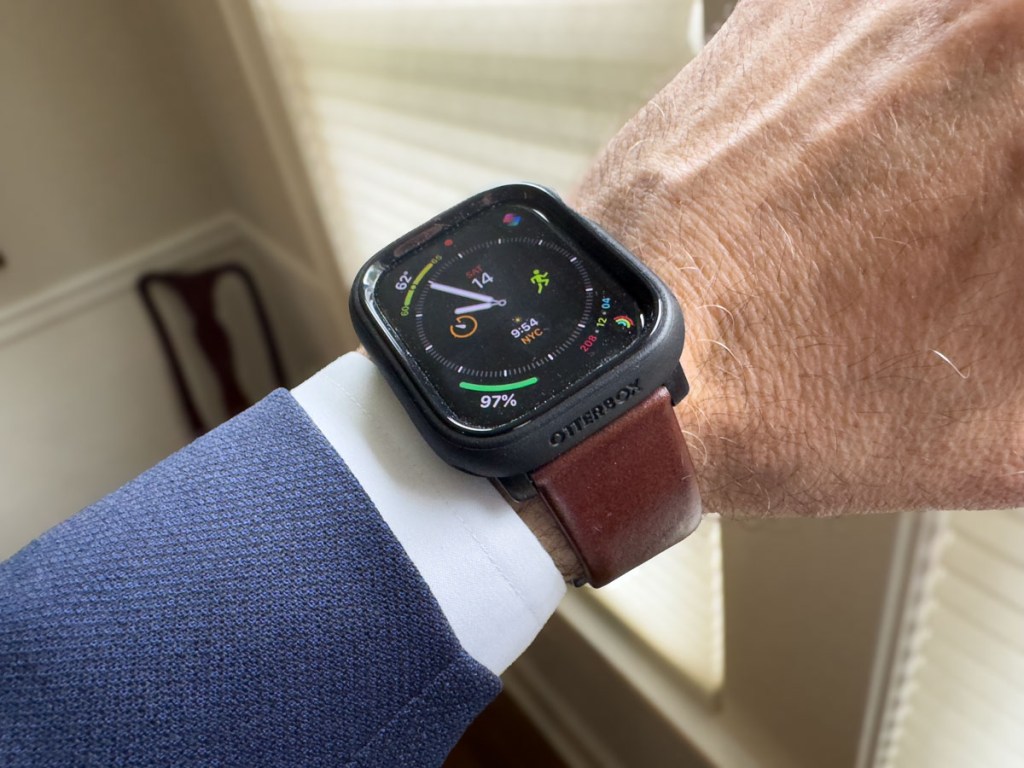
And here’s my Apple Watch with its new EXO EDGE bumper
(and Nomad leather band).
No More Screen Protection?
Case closed, right?

Well, what about the screen? It’s now exposed to any number of dangers with no net. 

Yes, I’d prefer to also have a screen protector on my Apple Watch, but I don’t want to use an integrated solution that can cause damage when removed.

My EXO EDGE bumper should offer sufficient protection from most scenarios. But no, it won’t protect against a sharp object at 90 degrees moving directly towards the screen.

You Can’t Protect Against Every Situation
I could seal my Apple Watch in bubble wrap and duct tape. Or perhaps I should just keep my Apple Watch in my pocket all the time. But, of course, that’s all absurd.

I’ve taken reasonable precaution to protect my Apple Watch’s body and screen with a simple OtterBox bumper. We’ll see how far this sensible approach takes me this time.

This topic falls under a larger question I sometimes have regarding the practicality of manufacturing expensive, shiny surfaces that require constant protection. (Wouldn’t it be great to drive a car with a tough, rubberized exterior?)

Alas, I know you’ve just got to travel your life’s path without worrying about every possible stumble.

But it’s okay to be smart and apply certain protections.

And just try not to trip.
How to Update Account Settings on Apple Watch Using your iPhone

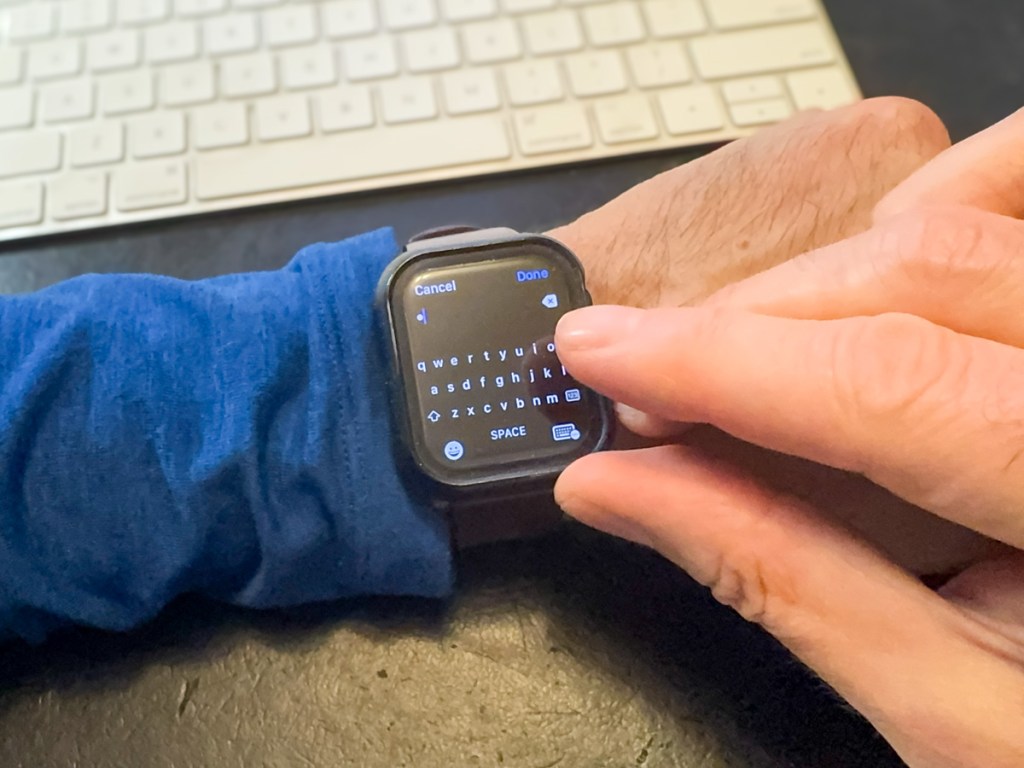
Trying to type into Apple Watch keyboard
Stop trying to sign into your Apple ID using your Apple Watch’s micro keyboard. Your finger is probably way too big for this. Here’s the better way to get the job done.

I don’t like messing with my Apple Watch. I’ve set it up to do what I want, and I usually don’t dig in to change the settings. The screen is so tiny. Yes, its interface is clever, but it’s not much bigger than a postage stamp. 

And that’s fine. It’s a watch… not an iPhone. 

Sure, it’s similar to iPhone in certain ways and is best tethered to one. And I can easily interact with it using the Digital Crown and side button.

But please don’t ask me to type anything into my current Apple Watch Series 9. That’s absurd. Yes, you can call up a cute micro keyboard to use. But come on… My index finger takes up 30% of the entire surface of my Apple Watch. 

Update Apple ID Account Settings on your Apple Watch
But that exactly what my Apple Watch sometimes asks me to do after a software update. I’m supposed to log back into my Apple ID account. And then my Apple Watch presents me with its tiny keyboard. Are you kidding?!  

My finger’s surface area can press onto 3 keys easily… so tapping away gives me about a 30% chance of keystroke success. (And the tiny scribble pad? That’s no better.) 

So recently, after failing to sign into my Apple account after multiple miss-tapping sequences, I looked for another way in…

Use your iPhone Instead
If you think your iPhone can help, you’d be correct. Strangely, I couldn’t quickly solve this tech challenge by Googling it, but eventually I found the clue. Here’s how it works:

  • You simply need to activate your sleeping iPhone right after your Apple Watch prompts you to micro-tap your password. 
  • Immediately, your iPhone will come to the rescue and open a thin text-prompt window on its own screen for you type into. 
  • And as you do that, your password will magically mirror onto your Apple Watch’s screen. Done.

So obvious, right? (The solution is already baked into the Apple Watch/iPhone relationship.)

No More Micro Tapping
Perhaps the whole world already knows this trick. And if it’s just you and me who’ve finally caught on, so be it. (I won’t tell anyone.)

But now, my finger will never again attempt the absurd micro-tap dance on my Apple Watch. 

It’s a micro win… but a win, nevertheless.

How to Slow Down the Inevitable End for your Beautiful Tech

Yes, I immediately ruined the sleek beauty of my new Apple Watch by strapping a protective bumper over it. Was that necessary? Here’s what happened the very next day…

Design is a key element for the look of your personal tech. Sure, how your gear works is important, but it sometimes feels like style supersedes function.

So, if a piece of technology is designed to look beautiful, covering it up can be viewed as something of an insult. Or at the very least, you’re certainly not cool.

But the reality we move through every day doesn’t usually contain smooth edges and gleaming surfaces, unmarred by the brutality of existence. Wearing expensive and beautiful personal tech in an unpredictable and messy world creates inevitable danger for your devices.

Let me count the ways I’ve put my tech in harm’s way.

Projectile AirPod
During the latter part of the pandemic, I was walking to work from Grand Central Terminal wearing my Apple AirPods. When I stepped into the crowded office elevator ten minutes later, I temporarily popped on a face mask.

As I exited the elevator onto my floor, I quickly pulled off my mask. That was a mistake.

One of the mask’s ear loops caught the left AirPod, and a rubber-band effect propelled it forward into the elevator-bank hallway.

My AirPod flew towards the wall and hit it hard (with a horrible ‘ping’ impact). It ricocheted onto the floor and then skidded about like a glass marble. I chased after it in horror.

Somehow, my tiny AirPod seemed undamaged.

Apple Watch Scarface
Five years ago, I bought my first Apple Watch. Of course, I immediately bought a plastic bumper for it, which provided a protective raised edge.

I had to ruin my Apple Watch’s sleek beauty in the name of common sense. I often whack my wrist on objects. I felt the watch would simply never survive.

And for years, the bumper worked just fine. Then one day, I looked at my watch to check the time, and I saw a diagonal scratch on its face. There had been no impact that I could recall. The silent attack obviously came head on and avoided the bumper.

It would have been a more crushing moment had it occurred earlier in my Apple Watch’s life, but it was still annoying.

That said, I often spot people living with mutilated smartphones, the spider-cracks spanning entire screens. And these people act oblivious to the damage, since the screens somehow continue to function. (But I know they must be crying inside.)

My Apple Watch’s singular scratch was a laughable inconvenience by comparison.

OtterBox Bumper
I finally said goodbye to that scratch when I recently upgraded to my new Apple Watch Series 9.

And this time, I not only bought a bumper to protect my new Apple Watch’s edges, I found a model with a built-in screen protector. Yes, please!

While not exactly inexpensive, I think the OtterBox Eclipse is well worth its cost for the added screen protection.
So, I popped on the Eclipse. A warm feeling of invincibility washed over me (silly human).

A Danger at Every Corner
The very next day, I walked up to my closet to pull out my sneakers. I used my left hand, which was sporting my new Apple Watch. My hand almost imperceptibly brushed against the door frame’s edge as it moved in for my sneaks, which were jammed in the left corner.

An hour later, my heart skipped a beat when I realized there was a long horizontal scratch by the OtterBox’s lower edge.

What?! This is day 2 for my new Apple Watch! And I’ve ruined it already?!

I looked closer…

Phew. The scratch was actually on the OtterBox case… not the Apple Watch. (Yay OtterBox!)

And it wasn’t a scratch. It was a whisper-thin line of paint that had rubbed onto the case from my painted door frame as my wrist brushed by.

Was my brand-new OtterBox case now permanently scarred? Not necessarily.

Scrub Up
I quickly set up a mobile tech repair station on my dining room table with a bottle of rubbing alcohol and a folded strip of paper towel. I dabbed an edge of the paper towel into the rubbing alcohol and then very gently ran it over the line of paint on my OtterBox case.

It was critical not to overexpose the OtterBox case to the rubbing alcohol as it could ruin the case’s finish. And of course, I knew not to touch the screen protector with the rubbing alcohol. (I’m not a chemist, but I didn’t want to discover how quickly I could do even more damage.)

My light-touch strategy worked. The paint disappeared, and my OtterBox case looked like new. Life was good again.

Have a Repair Plan
One more word: AppleCare.

You can cover up your tech all you like. Sometimes that’s not going to be enough to protect it. You might say that damage is inevitable. It’s just a matter of when and how.

You can’t control everything, and that’s okay.

No, it’s not a good idea to catapult your AirPod onto a marble wall. Try not to drop your smartphone on a cement sidewalk or whack your Apple Watch onto what feels like a diamond-edged wall corner.

But when you do, having paid a little more for a repair plan certainly helps.

Bumpers for Bumps
After AI takes over the world, I expect personal tech design will no longer focus on physical beauty. I imagine the iPhone 45 may be a gruesome-looking device with sharp wires fused to our skin like a Star Trek Borg interface.

Until then, we must endure the limits of sleek and delicate design for our personal tech and do our best to protect against the bumps of daily existence.

Otherwise, your gear’s ‘End of Life’ may come sooner than you’d prefer.