At Home with Tech

Unlock the power of all your technology and learn how to master your photography, computers and smartphone.

Tag: apple

Diary of a Frustrated Black Friday Cyber Shopper

Hitting the malls to purchase your favorite doorbusters is so yesteryear. This time, all I needed was my cup of Joe and my computer. Or so I thought…

Hitting the malls to purchase your favorite doorbusters is so yesteryear. This time, all I needed was my cup of Joe and my computer. Or so I thought…

10:00pm, Thanksgiving evening-
Go to sleep early.
(too much tryptophan)
Must be frosty for Black Friday!

6:00am, Black Friday-
Wake up. Make coffee. Sit down and boot up iMac.

6:10am-
Navigate to Apple’s big one-day sale.
No real discounts anywhere in sight.
Deep sigh…

This year, Apple only offered gift cards towards future Apple Store purchases… Their previous Black Friday discounts were never that great to begin with, but this ‘evolution’ was even less inspiring.

6:30am-
Next stop – Amazon
Review list of Lightning Sales. Nothing electrifies.

Out of frustration I did put an $11 Rayovac ‘head lamp’ into my cart.
(My old geeky REI head-mountable flashlight had stopped working recently.)
It’s useful to have one of these flashlights around when you need an extra directional light source in front of you, and you can’t hold it in your hands.

6:35am-
PING!
Great deal on a Blu-ray Disc of ‘Star Trek into Darkness’ for just $7.99 on Amazon.
(Complete with digital download for Road Warrior’s iPhone.)

I said to myself, “Make it so!”
But then I noticed a review warning the universe this version didn’t contain enough of the fun bonus material.

6:40am-
Delay purchase.

Up further research, I uncovered a raging Star Trek fan controversy a few months back when four different Blu-ray Disc versions were released to separate retailers.
This sales tactic effectively split up all the extra content outside of the movie itself.  So no one version contained it all.

And Amazon’s Blu-ray package seemed especially lacking…
So I put away my phaser and cancelled the mission.

6:45am-
Rayovac deal on Amazon expires in cart.

6:50am-
Head over to Target.
See the fans’ ‘preferred’ Star Trek Blu-ray version with more goodies.
Only $9!

After I completed my little happy dance, I took a closer look.
The online purchase button was grayed out.
You could only buy it in the store.

KHAAAAAN!!

7:00am-
Little Lester wakes up.

Frustrated with all my shopping roadblocks, I put my computer to sleep and headed off to the family breakfast table…

Hunting and Gathering like our Ancestors
Later that morning, I ventured out of my cyber bubble to do a little brick and mortar shopping, and ironically found my old-school experience much more satisfying.

At Staples, I picked up a 32 GB SanDisk USB Flash Drive for just $10.
(not available online)

And I found a couple of good deals on Thomas Train Set accessories for my three year old at Toys”R”Us.
(also not online)

Yes, I know the day is called Black Friday and not Cyber Monday for a reason.
But I figured with all the cyber creep going on, there really wasn’t much of a difference anymore.

Apparently, the stores still want you to get off your tushies on Friday….
It seemed their best deals were still only available on sight.
(not on site)

Following my shopping adventure in the wild like my ancestors, I headed out to a family lunch gathering.
Additional cyber shopping would have to wait…

The Discount Gift Card Illusion
Later that night, I found one last window of opportunity to distribute some of my hard-earned money back to the Black Friday economy.

A few minutes in, I ran across what I thought was a genius idea:

  • Discount gift cards…for myself!

It was the inspired moment I’d been waiting for all day.

If I couldn’t find any online deals, why not buy discount gift cards to use at those very same stores…?

It’s like engineering your own discounted purchase.
Right?

So I checked out the usual suspects:

They claimed to offer deals up to 35% off store gift cards.
But the harsh reality was the discounts were substantially smaller for the better-known cards I was interested in.

More like 2%-9%.

Yes, that’s technically a savings, but it wasn’t enough of an incentive to keep me interested…
So I chalked up the wasted research to my ongoing education towards tech nirvana and moved on…

Canon to the Rescue
9:00pm-
Wait! There’s a sale on the Canon PowerShot Elph 330 HS!

All along, I’ve been looking for a deal on a small pocket camera for my wife and me.

I’ve used the older Elph 300 and found it to be a fabulous little workhorse of a camera. The Elph 330 has been upgraded with a nifty 10X zoom and has been selling this year at a $179 price point..

And now I saw that Best Buy was selling it for only $129!!
(Including an 8 GB memory card and camera case)

Deal?

Truthfully, I’m not sure how much of a Black Friday moment this was.
Multiple retailers were selling it at the same price point, because Canon was offering the $50 discount.

So the only real deal was how many ‘extras’ the retailers would throw in on top of the Canon mark down.

I did a little more research and noticed that Adorama had a slightly sweeter offer.
They included a larger 16 GB memory card along with the camera case.

So I took the Adorama deal.
Click.

Shopping Endorphins Released
I had finally found my Black Friday moment!
(I would not be denied my annual Black Friday endorphin surge.
Though I have to admit this time around, I had my eyes wide shut.)

Honestly, this annual ‘hunt’ is a lot of work, and I’m not sure if the payoff justified the effort this year.

What does all this say about me?

Coincidentally, The New York Times just ran a Black Friday story
talking about how retail marketers are targeting ‘self-gifters.’

The article identified this shopping group as a ‘special demographic niche’ and then identified a poster child by featuring an ‘incurable self-gifting’ man from North Carolina.

They included a photo of him happily sitting in his living room, working his laptop while his wife stood by.
As I looked at the smile on his face, his hyper-focused eyes looking for bargains…
…he actually appeared a bit maniacal.

Could that be me?

Should I be worried?
(pregnant pause)

I say, “NO!!!”

Look, we all end up buying ourselves things from time to time.
Is it so wrong to buy yourself a gift or two on Black Friday?

And isn’t that the day you’re supposed to find better prices?

Why should all this be such a surprise?

So I’m a self-gifter from time to time…
I know I’m low-hanging fruit.
I’m good with that.

The Truth is Out There
So another disappointing Black Friday has come and gone.
Yes, I bought a cheap flash drive and got a couple train deals for my son.
And, I’m relatively happy with my Canon Elph purchase.

But it’s hard for Black Friday to live up to all the hype.
Especially if you’re not heading out to the malls at 12am to stalk your ‘doorbusters.’
(This year, stores actually opened on Thursday!)

The good news is you get to avoid all that madness if you stay close to home.

And if you can distance yourself a bit, a simple truth permeates through all the holiday advertising Kool-Aid.

The act of pounding the pavement may still be the way retailers reward you on Black Friday.
But finding all your holiday shopping deals is not a one-day sprint.
It never was…

It’s more like a marathon.
You’ve got Cyber Monday,
and then most of December ahead of you.

Take a breath.
Exhale.
Pace yourself.

Then you may find your Tech Zen.

Good luck!
I’ll see you at the finish line.
(or somewhere close!)
Retraining your Borg Mind to Master the Sounds of iOS 7

When the update bar gets to the finish line, your iPhone will never be the same. Better. Stronger. Faster. And unfamiliar. Welcome to the updated audio world of iOS 7.

When the update bar gets to the finish line, your iPhone will never be the same. Better. Stronger. Faster. And unfamiliar. Welcome to the updated audio world of iOS 7.

You are more Borg than you know.
Remember on ‘Star Trek’… that race of evil, technology-enhanced humanoids, all enslaved to the connected, collective ‘Hive Mind?’
Yeah… those guys.

The good news is I’m not here to report that you’ve lost your free will to technology.
(not yet)

The bad news is you’ve already lost total control over parts of your unconscious autonomic mind to your mobile operating system.

Case in point:
iOS 7.

Reprogramming Your Autonomic Tech Self
Your smartphone probably isn’t drilled into your forehead or otherwise hardwired via more elegant solutions.
But since you carry your phone about with you everywhere you go, it might as well be.

And when you’re not directly interfacing with it visually, the method your phone uses to stay connected is through a myriad of audio cues:

  • ‘Ding a ling.’  Your phone rings.
  • ‘Bleep.’  You’ve got mail.
  • ‘Ping.’  Hey, you’ve got a text.
  • ‘Ta Da.’  There’s calendar invite.
  • ‘Pong.’  Here comes a tweet.
  • ‘Beep Beep.’  Time for your appointment.
  • ‘Wahhhhhh.’  Your date just cancelled on you.

You really don’t have to think about what all the sounds mean anymore.
You just intuitively know it.

It’s like not having to think about breathing.
Your autonomic nervous system controls that in your brain’s medulla oblongata.
(And you thought you’d never again use that factoid from high school biology class.)

So what happens when all those familiar iPhone audio cues change?
Enter the new and ‘improved’ world of iOS 7.

Your iOS Life as It has Been… is Over.
I finally upgraded to iOS 7, Apple’s newest mobile operating system for their mighty army of iPhones/iPads.
I’m usually a late adopter, waiting around a few weeks for the 2nd or 3rd update tweak before I pull the trigger.  First versions are always a little buggy.
(I jumped in this time at iOS 7.0.3.)

It’s no secret that this new iOS looks quite different.
And it contains enough operational updates to require your focused attention while you’re brushing up on how to use it.

For me, the larger problem wasn’t what I had to relearn visually.
It was losing the ability to understand the sounds of my phone’s updated language.
My phone would talk to me, and suddenly, I couldn’t understand it.

It felt as if my connection to the Borg Collective had been severed.
And I was about to began wandering about aimlessly with my arms flailing this way and that…
(not that the behavior is so unusual for me)

The only solution was to learn all of the new default audio cues.
And then let that information slowly seep into my medulla oblongata…

Sure, I still kind of knew what was happening when the phone rang.
Although I did miss calls, sometimes thinking I had heard someone else’s ring tone…
And the default jingle is so much more soothing, you can easily miss it in the roar of life.

Plus, I felt detached from the newly foreign sounds.
Even the on/off clicking cue was different… It had more echo.
Couldn’t they leave anything alone?!

Help!!!
What alternate universe had I been transported into?
My happy, Borg-like relationship with my iPhone was now just a mess.

Resistance is Futile
After a week, I decided it was time to go back to the future.
I just didn’t dig the new language.

(No, I didn’t ‘man-up’ and stick it out till my unconscious sufficiently absorbed the update.)

Instead, I drilled down deep in the iOS settings menu to discover
‘Classic Sounds.’

And I reactivated them.
(all of them)

Mmmmmmm… Classic Sounds.

I felt all warm and cozy again.

Yes, one day I’ll personalize the language of my iPhone with some of the newfangled audio cues.
(‘cause old sounds do eventually get boring…)
But I’ll determine the schedule of implementation, thank you very much.

And thank you, Apple for leaving the back door ajar for me.

I’m happy to report that symbiosis has finally been restored in my little
bio-tech relationship. I can again walk and talk with my iPhone… with ease.

My sense of individuality remains intact.
Total assimilation can wait for another day…

Three Websites to Create and Mail a Card from Your Computer

This photo card I created at Paper Culture represents the end of a tech quest I’ve been on for my father: Type a card. Put it in the mail. Don’t get out of your chair.

This photo card I created at Paper Culture represents the end of a tech quest I’ve been on for my father: Type a card. Put it in the mail. Don’t get out of your chair.

My father asked me a couple years ago how to send out a letter from his computer directly to the mail.

I told him that was a service called email.

He gave me an annoyed look.
(My eighty-year-old dad is quite tech savvy for his generation.)

He politely replied that an email can get lost in the deluge people receive.
Plus they don’t carry the gravity of a physical piece of mail.
(He had a point.)

Dad is still quite focused on the golden days when telegrams ruled the world of instant communication!

The idea of creating and sending out a physical piece of mail through your computer may seem more quaint than critical, but it’s not an unreasonable request.

At the time, Apple’s Cards iOS app had just launched.
The service was designed to mail out customized cards with your photos via your iPhone/iPad as opposed to using a desk-bound computer.
Cards was a great idea and a nifty time saver, since you didn’t have to schlep to the post office. Apple did all the heavy lifting.

Suddenly ‘quaint’ became ‘cool.’
But it wasn’t quite right for my father, as he didn’t have an iPhone

So Cards was a near miss.

I think I then got consumed with my life as a new parent.
And I never did come up with an answer for my dad.

Fast-forward two years…

Cards… We Hardly Knew You!
Guess what?
Cards wasn’t that cool after all.

Amidst all the recent fanfare of the iPhone 5S and 5C launch,
Apple also killed off Cards.
What?!

Yes, On September 10, Apple quietly acknowledged its Cards service had been discontinued, pushing customers towards iPhoto instead.
…And also pushing people to get off their tushies to find a mailbox!
(iPhoto won’t mail out your cards for you.)

Three Choices Take Center Stage
Apple’s Cards obit got me thinking back to the unfinished project for my dad.

Today, there are plenty of ways to send out a greeting card online, even using photos you’ve uploaded.
The problem is the massive overload of design options and targeted ‘themes’ for your card.

You’ve got hundreds… sometimes thousands of choices.

My father is looking for something simple:

  • No anniversary
  • No graduation
  • No congratulations
  • No happy retirement
  • There’s no event to celebrate!

He wants to avoid all the fanfare and just write and send out his own little notes.

So I began my research again…

And with the vacuum created by Card’s departure, the competition was happy to remind everyone they’re out there…

Sifting though them to find the ones that still stuck to the basics wasn’t easy…
But I found three choices I think my father will like….

Shutterfly

So of course, I started with Shutterfly, because it’s such a well-known brand.

That said, I realized it’s become quite the sprawling mall of photo-related products.
Believe me, finding the right page to create and mail out a singular card wasn’t easy.

Shutterfly Photo Cards
Shutterfly doesn’t offer the option to mail out old-school post cards or individual single-sided photo cards.
(They only sell single-sided photo cards in bulk.)

Shutterfly Flat Stationary Cards
But wait… you’re suddenly in luck if you morph the aforementioned photo card into a ‘flat stationery card.’
Yes, Shutterfly will mail out individual flat stationery cards that you can customize with your photos:
(5 x 7, 5 x 5, 6 x 8, and 4 x 8…but not 4 x 5!)

The price:

  • $2.47 for most of the sizes (They’ve got a sale running.)
  • $2.44 for the 6 x 8 (They’ve got a bigger sale running.)
  • Plus 99¢ to mail ($1.49 for international)

The only downside, and it’s a big one is all of these cards are tied to a theme.
So you may have trouble making your simple message fit if its not tied to some big ‘event.’

Are you getting a headache yet?

Shuddering with Shutterfly
I’ve got to tell you all my Shutterfly research was exhausting.
I could have driven back and forth to the post office five times by now.

Touchnote

Touchnote comes closer to hitting the sweet spot.
Most importantly, it’s so simple by comparison.

  • You can quickly send out a postcard or greeting card
  • They also offer a mobile app for Android and iOS, so you can do all your work with your smartphone (like Apple’s former Cards app)
  • You can send your postcard anywhere in the world

And you can’t beat Touchnote’s pricing:

  • You pay in ‘Credits.’
  • It costs 1 credit to create and send a postcard
  • 2 credits for a greeting card
  • A credit costs $1.49
  • But it’s cheaper if you buy in bulk…
  • If you buy a pack of 5 credits, you get the 6th for free
  • If you go crazy and get the 50-credit pack, they give you 25 more for free, which brings the price down to the low/low price of 99¢/credit

I picked up the 5-credit pack, which meant I would be sending out my postcards for $1.25.

Not bad…

I only encountered one problem:

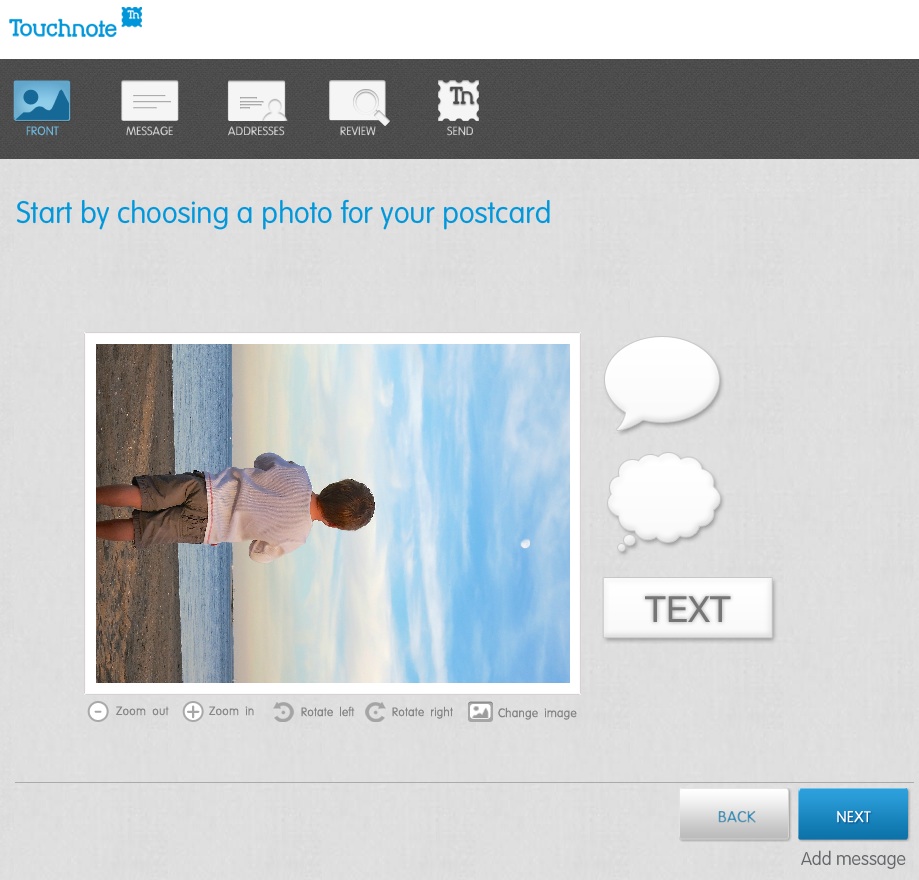
Touchnote 1
When I first loaded up my vertically oriented image, I rotated it into portrait mode from the default landscape setting.
But unfortunately, I realized you can’t use the clever text and thought bubbles they offer in portrait mode.
(disappointing)

Otherwise, it was a snap.

The postcard goes out the next working day, and they say it will arrive in 1 to 4 working days (within country).

Paper Culture

These guys are the green alternative.
They also promote the quality of their paper stock. But you’re not killing trees when you use Paper Culture.
In fact, quite the opposite…
All of their products are printed on 100% post consumer recycled paper.
Plus, a part of every order placed goes towards planting a tree.
(They’ve got a goal of planting 1 million trees, and they’re almost a third of the way there!)

Pricing:

  • $2.59 for a standard card (6 x 4.3)
  • $3.19 for a larger card

After that, they just charge the cost of the stamp to mail your card for you.

So all in, that’s $3.05.
(though I got a 15% discount on a deal that’s ending soon)

For your 3 bucks, they also provide free designer assistance and offer you up to 2 proofs for free.

And they’ve got a line of personal stationery that allows you to send out a classy-looking note (with a photo if you like), just like my father asked about!

What’s not to like?

Well I did run into one disappointing detail in the fine print on the final order page:

“If you approve your proof today, we will ship your card(s) no earlier than 6 calendar days before and no later than the date you select below.”

The earliest date I was allowed to select was a whole week out.

So that means they can take their time being all green.
And delay up to a week putting my card in the mail.

Hmmmm….

I just had a flashback to the old Orson Welles commercial.
“We will sell no wine before its time…”

Hallmark

Of course I checked out the grandfather of all greeting cards.
Hallmark offers a similar online card service that pops your card in the mail…

Their pricing structure is more complicated:

  • $1.29 for a 3.9 x 5.3 flat stationery photo card
  • $1.99 for a 3.9 x 5.3 folded stationery premium paper card
  • $3.49 for a 5 x 7 folded photo card
  • $5.99 for 5.5 x 5.8 folded song card
    Yes, the one with the little music chip and speaker
    (And yes, you can choose a song from their relatively extensive though super clichéd song library)

Like Paper Culture, they’ll mail out your card for the price of a stamp.
But they only mail to the U.S. and its territories.

I went with their simple flat stationery photo card for $1.75 all in.

Again, I ran into one little snag…

I first uploaded a photo of my father and me enjoying a Vietnamese coffee at an outside café in New York City.

Then, Hallmark’s spell check program went into Red Alert mode.
Something about ‘Anytown’ not being spelled correctly.
(That was strange, as I had not typed in any text!)

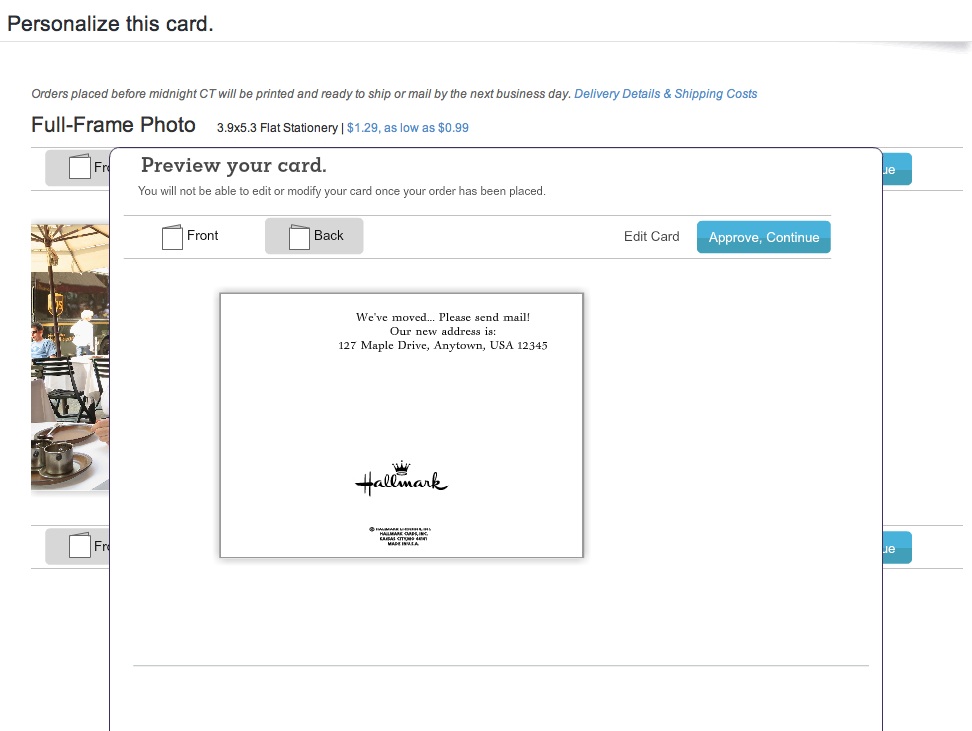
But then I realized the spell check was referring to the back of the card, which I hadn’t gotten to yet!
It had populated a default ‘Anytown’ address.

Hallmark
(How ironic Hallmark was questioning the spelling of its own default ‘Anytown’ word!)

The earliest mailing date Hallmark offered was two days off, which wasn’t bad compared to Paper Culture, but not as fast as Touchnote.

Survey Says…

So how do these competitors stack up?

I’d call it a relative draw.

All three online card services did a solid job.
Yes, they all had their own minor hiccups, but only deserving a minor ding.

Other points to consider:

Touchnote:

  • Easiest to use, but the others aren’t far behind

Paper Culture:

  • If you’re interested in helping Mother Nature

Hallmark:

  • You still can’t go wrong with a Hallmark card

Price (including stamp):

  • Touchnote: $1.25 (postcard)
  • Hallmark: $1.75 (flat stationery photo card)
  • Paper Culture: $3.05 (note card)

(Note: These aren’t entirely apples-to-apples comparisons, but they’re close.)

Dad- you really can’t go wrong with any of these services.
Just stay away from Shutterfly for this particular use.

Happy letter writing…

You’re welcome.

Follow my blog with Bloglovin