At Home with Tech

Unlock the power of all your technology and learn how to master your photography, computers and smartphone.

Tag: apple

My Laptop Battery Got Pregnant
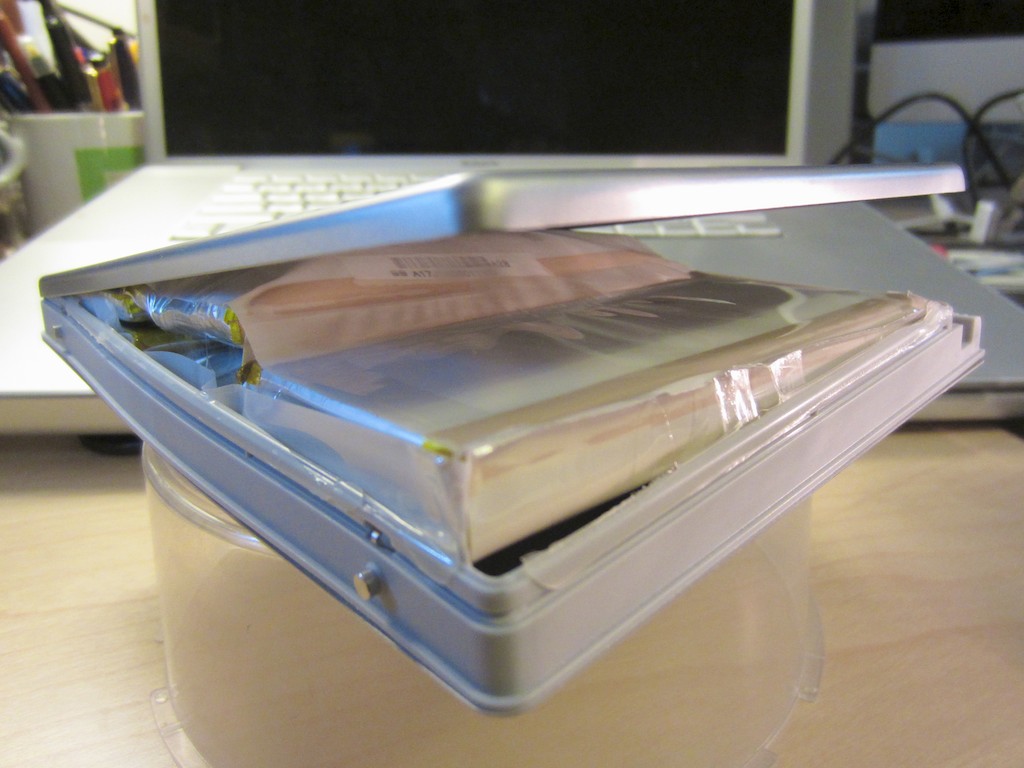
Behold my science experiment! This used to be the battery from my 2007 MacBook Pro laptop. But now, I believe I’ve discovered a new life form.

The lithium-ion battery from my old Apple MacBook Pro laptop encountered a massive failure a few weeks back before my family’s beach vacation. Two of the six chemical packs, which comprise the battery’s guts, started growing in size.

Yes, growing.

Take Me to your Leader
One morning I picked up my laptop and noticed a small but unsightly bulge under the unit. A few days later, the battery’s bump got larger and now was also pushing inwards, creating pressure on the computer’s trackpad.

When I tried to use my laptop, the trackpad was frozen from the pressure, rendering the computer somewhat limited. I had no choice but to remove the battery and go on vacation with the computer entirely reliant on its electrical tether.

When we returned home a week later, my battery had mutated into an alien life form and was battling local pest-control agents for rulership of my street.

Okay, it wasn’t that bad, but my swollen battery had certainly been eating its Wheaties.
Now, the top had split open, as the two lithium-ion cell envelopes were continuing to balloon in size. They hadn’t burst open, but I was especially thankful Apple makes its batteries without mercury.

So I decided to make my former power source into a little science experiment.
I want to see how big it would grow.
I sealed it into a Ziploc plastic baggie in case of leakage, cordoned off a section of my house with yellow hazard tape, and waited.

Cause and Effect
Over the next week, its growth slowed, but I did have a lot of time to think.

Had my life just turned into a bad science fiction movie? Usually in those plots, mankind is somehow to blame for the creation of the (fill in the blank) horror.

Did I have something to do with this?

I thought back to the day I spilled coffee all over my desk.
Coffee seepage could certainly be the culprit.
But no, I’m certain my MBP had remained unscathed during that ‘incident.’
I now had access to my battery’s innards, and I could clearly see there was no evidence of a coffee invasion.

Then, later that week, a friend of mine with the same old MBP line told me that he had recently experienced the same problem with his battery.
Coincidence?

Hmmm….

The Truth is Out There
So I powered up my iMac and did a little research.

Apple says on its Notebooks Info Page that its current batteries can last up to five years.

My pregnant battery was… well, already five years old.
So it certainly didn’t die prematurely.

But what about its sudden super nova-like quality?
That particular detail is not in Apple’s literature.

But I did come across some interesting Google results-
First of all, I was not alone.

  • One engineer blamed my battery’s mutation on ‘thermal runaway’ (overheating), which is initiated by a chemically created heat overload.
  • Another tech geek talked about the resulting potential for a fire hazard.
  • Apparently, poor battery charging habits (overcharging) can cause this problem to crop up.
  • So you need to exercise your battery’s electrons and periodically drain the battery and fully recharge it to maintain its healthy condition.

I found other posts written by similarly crippled Apple laptop owners, and I read a blog that even offered a pseudo-serious do it yourself solution called “How to ‘Fix’ a Swollen MacBook Battery.”
It involved rupturing the bloated metal covered envelope with a pin to allow for the release of the pent up gases.

That sounded a wee-bit dodgy. I decided this was an extremely bad idea.
I will NOT be trying this at home (no disrespect to my fellow blogger).

So I continued my research through the X Files.

I burned the midnight oil. I refilled my cup of coffee. (and didn’t spill it)
Then, finally… I spotted it!

I triumphantly uncovered the news that Apple had officially acknowledged the problem back in 2007 with my generation of battery (model number A1189), and issued a recall and replacement program.

What a relief!

How Late is Too Late?
But the replacement program ended in May of 2009.
I was three years too late.
(D’OH!)
Talk about missing the train.

I had completed my little marathon, but there was no one there to greet me at the finish line. (sniffle)

But I did get my five years with the battery.
Time to pony up, buy a new power buddy for my MBP, and move on.

My Ziploc Baggie’s Visit to the Apple Store
So I paid a visit to my conveniently located Apple Store at Grand Central Terminal in New York City.

I sat down at the Genius Bar, explained my situation, and gently pulled the science experiment out of my workbag as if to display a priceless ancient artifact.

The Apple Genius stared at the bulging plastic baggie.

He said, “Yes, I’ve seen that before,” with zero emotion.

“But is it normal to do that?” I replied.

Mr. Spock chose his words very carefully.
“Yes, batteries can react in that way.”

We went through the obligatory diagnostic questions, which simply confirmed the obvious: Because my battery was years beyond its warrantee, I needed to purchase a new one.
Deep down though, I was hoping for a little more from Apple.
(A few web posts from a couple years back had alluded to Apple exceeding expectations when “battery-gate” went down for those Apple customers.)

But- No!
I dared not hope.

Waiting in the Doctor’s Office
The Apple Genius explained I could buy a new battery for $99 at the Genius Bar with a three-month warrantee or purchase a battery in the retail section of the store for $129 with a one-year warrantee.

Despite my “Jabba the Hut” sitting next to me, I had enough faith in Apple that another battery would last beyond three months. I’d happily save the thirty bucks.

“I’ll take the $99 one, please.”

He said he would check for it in the back and quickly disappeared.
Really quick.

Three minutes went by.

I watched a few Apple shoppers typing feverishly on new laptops for sale.
(I think these ‘customers’ were just checking their email.)

Five minutes passed.

I looked around the Genius Bar. There was a man, despondent and watching nervously as another Apple Genius tended to his sick first-generation Apple TV. (Mine is still chugging along.)

Where could my Genius have gone?!

Finally, he reappeared holding a new battery box.
I reached for my wallet.

He looked at me and started talking.
When he was done, he stared at me, waiting for a response.

The problem was… I wasn’t exactly sure what he said.
It was kind of complicated.

Clarity in Confusion
Something about his parts inventory not having the new battery onsite.
But he had located the battery in the retail section.
However, he was unable to sell me the retail battery at the Genius Bar.
He implied it was against the rules.

He could order another battery for me through the Genius Bar, but it would take four or five days to come in, and he didn’t want me to be without my laptop for that long. Plus it was a holiday weekend, and there was plenty of inventory left.

(Are you following any of this?)

And then he asked me to make a choice.
Did I want to pay the retail price or go with the non-retail choice?

I thought for a moment. But there was no non-retail choice.
He just told me he couldn’t sell me the very battery he was holding in his hands!

Exactly.

I looked into his HAL-ish eyes. They offered me nothing.
But deep down, I could tell he was winking at me.

“I’ll take the second thing you just said.”

“Good,” he replied.

He broke open the box and handed me the battery.
And then he took my science experiment.

“Do you mind if I keep the bag?”

“Please do!”

The Exchange
Ladies and Gentlemen, I believe the official designation for what just happened is called an “exchange.”
On the bottom of my Apple Store receipt, there was $129.00, and on the top, there was ($129.00).
That math on that makes- $0.

I shook his hand as he sent me on my way, and I told him that he had made my day.

And then finally, I saw it.
He smiled.

Genius!
So I’ve been thinking a bit about my free replacement battery.
This act of… corporate generosity.
I’m just not used to that kind of thing.
And I’ll never really know why it happened.

Maybe this was Apple’s unofficial way of apologizing five years later for a badly made battery.
Maybe this was an Apple Genius adroitly taking advantage of a glitch in the system.
Maybe Apple purposely creates these ‘windows of opportunity’ for Apple Geniuses to use at their discretion.

Clearly, my Genius exercised his personal sense of responsibility to solve my problem, and then some!
And he was enabled to do this by a company that prides itself on amazing customer service.

All I can do is take two lessons from today’s story:

  • Exercise your electrons
  • And be appreciative when something nice happens

Thank you, Apple.

I am fully recharged!

My iPad Doesn’t Brake for Flash

This PBS report took me just minutes to serve up to my wife during dinner. But as the resident technology chef at home, my meal got burned, because we couldn’t watch the video on our iPad. Whose fault is that?!

I was enjoying a quiet dinner with my wife on Friday night after putting our toddler to bed. Mid course, my wife mentioned an email she received from her brother about a TV report on the important topic of childhood diabetes and obesity his wife produced for the PBS series “Need to Know.”

The show was premiering that evening, and we were invited to tune in. The email also contained a link to the show’s webpage where the video already lived online.

I don’t think I’ve watched any TV in real time over the past year with the exception of some news and the Olympics.
(and that was mostly in ‘pretend’ real time)

Time shifting is really the only way I consume TV content these days. DVR it and watch it later.

But recording “Need to Know” on our cable DVR and watching it sometime the following week seemed like an insufficient response to such a happy email from a family member.

A more immediate response was required.

So I told my wife I would grab the iPad, and we could watch the video online over dessert. What’s faster than that?

Isn’t technology wonderful?
Except when…

I tapped the icon of the video to begin playing on the iPad, and nothing happened.

Oh, yeah. It’s a Flash video.

The IT Guy calmly stated that it was a well-known fact that Apple’s mobile products don’t use Adobe Flash Player, and so they don’t play Flash videos.

The Look
And then we gave each other the look. The look that says, “That’s nice, but it should really just work. We nodded to each other briefly and smiled, acknowledging the problem. We’d been there before.

But deep down, I was miffed.
I know my wife didn’t mind, but the shiny exterior of my home tech kingdom was dinged. And don’t tell her, but so was a little bit of my pride.

But you’ve got to move on.
And I had a back up plan.

I suggested we schlep over to my iMac in the other room to watch the video.
What an inconvenience!
The bananas flambé was ruined.
(It was actually just Trader Joe’s Apple Sauce.)

We proceeded to successfully watch my sister-in-law’s PBS report.

The Future has Arrived?
So, instead of having to go sit on the couch and wait for the PBS show to broadcast later that evening and then wait the for the particular story to run, we watched the report online within minutes of beginning our conversation.
That’s not so bad.

But the promise of today’s technology says we should have been able to do this in seconds through one or two clicks, tops.

Now, I’m not bickering over the loss of a few minutes.
But I could have done without the irritation that the shining beacon of home tech didn’t quite work right for me… again.

It’s 2012, and we’ve just landed on Mars again in a rather stunning fashion.
Did you all watch NASA’s Seven Minutes of Terror on YouTube?
After seeing all that amazing technology in harmony, shouldn’t something as straight forward as this be a non-issue?

Apple vs Adobe
A little history lesson-

In April, 2010, Steve Jobs posted his famous open letter to Adobe regarding his “Thoughts on Flash.”

It explained why Apple didn’t support Flash on Apple’s mobile devices-
Flash didn’t work with touch-based devices. It was a closed platform, created terrible battery life on mobile devices, and had poor reliability, security, and performance.
(Steve Jobs didn’t like Adobe, much.)

After this, Android users jumped up and down with glee, doing their superiority dance, and they happily watched their Flash videos on their Droids.

But last November in a surprise announcement, Adobe said it would no longer develop future versions of the Flash Player for mobile browsers.

What?!!
Android users stopped jumping.

Adobe explained on its blog its decision to abandon Android’s mobile browser-

1- Premium experiences on mobile devices are typically being delivered through apps, and
2- Mobile websites mostly rely on HTML5 based video delivery.

Looks like Apple was right all along.

Adobe decided to focus on HTML5 technology for mobile viewing, which Apple has long supported. (Adobe will still continue to develop desktop versions of its Flash Player.)

So while Androids and BlackBerry PlayBooks still can play Flash-based videos today, that capability now has an expiration date.

The End of Flash for Android
On August 17th, Adobe removed its Flash Player from the Google Play store, which is the beginning of the end.
Existing users running Android 4.0 “Ice Cream Sandwich” will continue to get updates through September 2013.

If you’re one of the few trailblazers who already have Android 4.1 “Jelly Bean,” you’re out of luck now.

Mobile Apps are the Future
So all this said, why do websites still publish Flash-based videos that can’t be viewed on mobile devices?

Shouldn’t these companies all just have mobile versions of their websites to prevent this problem? Or why not just use the right technology for videos that can play on all platforms?

Hello…!? PBS?

Wait a minute… I’m suddenly channeling a likely response –

Just Download the mobile app.
Oh yeah. Everyone’s got one of those, these days.

So a couple days later, I took the iPad and tapped on Apple’s App Store, and of course, there was the PBS app.
I downloaded it, clicked on the “Need to Know” series, and then found the episode with my sister-in-law’s story.

Bam!
There it was, thirty seconds later… playing on the iPad.

My Tech Pecs
The problem with this micro success is that it happened 48 hours after the moment I really needed it.
That particular instant when I wanted to flex my tech pecs in front of my wife.
(Married guys, you know what I mean.)

No one wants to deal with all those extra steps when clicking on a link that’s supposed to just… work. It’s a de-motivator.

The good news is we can redeem ourselves
There are lots more links out there to click on and get right.

Much like life, using home tech can be complicated.
But figuring things out can be fun (even a little), if you allow for it.

Just don’t forget-
Perfection is unnecessary, if you’re already getting it done.
Always have a back up plan.
And never lose site of what’s really important.

Especially on the night before your anniversary.

Enough said.

Five Tips to Rescue your Best Summer Family Photos

Your family vacation is over. Now, you’ve got hundreds of photos to organize after you track in sand to your bedroom. Still feeling relaxed? Don’t burst your vacation bubble. It’s time to rescue your best photo memories!

Remember the Star Trek episode titled “The Trouble with Tribbles” where those cute furballs kept replicating like rabbits? Everyone loved them, but those darn tribbles quickly clogged up the Enterprise. At the end of the episode, the tribbles find their way into a poisoned storage bin of quadrotriticale (grain) destined for a hungry human colony. All the tribbles have a big feast and then get a huge stomach ache. (A lot of them actually starve surrounded by all that food, but I guess the AHA wasn’t on the set that day.)

What does this have to do with your digital photo collection from your summer fun?

Here’s today’s cautionary warning:
You too can starve with a computer full of amazing family photos.

The Quadrotriticale Paradox
We all want to share our best vacation moments with family and friends. But I’ve discovered an ironic phenomenon, which I’ll coin the
“Quadrotriticale Paradox.”

It suggests the more vacation pictures you bring home that clog up your computer, the smaller the chance you’ll actually share your best photos.
There is a clear inverse probability.

I just got back from a weeklong family beach vacation.
And I’ve been known to snap a photo or two. This time, it was more like 522.
We shared a beach house with another family. And they had their own ‘photoholic’ who took really great pictures. At the end of the trip, we swapped our respective photos through Dropbox.

Now, I was blessed with 692 photos!
That’s a whole lot of tribbles to manage, even for me.

Where do you start?
Well, many folks just upload their snapshots someplace where people can take a look.

I often watch with envy as some of my friends regularly share their photos on Facebook and other social platforms.
But, honestly, some of the photos seem a little half-baked. Not quite ready for prime time.

But who really cares?!
They’re not submitting their photos to an amateur photo competition.
My friends are successfully sharing their lives in the moment.
That’s the only point, and they’re getting the job done!

But if you’re a photoholic like me, you can’t do that.
Nobody wants to look at hundreds of your vacation photos (especially my dad).

And what about your best photos… your little magic gems?
You know, the ones where people say, “Wow, how did you get that?!”

The Curse of the DSLR
Capturing magic shots of your toddler requires the fine art of snapping away and waiting to get lucky. This is especially true using a DSLR. But you’re inevitably creating an excess of mediocre shots in search of the perfect photo.

So maybe you get fifty gems (not a bad catch).
But they’re all buried under hundreds of inferior versions.

Now what?

Tip #1 – You Must Sift through all your Photos to Find the Gems

There’s No Magic Bullet
You have to go through each photo to choose the best ones. Sorry.
I use a numbering system. 1 through 5.
Both iPhoto and Apple’s Aperture allow you to do this.

Here are my rating rules-

1- Total failure. Give it an immediate appointment with the trash bin.
2- Really bad photo. Trash it unless it’s the only shot of something special.
3- Just okay. Decide whether to trash it another time.
4- Good photo, but there’s a better version of it.
5- The better version or simply a great picture.

Once I’m done with this evaluation, I adjust the photo album to display in an ascending order based on the ratings I’ve just assigned the pictures.

Then, I review the 2’s again just to make sure I wasn’t too harsh before I delete them. Sometimes a few of them get a reprieve and get bumped up to a 3.

Then I move the 1’s and 2’s into the trash, and DELETE!
Your worst photos are now gone forever.
Now it’s time to focus on the pictures you want to show off.
And those are your 5’s.

Tip #2 – You Can’t Share Your Photos if You Lose Them

Preparing for the End of the Mayan Calendar
I occasionally take the 5’s and put them in a folder called “Best of 2012.” That folder is what I use for my end of year photo books as well as my “end of world” photo back-up strategy.

Sure, I’ve got Time Machine on an external Lacie hard drive for my iMac. But when you’re on vacation, does anyone else have nightmares about coming home to some disaster?

So to start my vacation with peace of mind on the photo archiving front, I do a second back up of all the 5’s to another portable hard drive, which I then pop into a small SentrySafe firebox.

I’m not sure if that will protect against an invasion of angry mutant tribbles.
But I always sleep a little sounder my first night away on vacation.
Don’t judge.

Tip #3 – Share Your Photos Quickly

Your Family Photos have an Expiration Date
I’ve learned a painful lesson capturing photos of my toddler over the past two years. Children grow up fast. No one is interested in last month’s photo. They want to see what he did yesterday!

Case in point…

On the Monday after I returned from vacation, I hadn’t yet had time to take the hour needed to do the prep I describe above.
All I could do was quickly choose three pictures that jumped out and print them to show off at the office. (Colleagues want to see!) I figured a few hard copies should cover it. I also downloaded the complete mass (mess) to my iPhone as part of my normal data syncing process.

So I almost got through the day…
But before I headed home, I went to get a haircut.
(I had gotten a little shaggy over vacation.)

As soon as I mentioned the beach trip to my hair stylist, she immediately demanded to see pictures. I warily pulled out my iPhone and flipped to the middle of the 692 where I knew there were a few good shots back to back. I thumbed through them and swiftly made my move to put my iPhone away, hoping I had satisfied her.

Not quite.

Instead, she took the phone out of my hand and kept flipping through what seemed like hundreds of number 3 photos. I was mortified.
These photos weren’t supposed to be seen! They were 3’s!!
Holy frak… that one was a 2!! Stop!!!
Time crawled to a halt.

Finally, she had her fill, and handed back my phone.
She was beaming. “You have such a beautiful family,” she said.
And my haircut continued. Perhaps I had overreacted.

But I decided I wasn’t going to get cornered unprepared again.

Tip #4 – Perfection of Process is Overrated

Throw Out the Handbook
Sometimes, when time is working against you, you’ve got to just get it done.
That means forget about Tip #1.

So that night, still without the requisite hour to whip my photos into shape, I quickly browsed again, found ten more photos, threw them into a folder, and synced them to my iPhone with the original three I had printed out.

The next day, I got pressed twice to give up the goods, but now I was ready. Having the hastily prepped photos ready to display on my iPhone was all it took to satisfy my paparazzi.

The lucky thirteen weren’t necessarily the best of my 692.
But in the moment, they did the job.

I suddenly feel the urge to offer a relevant quote from a movie-
“Fate rarely calls upon us at a moment of our choosing.”
(Transformers: Revenge of the Fallen)

You’re welcome.

I know I’m not saving the universe here, but in my little world…
Mission accomplished!

Tip #5 – Finish the Job and Tame the Beast

Show off your Photo Bling
After the firestorm of immediacy subsides, you may return to your regularly scheduled programming.
(And don’t forget to quickly share the baker’s dozen online or via email.)

So you’ve got your all your 5’s.
Time to buff out the gems to perfection. (color balance, brightness, crop, etc.)
This will take some time. But it’s worth it, because these are the pictures you’ll print and distribute, and use to create your photo books.

Remember, don’t wait too long to share or suffer the consequences of an indifferent audience.

The other downside to delaying this part of your photo organization is you’ll eventually develop such a backlog of pictures you’ll never catch up.
You’re always taking new shots, and the wild of your disorganized photo jungle will continue its creep!

Over the course of time, you’re easily managing many thousands of pictures.
It’s a beast that needs to be kept under control.

Or else.

Now go tame your jungle and hunt down your best summer pictures!

And if you come across a wild tribble or discover a way to stretch the fabric of time, please let me know!