At Home with Tech

Unlock the power of all your technology and learn how to master your photography, computers and smartphone.

Tag: caring for aging parent

How to Create a Music Bubble for an Aging Parent in Rehab
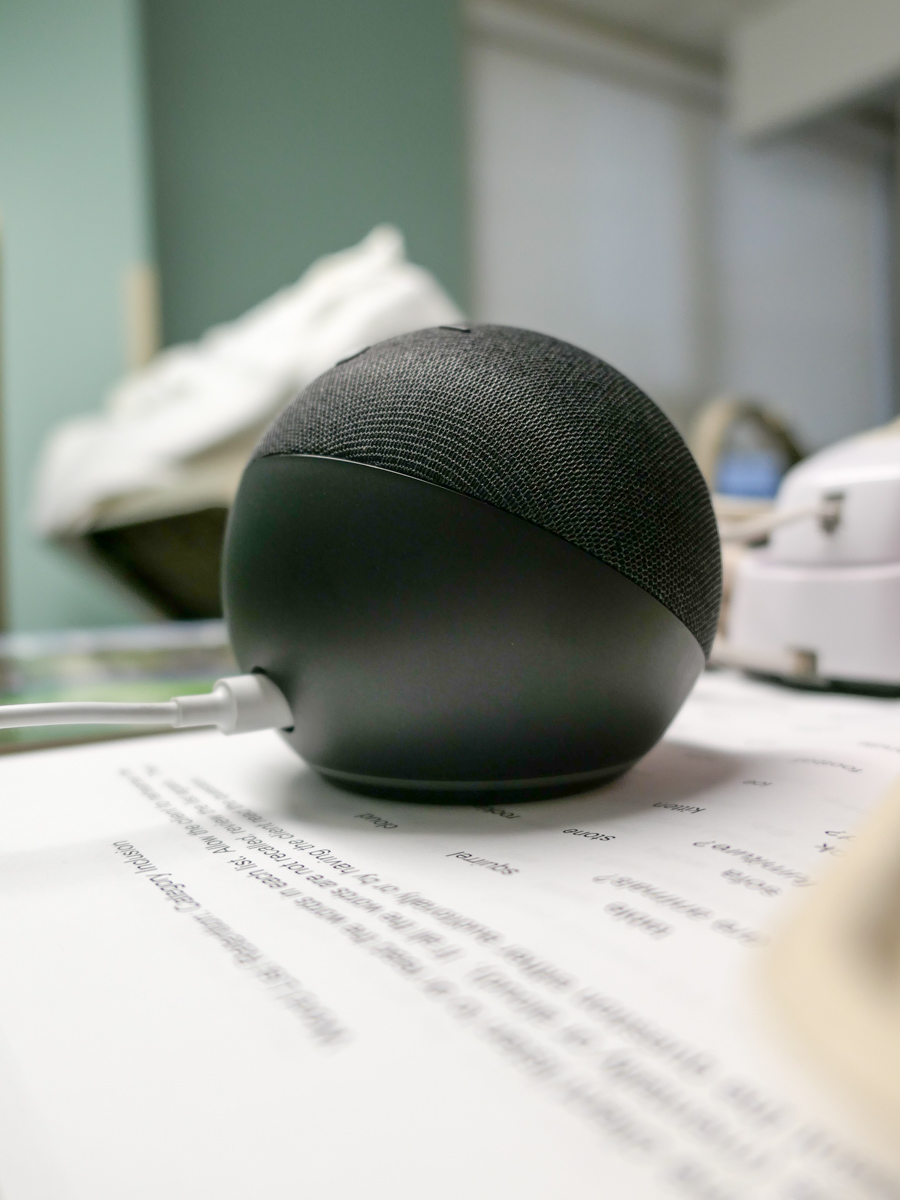
Adding the sounds of Alexa and a comforting music playlist to a foreign environment can be a great gift to help maintain a sense of normal while away from home.

If you injure yourself and have to spend a chunk of time away from home in a rehabilitation facility, the experience can be disorienting. All of your daily patterns are disrupted and your tether to the normal is severed. Mentally, this can be hard for anyone, but I think it’s especially difficult for an older person.

Recently my father fell at home. Fortunately, he didn’t really hurt himself, but the fall weakened his legs, and he couldn’t move about with his walker.

So, my 89-year-old dad went to rehab to help him get stronger.

It’s been a slow process.

Dealing with the Unwanted Noise
I visit my father, smuggle in a diet coke and try to cheer him up. I talk with him and attempt to help as best I can.

I can’t pretend to really know what it’s like to be away from home like this.

That said, I feel one of the biggest disruptors is all of the uncontrollable background noise. Much of it comes from TVs that drone on nearby.

Sound Bubbles
At home, my father loved to play music on his voice-controlled smart speaker I bought him a few years back. In fact, he blanketed himself through much of the day with familiar old-time tunes.

He could easily control the soundtrack by simply talking with Alexa. (Okay, sometimes he might yell at Alexa.)

He had always enjoyed listening to music while I was growing up. His 8-track tapes and Sony record player system later gave way to his collection of CDs. Technology was his tool to help maintain his own sound bubble in our New York City apartment.

Music has always been a fundamental part of his daily experience.

Even though my father is now hard of hearing, he hears his music just fine. It has continued to permeate through his whole body thanks to Alexa.

Adding a Voice-Controlled Smart Speaker
I sat next to my father as he rested in his rehab-center bed, and suddenly it came to me. Why couldn’t I recreate his music bubble for him in this place?

It had Wi-Fi for its guests to use. So that critical piece was in place.

When I asked the nurse about installing a Wi-Fi music speaker, she replied that guests are allowed to have radios. So an Alexa device would be okay too.

So, I ordered a small Amazon Echo Dot for $25 along with an extension cord for easier installation.

And I headed back to see my dad.

Alexa!
The set up through the Alexa app on my iPhone was a snap. I quickly got a Frank Sinatra playlist up and running on his new Echo Dot positioned on the table next to his bed.

I was a little concerned how the music would blend with all of the other unwanted audio encroaching on his space. But I’ve got to say the resulting mix was okay. The music became the main track, and everything else turned into more a background buzz.

My father’s sound bubble was back!

The Healing Nature of Music
Alexa has been back with my father for over a week, and the reunion has been great.

He hasn’t talked so much about it with me, but everyone who’s been working with him is delighted with its impact.

His physical therapist told me that my father is happier and more like himself when the Echo Dot is playing his favorite jazz from the 1940s.

And all of the nurses I’ve met on the floor agree that using the Echo Dot as a Wi-Fi music player is a great idea.

Replace the Soundtrack
I feel like I’ve made some kind of massive discovery. (Of course, I haven’t.)

But if you’ve got an aging parent away from home, adding in a small smart speaker to the unfamiliar environment can be a really smart value add. (This is especially true if it’s difficult to reach a radio.)

Thanks to these relatively inexpensive voice-controlled devices, curated music bubbles are super simple to create.

I highly recommend it.

How to Choose the Best TV for Your Aging Parent

Taking my father out to dinner on his birthday was easy. Helping him buy a new TV was considerably harder. That’s because they don’t make TVs like they used to. And that’s exactly why you’ve got to pay close attention when selecting a replacement TV for a member of the Greatest Generation. Here are my shopping tips…

My 86-year-old father needed some help replacing his old analog bedroom TV, which had finally sputtered out years past the digital revolution. So my dad picked up his iPhone and asked me for a recommendation on a replacement. If you ever find yourself in a similar situation, here are the factors to consider…

Select the Right TV Size
My dad’s old TV was this tube-based hulking box with a massive body and 27” screen in the ‘classic’ 4×3 orientation. A slender 16×9 32” LED HDTV would be the likely replacement, though that feels small by today’s standards. The 40”-43” is the next jump up in size.

While that’s considered normal for a ‘small’ TV today (seriously), you’ve got to make sure it fits in the bedroom space. Plus, you’ll likely need to buy a new TV stand.

Why…?

HDTV Legs Require More Surface Space
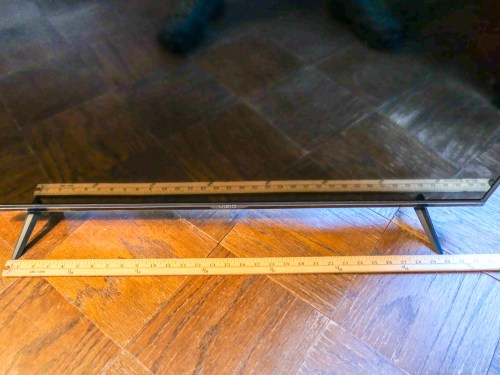
Well, somewhere over the last few years, TV manufacturers have seemingly switched from the center-stand mount design to upside-down V-shaped legs near each screen edge. This design change effectively increases the surface area required for any HDTV to sit on….

My father’s existing TV stand is only 29” wide. That would barely cut it for a 32” HDTV, let alone anything larger…

And even if you could balance your new HDTV onto an old stand, you’d have to worry about the risk of accidentally bumping the TV, causing one of its legs to slip off the stand… and then crash!

Yep, that could easily happen, now that HDTVs weigh so much less than their analog ancestors.

So, you’re probably going to have to also consider a new furniture solution…

Don’t Need to Go with 4K Picture Quality
I centered my research on a 40”-43” screen size for my dad. All I wanted was a straightforward, non-smart, non-4K, easy-to-use model that would quickly connect to my father’s cable box.

And let me simply say… you can’t buy that TV anymore.

Most TVs out there today come with a 4K resolution. But for a smaller screen size, you really don’t need all of those pixels. 1080p ‘full HD’ is just fine. That’s already a huge jump in quality compared to my dad’s analog dinosaur.

I’m sure any number of you would say you can see the 4K difference on a 43” screen.
But do you have the eyes of an 86-year-old?
(I’m just working the right solution for my particular user!)

If Possible, Avoid Smart TVs
Most TVs today are smart TVs with Wi-Fi and on-screen apps containing all of those marvelous and now-standard streaming options. But quite honestly, I didn’t really want to introduce my dad to the streaming world. He’s quite happy with how he used his old TV.

And more importantly, I don’t think he needs the added complexity, because that will just create more calls to… you guessed it… the IT Guy!

Not that I don’t enjoy talking with my dad on the phone. But there’s only so much I can remotely do to help him with his tech.

Yes, I do try to get into New York City to visit him every week. But he’s the kind of octogenarian who needs more immediate solutions to his tech challenges.
(We’ll just say he’s a little impatient.)

Would you like me to tell you about the time when my father’s iPhone’s ringer volume was turned down all of the way? …or the day my dad’s
iPhone wouldn’t charge anymore?
(Don’t get me started.)

But get this…

I actually couldn’t find a non-smart TV made by a manufacturer I trusted.
(Spoiler alert: My dad ended up getting a smart TV after all!)

Look for Absurdly Low Prices
Okay.. so I zeroed in on the market for 40”-43” Full HD (1080) televisions, which were also inevitably ‘smart.’ And I was shocked at how inexpensive TVs have become in this ‘smaller’ size category.

Sure, you can spend $650 on Samsung’s well regarded Q60 Series 43” 4K QLED TV.
($648 on Amazon Prime)

But for what we’ve been talking about, the price point is less than half of that. Here are two great choices I found…

Breaking the $200 Barrier
Vizio D-Series 40” Class Full HD Smart LED TV (D40F-G9)

Breaking the $300 Barrier
Samsung 5 Series N5300 43” Class HDR Full HD Smart LED TV

Really.

Both Samsung and Vizio have strong reputations for TVs although Samsung often sets the gold standard. Vizio is usually seen as a lower-cost alternative with good value.

But I especially liked the 40” Vizio for its smaller size. Most manufacturers are now only putting out 43” models in this range.
(Remember, I don’t want my dad’s new TV to overwhelm his bedroom.)

So I went with the Vizio.
Click.

Keep It Simple
If you’d like, here are my consolidated shopping notes:

  • 40”-43” screen size
  • Full 1080p HD, but not 4K
  • Smart functionality is unavoidable
  • $200-$300 price point
  • Vizio or Samsung are good TV brands
  • Don’t forget you’ll need a wider TV stand to fit the LED feet

Ultimately, I think less is more when buying technology for the elderly. Keep it simple… Spending twice as much doesn’t necessarily mean a better experience.

My father loves his new television… His first words were, “It’s much brighter!”
(Mission accomplished.)

No, he hasn’t figured out there’s a ‘smart’ interface with it yet. But he will…

And yes, now there will be the inevitable training and trouble-shooting calls
in my future!
(Easy problems for #AdultChildofAgingParent)