At Home with Tech

Unlock the power of all your technology and learn how to master your photography, computers and smartphone.

Tag: digital photo collection

Five Tech Tips to Keep Your Life in Order
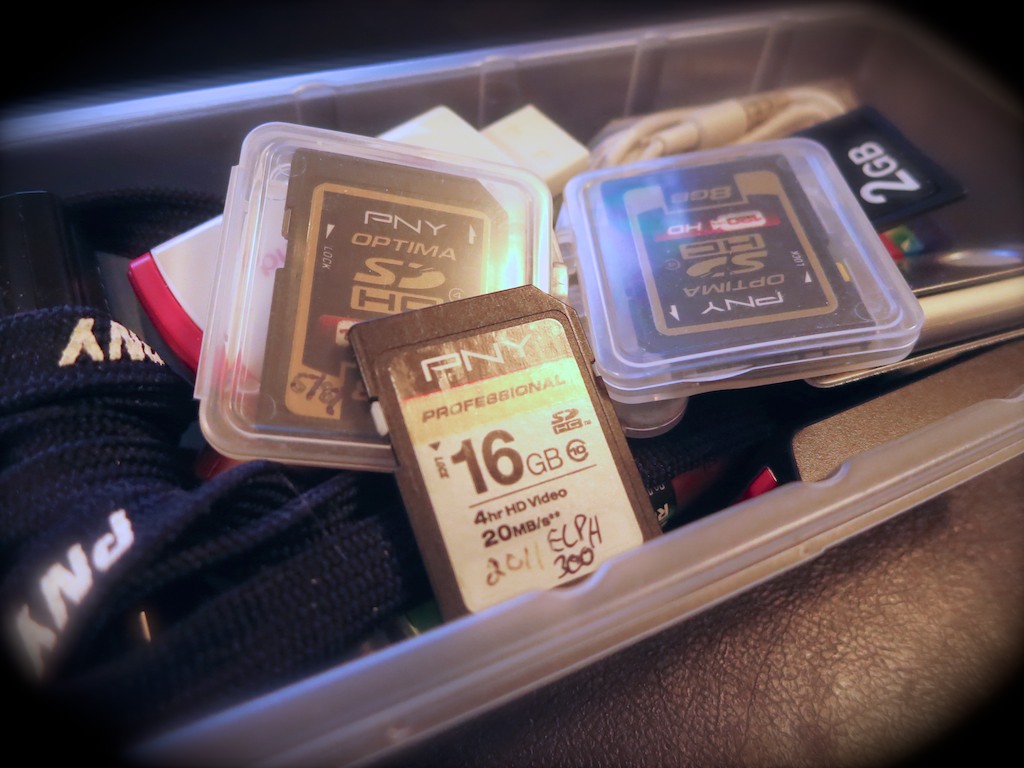
Is this mound of forgotten flash memory a sign of clutter or organization? Well, it depends on what you’ve previously done with the digital files. That’s where the battle to maintain some digital harmony in your life must be fought…

Is this mound of forgotten flash memory a sign of clutter or organization? Well, it depends on what you’ve previously done with the digital files. That’s where the battle to maintain some digital harmony in your life must be fought…

Don’t let cold spring breezes freeze your good intentions to get organized.
For many, the annual cleaning ritual is about to begin. So I propose it’s also a perfect time to tidy up some of your zeroes and ones. Just because your digital files don’t take up a lot of physical space doesn’t mean they’re not cluttering up your life!

1.
Delete Half of Your Email
Have you lost an important email recently? If so, I bet you’ve got too much hanging around.

Let’s face it… you don’t need to hold onto most of your personal email. Much of it is probably unwanted marketing messages anyway.
(Usually from companies you naively gave your email address to in the first place)

And if you’ve got thousands of unread emails stacked up, that’s also a sign it’s time to thin out your in-box.

My favorite way to keep the job manageable is to simply sort by sender, select huge email chunks, and then delete away.
Don’t be shy…
(And it feels so good!)

2.
Organize Your New Family Photo Files at Least Once a Week
There’s really only one way manage the hundreds of photos you’re likely snapping a month:

  • You’ve got to regularly go through them on your computer and organize them into content buckets.
  • And to be really effective, you’ve got to delete the mediocre pics.
    (They’re never going to get any better!)

I think rolling up your sleeves once a week should do it.
Here are a few tips on getting the task done.

3.
Buy a New SD Memory Card for Your Camera
Have you realized that SD cards have become so inexpensive?

Case in point:
On Amazon, I found this
16GB Class 10 SDHC SanDisk flash memory card for $8.10.

Originally, the magic of digital photography was the mind-blowing concept that it didn’t cost you anything to snap a photo. You’d just delete the older photos on the card and your camera could keep on going… forever.

But no matter how much memory your card’s got, it does eventually run out of space.
(Especially if you like recording videos)
Because who’s really got the time to pay attention to how many megs are left?

It takes some ongoing effort to delete the hundreds and sometimes thousands of photo and video files… unless you want to simply clear the whole card and start over.

I don’t know about you, but time is always something I need more of…

Have you ever found yourself struggling to quickly delete the old photos off your camera’s SD card right before you want to capture a priceless moment?
(It’s maddening.)

So here’s a radical concept…

  • Don’t try to keep up with your nearly filled memory card. When it’s time, just replace it.

It’s okay to buy new SD cards every so often to make sure your camera is ready for action. Sure, that’s a bit wasteful, but it’s not like having a tiny stack of old SD cards lying around is going to mess up the house.

Plus, SD cards don’t last forever. So it’s probably a good idea to recycle out the older ones every couple of years.
(You really don’t want to wait until a card with priceless photos turns into an unreadable plastic square.)

4.
Update the Software on Your Computer
Pop Quiz:
How often have you dropped what you’re doing to comply with this message on your screen: “Updates Ready to Install.”

Exactly.

Nobody wants to take the time to update your software.
But you’ve got to do it!

I’m not saying you should be the first to install an update.
(That can also lead to problems…)

But if you wish to keep your computer healthy, updated software should be part of your plan…

5.
Get Rid of Your Old VHS Tapes
If you haven’t yet converted all that old content off your dusty tapes into digital files, it can’t be that important.
VHS is dead tech. Let it all go…

Enough said.

Bonus Tip!
Remember that new piece of tech you recently bought?
Register it online now, while you still know where the receipt is!
You don’t want to lose out on the manufacturer’s warrantee…

The Endless List
If you’ve got all of these digital projects already handled, congratulations.
(You must not be the parent of young children.)

So let me throw one more task onto your ‘to do’ list.
Are you caught up on making all those photo albums you’ve been meaning to create online?

Uh huh.

Get to work…!

Five Tips to Rescue your Best Summer Family Photos

Your family vacation is over. Now, you’ve got hundreds of photos to organize after you track in sand to your bedroom. Still feeling relaxed? Don’t burst your vacation bubble. It’s time to rescue your best photo memories!

Remember the Star Trek episode titled “The Trouble with Tribbles” where those cute furballs kept replicating like rabbits? Everyone loved them, but those darn tribbles quickly clogged up the Enterprise. At the end of the episode, the tribbles find their way into a poisoned storage bin of quadrotriticale (grain) destined for a hungry human colony. All the tribbles have a big feast and then get a huge stomach ache. (A lot of them actually starve surrounded by all that food, but I guess the AHA wasn’t on the set that day.)

What does this have to do with your digital photo collection from your summer fun?

Here’s today’s cautionary warning:
You too can starve with a computer full of amazing family photos.

The Quadrotriticale Paradox
We all want to share our best vacation moments with family and friends. But I’ve discovered an ironic phenomenon, which I’ll coin the
“Quadrotriticale Paradox.”

It suggests the more vacation pictures you bring home that clog up your computer, the smaller the chance you’ll actually share your best photos.
There is a clear inverse probability.

I just got back from a weeklong family beach vacation.
And I’ve been known to snap a photo or two. This time, it was more like 522.
We shared a beach house with another family. And they had their own ‘photoholic’ who took really great pictures. At the end of the trip, we swapped our respective photos through Dropbox.

Now, I was blessed with 692 photos!
That’s a whole lot of tribbles to manage, even for me.

Where do you start?
Well, many folks just upload their snapshots someplace where people can take a look.

I often watch with envy as some of my friends regularly share their photos on Facebook and other social platforms.
But, honestly, some of the photos seem a little half-baked. Not quite ready for prime time.

But who really cares?!
They’re not submitting their photos to an amateur photo competition.
My friends are successfully sharing their lives in the moment.
That’s the only point, and they’re getting the job done!

But if you’re a photoholic like me, you can’t do that.
Nobody wants to look at hundreds of your vacation photos (especially my dad).

And what about your best photos… your little magic gems?
You know, the ones where people say, “Wow, how did you get that?!”

The Curse of the DSLR
Capturing magic shots of your toddler requires the fine art of snapping away and waiting to get lucky. This is especially true using a DSLR. But you’re inevitably creating an excess of mediocre shots in search of the perfect photo.

So maybe you get fifty gems (not a bad catch).
But they’re all buried under hundreds of inferior versions.

Now what?

Tip #1 – You Must Sift through all your Photos to Find the Gems

There’s No Magic Bullet
You have to go through each photo to choose the best ones. Sorry.
I use a numbering system. 1 through 5.
Both iPhoto and Apple’s Aperture allow you to do this.

Here are my rating rules-

1- Total failure. Give it an immediate appointment with the trash bin.
2- Really bad photo. Trash it unless it’s the only shot of something special.
3- Just okay. Decide whether to trash it another time.
4- Good photo, but there’s a better version of it.
5- The better version or simply a great picture.

Once I’m done with this evaluation, I adjust the photo album to display in an ascending order based on the ratings I’ve just assigned the pictures.

Then, I review the 2’s again just to make sure I wasn’t too harsh before I delete them. Sometimes a few of them get a reprieve and get bumped up to a 3.

Then I move the 1’s and 2’s into the trash, and DELETE!
Your worst photos are now gone forever.
Now it’s time to focus on the pictures you want to show off.
And those are your 5’s.

Tip #2 – You Can’t Share Your Photos if You Lose Them

Preparing for the End of the Mayan Calendar
I occasionally take the 5’s and put them in a folder called “Best of 2012.” That folder is what I use for my end of year photo books as well as my “end of world” photo back-up strategy.

Sure, I’ve got Time Machine on an external Lacie hard drive for my iMac. But when you’re on vacation, does anyone else have nightmares about coming home to some disaster?

So to start my vacation with peace of mind on the photo archiving front, I do a second back up of all the 5’s to another portable hard drive, which I then pop into a small SentrySafe firebox.

I’m not sure if that will protect against an invasion of angry mutant tribbles.
But I always sleep a little sounder my first night away on vacation.
Don’t judge.

Tip #3 – Share Your Photos Quickly

Your Family Photos have an Expiration Date
I’ve learned a painful lesson capturing photos of my toddler over the past two years. Children grow up fast. No one is interested in last month’s photo. They want to see what he did yesterday!

Case in point…

On the Monday after I returned from vacation, I hadn’t yet had time to take the hour needed to do the prep I describe above.
All I could do was quickly choose three pictures that jumped out and print them to show off at the office. (Colleagues want to see!) I figured a few hard copies should cover it. I also downloaded the complete mass (mess) to my iPhone as part of my normal data syncing process.

So I almost got through the day…
But before I headed home, I went to get a haircut.
(I had gotten a little shaggy over vacation.)

As soon as I mentioned the beach trip to my hair stylist, she immediately demanded to see pictures. I warily pulled out my iPhone and flipped to the middle of the 692 where I knew there were a few good shots back to back. I thumbed through them and swiftly made my move to put my iPhone away, hoping I had satisfied her.

Not quite.

Instead, she took the phone out of my hand and kept flipping through what seemed like hundreds of number 3 photos. I was mortified.
These photos weren’t supposed to be seen! They were 3’s!!
Holy frak… that one was a 2!! Stop!!!
Time crawled to a halt.

Finally, she had her fill, and handed back my phone.
She was beaming. “You have such a beautiful family,” she said.
And my haircut continued. Perhaps I had overreacted.

But I decided I wasn’t going to get cornered unprepared again.

Tip #4 – Perfection of Process is Overrated

Throw Out the Handbook
Sometimes, when time is working against you, you’ve got to just get it done.
That means forget about Tip #1.

So that night, still without the requisite hour to whip my photos into shape, I quickly browsed again, found ten more photos, threw them into a folder, and synced them to my iPhone with the original three I had printed out.

The next day, I got pressed twice to give up the goods, but now I was ready. Having the hastily prepped photos ready to display on my iPhone was all it took to satisfy my paparazzi.

The lucky thirteen weren’t necessarily the best of my 692.
But in the moment, they did the job.

I suddenly feel the urge to offer a relevant quote from a movie-
“Fate rarely calls upon us at a moment of our choosing.”
(Transformers: Revenge of the Fallen)

You’re welcome.

I know I’m not saving the universe here, but in my little world…
Mission accomplished!

Tip #5 – Finish the Job and Tame the Beast

Show off your Photo Bling
After the firestorm of immediacy subsides, you may return to your regularly scheduled programming.
(And don’t forget to quickly share the baker’s dozen online or via email.)

So you’ve got your all your 5’s.
Time to buff out the gems to perfection. (color balance, brightness, crop, etc.)
This will take some time. But it’s worth it, because these are the pictures you’ll print and distribute, and use to create your photo books.

Remember, don’t wait too long to share or suffer the consequences of an indifferent audience.

The other downside to delaying this part of your photo organization is you’ll eventually develop such a backlog of pictures you’ll never catch up.
You’re always taking new shots, and the wild of your disorganized photo jungle will continue its creep!

Over the course of time, you’re easily managing many thousands of pictures.
It’s a beast that needs to be kept under control.

Or else.

Now go tame your jungle and hunt down your best summer pictures!

And if you come across a wild tribble or discover a way to stretch the fabric of time, please let me know!