At Home with Tech

Unlock the power of all your technology and learn how to master your photography, computers and smartphone.

Tag: iPhone

How Long Should an Apple Watch Last?

I didn’t plan on buying a new Apple Watch. But fate had a different directive. Here’s how you might want to better integrate the inevitable into your home-tech upgrade planning.

Last summer, my old iPhone drowned. It was the result of my little kayaking adventure mishap. (With a spectacular demonstration of clumsiness, I slipped on a submerged rock and fell into knee-deep water as I was getting out of my kayak.) My iPhone was only submerged for a moment, but it was enough.

I later rushed it to the Apple Store as my iPhone struggled to boot up, but it was too late. They called it as my iPhone lay on the cold table, surrounded by Apple Geniuses. One reviewed the diagnostic. It was hopeless. R.I.P. my dear iPhone.

Don’t Wait for the Tragic Last Day
I’ve thought a bit about that day since then. And I’ve come to realize that human error may not have been entirely to blame for this tech tragedy. My almost five-year-old iPhone XS Max had been acting a bit glitchy.

Earlier in the summer, it had exhibited charging anomalies. When I plugged it in, the screen complained about moisture in the charging port. (Yes, it had been raining earlier.) Of course, I was concerned that it wouldn’t charge for hours at a time. So, I took it to the Apple Store. My iPhone received a clean slate.

Fast forward a couple months. My iPhone was dead.

Coincidence? Not necessarily. But in hindsight, perhaps my five-year-old device was simply getting old and beginning to reach its natural end.

Tech doesn’t last forever.

Maybe waiting for the very end is always going to end in some tragic way.

The Logic Board in my Apple Watch Series 4
Let me tell you a different story. It’s about my old Apple Watch Series 4 that’s also five years old. Guess what? It had also been acting glitchy.

It was inexplicably crashing every so often and rebooting. And then its battery suddenly couldn’t power it through even one day. (I knew Apple Watch batteries don’t last forever, but this was a sudden change.)

So, I recently took it to the Apple Store. And the Apple Genius attempted to do a diagnostic. That process required my own iPhone (now a mighty iPhone 15 Pro Max) to do the health check with its linked companion.

My aging Apple Watch wouldn’t cooperate, and even though it was still successfully paired to my iPhone, it wouldn’t let my iPhone do the diagnostic.

Is that bad? Yeah, it’s bad.

The Apple Genius shook his head, looked at me and said my Apple Watch would have to be sent out for repair, and that cost could range from $99 for a new battery to over $200. And then he said the dreaded ‘L’ word.

“It’s probably a logic board problem.”

Logic board?! My Apple Watch was long past its Apple Care days. The likely cost to repair this old piece of tech would simply not be worth it.

So, I called it. Goodbye dear Apple Watch.

One piece of good news: I received $70 to trade in my failing Apple Watch for a new Apple Watch Series 9.

Five Years is Enough
No, this wasn’t as traumatic an experience as my iPhone story. Of course, I knew that I might need to buy a new Apple Watch. I was prepared for that likelihood.

I got five years out of my Apple Watch. That’s a good run… I think.

You have to remember that newer software will inevitably slow down old hardware. And eventually, you won’t be able to even update the software on an Apple Watch. And who really wants to go through that? Even if you’re a glutton for that kind of punishment, the hardware can/will also fail eventually.

Gone are the days when you can maintain your grandparent’s watch forever. Certainly not with an Apple Watch.

Plan for the Inevitable
Yes, wearing an Apple Watch is a relatively expensive way to know what time it is. (Of course, Apple Watches do much more than that. And obviously, I enjoyed my first Apple Watch enough to get another one.)

We all know what the Apple ecosystem costs. No surprises there. This is more about better understanding recommended replacement cycles.

Give Yourself Enough Time for a Smooth Transition
If there’s a lesson learned from my past year of Apple upgrades (I also recently bought a Mac Studio to replace my old iMac), it’s not to squeeze every last day out of your tech to get the most value from your original spend.

Three years? Four? Maybe five years? After that, I think you’re asking for trouble. And when the early signs of obsolescence show up, don’t dismiss them as minor inconvenience.

Sure, you can always choose to upgrade much faster to get the latest and greatest. And I think that’s fine if you feel a compelling reason to do that.

But if you’re happy with what you’ve got, just remember the status quo can’t last forever.

It’s always best to upgrade your tech while you still have the choice. Emergency technology purchases can really make anyone nauseous.

The Silver Lining
Happily, this time, upgrading to my new Apple Watch was a smooth experience that I was prepared for.

And of course, the silver lining when you’re forced to upgrade is that you get all the benefits of your newer tech.

Welcome home, Apple Watch Series 9!

Is It Bad to Fully Charge your iPhone Every Night?

With new iPhones, now you have the option to throttle back the battery’s charging limit to just 80%. Is that good? Let’s find out.

Once upon a time, rechargeable batteries, however magical at the time, came with ‘memory’ problems. If you kept topping off your device with a bit electrical juice every day without really using the rechargeable battery, it would ‘forget’ how to fully recharge.

Today, Apple says of its lithium-ion iPhone batteries, “You can charge your iPhone every night even if the battery isn’t fully depleted.”

Well, that’s progress. So, what’s the problem here?

Should You Charge your iPhone to 100% Each Night?
On the one hand, yes, our friends from Apple say it’s okay to charge up your iPhone’s lithium-ion battery every night.

On the other hand, Apple has now offered a new feature in its iPhone 15 line to limit charging to just 80% to help reduce the drain on battery life.

The reality has always been that full-charge cycles accelerate the eventual reduction of an iPhone’s lithium-ion battery’s lifespan.

In fact, fully charging up and completing discharging your iPhone’s battery… that’s actually bad. Charging up to just 80% will, in fact help your battery last longer.

The 80% Solution
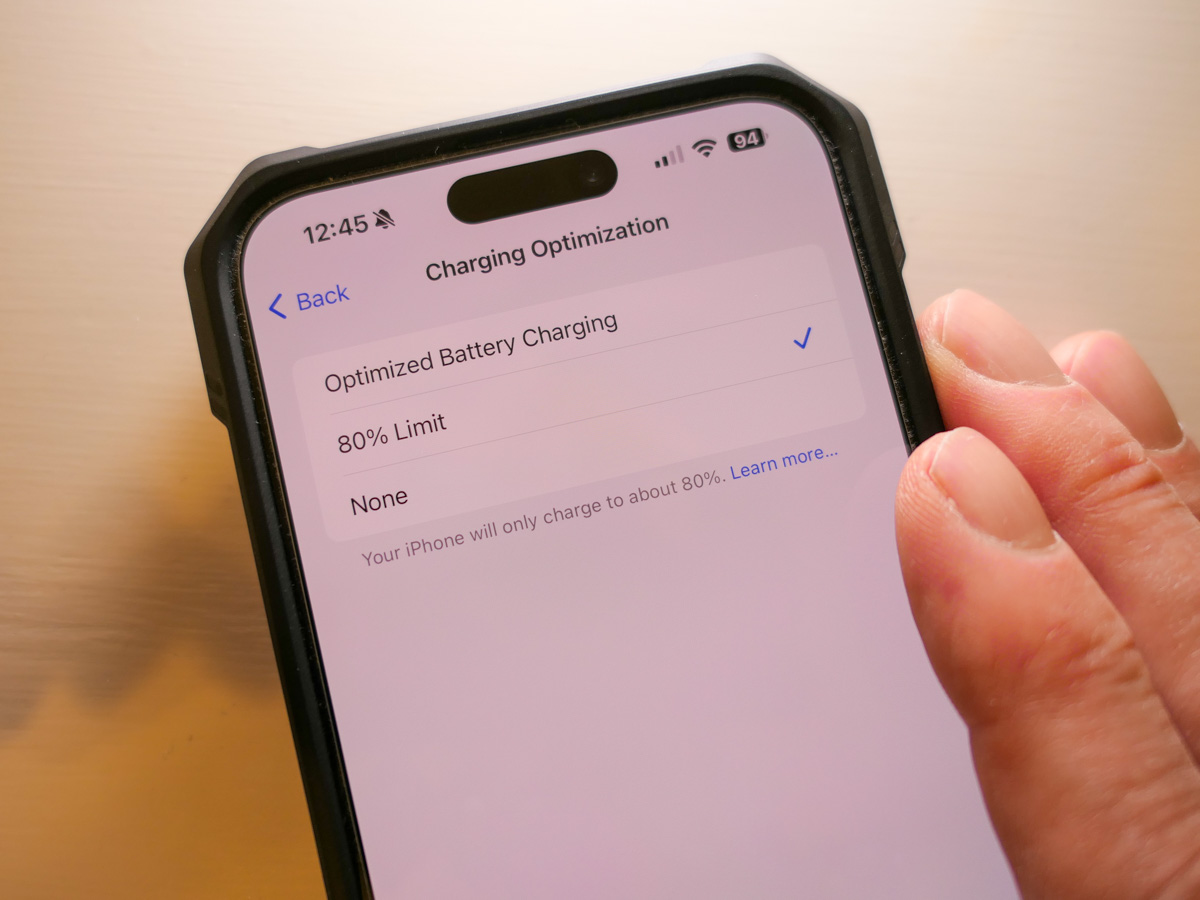
Here’s how you activate the 80% Limit mode:
Click:

  • Settings
  • Battery
  • Battery Health & Charging

Choose between:

  • Optimized Battery Charging
  • 80% Limit (sometimes it still goes to 100%)
  • None

Apple’s default setting is – Optimized Battery Charging

The Value of Optimized Battery Charging
So, yes, you can choose the 80% Limit setting, but Apple also talks a lot on its support pages about how useful the Optimized Battery Charging setting can be to maintain your iPhone battery’s health.

How Optimized Battery Charging actually works… I do find confusing. Something about learning algorithms based on your use. The setting doesn’t always get your iPhone’s charge level back to 100%, and it can delay when the actual charging is happening overnight. (I think there could be some borrowed “Flux Capacitor” or “Borg” tech involved. Who knows.)

But it’s all supposed to be good for your iPhone’s battery. (And that’s all that really matters, right?)

Plus, the name implies it’s the best setting. It’s ‘optimized.’ And it’s the default setting.
What more can you ask for?

80% is Technically Better than 100%
So why is there now the 80% setting? Well, it’s not totally clear to me other than charging up to 100% is simply not optimal for a lithium-ion battery. (Yes, there’s some irony here.)

I imagine the 80% solution is technically best for your phone’s battery, but then you’re constantly denying yourself the dopamine hit when you see that 100% glow to start your day.

Optimized 100% is Better than Regular 100%
So ‘optimized’ charging is designed to minimize the inevitable long-term damage of the 100% solution.

Optimize. Yes. That’s the camp I’m in.

Live your life. Minimize the damage.

As nuanced as all this may feel, what is crystal clear is to never go with the third battery-health option – ‘None.’

Then, you’re just charging up… old school. You’ve got yourself the 100% solution with no benefits from optimization. Your iPhone’s battery will flame out (not literally) more quickly.

Optimize Me!
So where does all of this leave us?

  • Is it bad to charge your iPhone to 100% every night. YES.
  • Can Apple minimize that problem by optimizing it? YES.
  • Should you go ahead and keep charging every night in Optimized Charging mode? YES.
  • Is that better than the 80% Solution? PROBABLY NOT.

But where’s the fun in 80% of anything?
I want 100%!

Plus, I want it to be optimized, even if it’s just a word to make me feel better about making the wrong choice. Well, second best.

Happy charging.

My Biggest Discoveries I Blogged About over the Past Year

Here’s my At Home with Tech year in review. Below are the links to my key learnings and tech discoveries.

So yes, these next few weeks can all be about looking forward. The fresh start. The resolutions. The turning over a new leaf. But I like to think of this time of year as the next chapter that builds on the past. It’s not so much ‘the new’… as ‘the next.’

I try to carry it forward. That way, I can greet these annual cycles with the perspective of my past years’ experiences. Said another way, it’s important to look back as you look forward. Otherwise, a lot can get lost across the years.

That’s why I think it’s critical to package up the story of your past year in an organized photo collection (digital or book) or perhaps an edited video-clips overview.

You might also want to perform a mental review and acknowledgement of your other notable actions and learnings.

Take it in. Then lock it in, or let it go if need be.

At Home with Tech Year in Review

As you know, I document my thoughts on technology and family life each week. So, I’ll follow my own advice and offer this summary of my blog posts that reflect my big learnings across the past year. Please check out the links below that most interest you!

My Growth as a Parent

Working in our Post-Pandemic World

My Journey as the Family Photographer

My Role as the Family Archivist

How a tiny film-to-digital converter brought new life to my father’s old analog slides
How to quickly turn a scanned negative into a positive image on a Mac
How to use SmugMug as a family photo archiving tool
How to prevent your family’s identity from being washed away by time

Maximizing your Family Video Clips

My Family Vacation Tips

Best Practices for your iPhone

My Evolving Understanding of Apple Computers

Here’s to a Prosperous 2024
As always, thank you for reading my blog. I’m looking forward to sharing more with you in the year to come.

Happy New Year!