At Home with Tech

Unlock the power of all your technology and learn how to master your photography, computers and smartphone.

Tag: Lifetouch Picture Day

Is the Lifetouch Digital Package for your Child’s School Photo a Good Deal?

After your kid’s school picture day, it’s time to choose which photo package to buy. Here’s how to figure out what might be best for you.

I have a confession to make. I have dozens of unused Lifetouch school photos of our son still sitting in their original envelopes. They span back over a decade of my middle schooler’s life. What happened?

Quite simply, I ordered more photos than I needed. Each year, I’ve really tried to order to right package for my family. But the truth is the package configurations are supersized with options I don’t need. I’ve never wanted those little 2×3 wallet photos to give out. (Doesn’t a digital picture on a smartphone serve the exact same purpose?)

Sure, an 8×10 print is nice. Even a couple of 5×7’s. But really, it’s the digital file that’s most important to me. Then, I’ve got the keys to do exactly what I want with it. I don’t really need a photo factory churning out a high volume of prints for me. (Caveat: I’ve got a smaller family.)

But of course, Lifetouch wants you to buy prints. That’s their profit margin. So, the digital file is difficult to isolate.

Welcome to the Digital Landscape
Now, Lifetouch (owned by Shutterfly) offers their new Digital Only Package.
Yay! But wait…

It contains two digital versions of the exact same photo. One has the standard blue background. The other offers the background of your choice.

You also get the option to stamp your kid’s name and grade on the front, and the option to allow a Lifetouch artist to retouch your kid’s photo to ‘improve’ it.

Really?

Keep it Real
So, I don’t really want or need a buffed-out photo of my 13-year-old son. He’s perfect. And I say that every kid is perfect. There’s no need to change anything. Seriously. I understand why a parent might want to improve a photo, but that’s not the way your kid looked in that moment.

If you’re buying school portraits every year, like I’ve done, I think it’s best to think of them as a progression of a child’s life over time. That’s their ultimate value. We all have thousands of photos of our children that we’ve taken ourselves. We don’t really need another photo.

But taking the same photo year-over-year… and then putting them together in a montage… I find that’s a magic equation to help tell the story of a person’s early years.

The Basic Package
For $19.99, the Basic Package offers plenty for most needs (unless you have a large family). You get the digital photo file with the basic background (forwarded to your Shutterfly account). Plus. you receive a few prints:

  • 2 – 5×7
  • 2 – 3×5
  • 4 – 2×3

The two 5×7’s are useful, and I can pop them in frames. The rest will sit in the envelope forever.

Still… spending twenty bucks for a portrait, the digital file and a couple usable prints is a good deal.

The Digital Only Package
For $36.99, the Digital Package still only gives you the one portrait. Sure, they say they give you a second digital file with a different background. And that’s true, but I don’t feel that almost doubling the price is worth it for the exact same picture of your child.

No, I don’t need the ‘premium’ touch up treatment, thank you very much.

And I absolutely don’t want his name and grade burned into the image of the digital file. That’s really limiting for future use in my own photo montages of him that I may create. (I just want the ‘clean’ photo.)

Basic is Best
If you compare the two packages and strip away the undesirable pieces, the Basic Package gives you more. You get the digital portrait plus a few hard copies.

The Digital Package effectively gives you the same digital portrait. And that’s it. For almost double the cost.

So, this year, I’m buying the Basic Package.
Click.

Barrett’s Suggestion for Lifetouch
If I were to design a Digital Only Package that I would want to purchase, it would contain four digital files.

  • 2 digital files with the background of my choice
  • 2 duplicate files with the name and grade burned into the image
  • Optional premium retouching service (if you insist)
  • $29.99

You’ve got to believe that eliminating the printing/packaging/delivery costs of physical prints is a huge savings for Lifetouch. Why not beef up the Digital Only Package a bit and bring the price down?

Food for thought, Lifetouch…

Why You Should Spend More for these Backgrounds in your Lifetouch School Photos

It’s another Picture Day! Here’s why choosing the right background is the most important part of your kid’s Lifetouch Picture Day portrait. And what exactly is the right background…?

Our son’s 7th grade school ‘Picture Day’ is coming up, and it’s time again to decide which Lifetouch photo package to order. Sure, it’s nice to have another official ‘portrait,’ but I’ve already got plenty of photos of our twelve year old. For me, the reason to pay for yet another Lifetouch picture is only if it visually represents a specific moment in time. If you can’t tell it’s his 7th grade photo, what’s really the point?

While you can also write that detail on the back of a physical print, it’s best if the photograph itself displays the year or his grade.

The Two Best Digital Backgrounds
The ‘standard’ background offered in the less expensive photo packages is relatively useless. It’s just a colored background. That gives no indication that it’s a school portrait from a specific year.

In the old days, it may have been worth it to have one of these generic ‘professional photos’ for the coffee table. But today, come on… aren’t we all photographers who are capable of capturing countless amazing moments of our children to frame?

The standard background is a non-starter… I don’t need it. Don’t want it. Not worth it.

And remember, the portrait is shot on a green screen. In the post production process, the digital backgrounds can be easily changed with a click of a button. It really costs nothing to switch them around. (This is all about the perceived value of something, and what people will pay for it.)

Here are the two best digital backgrounds:

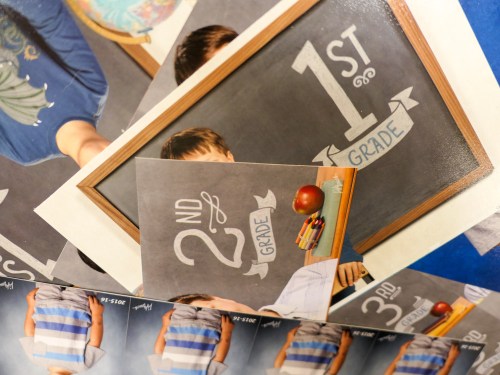
  • 7th Grade
  • 2022-2023

Either of those backgrounds provide the critical context. Without context, the photos aren’t school photos.

So, will you pay more for the right background in your kid’s Picture Day photo?

That’s certainly the hook for me.

The Digital-Only Package
I really only require the digital file of the portrait. (I can print out my own photos, thank you very much.) There’s no need to pay a premium for a physical print.

Clearly Lifetouch knows this, and they’ve been pretty stingy over the years giving up digital files, and they baked them into the more expensive packages.

Happily, this year, Lifetouch offers a Digital-Only Package for $34.99.

For that price, you get two digital files and no physical prints. It’s actually the same photo, but you get that generic background with the first photo file. Fortunately, the second photo file can have the background of your choice.

So really, you’re getting one jpeg for thirty five bucks.
(Then, you’ve got to print it out yourself, if you want a hard copy.)

The Basic Package
By comparison:

The least expensive Basic Package is $19.99.

  • You get one digital file with the awful standard background
  • And a few physical pics with the same standard background

Not interested.

And what do the more expensive packages get you?

The Plus Package
The $49.99 ‘Plus Package’ provides:

  • A whopping 5 digital files with the background of your choice
  • Plus your kid’s name and grade listed on the bottom of the photo
  • And all of the prints you’ll never really need (1 8×10, 4 5×7, 2 3×5, 8 2×3 wallets)

Do I need 5 digital backgrounds? No, not at all. (Only the two matter to me.)
Do I need all of those prints? Nope.

All that said, is it nice to have a couple prints? Sure. That way, I don’t have make the effort to print anything out. It’s delivered and done.

Delivered and Done
Is it worth $15 more to get what I really want and not have to boot up the Lester Printing Factory?

Or should I just spend $35 on the Digital-Only Package to get the one usable file and call it a day?

I’m sure the execs at Lifetouch have spent a fair amount of time noodling over this exact question.

$50 for what you want or $35 for what you need?

On mylifetouch.com, the Plus Package is promoted as “Best Value.”
After all of my griping on this topic, I must admit…that much is absolutely true.

Plus it is.

Click.

Fifty Bucks a Year?
Will I ever break free from my annual spend for Picture Day?

Unclear.
(I certainly haven’t reached escape velocity yet.)

But here’s one way to resolve my ongoing dilemma, if at least at least for another year…

At the end of the day, all I really want are the digital files with the background of my choice. Plus.. maybe one physical print for the convenience of not having to do it myself.

And how much does Lifetouch charge for an extra 8×10?
$16.99

So by choosing the Plus Package for $49.99, I’ve actually saved myself two bucks!
(By comparison, the Digital Package plus the à la carte 8×10 print = $52)

I call that Lester Math Logic.

Happy Picture Day. And don’t forget to smile.

The Best Way to Order Lifetouch Photos after Picture Day

Take it from a parent who has done this four times already… you’ve got to keep it simple when approaching your Lifetouch photo order. And it all boils down to one important detail…

It’s that time of year again at my son’s elementary school… Picture Day. Lifetouch photographers arrived to take individual photo portraits of all of the students. And of course, I’m one of the parents who’s always guaranteed to buy a picture package. I’m not exactly sure why it feels so important… why I need my son’s official fourth-grade photo. It’s not like I don’t have any pictures of him. Heck, I’ve even got a cool collection of pics I snapped as he walked into his first day at school this year. Couldn’t one of those be his fourth-grade picture? Apparently not.

I think I still suffer from a 19th-century belief-system that a posed and sometimes awkward-looking photograph is the official way to visually document a family’s history. And I’m not alone. But today, we don’t really need a professional photographer to take a simple shot of our children in front of a green screen. We’ve got skills, right? Even a smartphone could get the job done. In fact, why couldn’t kids simply take selfies of themselves on school picture day? It would be fun, easy and essentially free.

I know I might get a few nasty letters from angry parents and Lifetouch (now owned by Shutterfly) even for suggesting this radical idea. But if I could put on my futurist hat for a moment…. I wonder how solid the annual school photo business model will be in a few decades when today’s kids grow up and become elementary school parents.

But I’m getting ahead of myself…

So Many Hurdles
It’s still today, and I’ve again got some Lifetouch photo-ordering decisions to make. I’ve gone through this exercise for the past four years… As simple as the photo-package choices appear, every year it’s still a relatively complicated online purchasing process to figure out exactly what you’re getting. And it’s expensive.

The truth is, all I really want is the one digital file of my son’s photo. I can handle the rest. But that’s not a business model for any kind of profit… so the digital file is never something you can purchase just by itself.

So, I inevitably select a more expensive photo package than I need, and I’ve tried to maximize the value of my orders by choosing different backgrounds for as many of the physical photos I end up getting.

And I’ve done all of this without the benefit of seeing my son’s actual portrait ahead of time. (This blind-selection process is also a business model that really shouldn’t stand the test of time.)

And now, as I go through all of this again for a fifth round, I’ve had a parental epiphany… I’ve realize I’ve been looking at this all wrong!

Let the Background Tell the Story
I thought I was being clever by ordering lots of different digital backgrounds in my photo package. In fact, that detail is entirely irrelevant. You’ve got only one image of your kid to work with. One background is all you really need, because different backgrounds really can’t obscure the reality that it’s still the same picture!

And the other mind-bending reality I’ve finally figured out is the image of my kid is mostly irrelevant. As long as he looks okay and isn’t mid-blink, that’s not the central element of the photograph. This picture isn’t really about him…

I’ve realized the most important part of my son’s school portrait is the ‘when!’ It’s his ‘fourth grade’ photo.

And to reflect that, this year I’ve chosen the digital background that says…
“4th Grade.”
That’s it. That’s the piece that matters most.

Maybe you’ll prefer the background which displays the year. I think that’s okay too. But in future years, you’ll later need to do the math about which grade that was.

Future-Proofing
For me, all that matters is the digital background choice that displays the school grade. That’s the whole point of the picture.

And that also gives the photo some long-term value. Otherwise, it becomes just another one of thousands of photos that will briefly cycle through your consciousness or social media stream.

Finding the Joy of Simplicity
So suddenly, this whole Lifetouch ordering exercise is so simple. Just choose the background with your kid’s grade. Everything else is like buying the extra undercoating on a new car.
(They don’t really do that anymore, but you get my point.)

Try not to buy a bigger and more expensive package than you need, and please don’t forget to select a package that gives you access to your digital file via Shutterfly.

Pencils down.
It’s time for juice and cookies…