At Home with Tech

Unlock the power of all your technology and learn how to master your photography, computers and smartphone.

Tag: photos

My Life in 30 Seconds

A friend drew this wonderful pencil sketch of my face as the basis for the birthday gift piñata she made for my party. I’ve found that my birthdays have always been a time of reflection. Last year was particularly intense…

With my father’s recent passing, I’ve been thinking a lot about his legacy, which has led me to think a bit more about my own.

And I’ve been reflecting back on my journey to date. I’m talking way back and trying to take in my whole life. What’s my story so far, and how has it evolved?

One way I’ve gone through this exercise is to review the photos I’ve created and collected over the years. They document many of the moments that have helped to define me.

Create a Photo Montage of your Life
Five years ago, I created a little photo project, which I’ve decided to return to and update. It’s been really useful to jog my memories during this time.

The goal is to select just a very few pics that represent my life so far. And then create a photo montage in a short video. The result is inevitably influenced by the chosen group of pictures, which will vary each time I try this.

Still, these photos do represent one way to look at your life. And I’ve enjoyed this exercise to help regain a broader view.

My Life in 10 Seconds?
How many photos do you select? Well, one option is to squeeze down the number to how many can fit into a defined amount of time. Sure, if you don’t want to restrict yourself, the video might last for hours. But what if you just limit yourself to just a fraction of that?

When I first tried this five years back, I held my video to just 10 seconds, and
I explored a few different photo montages at that length.

Okay… That ended up being a little too fast, as my pictures needed to fly by so quickly you could barely register each image. Some of my viewers complained.

So this time, I’m giving myself the luxury of a whopping 30 seconds.

Barrett’s Birthday Photo Montage
Each birthday is a marker in time and one simple way to collect a group of photos to tell a story. So here are my birthdays…

Though birthday pics can look visually similar across the years (mine certainly do), when strung together, the collection acts as a sort of time machine.

For many of these photos, I tried to represent my age by holding up certain fingers. (I eventually gave that up when I ran out digits!)

Barrett’s Life Photo Montage
Without the guard rails of a specific life event to work with, which photos should you choose to represent your life? Yes, that’s a much harder exercise and one that will take more time to figure out.

I created this draft, but it’s hardly ‘finished.’

This montage offers more visual interest as it shows me out-and-about in the world (as opposed to stuck in front of a birthday cake). But it’s still missing a key ingredient in any life.

You’re Not Alone
Of course, it’s all the people you know. Your family and friends are such as important part of your journey. You need to include them in any photo montage that truly reflects your life.

So, happily, I’ve still got a lot of work to do on that front. Until then, my little photo montage is hardly complete.

What Comes Next?
No, 30 seconds is not a lot of time. And hopefully, it’s not enough for anyone to really work with.

If anything, it’s just a taste or an echo of something much larger… and longer.

But I’ve still found it to be a useful exercise to try to hone in on just a few highlights.

And perhaps, it might help focus me on what my next highlights could be.

Time machines can work in both directions.
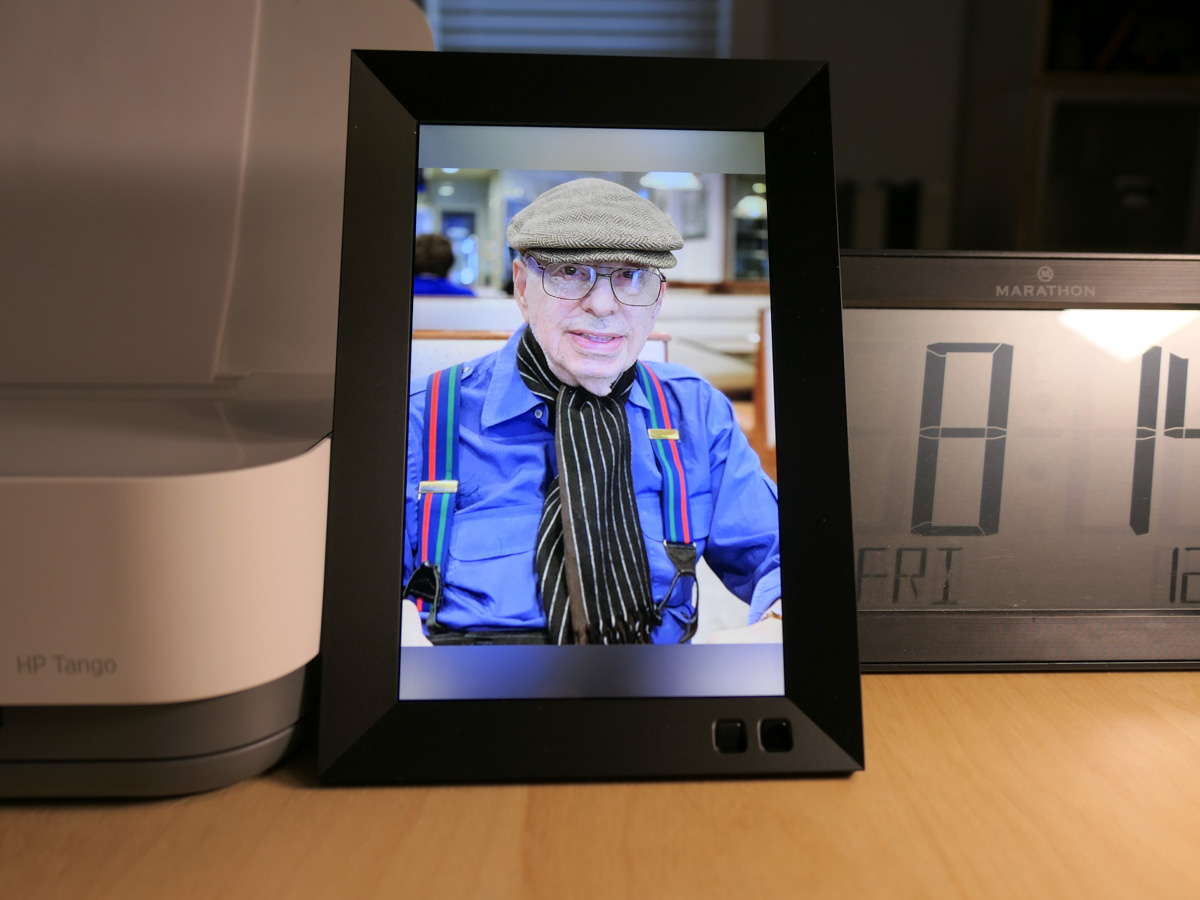
How a Digital Photo Frame Helps Me Remember my Dad

I’ve set up a photo gallery of my father’s life on this digital photo frame. It’s powered up next to me at my desk and rotates through his images across the years.

My father is gone. I knew this day would eventually come, but I was still entirely unprepared for the terrible moment when it arrived.

He passed away on December 15th. While he wasn’t in the best of shape, his death was sudden and a surprise. He was in rehab at the time and was medically stable. The nurse had just been in to see him. When she came back, he wasn’t there anymore.

That was it.

My dad always liked to play by his own rules. So, it feels appropriate that he left this world on his own terms. He had always told me that he wanted to die in his sleep. This seemed pretty close. He wasn’t in pain, and it was quick.

He was 89. (Here’s his obituary.)

My father had a full life, and throughout his 80s he often told me that he didn’t expect that he would be sticking around that long. He also said in recent years that he was okay with passing on, because he had enjoyed his life.

Donald Lester had “lived.”

One Last Present
A week before he died, I ordered a digital photo frame to give him for the holidays. My plan was to set it up in his rehab room to share some family photos with him.

After my success placing an Amazon Echo Dot Wi-Fi speaker next to his bedside so his could listen to his favorite tunes from the ‘40s and ‘50s, this was to be my next step. I wanted to provide a little more personal tech support to help make his time away from home more comfortable.

Plus, my father loved technology. (I got that from him.) I knew he’d get a kick out of the digital photo frame.

But I never got the chance to give it to my dad.

A Different Use
So, the Nixplay frame sat in its unopened box on the floor of my home office. I’ve been wondering what to do it with. Of course, I knew I could send it back.

Instead, I’ve decided to hold onto it.

I would finish what I had set out to do… but with a modified purpose. I would still load it with family photos, but with pictures of him… for me.

His Pictures Tell his Story
I powered up the digital frame, and it’s now in place on a shelf by my desk.

It glows warmly with images of my father and cycles through his photos across the years. It’s one way to keep his story alive.

He was a born-and-bred New Yorker. He traveled the world including Africa and into the Amazon rain forest. He had his suits tailored from Hong Kong, and he loved to wear his bowlers and straw hats. And he was a life-long Yankees fan.

He was a real character.

A Digital Candle
I think setting up this digital frame near me is also a way to help me process all of this.

As you might imagine, there’s been a lot ‘to do’ over these past weeks. I haven’t had much time to truly feel the impact. The loss. As that happens in the months ahead, this frame will serve as a comforting support for me and my family.

It’s a little candle for me.

Holding onto the Memories
Over the past months, I’ve been slowly digitizing some of the photos that my mother had placed in thick albums decades ago when I was growing up. She was the family archivist. (I can’t believe it’s already been 16 years since she passed.)

Moving forward, of course I’ll continue my family-photo archiving project. And I’ll keep feeding the frame with images of my father throughout his life… and mine.

It’s one way to honor his memory and to help me remember the good times.

I miss you, Dad.

How iCloud Photos Saved my Family’s iPhones

If your iPhone is running out of storage, it may be because it’s housing too many photos and videos. Here’s why iCloud Photos can help.

My wife and I have been happily shooting and collecting thousands of photos and videos on our iPhones over the years. But there’s a problem. We’re running out of storage on our devices.
(As we upgraded from one iPhone to the next, the digital files simply ported over, and our huge visual libraries kept on growing.)

On one level, it’s nice to have access to every photo and video you’ve ever taken on a smartphone. But it’s entirely impractical. It’s way too many files, and more importantly, any iPhone probably can’t handle that much content without being overwhelmed with the storage need.

Sooner or later, your iPhone will become hobbled. And when you find yourself deleting apps to try to free up precious memory, you really know you’ve got a problem.

Yes, I’ve been there. You need a better solution.

Fortunately, Apple’s got one.

iCloud Photos
To access more storage, you have to look to the cloud. You simply activate Apple’s iCloud Photos, and all of your photos and videos will sync to your iCloud account and across all of your other Apple devices.

How does this help your iPhone? Well, just be sure that “Optimize iPhone Storage” is checked in the settings for your iCloud Photos. That’s the magic step.

When you activate this setting, your iPhone will generate and hold onto smaller versions of your photos and videos while the full-resolution versions live in iCloud.

With just the compressed versions of your photos and videos on your iPhone, you’ll suddenly have a whole lot more available local storage.

Plus, you’ll have all of your media backed up in iCloud.

There is a Cost
Of course, there’s a price for this iCloud ‘upgrade.’ (The measly 5GB you get for free will barely cover a week’s worth of content.)

50GB costs 99 cents/month, and 200GB is $2.99/month.
(2TB goes for $9.99/month, but that’s much more data than your iPhone can generate.)

Before your turn on iCloud Photos, you’ve got to upgrade to an iCloud plan that will cover your needs.

I decided to go with the 200GB plan and share it with my wife’s iPhone through Apple’s Family Sharing feature.

No Finish Line
iCloud Photos is a simple solution to solve for the problem of your ever expanding library of photos. Paying a few bucks a month to activate this capability is definitely worth it.

But simply maintaining a disorganized library of imagery over the years isn’t going to do you any favors. You’ve got to eventually go through your photos… choose the best ones, organize them and then delete the rest.

You need to do the work and curate your best images. Otherwise, they’ll get lost in your sea of countless photos.

Sure, they’ll be safely stored in iCloud. And your iPhone will have more storage.

But that shouldn’t be the end of the story.

Good luck as you continue this life-long photo and video project!