At Home with Tech

Unlock the power of all your technology and learn how to master your photography, computers and smartphone.

Tag: RAVPower

6 Ways to Protect your Data and Tech at Home

If you’re looking to beef up the reliability of your digital resources, here’s a list of the gear behind my tech.

With so many daily norms shattered as a result of COVID-19, I’ve discovered the act of online holiday shopping to be a comforting activity. Of course, it’s no less frustrating trying to find the actual deals. But that’s always been a part of the challenge, right?

Right now though, what’s most important to me isn’t what shiny new tech to buy. It’s how to make sure the gear I own continues to work properly. And that’s often about the tech behind the tech.

I thought it could be helpful to share some detail on the support gear that helps to keep my tech going every day. This list isn’t about the coolest hardware. It’s simply about what helps maintain order with my tech at home as well as a sense of stability for my (digital) existence. 

It all about protection and reliability.

1. Backup Drive for your Computer

Cloud storage should now be a major player in your backup plan, but having dependable external drives is still a good strategy. I’m a big fan of G-Technology Drives (owned by Western Digital).

The G-Technology 4TB G-Drive USB 3.0 goes for $129.95 on Amazon.

It’s what I use for my iMac’s Time Machine backups.

2. Portable Backup Drive

Yes, I’m sticking with G-Technology for the portable choice. My go-to drive is the G-Drive Mobile USB-C.

The 4 TB version costs $139 on Amazon.

3. Wireless Mesh Router

If you’re like me, your home WiFi is now tasked with supporting multiple family members throughout the day…and in every corner of your home. To help make sure that your WiFi reaches your entire family perimeter, you need a mesh WiFi system in place.

When I replaced my old Apple AirPort Extreme WiFi router, I went with the two-unit RBK50 mesh WiFi system made by Netgear Orbi. Next to my Sonos speaker in the photo above, it costs $295.19 on Amazon.

4. Smartphone Case
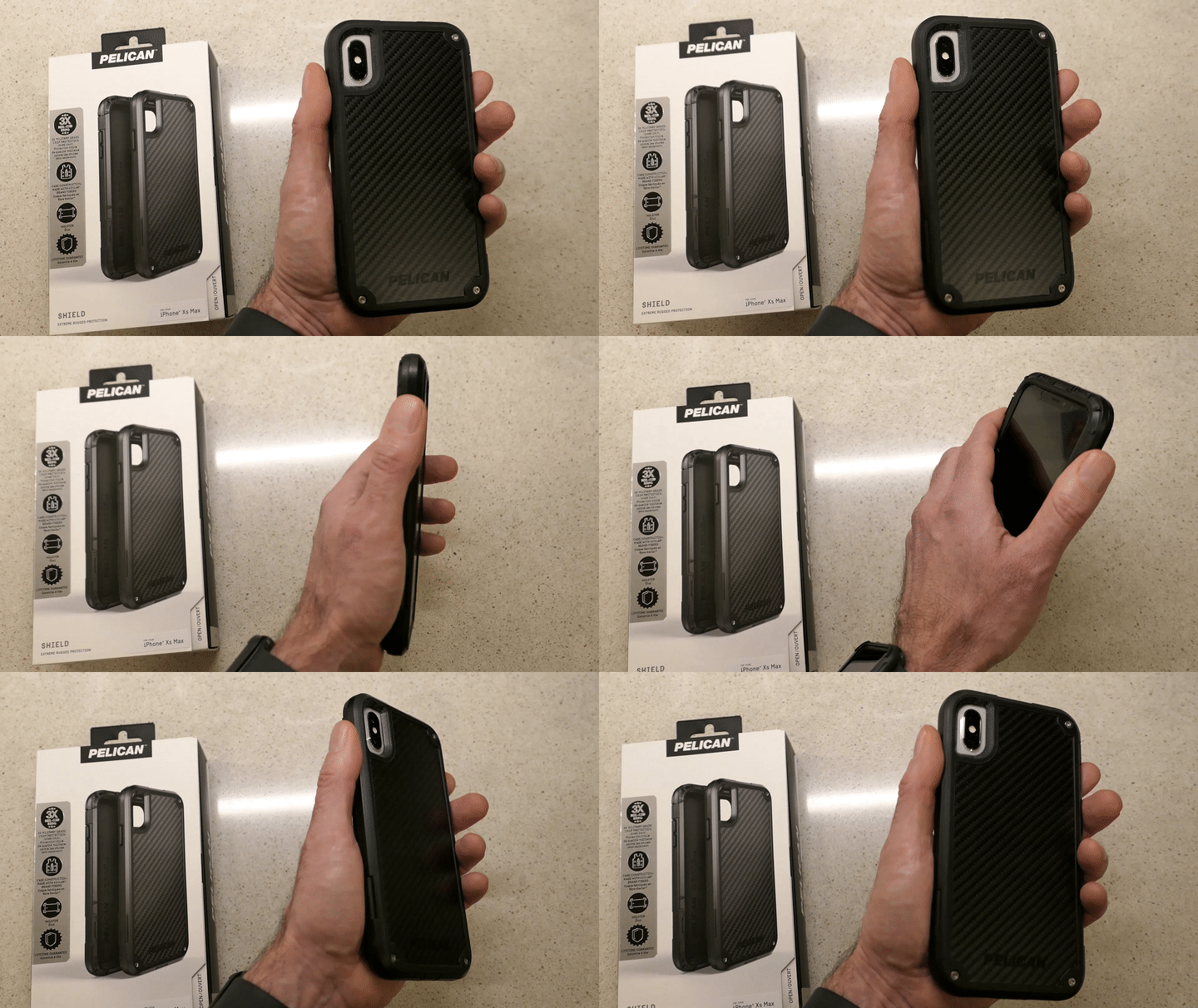
Holding Pelican Shield Case for iPhone XS Max

You really don’t want to deal with a cracked smartphone screen if you can avoid it. I’ve always felt that a solid case is critical to maintaining your smartphone’s structural integrity. 

I’m partial to Pelican cases. The company is best known for its equipment cases that protect gear worth many thousands of dollars. Its smartphone cases are also tough, and the “Shield” model looks like it comes from the alternate universe in the TV series, “Fringe.” 

5. Portable Power Bank for your Smartphone or iPad

You know what happens when one of your portable screens runs out of juice, and a power outlet is nowhere to be found. A little portable power can really save your day.

RAVPower 16,750mAh Power Bank USB External Battery Pack is
$27.99 on Amazon
(This model also comes with a built-in flashlight.)

6. Cloud Backup

I’ve been using Backblaze after CrashPlan broke up with me. So far, so good.

As I mentioned, cloud backup should always be a part of your data protection strategy.

Maintaining Comfort
As we enter this season that promotes comfort and joy, it’s always a useful reminder to have some boring supports in place for your important tech. I’m not sure that will specifically generate joy, but it certainly will maintain comfort.

That’s always on the top of my list.

Three Preparation Tips for the Next Blackout

Having enough rechargeable portable power is a key component to effective blackout planning. Here’s what I recommend…

COVID-19 isn’t the only challenge that Mother Nature has been throwing at us. The pandemic may be dominating most of our attention, but it’s important to remember there are other disruptions we need to prepare for. I’m talking about powerful storms that can knock power out for days. Yes, it’s that time of year when your daily life can quickly grind to a halt, and you find yourself becoming a nomad, in search of electricity to power your essential tech.

Recently, Tropical Storm Isaias blew through my neck of the woods, taking out power for over 675,000 people in Connecticut. It took almost a week for some folks to get their electricity back. My neighborhood was dark for days, but in a lucky twist of fate, our street didn’t go down.

So, we hosted a power-up barbeque for some friends whose house didn’t fare as well. They brought over their entire arsenal of mobile tech, and I set up a power station for them to use on our deck to maintain social distancing. As they were leaving, I also lent them one of my beefy RAVPower portable chargers to help maintain their tech glow for as long as possible.

Battery Back-Up Planning
When the power goes out, having a gas or propane power generator is obviously a great way to maintain your home’s critical equipment, like heat and air conditioning. (Plus, it will keep your smartphone charged!)

But short of taking this expensive step, having enough portable battery power on hand may be sufficient to at least maintain your electronic communication needs for a few days.

This may seem obvious, but it’s always a good idea to review the state of your battery back-up arsenal before you need it.

My parents taught me to always have a good flashlight on hand along with candles and matches. Here are three next-generation tips:

1.
Prioritize your Smartphones
Make sure you have enough rechargeable portable power banks to keep all of your family’s smartphones going for a week. Say what you will about our reliance on the smartphone, but communication with the outside world is really important, especially during an emergency.

I’m partial to Anker and RAVPower products. Recently, I picked up a RAVPower battery with a twist… it also has a solar charger on its side to help keep it going.

It’s the RAVPower Solar Power Bank (25,000mAh)
$45.99 on Amazon
RAVPower says it will charge an iPhone 8 nine times and a iPad mini 4 three times.

Speaking of solar…

2.
Go Solar
Goal Zero makes a variety of solar panels that will charge your portable tech (as long as the sun shines).

Their products are designed for camping, but they’ll work just fine when you’re camping out at home without electricity.

It’s expensive tech, but the sun is free to use.

3.
Use your Car as a Digital Life Boat
If you’ve got a car, you probably already have a smartphone charger set up in it. Don’t forget about that charger, even if you’re not driving anywhere.

Your vehicle can easily become your digital oasis.

Time to Set Up Camp at Home
No, none of this is revolutionary. The idea is to simply make sure you’ve got enough battery power to recharge your tech when the unexpected happens.

In a pinch, my parents relied on candles. They always work.

So does a little portable power and the right charging cables.

When the power goes out, and your home looks like it’s devolving into a wilderness, you’ll feel a lot better if you can easily set up your digital tent and go camping!

5 Camping Tips from a City Boy

Thinking of going camping for the first time? On the fence? Here’s the good news: You don’t have to entirely ‘get away from it all’ if you don’t want to. Here’s how to keep your mobile tech alive and well…

I was a city boy growing up. I was raised on the Upper East Side of Manhattan. My only real exposure to nature was camp outside of the city. And that wasn’t camping.

My wife loves camping.
She introduced me to its allure. I gave it a shot and found it wasn’t so bad.
(Although we endured a terrible thunderstorm over our first night.)

We did a bit of camping, but it wasn’t a ‘thing’ for us. But then our son came along…

Two years ago, we tried family camping with our then five-year-old boy. Specifically, at the annual Grey Fox Bluegrass Festival in Oak Hill, New York.

I think the sweet spot for any family camping location is to go somewhere that already has built-in activities to do as a family. So, the idea of a music festival that includes a family tent for kids was perfect.

Our kid really digged it. The concept of pitching your own little ‘house.’ It was magical for him.

Now, family camping is absolutely a ‘thing’ for us.
Grey Fox has become an annual event…
(We just returned from our third Grey Fox camping adventure.)

So I think it’s fair to say that today ‘we’ love camping.

But…

My iPhone Goes Camping Too
I haven’t totally played fair. I’ve also spent the last couple of years figuring out technology tricks on how to stay ‘connected’ while on our camping excursions.
(I’m sure purists might fault me for this intention.)

My reality is I simply can’t leave my iPhone behind. My life doesn’t easily let me disappear for a few days. If my 84-year-old father needs to reach me, I’ve got to be able to answer the call.

Fortunately, the giant field we camp on at Grey Fox gets one to two bars of AT&T cell coverage.
(Other service providers are noticeably absent.)
So, my iPhone didn’t fall off the grid.

The bigger challenge was keeping my iPhone powered up.
(Plus, my wife’s iPhone)

Looking to the Sun with Goal Zero
As long as the sun shines, it’s a great idea to bring a portable battery station that recharges with a solar panel to nurse multiple smartphones over the course of days. A while back, I did my research and decided to go with some nifty gear made by Goal Zero.

Goal Zero Sherpa 50 Power Pack
Capacity: 50Wh, 5,200mAH
$178.48 on Amazon

I paired it with the Goal Zero Nomad 20 Solar Panel, which has a 20W solar capacity.
$159 on Amazon

And I added in the Light-A-Life 350 LED
$32.00 on Amazon
to illuminate the inside of our REI Kingdom 400 tent.

Goal Zero Upgrade
We were camping with another family this year, and I found it especially convenient that the other dad was also at home with his tech.

My friend brought the newer and more powerful models that Goal Zero offers:

The Goal Zero Yeti 150 Portable Power Station, which provides 150Wh and 14Ah of battery power
$199 on Amazon

He paired it with the Goal Zero Nomad 28 Plus Solar Panel, which has a 28W solar capacity.

Important note: Solar-powered battery solutions are not cheap!

You’ll notice that the Sherpa 50 and Yeti 150 are essentially the same price, but the Yeti 150 gives you a much bigger bang for the buck. The only downside to the Yeti 150 compared to the Sherpa is the Yeti is much bigger. But if you’re car camping, that shouldn’t really be a consideration.

We tethered the two Nomad solar panels together and successfully created our very own solar ‘FrankenPower’ Grid.

It worked great and easily kept four iPhones going over four days with plenty of power to spare.


A Cheaper Choice
Over the course of multiple camping excursions, Goal Zero gear becomes less expensive per use. But if you want a cheaper way to power your gear on your first camping adventure, just bring a few basic (inexpensive) power sticks.
(You just need to bring enough since you won’t have a solar recharging capability.)

Last year, I picked up this beefy RAVPower battery pack as a backup option-
RAVPower 26800 Battery Pack (26800mAh)
$49.99 on Amazon
(It has three USB ports and is rated to recharge an iPhone 7 nine times!)

So, you can probably get away with spending less than fifty bucks to power your smartphones on a family camping trip. It all depends on your needs and your desire to generate additional power in the field.

Glamping
You might be thinking about now… “Maybe Barrett doesn’t really love camping if all he talks about is how to maintain his ‘normal’ life with all of his companion tech.”

And you might be right.

But I’ve decided that for me it’s not about loving the camping experience.
It’s about proving to myself that I actually can camp. And enjoying the fact that I can step out of my comfort zone and rough it for a few days.

To successfully ‘survive’ in the ‘wild’ and provide your family dry shelter… that’s a useful skill.
(Just don’t take all the credit when your more-qualified spouse is also there pitching the tent.)

And to MacGyver your mobile tech to stay connected with the world…That can make you feel a tad clever, although I guess that’s not in the spirt of true camping.

Perhaps this all falls under the category of ‘glamping.’
(Guilty as charged!)

Tips to Take with You
The truth is I’ve not really taken my family that far away from civilization.
(Our car was located a whopping fifteen feet away from our pitched tent.)

So, I’m not pretending to be some kind of Grizzly Adams.

The point of my story is you can teach a city boy some new tricks.

And for all of you out there who think they may hate camping, remember there can be a lot more to the experience than just spending a few days in a tent.

To review, here are my 5 family car-camping tips that will brighten your days in the ‘wild.’

  • As long as there’s a bar of cell phone coverage out there, you don’t have to disconnect from the world if you don’t want to.
  • Just bring battery and/or solar powered backup to keep your smartphones going.
  • Camp with someone who knows more about camping than you do.
  • Camp near a festival or event that can fill your day with baked-in activities for the family.
  • Don’t stress. Remember, you’re really only fifteen feet away from the rest of your world.
    (As long as your car’s battery doesn’t die)

Jump in… the water’s warm!