At Home with Tech

Unlock the power of all your technology and learn how to master your photography, computers and smartphone.

Tag: Shutterfly

Three Websites to Create and Mail a Card from Your Computer

This photo card I created at Paper Culture represents the end of a tech quest I’ve been on for my father: Type a card. Put it in the mail. Don’t get out of your chair.

This photo card I created at Paper Culture represents the end of a tech quest I’ve been on for my father: Type a card. Put it in the mail. Don’t get out of your chair.

My father asked me a couple years ago how to send out a letter from his computer directly to the mail.

I told him that was a service called email.

He gave me an annoyed look.
(My eighty-year-old dad is quite tech savvy for his generation.)

He politely replied that an email can get lost in the deluge people receive.
Plus they don’t carry the gravity of a physical piece of mail.
(He had a point.)

Dad is still quite focused on the golden days when telegrams ruled the world of instant communication!

The idea of creating and sending out a physical piece of mail through your computer may seem more quaint than critical, but it’s not an unreasonable request.

At the time, Apple’s Cards iOS app had just launched.
The service was designed to mail out customized cards with your photos via your iPhone/iPad as opposed to using a desk-bound computer.
Cards was a great idea and a nifty time saver, since you didn’t have to schlep to the post office. Apple did all the heavy lifting.

Suddenly ‘quaint’ became ‘cool.’
But it wasn’t quite right for my father, as he didn’t have an iPhone

So Cards was a near miss.

I think I then got consumed with my life as a new parent.
And I never did come up with an answer for my dad.

Fast-forward two years…

Cards… We Hardly Knew You!
Guess what?
Cards wasn’t that cool after all.

Amidst all the recent fanfare of the iPhone 5S and 5C launch,
Apple also killed off Cards.
What?!

Yes, On September 10, Apple quietly acknowledged its Cards service had been discontinued, pushing customers towards iPhoto instead.
…And also pushing people to get off their tushies to find a mailbox!
(iPhoto won’t mail out your cards for you.)

Three Choices Take Center Stage
Apple’s Cards obit got me thinking back to the unfinished project for my dad.

Today, there are plenty of ways to send out a greeting card online, even using photos you’ve uploaded.
The problem is the massive overload of design options and targeted ‘themes’ for your card.

You’ve got hundreds… sometimes thousands of choices.

My father is looking for something simple:

  • No anniversary
  • No graduation
  • No congratulations
  • No happy retirement
  • There’s no event to celebrate!

He wants to avoid all the fanfare and just write and send out his own little notes.

So I began my research again…

And with the vacuum created by Card’s departure, the competition was happy to remind everyone they’re out there…

Sifting though them to find the ones that still stuck to the basics wasn’t easy…
But I found three choices I think my father will like….

Shutterfly

So of course, I started with Shutterfly, because it’s such a well-known brand.

That said, I realized it’s become quite the sprawling mall of photo-related products.
Believe me, finding the right page to create and mail out a singular card wasn’t easy.

Shutterfly Photo Cards
Shutterfly doesn’t offer the option to mail out old-school post cards or individual single-sided photo cards.
(They only sell single-sided photo cards in bulk.)

Shutterfly Flat Stationary Cards
But wait… you’re suddenly in luck if you morph the aforementioned photo card into a ‘flat stationery card.’
Yes, Shutterfly will mail out individual flat stationery cards that you can customize with your photos:
(5 x 7, 5 x 5, 6 x 8, and 4 x 8…but not 4 x 5!)

The price:

  • $2.47 for most of the sizes (They’ve got a sale running.)
  • $2.44 for the 6 x 8 (They’ve got a bigger sale running.)
  • Plus 99¢ to mail ($1.49 for international)

The only downside, and it’s a big one is all of these cards are tied to a theme.
So you may have trouble making your simple message fit if its not tied to some big ‘event.’

Are you getting a headache yet?

Shuddering with Shutterfly
I’ve got to tell you all my Shutterfly research was exhausting.
I could have driven back and forth to the post office five times by now.

Touchnote

Touchnote comes closer to hitting the sweet spot.
Most importantly, it’s so simple by comparison.

  • You can quickly send out a postcard or greeting card
  • They also offer a mobile app for Android and iOS, so you can do all your work with your smartphone (like Apple’s former Cards app)
  • You can send your postcard anywhere in the world

And you can’t beat Touchnote’s pricing:

  • You pay in ‘Credits.’
  • It costs 1 credit to create and send a postcard
  • 2 credits for a greeting card
  • A credit costs $1.49
  • But it’s cheaper if you buy in bulk…
  • If you buy a pack of 5 credits, you get the 6th for free
  • If you go crazy and get the 50-credit pack, they give you 25 more for free, which brings the price down to the low/low price of 99¢/credit

I picked up the 5-credit pack, which meant I would be sending out my postcards for $1.25.

Not bad…

I only encountered one problem:
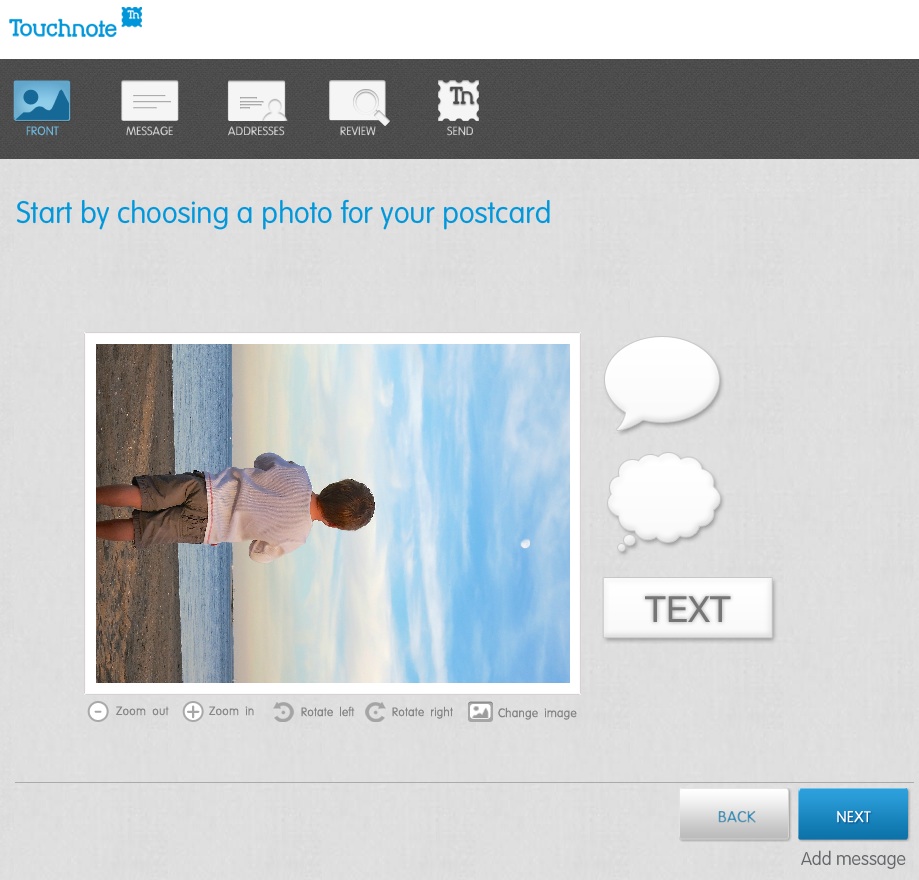
Touchnote 1
When I first loaded up my vertically oriented image, I rotated it into portrait mode from the default landscape setting.
But unfortunately, I realized you can’t use the clever text and thought bubbles they offer in portrait mode.
(disappointing)

Otherwise, it was a snap.

The postcard goes out the next working day, and they say it will arrive in 1 to 4 working days (within country).

Paper Culture

These guys are the green alternative.
They also promote the quality of their paper stock. But you’re not killing trees when you use Paper Culture.
In fact, quite the opposite…
All of their products are printed on 100% post consumer recycled paper.
Plus, a part of every order placed goes towards planting a tree.
(They’ve got a goal of planting 1 million trees, and they’re almost a third of the way there!)

Pricing:

  • $2.59 for a standard card (6 x 4.3)
  • $3.19 for a larger card

After that, they just charge the cost of the stamp to mail your card for you.

So all in, that’s $3.05.
(though I got a 15% discount on a deal that’s ending soon)

For your 3 bucks, they also provide free designer assistance and offer you up to 2 proofs for free.

And they’ve got a line of personal stationery that allows you to send out a classy-looking note (with a photo if you like), just like my father asked about!

What’s not to like?

Well I did run into one disappointing detail in the fine print on the final order page:

“If you approve your proof today, we will ship your card(s) no earlier than 6 calendar days before and no later than the date you select below.”

The earliest date I was allowed to select was a whole week out.

So that means they can take their time being all green.
And delay up to a week putting my card in the mail.

Hmmmm….

I just had a flashback to the old Orson Welles commercial.
“We will sell no wine before its time…”

Hallmark

Of course I checked out the grandfather of all greeting cards.
Hallmark offers a similar online card service that pops your card in the mail…

Their pricing structure is more complicated:

  • $1.29 for a 3.9 x 5.3 flat stationery photo card
  • $1.99 for a 3.9 x 5.3 folded stationery premium paper card
  • $3.49 for a 5 x 7 folded photo card
  • $5.99 for 5.5 x 5.8 folded song card
    Yes, the one with the little music chip and speaker
    (And yes, you can choose a song from their relatively extensive though super clichéd song library)

Like Paper Culture, they’ll mail out your card for the price of a stamp.
But they only mail to the U.S. and its territories.

I went with their simple flat stationery photo card for $1.75 all in.

Again, I ran into one little snag…

I first uploaded a photo of my father and me enjoying a Vietnamese coffee at an outside café in New York City.

Then, Hallmark’s spell check program went into Red Alert mode.
Something about ‘Anytown’ not being spelled correctly.
(That was strange, as I had not typed in any text!)

But then I realized the spell check was referring to the back of the card, which I hadn’t gotten to yet!
It had populated a default ‘Anytown’ address.
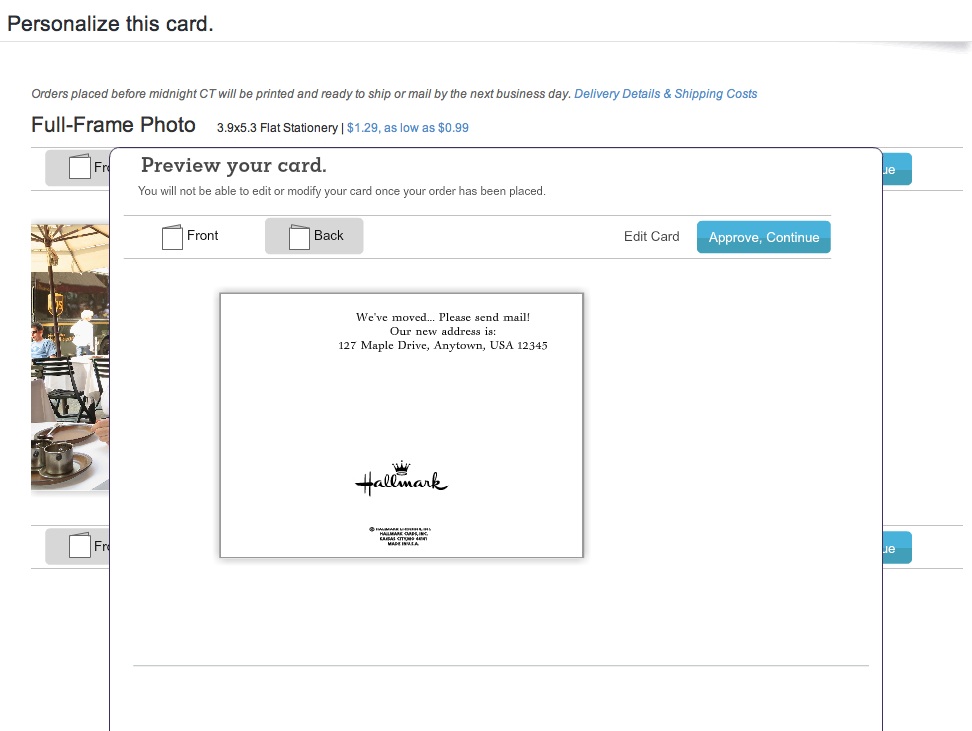
Hallmark
(How ironic Hallmark was questioning the spelling of its own default ‘Anytown’ word!)

The earliest mailing date Hallmark offered was two days off, which wasn’t bad compared to Paper Culture, but not as fast as Touchnote.

Survey Says…

So how do these competitors stack up?

I’d call it a relative draw.

All three online card services did a solid job.
Yes, they all had their own minor hiccups, but only deserving a minor ding.

Other points to consider:

Touchnote:

  • Easiest to use, but the others aren’t far behind

Paper Culture:

  • If you’re interested in helping Mother Nature

Hallmark:

  • You still can’t go wrong with a Hallmark card

Price (including stamp):

  • Touchnote: $1.25 (postcard)
  • Hallmark: $1.75 (flat stationery photo card)
  • Paper Culture: $3.05 (note card)

(Note: These aren’t entirely apples-to-apples comparisons, but they’re close.)

Dad- you really can’t go wrong with any of these services.
Just stay away from Shutterfly for this particular use.

Happy letter writing…

You’re welcome.

Follow my blog with Bloglovin

Parental Omniscience for only $24.95

This is Doggie, my son’s favorite lovey. Doggie is with my old Canon Elph 960 (yes that’s scotch tape holding it together) and its Eye-Fi card, which wirelessly uploads photos of my son to my iPhone. Recently, my boy’s photo stream stopped flowing. Doggie was sad. He asked Dada for help.

I know what it feels like to be Thor and cast out.
I had everything just the way I liked it, and I was happily ruling my own universe.

By that I mean I’d been using the magic of the Eye-Fi wireless memory card for the past two years to open up a personal portal into my son’s daily adventures.  While I was away at work.

Allow me to explain.

Eye-Fi Magic
The Eye-Fi card is a wireless memory card you put in your camera, just like any other card. The difference is Eye-Fi also has Wi-Fi built into it.
(That makes it twice as expensive.)

But for the price, you get the power of the Cloud. After you take a picture, your camera doesn’t need to be tethered to your computer to upload. Instead, Eye-Fi immediately sends your photos to your computer’s hard drive and the Web wirelessly and effortlessly.

So after a fun photo session of my son sucking down applesauce, my camera’s battery provides the 4 gig Eye-Fi card the power to chat with my MobileMe online photo gallery I created with iPhoto. Apple also has a great app called Gallery, which perfectly displays all of my son’s photos on my iPhone.

I could see all…
It was a beautiful thing.

And the piece de resistance?
My Eye-Fi account would then email or text me whenever new photos had been uploaded.

Say I was away at a boring meeting, wondering what my little boy was up to.
I’d hear the text ping go off, whip out my iPhone, and show my colleagues photos of my son’s latest milestone taken minutes earlier. Pretty cool!

This trick did wear out its public welcome, but it has been invaluable for me.
It seemed like magic two years ago, but with everything going Cloud based these days, it’s just another mortal tool to make your digital life a little easier.

Dark Clouds
But one day, a storm approached.
And I was cast out. I looked up, and I saw iCloud everywhere.
I would need to learn the ways of mere mortals.

We know MobileMe’s days are numbered.
But I think Apple has already begun pulling the plug.
A couple of months back, my Gallery app started crashing.
And then it never opened again.

Coincidence? I think not.
I needed to find a replacement and fast!

Join the Party
I have to admit; I’m a little phobic about putting unfiltered photos up on giant social websites like Facebook. (even if they are posted as private)
I’ve enjoyed the cozy feeling of presumed privacy with my obscure MobileMe photo albums. Being a part of the huge digital social universe feels a wee visible for my boy’s little photo stream.

This is not to be confused with Apple’s Photo Stream service. I’ll soon press the button to join with iCloud, but I’m not sure Apple’s Photo Stream will be a total replacement for the distribution of my son’s pics either. Remember I’ve got a very targeted way I want these particular photos organized and remotely served up to me and my wife.

You know, I don’t think I’ve really got a choice.
Either I play in the pond with the millions of other online photo sharers.
Or I will just see my son the old fashion way… in person.

So I decided it was time to join the party and hope that only my wife and I would show up.

I did some research and of course there are a crushing number of online photo sharing options. After some fact crunching, I came up with two leading contenders: SmugMug and Flickr.

SmugMug?
I know SmugMug has a loyal fan base, and this service been around for a while.
(I’m always happy to let someone else kick the tires.)
The annual membership is $40.
And there’s the Smugview iPhone app for $2.99. All good.
I was 30 seconds away from pulling the trigger, but then I remembered I already had my toe in the digital water with Flickr.

D’uh! Flickr!!
You might feel this is the obvious choice. And I guess it is. I just needed to go through the exercise. I already have my Flickr account replacing my former MobileMe photo-sharing activity with family and friends. And I’ve upgraded to the annual $24.95 Flickr Pro subscription to better handle photos above the 200-picture limit in their basic (free) account.

Flickr also has its free iPhone app. And I know I can create private Flickr albums.
Let’s do it!
So I got to work.

  • On my iMac, I directed Eye-Fi to upload to Flickr with my normal user login info.
  • Downloaded the Flickr iPhone app. Signed in the exact same way.
  • Tweaked the settings to uber private.
  • Took a test picture of my wife reading Goodnight Moon to our son.
  • Opened up the Flickr app on my iPhone a minute later.

BAM! There it was!
And the email announcing the upload showed up a few minutes after that.

Q.E.D.
(Quite easily done)

The uploaded photos are organized into new Flickr albums (sets) each day.
Eye-Fi also simultaneously sends the pics to iPhoto for archiving.
(The only complaint I have is Eye-Fi doesn’t connect directly to Aperture, my preferred photo management/editing program.)

Back in Business
So there you have it. I’m omniscient again, knowing the business of my lad’s daily adventures while I’m off storming the castle during the week.

Flickr has done the job. Yahoo!

That said, if any of you have other solutions you’d like to share, I’m all ears.
I’m only $25 in. I could be convinced to try the next best thing…

Your Shoebox VS. The Cloud

Old Shoebox Tech saved this 114-year-old photo of my great-grandfather.

I work with a few colleagues who are fond of conspiracy theories. It seems like a fun hobby for them. (To each his own.) They enjoy pointing out unsubstantiated facts that suggest a bumpy ride ahead. And they’re loving the whole 2012 thing.

While I’m not planning to move to a desert island any time soon, it does remind me about my own little worse case scenarios.

Here is one that occasionally keeps me up at night, especially after my toddler bangs on my computer keyboard a bit, while I’m trying to use it!

What if you woke up the next day to realize you’ve lost your complete digital family photo collection?
Not one picture from the 21st century.

The Shoebox
This nightmare didn’t existed in the old analog days.

Worse case scenario- the shoebox.

My parents had some family pictures from the ‘40s and ‘50s in a shoebox stuffed in the back of the closet.  Sure, the box got lost for years. But it wasn’t going anywhere. This practice borders on archival neglect, but it worked just fine.  Yes, these precious photos are a little faded and could be in better shape, but they’ve weathered the decades intact.  Most importantly, they still exist.

I was a little more organized than the shoebox strategy in my non-digital years. I developed my film, ordered the prints, and put my favorite photos in albums, which sit proudly on a shelf.

Then Y2K hit, and digital photography came to the masses. The computer meltdown we feared never appeared on 1/1/01, but I believe the legacy of that expected digital doomsday is alive and well today.

Back It Up
I think I snapped my last photo on film sometime in 2001.  Without negatives, I knew to back up the photo files and I did so with decent regularity.  (Remember Zip disks and how awesome it was that they could store a whopping 250 megs?!)

Then came CD storage, external hard drive back up, and consumer friendly tools like Time Machine.

Photo Shangri-La
For the next decade, technology offered amazing ways to share your pics. From email and online sharing to your smartphone and digital photo frame, the options were many. Today, your photos have no boundaries. What could be better than that?

So remember, all of your photos sit on your computer and are hopefully safely backed up. Maybe you’re using Apple’s Photo Stream for your most recent 1000 pictures.
And your favorites are also floating around digitally based on how you’ve decided to share them.

Where are most of your pictures not living?

On photo paper.

“Hold on,” you say in protest. You can print a photo any time you want.

Photo printing is available online or at the CVS down the street. You can get your photos in a day or an hour. The archaic practice of bringing in a roll of film for 3-5 day rush-developing is long gone.

But wait, there’s more…

The Double-Edged Sword of the Home Photo Printer
Doesn’t everyone have a printer now that can print a decent photo? Yes, I know ink cartridges are insanely expensive and clog up if you don’t use them every third day, but if you want, you can create a great hard copy of any of the thousands of pictures you’ve taken since the turn of the century…
… in 78 seconds.

Bam!  Isn’t technology wonderful?!

OK… here comes the big question:
How many hard copies of your digital photos do you actually possess?

Could you fit them all in a shoebox?

That’s the problem!
There are no more hard copies.
And here’s the ultimate irony- There is an inverse relationship between how easy it is to create a digital photo print and the number of times you’ve actually made one.

I’m sure there’s a bunch of you out there who would say,
“Good riddance. Who needs useless hard copies?”
They’re redundant and expensive. The digital versions are free and always accessible. You can back them up to the Cloud… to Flickr… they exist everywhere. They are infinitely backed up. Your priceless photos couldn’t be safer.

I hear a knock-knock at the door.
My conspiracy friends have come by for dinner.

Your Photo Library’s’ Last Meal?
Let’s review the menu…

The Obligatory Appetizer – You Eat Too Much.
People take too many pictures.
Once you buy the memory card, you’re set for infinity. Then it’s all free.
Some of these shots are great. Many are good. Plenty are just okay.
Chances are you’re holding onto all of them. Who’s got time to delete the marginal shots?

The Scary Main Course – Got any TUMS?
Your best photos are getting lost in the quagmire of your photo glut.
Unless you can devote some serious time on a regular basis to organizing your photos, many of the ones that really matter will eventually be lost, like that email that disappears behind your next 500 messages. Time is your enemy.

Yes, there’s the instant gratification of posting pictures on your Facebook page or Flickr account.
Yes, they’ll always be there, (maybe).
But no, the problem isn’t solved.
Over time, your virtual photo archive will just gell into a costly, unviewable mess. And with all your thousands of pics, the Cloud doesn’t stay free for long.

Plus, nobody wants to be subjected to all these pictures, and without some organization, neither will you.

The Healthy Dessert – Your Meal is Saved!
I say, “Sign Up Here to Get Organized!”
Print an annual photo book of your life.

Let’s face it. Every photo is not worth existing in corporeal form. But I think it’s critical to print out your favorite photos every year. Sure, you can do it the old-fashioned way by placing hard copies into an album, but I shudder at the time suck. (Anyone out there still doing scrapbooks?)

The simple solution is a photo book constructed via the Web.
It’s the perfect marriage of new tech and old-fashioned wisdom.

There are lots of services that let you build a photo book right from your computer. These gorgeous, coffee table-ready books aren’t cheap, and that’s actually a good thing. It forces you to be selective as to which photos to include. Remember, nobody wants to be overwhelmed with too many pictures.   And don’t be lured into creating lots of full-page images.
You quickly burn through pages that way.

Here are a couple options:

Apple’s Photo Books
It’s super convenient, because it’s integrated into Apple’s iPhoto and Aperture, and you’ve got immediate access to all your pictures without having to upload them.
The cost starts at $29.99 for a 20 page 8.5” x 11” hardcover book and 99 cents for each additional page up to 100.
This is the service I use. And for full disclosure, I’ve pushed up to that 100-page limit for my annual books. (Like you, I take a lot of photos in a year!)

Shutterfly
The 8” x 11” hard cover photo book starts at $34.99. Each additional page is $1 with a 101-page limit.

So there you have it!  Go activate your own micro publishing empire!
Each year, spend a little time and create one of these books.
It’s really a no brainer.

The Unexpected Aperitif – The Goodness Continues
But wait. There’s more! Through this process, you’ve also digitally collected your best-of-the-best pictures for the year. Take those files, burn a few disks, upload them to the Cloud, and maybe even throw them on a thumb drive for safe keeping.

And where are you going to put that thumb drive?
Here’s a thought…  Got a shoebox?