At Home with Tech

Unlock the power of all your technology and learn how to master your photography, computers and smartphone.

Tag: smart home

I’m Going Mad Trying to Find a Mystery Sound in my Kitchen

Happy ghosts float in a kitchen

I used to recognize every sound throughout our house. Then, a faint digital tone began pinging. I can’t locate this ghost in our kitchen, and it’s challenged my very existence.

I grew up in an apartment in Manhattan. The background roar of New York City flowed through me day and night. Our apartment building also echoed the nosy lives of dozens of people living around us. Strange creaks, bangs, bumps and even occasional screams were just a normal part of existence. I mostly tuned it out, but every so often, a new alien-like sound would pique my interest.

Then I moved out of the city, and throughout most of my adulthood, I’ve lived in houses in suburban neighborhoods. Though not exactly the wilderness, there was always enough quiet ambience that allowed me to mentally catalogue the origins of every sound my home made.

  • The click of the furnace kicking into gear
  • The low rumble of our garage door opening
  • The high-pitch whoosh of water flowing to hydrate our lawn
  • The happy tune from our LG washer machine when it’s done with its cycle
  • The thump of the cat jumping off our LG dryer
  • The three pings from my new Behmor Brazen Plus 3.0 coffee maker after brewing

I knew our house’s every mechanical, digital and biologic whisper and where it came from.

Until one day recently… I didn’t.

Smoke Detector Madness
The only problem I’ve previously had with noises in my house was tracking down the annoying cry of my smoke detector looking for fresh batteries. Sure, I’ve got a more advanced Google Nest Protect monitoring the second floor by our bedrooms, but our first floor and basement still host old-school First Alert models.

And honestly, I could never tell which sibling puck was in distress. So, I had to painfully wait in front of one of them for 90 seconds until the next piercing chirp. And of course, that always happened after I’d been rudely awakened by this cruel (but necessary) warning at 2am.

Fortunately, even these basic smoke detectors have evolved over time, and the most recent First Alert model I’ve installed has a 10-year lithium battery sealed into the unit. So hopefully, my excruciating dead-of-night searches won’t be so frequent.

You Can’t Find Me
But recently, a ghost ping has cropped up in my house, and it is completely unknown. The sound is faint and just one ping. I hear the digital note only every few days, and there is no pattern to it.

It’s entirely infuriating, and I feel this brief tone is taunting me.

Sure, I could ignore It. (This innocuous accent isn’t loud enough to wake me up at night.)

But its existence challenges my control… my authority… my human dominance over our little kingdom.

The Digital Ghost in our Kitchen
The best I can tell, this evil ping comes from somewhere in our kitchen. The faint digital heartbeat doesn’t give me enough information, because it’s too infrequent. (I can’t stand around for a day waiting for the next one.)

Logic tells me the culprit is one of our newer devices… my Brazen coffee maker or perhaps our Instant Pot.

They’re both usually plugged in. Perhaps this is just a little friendly reminder that one is unnecessarily sucking energy in standby mode.

So, what’s the big deal?

Open the Pod-Bay Doors, HAL
Well, I can’t stop thinking about this silly audio ping that currently remains outside my control. I consider it a form of defiance.

As I’ve worked hard over the years to make our home ‘smarter,’ that also means I’ve bolted in more tech to track. Most of it is ‘set-it-and-forget-it.’ But that can’t last forever. So, isn’t this a problem just waiting to happen down the line?

Eventually, your home may take on a life of its own. It can start with a little mystery ping. But it probably won’t end there.

Life isn’t set-and-forget. Your tech shouldn’t be either. And now we’ve got AI to improve everything. See where I’m going?

Don’t Lose the Manual
I’m no Luddite. But it’s clear to me that as we continue to embrace technology in every part of our existence, we must pay attention and not lose too much control. AI is allowed to occasionally hallucinate, but we can’t afford to do that even once. (Humanity doesn’t come with that disclaimer.)

If you think my concern is only worth considering as a screenplay plot device for your next Sci-Fi blockbuster, please considering offering me a screen credit.

Otherwise, I’d recommend you always track down that next digital phantom that crops up in your house. Sure, it may just be an innocent ping.

But when your home talks to you, it’s always best to understand what it’s saying.

Placing a Google Nest Cam in the Wild May Not be that Smart

Here’s my cautionary tale when I tried to add a battery-powered Google Nest Cam into my existing Nest ecosystem and then position it in my backyard.

I maintain several Nests in our home. These different smart home devices have worked great together across the years with my Nest iPhone app.

  • I can peer in from afar using my Nest Cam.
  • I control the temperature with my Nest Learning Thermostat.
  • And my Nest Protect monitors my home and updates me with any smoke or carbon monoxide detection. (Fortunately, it’s my least-used device.)

Google bought the Nest product line a decade ago and began integrating it into the Google Home ecosystem. Yes, all my Wi-Fi Nest gear still worked fine with my old Nest app. But every so often my app nudged me to migrate to the Google Home app. I’d be stalling, simply because I didn’t want to mess with a good thing.

Then, a new variable entered the equation.

Adding a Google Nest Cam to my Nest
I decided to add an outdoor, battery-powered Google Nest Cam into my Nest world. I wanted to put it in my backyard to track occasional wildlife that meanders by.

Buying a battery-driven device is both a blessing and a curse. You can’t quite set it and forget it, as it will need to occasionally be recharged. But you also don’t have to run an electrical line into your backyard.

So, there’s amazing flexibility with a wire-free, battery-powered security camera that you can pop most anywhere (indoor or out). What’s not to like?

Mandatory Upgrade to Google Home
So, I bought my Google Nest Cam, opened the box and eagerly pulled out the gleaming white orb. I then plugged it in to juice it up. But when I started the installation process using my Nest app, I immediately ran into trouble. A message popped up that said this Nest Cam will only work with the Google Home app.

Okay. Sorry Nest app. It was great working with you. Now, I finally had to download Google Home onto my iPhone and migrate my Nest account over to Google.

The process went smoothly, and I was welcomed into the Google Smart Home world. I scanned a QR code with my iPhone, and the app did the rest.

So, I was quickly back on track.

Two Apps Instead of One
Yes, my new Google Nest Cam was ready for action. But what about the rest of my Nest ecosystem? Everything showed up on my Google Home app except my Nest Protect. Where did that go?!

I did a bit of online research and found the unfortunate answer. The Nest Protect hasn’t yet been integrated into Google Home.

What?

I would still have to use my old Nest app to stay connected with my Nest Protect. (I’m not saying goodbye to my Nest app after all.) So now, I’ve got two apps to use instead of one.

  • The Google Home app for my two Nest Cams and my Nest Learning Thermostat
  • My old Nest app for my Nest Protect

I don’t think that’s fabulous integration.

But it’s a minor inconvenience. You can’t get distracted by the little things. I’m sure it’ll eventually get sorted. Time to move on.

Installation Fantasy
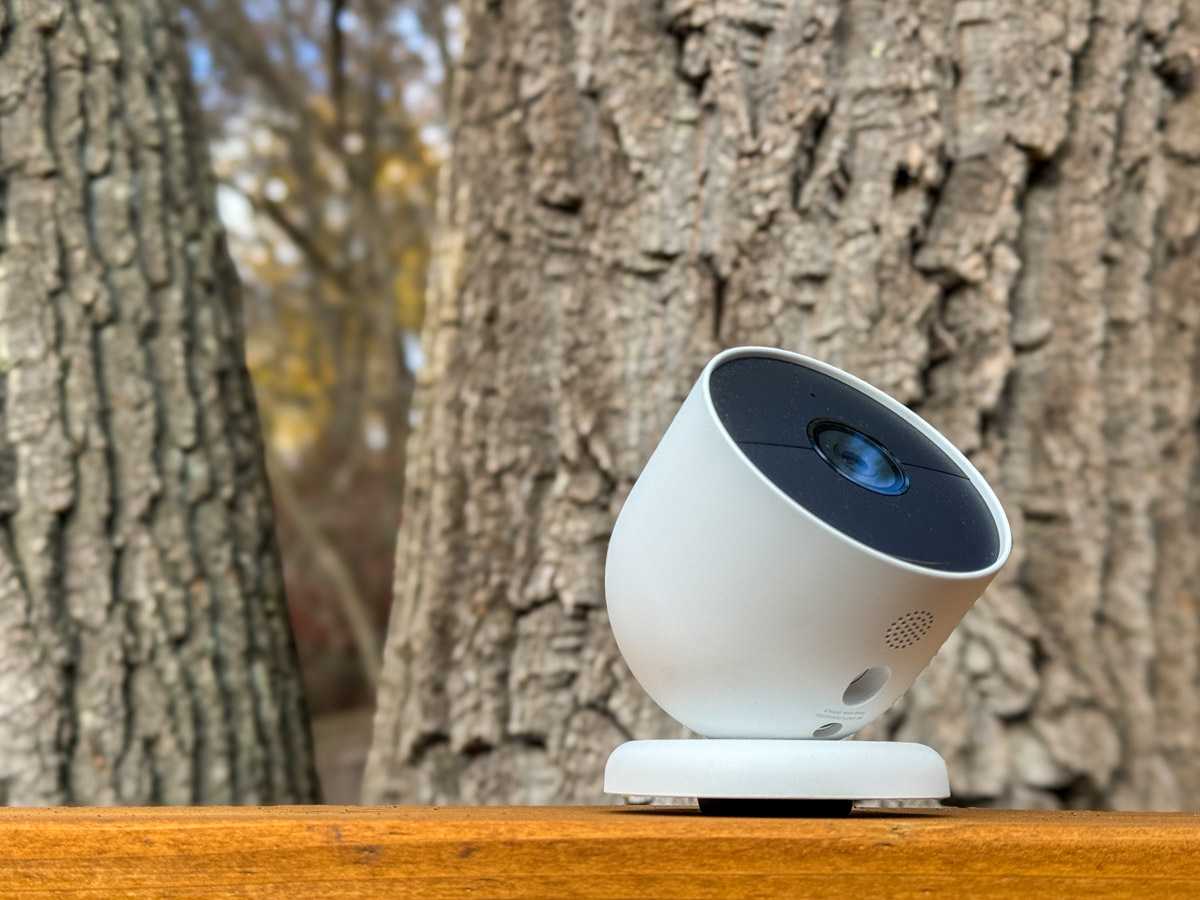
You may consider my installation plan a bit outside of normal parameters. I planned to attach it to a tree pointed at our deck to better observe the occasional wildlife that passes through our backyard.

I’ve spotted deer a few times as well as a red fox. I sometimes observe the neighborhood hedgehog, and I even saw a racoon once peering at me from the edge of our deck at night.

I know this can be normal stuff in the burbs. But remember, I’m a city boy from Manhattan. I’m not wired for this.

But I figured with a little more surveillance, I’d feel somehow happier.
(Please don’t push my theory too hard.)

A Tree is Not a Wall
I tried my tree installation plan several times, until I realized it was half-baked. The circular mount wasn’t going to sit properly on the uneven bark surface. And I wasn’t keen to wait to eventually find a dead Nest Cam cracked open on the deck or ground below.

On the other hand, I knew there were likely other solutions for a backyard installation… There must be something else I could attach it to.

But first there was another problem to consider.

How Waterproof is Water Resistant?
According to Google, “the Nest Cam is water resistant in accordance with its IP54 rating, but it is not waterproof.”

What does that mean? Can it be outdoors and uncovered, or can’t it? Does it require some sort of overhang for protection, like a porch ceiling?

I originally didn’t even consider the issue… it’s an outdoor camera, right? On the front of the Nest Cam box, there’s a photo of the camera dripping with rain while attached to the side of a house. And the words printed next to the picture… “Security, rain or shine.”

Well, maybe not too much rain.

I found some questions online about this, and yes there are stories from owners with malfunctioning Nest Cams after one too many rainstorms.

Hmmm… another rabbit hole to dig out from.

Another House For my Camera to Live In?
So back to my installation quandary. I had been thinking about screwing my Nest Cam onto a tree. Well, what about screwing it into something instead? Like a bird house.

That would offer some protection from the rain. I Googled “Nest Cam bird house,” and happily, yes, I saw some solutions out there.

But now, my project had morphed from a tech installation challenge into a backyard decoration project that will require a little more thought and my better half’s involvement. And that’s going to take a bit more time.

This is where my Google Nest Cam story pauses for now.

The Animals are Laughing at Me
I’m confident I’ll find a good installation solution. But it’ll probably require a bit more DIY thinking.

My uneven experience so far has taught me that a smart home is not the same as a smart backyard. And a Nest is not exactly the same as a Google Nest.

If you’re considering a similar expansion into the wild using a Google Nest Cam, it’s probably a good idea to think this all through first.