At Home with Tech

Unlock the power of all your technology and learn how to master your photography, computers and smartphone.

Tag: SmugMug

Four Ways to Showcase your Best Family Photos on your Phone

Are you able to call up any family photo you want on your smartphone? If not, it may be time to update your photo-archiving plan. Here’s what I did.

Our teenage son asked me a question during dinner last week that I had a difficult time answering. He asked if I could show him some pictures from when he was younger. Pictures of when he was younger?! 

I had thousands of photos… tens of thousands from the past fifteen years! But where were they? Could I immediately call up any of these pictures that best represented his earlier years? 

Could I Meet the Moment?
Sure, I could flip though endless photos living in my iPhone. But that would take too long. I started sweating. 

For years, I’d been dutifully curating my family’s photos on my Mac using Adobe Lightroom Classic, but when I received this simple photo request, I wasn’t ready for it.

I took a breath. He kept eating. The opportunity was about to pass. Then, I pulled out my iPhone, opened Apple’s Photos app and quickly went… to my shared albums.

A Shared Photo Album Saves the Day
And yes, there it was… the photo album I had created years ago and shared with my wife that collected some of our Lester adventures. I opened it up, pulled up my chair next to my son and began displaying a few fun pictures from his elementary school years. He smiled, and after a few minutes, we agreed to look at more another time.

After he left, I exhaled. 

Whoa! That was a definite dad moment. And I almost blew it.

Set Up Cloud-Based Photo Albums with Easy Mobile Access
Afterwards, I thought about our exchange and wondered why I had been caught so off guard with this simple request. I’ve spent hundreds of hours working on our family photos over the years. My challenge was more about my phone having easy access to my curated photos from my multiple cameras. 

So, I decided it was time for a little review of my existing photo archiving process and how to give myself better mobile access.   

The obvious way to handle this need is to create cloud-based photos folders/galleries that you can easily view with phone apps. There are plenty of way to do this. But you’ve just got to maintain your plan and keep your albums up to date.

#1
Apple’s Photos App
For an iPhone user, Apple’s Photos app is the built-in solution. The only limitation to shared albums is the pictures are organized in the order you load them in, not in the chronological order of the photos’ time stamp.

A regular (non-shared) album that you set up just for yourself to sync with your iPhone will order the photos in the correct time sequence.

#2
Amazon Photos

Back in 2019, I started using Amazon Photos for my cloud photo archive. The big draw was it was free with unlimited storage of full-res photos… included in the cost of my Amazon Prime membership.

It has an app for my iPhone, and yes, I use it (though I didn’t have a photo album set up with my son’s pics).

The one problem with Amazon Photos is I do worry that one day, Amazon will abandon its interest in photos. And then… poof?

#3
SmugMug

So, I looked for a company with a more photo-centric raison d’être. And I decided to go with SmugMug. I’ve been curating my best photos with this platform across the past few years. 

Also with unlimited, full-res photo uploads, SmugMug has become the platform for my official family archive. But I’m being very ‘precious’ about which photos live there. I think about my SmugMug galleries as an archive that will be handed to the next generation. And I do pay $200+/year to maintain this current strategy.

Yes, of course, I have photos of my son in my SmugMug account, and yes, I have the SmugMug app on my iPhone for immediate access. But I’ve intentionally restricted the photos of my son to ones that more reflect his life’s milestones for future generations to see. (I’m still fine tuning this theoretical goal.)

So, SmugMug is missing a bunch of the fun photos that I’d otherwise want to share with my son today.

#4
Lightroom’s Mobile App
And then it hit me… All the above solutions require me to export selected, edited photos out of Adobe Lightroom Classic’s ecosystem. 

What I had missed was never setting up a syncing solution directly to Lightroom’s Mobile app. I suddenly realized that was the obvious hole in my photo-archiving plan. 

Oops. 

Of course, I already have a great photo collection of our son in Lightroom Classic. So, I loaded the Lightroom app onto my iPhone. Then, with one click, I synced the collection to my iPhone. 

Well, that was an easy fix.

I’m now prepared for my next dinner with my son.

Don’t Fall Behind
It’s important to never let up on any photo archiving strategy. You can see I’ve worked with several solutions over the years. (Part of that is intentional to help protect against unexpected digital-file loss.)

Good photo organization takes a life-long commitment.

If you can’t immediately access the photo you want on your phone, it’s a clue there’s more work to do.

Is your phone ready for your next dinner?

My Biggest Discoveries I Blogged About over the Past Year

Here’s my At Home with Tech year in review. Below are the links to my key learnings and tech discoveries.

So yes, these next few weeks can all be about looking forward. The fresh start. The resolutions. The turning over a new leaf. But I like to think of this time of year as the next chapter that builds on the past. It’s not so much ‘the new’… as ‘the next.’

I try to carry it forward. That way, I can greet these annual cycles with the perspective of my past years’ experiences. Said another way, it’s important to look back as you look forward. Otherwise, a lot can get lost across the years.

That’s why I think it’s critical to package up the story of your past year in an organized photo collection (digital or book) or perhaps an edited video-clips overview.

You might also want to perform a mental review and acknowledgement of your other notable actions and learnings.

Take it in. Then lock it in, or let it go if need be.

At Home with Tech Year in Review

As you know, I document my thoughts on technology and family life each week. So, I’ll follow my own advice and offer this summary of my blog posts that reflect my big learnings across the past year. Please check out the links below that most interest you!

My Growth as a Parent

Working in our Post-Pandemic World

My Journey as the Family Photographer

My Role as the Family Archivist

How a tiny film-to-digital converter brought new life to my father’s old analog slides
How to quickly turn a scanned negative into a positive image on a Mac
How to use SmugMug as a family photo archiving tool
How to prevent your family’s identity from being washed away by time

Maximizing your Family Video Clips

My Family Vacation Tips

Best Practices for your iPhone

My Evolving Understanding of Apple Computers

Here’s to a Prosperous 2024
As always, thank you for reading my blog. I’m looking forward to sharing more with you in the year to come.

Happy New Year!

Why I joined SmugMug to Share and Archive my Photos

SmugMug is not just for professional photographers. Here’s why I decided to sign up for an account.

Keeping track of all my family photos feels like a Herculean effort these days. It’s not getting any easier. Sure, I’ve got photo organizational systems in place: Lightroom, digital backups and cloud storage.

But I often feel like I’m simply maintaining the existence of tens of thousands of photos. (Have you checked lately how many you’ve collected over the years?)

I’m hardly keeping up with my full curation process. Yes, I share photos with family and friends via texts and Dropbox links. I include some of my favorite travel and nature pics on my blog. I even get around occasionally to creating a photo book. One might say from afar that I’m getting the important pieces done.

But I remain unsettled.

Scrolling vs. Flipping
The photos I usually share are individual photos that you can simply flip through one at a time. That’s okay, but I’d really prefer if they could live collectively as a group in an online photo gallery. Then, you’d be able to view them as a collection that you can scroll through. The viewing experience is already optimized. (It’s a big difference.) And if you’d like to look more closely at one photo, you can do that too.

But I didn’t want to take the time to start designing and publishing complex online photo galleries. I needed a drag and drop solution…

After doing a bit of research I decided that SmugMug could help me.

Unlimited Storage
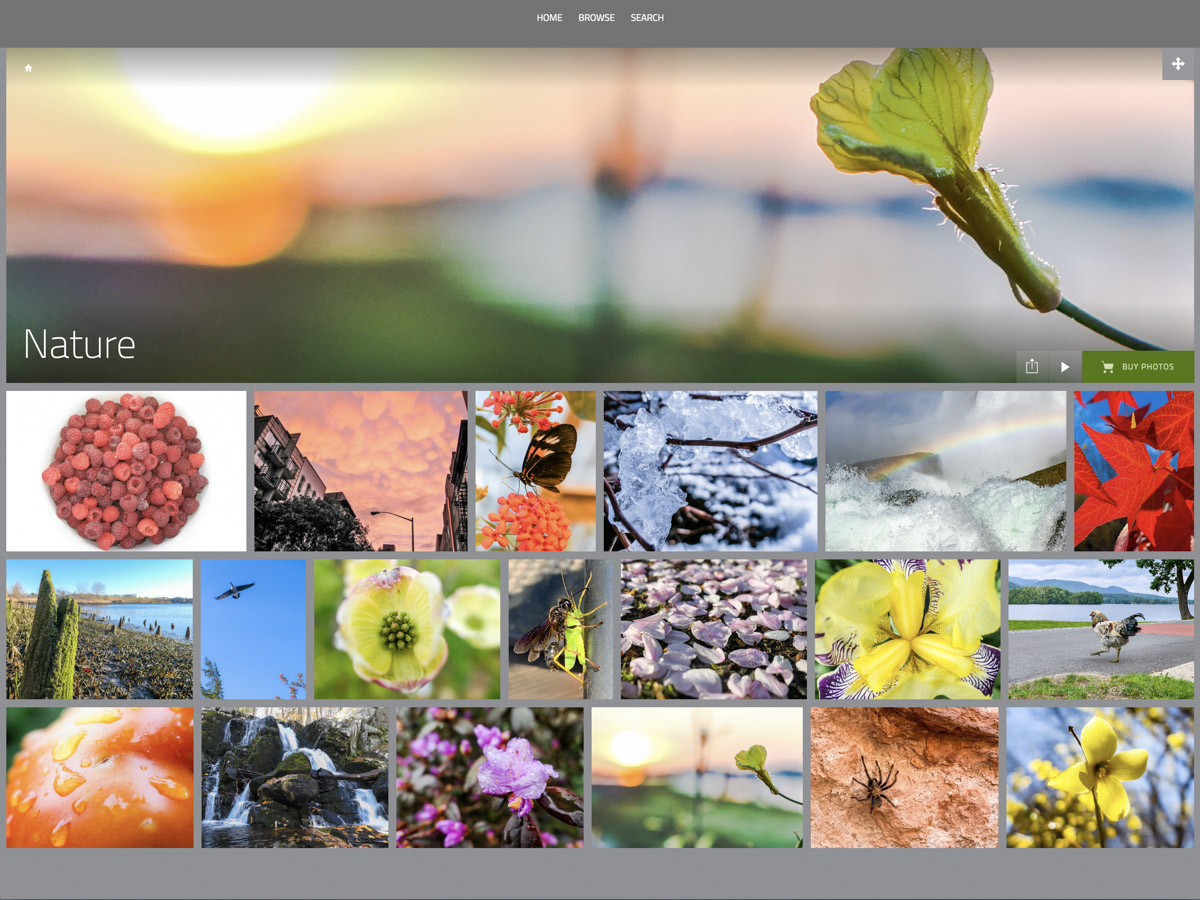
SmugMug is marketed to professional photographers who want to sell their photos online. But SmugMug also can be a powerful tool for handling your family photos. Not only can it generate unlisted online photo galleries to share with your family and friends, you can also create galleries with passwords. The bottom line is you have total control with who can see your photos.

SmugMug’s interface is easy to use, and the online galleries look great.

And get this… SmugMug offers unlimited storage. That’s right… unlimited. So I signed up and got to work.

But I wasn’t done climbing out of my own photo rabbit hole. Not yet.

Less is More
Sure, SmugMug can house all of my photos for permanent archiving, but really why would anyone want access to many tens of thousands of photos that tell my family’s story? No one will have the time. I certainly wouldn’t want to burden my son with that one day.

I’ve been going through, organizing and digitizing hundreds of my father’s photos that contain my family’s history back to the late nineteen century. Believe me… that’s been a lot of work.

My own family photo collection is enormous by comparison. I’m actually nearing 100,000 pics. (You should check how many you’re carrying around.)

Your family’s story can be told in a fraction of that. (And mine can too.)

Preparing for the Next Generation
So these unlisted SmugMug galleries I’ve begun generating will become the backbone of a slimmed-down, curated and optimized Lester family photo history.

It’s permanent, safe and ready to hand over to the future.

What do I mean by that?

Long-Term Strategy
Nothing lasts forever. Back-up hard drives can fail. A curated cloud photo collection seems more resilient to the ravages of time. Sure, no company lasts forever, but you’ve got to put your stake in the ground somewhere.

I’ve purchased my ticket to the future on the SmugMug train.

And yes, the ticket does come with a cost. I signed up for the annual ‘Power’ plan, which is $110/year.

As you multiply that out across (hopefully) many years to come, the price tag will be substantial.

But there’s no solution to store an unlimited number of full-res photos for free. That said, I technically do have that perk with Amazon Photos. But that platform doesn’t really offer a photo gallery solution when sharing links. (And I do sometimes wonder how long Amazon Prime benefits will include its photo division.)

A dedicated photo company feels like a better long-term bet.

Time to Share with the World?
Finally, there’s the other major SmugMug benefit that every photo gallery doesn’t have to be private. SmugMug is designed to create your own public website that features your photos. Being able to show off my public-facing photography is quite appealing.

You may have noticed that beyond my job as the family photographer, I’ve enjoyed sharing my travel and nature photography on my blog.
How nice it is that I can also curate these images to share on my SmugMug site.

It’s All Part of the Plan
No, I’m not selling my photos. Not today. No, I’m not a professional photographer. Well, not today.

Does my photography hobby support my professional brand leading video production teams?
It sure does.

Can SmugMug house videos?
It certainly can (up to 3GB files/20 minute length/1080p resolution).

Will my SmugMug site align with my other personal branding efforts?
Absolutely.

Barrett’s SmugMug Site
You can see I’m tad enthusiastic about joining SmugMug.

  • Long-term archiving? Check.
  • Private link sharing? Check.
  • Public website for some of my own work. Check.
  • Setting up for a future handoff to the next generation? Check.

Am I feeling smug? Maybe just a little.

But the truth is any photo curation solution takes a TON of work. And I’ve just begun my SmugMug journey.

If you’re interested in taking a look, you can find it here:
barrettlester.smugmug.com

Hope you like it.