At Home with Tech

Unlock the power of all your technology and learn how to master your photography, computers and smartphone.

Tag: technology

My New Area Code Twists My Tech-Dentity

Getting bored with your area code? Feeling like you need to move to the Big City? Don’t bother. Just sign up for a Skype Online Number with the area code of your choice. Sacrilege? Nope. It’s just progress.

A few months back, I flew to Latin America for work and came up with this elaborate experiment to stay in touch with my family and friends using Skype on my iPhone tricked out with a Skype Online Number. This new phone number allowed my friends and family to reach out to me without the iPhone burning a hole in my pocket by racking up ludicrous roaming charges. Once I allowed Skype to take control, the rest was free.
Quite a parlor trick! (though I needed to be tethered to Wi-Fi zones)

Sure, I paid $18 to set up my new Skype uber-number for three months.
But after that, I was in business as Barrett Lester, International Man of Tech Mystery…. reachable around the world… all for the cost of a domestic call.

I was digging it.

My experiment was a huge success. And I came home to a hero’s welcome.
I put my passport away and returned to my Clark Kent life.

Doubling Down on my Online Skype Number
Fast forward a couple months, and I get a friendly email from Skype.
My Skype Online Number was expiring. Would I like to renew it?

Hmmm. Well, I hadn’t used it since returning home. And I didn’t have any immediate plans for another international trip. So I wasn’t really sure why I needed to hold onto it. Still, I liked the idea of having it.

Though I live in Connecticut, I had chosen a New York City mobile area code for my Skype Online Number as I work down in NYC everyday.
(Yes, I am a Road Warrior.)

But there was something more to the choice.
I simply liked having the 917 area code.
It felt like it connected me back to my birthplace.
And to the place I currently spend most of my weekday waking hours.

Or maybe I simply coveted having a New York City area code, again.
I hadn’t realized this, but it held some value for me.
Those three digits were something of an identifier.
Being able to say those numbers just felt… good.

Operator, Would You Ring Up William Powell and Myrna Loy?
It was the same for my father when I was growing up. He would always enjoy sharing our Upper East Side area code to anyone and everyone when the old area codes began with two letters.

Ours were “R-E.” And these letters referred to a word- “Regency.”
I still remember how he would begin articulating our phone number in his deep voice with “Regency 7…” It rolled off his tongue like smooth whiskey. For me, every time he said it was like watching one of the “Thin Man” movies from the 1930’s.
How classy is that?

I think it was a badge of honor for him.

He occasionally talks about it the same way I still pine after my old DVR/DVD combo TV recorder that no one makes anymore. (I really loved that unit.)

In the New York of the ‘70’s, still having a “Regency” extension was an identifier. It said, I’ve had this number for a really long time.
Kind of like saying, “My relatives came over on the Mayflower.”

And now, through the magic of Skype and $54 a year, I can buy an identifier that says I am still a New Yorker. Plus I chose a coveted area code that most can’t get anymore. (Not sure how Skype pulled that one off.)

Problem? What Problem?
But I don’t live in New York City.

I’m buying into a tech identity (“tech-dentity”) that is not truly my own.
Is this a moral dilemma?

Many others have actually defaulted into this exact scenario.
They just pick up and move to a different state and simply don’t update their cell phone number. (like my wife)
And why should they? It’s a pain changing the number and an even greater challenge cajoling all their contacts to update the number.

So they just let it ride, right?

Ultimately, the concept of your phone number as one identifier for your
tech-dentity will blur over time as cell phone numbers continue to move around with the population.

But we’re not there yet.

Logic Not Required
So I signed up for a full year of my swanky Skype Online Number.

But wait… There’s more.

Then Skype offered me a deal I couldn’t refuse.
(I know. Someone should stop me.)
They sold me a GE Skype phone for the deeeeeply discounted price of $10. And yes, it also connects to my home line. (Which, by the way, I’m thinking, perhaps I don’t need anymore.)

You’re probably saying right now, “How many phones and phone numbers does this guy really need?”

Good question.

I’m telling myself I’ve got grandiose plans that some day I’ll use this technology to crack the code on how to restructure my home/personal phone communication plan so I feel I’m no longer funding the operating budget of a small country. And maybe even integrate Google Voice into the equation for not additional cost.
(A topic for another time.)

But for now, I’ve got to admit; I have only one tangible justification for holding onto the number – pure and simple v-a-n-i-t-y.
Vanity as a once, current, and, I suppose, always New Yorker.

Okay, now I’ve got that off my chest.
I feel better already.

Today, I pulled the trigger and forwarded my Skype Online Number to my regular AT&T cell phone number. So both numbers will now ring on my iPhone. Remember, Skype works on a regular wireless connection.
(Wi-Fi not required)

Tick Tock
At any moment, I may choose to fully activate the latent New Yorker DNA in my soul and fully use my 917 Skype Online Number which says,
“Hey, I’m still a New Yorker! Hear me roar!!”

Because I can.

But for now, I’m keeping the quaint suburban number that says,
“Hey, I live in the ‘burbs with two pear trees and a backyard.”

Because I do.

I am at peace with my complex tech-dentity.

My iPad Doesn’t Brake for Flash

This PBS report took me just minutes to serve up to my wife during dinner. But as the resident technology chef at home, my meal got burned, because we couldn’t watch the video on our iPad. Whose fault is that?!

I was enjoying a quiet dinner with my wife on Friday night after putting our toddler to bed. Mid course, my wife mentioned an email she received from her brother about a TV report on the important topic of childhood diabetes and obesity his wife produced for the PBS series “Need to Know.”

The show was premiering that evening, and we were invited to tune in. The email also contained a link to the show’s webpage where the video already lived online.

I don’t think I’ve watched any TV in real time over the past year with the exception of some news and the Olympics.
(and that was mostly in ‘pretend’ real time)

Time shifting is really the only way I consume TV content these days. DVR it and watch it later.

But recording “Need to Know” on our cable DVR and watching it sometime the following week seemed like an insufficient response to such a happy email from a family member.

A more immediate response was required.

So I told my wife I would grab the iPad, and we could watch the video online over dessert. What’s faster than that?

Isn’t technology wonderful?
Except when…

I tapped the icon of the video to begin playing on the iPad, and nothing happened.

Oh, yeah. It’s a Flash video.

The IT Guy calmly stated that it was a well-known fact that Apple’s mobile products don’t use Adobe Flash Player, and so they don’t play Flash videos.

The Look
And then we gave each other the look. The look that says, “That’s nice, but it should really just work. We nodded to each other briefly and smiled, acknowledging the problem. We’d been there before.

But deep down, I was miffed.
I know my wife didn’t mind, but the shiny exterior of my home tech kingdom was dinged. And don’t tell her, but so was a little bit of my pride.

But you’ve got to move on.
And I had a back up plan.

I suggested we schlep over to my iMac in the other room to watch the video.
What an inconvenience!
The bananas flambé was ruined.
(It was actually just Trader Joe’s Apple Sauce.)

We proceeded to successfully watch my sister-in-law’s PBS report.

The Future has Arrived?
So, instead of having to go sit on the couch and wait for the PBS show to broadcast later that evening and then wait the for the particular story to run, we watched the report online within minutes of beginning our conversation.
That’s not so bad.

But the promise of today’s technology says we should have been able to do this in seconds through one or two clicks, tops.

Now, I’m not bickering over the loss of a few minutes.
But I could have done without the irritation that the shining beacon of home tech didn’t quite work right for me… again.

It’s 2012, and we’ve just landed on Mars again in a rather stunning fashion.
Did you all watch NASA’s Seven Minutes of Terror on YouTube?
After seeing all that amazing technology in harmony, shouldn’t something as straight forward as this be a non-issue?

Apple vs Adobe
A little history lesson-

In April, 2010, Steve Jobs posted his famous open letter to Adobe regarding his “Thoughts on Flash.”

It explained why Apple didn’t support Flash on Apple’s mobile devices-
Flash didn’t work with touch-based devices. It was a closed platform, created terrible battery life on mobile devices, and had poor reliability, security, and performance.
(Steve Jobs didn’t like Adobe, much.)

After this, Android users jumped up and down with glee, doing their superiority dance, and they happily watched their Flash videos on their Droids.

But last November in a surprise announcement, Adobe said it would no longer develop future versions of the Flash Player for mobile browsers.

What?!!
Android users stopped jumping.

Adobe explained on its blog its decision to abandon Android’s mobile browser-

1- Premium experiences on mobile devices are typically being delivered through apps, and
2- Mobile websites mostly rely on HTML5 based video delivery.

Looks like Apple was right all along.

Adobe decided to focus on HTML5 technology for mobile viewing, which Apple has long supported. (Adobe will still continue to develop desktop versions of its Flash Player.)

So while Androids and BlackBerry PlayBooks still can play Flash-based videos today, that capability now has an expiration date.

The End of Flash for Android
On August 17th, Adobe removed its Flash Player from the Google Play store, which is the beginning of the end.
Existing users running Android 4.0 “Ice Cream Sandwich” will continue to get updates through September 2013.

If you’re one of the few trailblazers who already have Android 4.1 “Jelly Bean,” you’re out of luck now.

Mobile Apps are the Future
So all this said, why do websites still publish Flash-based videos that can’t be viewed on mobile devices?

Shouldn’t these companies all just have mobile versions of their websites to prevent this problem? Or why not just use the right technology for videos that can play on all platforms?

Hello…!? PBS?

Wait a minute… I’m suddenly channeling a likely response –

Just Download the mobile app.
Oh yeah. Everyone’s got one of those, these days.

So a couple days later, I took the iPad and tapped on Apple’s App Store, and of course, there was the PBS app.
I downloaded it, clicked on the “Need to Know” series, and then found the episode with my sister-in-law’s story.

Bam!
There it was, thirty seconds later… playing on the iPad.

My Tech Pecs
The problem with this micro success is that it happened 48 hours after the moment I really needed it.
That particular instant when I wanted to flex my tech pecs in front of my wife.
(Married guys, you know what I mean.)

No one wants to deal with all those extra steps when clicking on a link that’s supposed to just… work. It’s a de-motivator.

The good news is we can redeem ourselves
There are lots more links out there to click on and get right.

Much like life, using home tech can be complicated.
But figuring things out can be fun (even a little), if you allow for it.

Just don’t forget-
Perfection is unnecessary, if you’re already getting it done.
Always have a back up plan.
And never lose site of what’s really important.

Especially on the night before your anniversary.

Enough said.

GPS Jane

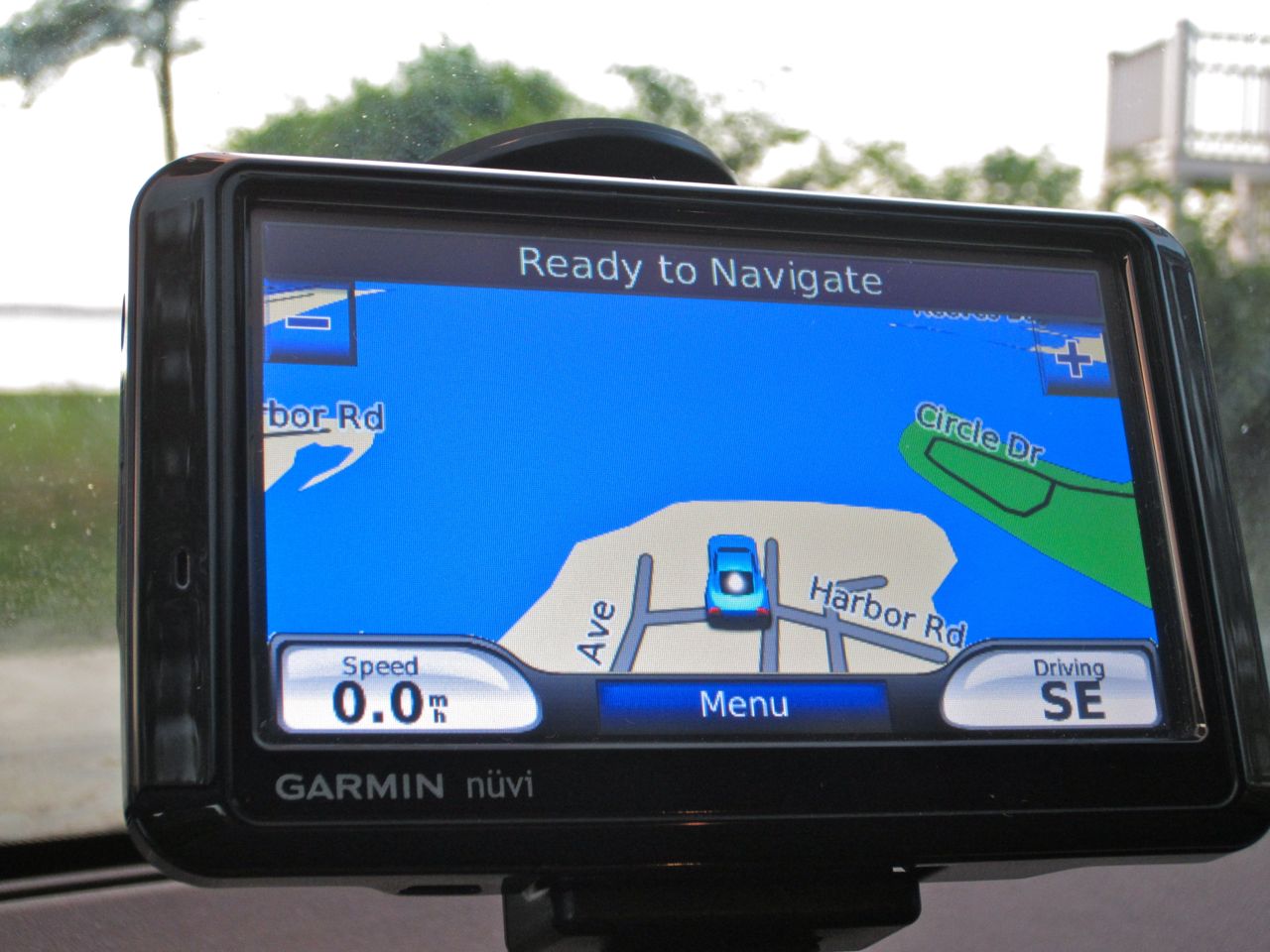
My Garmin Nuvi took my family on a ride getting to our vacation. Then, my iPhone Maps app actually got us there.

The first time my wife and I drove with GPS navigational support was six years ago, while driving in a car rental out in San Francisco.

I should first mention that my wife is the official navigator in the family.
She loves maps and has only gotten lost once (in the woods) in all the time I’ve known her.
It’s probably not going too far to say that I’m moderately to severely geographically challenged. I could get lost driving down a straight highway.

I could blame this unfortunate fact that I grew up in New York City and never drove a car until after college. Good excuse? Well it’s my story, and I’m sticking to it.

Driving around Fog City, I felt like I was in the car of the future. A portable navigation device using GPS (Global Positioning System) technology to take you anywhere you wanted to go. No more worrying how to get there.
I was sold, before I even got into the car.

My wife wasn’t so sure.
I was so charmed I set the device’s voice control to dictate its directions in a smooth female Australian accent.

And then I gave it a name.
Jane.

[My wife joked about “the other woman.”]

The Other Woman
We ended up not following Jane’s directions much that day due to human/computer incompatibility. My wife had her map, and unless she saw the logic of the Aussie hussie, my wife called out an alternate course.

And though we collectively agreed there was little value to this circus show circuit freak, I purchased one within three months. (the Nuvi 760)

The name stuck, and eventually, the two north stars in my life came to some sort of understanding, and Jane became a welcome passenger on most of our big road trips.

Today, even though portable GPS navigation tech is a common consumer tech tool, and of course available in many car models and through our iPhones, we still use our aging Jane quite a lot. The fact that she talks still keeps her ahead of much of the still silent competition, unless you want to buy a costly GPS app for your iPhone.  (That said, I understand Android’s native free navigation capability is pretty awesome.)

And as of May, Garmin has sold over 100 million of its GPS products. So I’m not alone in my devotion to this magic tool that stretches my navigational capability.

Deep down, though, my two navigators still don’t get along.

And much like a bad movie where the “other woman” threatens the lives of a happy couple, I have finally begun to see the errors of my ways with Jane. But is it too late?

The Blind Leading the Blind?
First off, I’ve clearly become overly reliant on Jane.
I take Jane with me down the street to get a quart of milk.
New restaurant in the next town? Too far to risk getting there by myself.
I need my Jane!

And now that Jane has comfortably cemented herself to my life, something strange has begun to happen.
She’s getting lazy.

Her directions are sometimes, well… wrong.
And over time, the problem has gotten worse.
Her directions eventually get me where I want to go, but not always through a shortest route approach.

Yes, I know that road maps need to get updated from time to time, and you’ve also got to refresh your portable GPS unit’s memory with software updates.

About a year ago, I got an email from Garmin offering lifetime software updates for Jane. I took the deal, thinking I would never need to look for another portable navigator ever again.

Cue the ominous movie music…

Jane Takes a Vacation during our Vacation
Last weekend, the Lester family got into the car to kick off our little beach vacation on the North Fork of Long Island.

As usual, Jane was front and center as we headed out.
I type ‘Harbor Road’ into her keypad, but before I can complete my data input, she automatically suggests ‘ Harbour’ without allowing me another option.  She then happily locks in the address but also changes the two-digit house number to a non-related three-digit number.

It’s like the vacation address just doesn’t exist.
Am I in a Twilight Zone episode?
If only…

So I pull out my iPhone and repeat the same exercise to see how the Maps app handles the task.

Problem? What problem?
My iPhone quickly locks into our correct route.
There it is. Harbor Road, on the water.
Not Harbour Road, several blocks inland with an entirely different address.

My wife is driving.
So I have the flexibility to run both devices simultaneously.
A little competition, if you will. (Getting into the spirit of the Olympics.)

Let the Games Begin!
The two wonder machines run neck and neck until the last mile. I knew it would come down to the wire.
Then Jane says calmly, “Turn right.”

But iPhone Maps clearly points, Left!!

This is the moment of truth.
It was time to change the status quo.
I call out, “Take a left…Now!!

Jane proclaims her disapproval at my disobedience.
I firmly repeat my navigational act of anarchy.

My wife complies, and as our car begins its left turn, Jane admits defeat.
I look at her readout and it says, “Recalibrating…”

And in that moment, Jane lost her grip on me.
She eventually regains her composure and finally displays the original address I had wanted all along, as well as our now-correct bearing.

Too late, Jane.

She decides to acknowledge her error in the last minute of our journey?!
I don’t think so. This is the last straw.

I know. Jane and I are bonded together for life. Right?
Lifetime updates with no additional cost.
Doesn’t matter.
It’s time to make a change.

Jane, it’s over.

Let’s Just Remember the Good Times
My change of heart has nothing to do with the recent but separate tech announcements by Google Maps and Apple promoting even greater upcoming capabilities for smartphones. And even more irrelevance for dedicated GPS devices.

Wired has already declared, “The portable GPS device is dead.”

Nope. I’m not just reading the writing on the wall about Jane.
This time, it’s personal.

Where’s the Nearest Flower Shop?
Now I’ve got to woo back the one and only true navigator in my life.

So I decide to write my wife a little note to express the error of my ways and my true regret.

Dear Wife,

I’m sorry I ever doubted your navigational superiority.
Artificial intelligence can never match your keen sense of direction, and your innate capability to drive around a traffic jam, leaving all others in your dust.

I was wrong to ever trust Jane, when you are truly my one and only navigator.

Can you ever forgive me?

Love,

Your Geek

So I close the envelope and look around for my wife.
It’s suddenly way too quiet.
Oh no… She’s gone!

Don’t worry.
She just went shopping with a friend at a local farm stand on the side of the road, five miles away.
I should go find her.

But I don’t really know where she went.
Ummmmm…

Excuse me. I’ve got to go and find Jane.