At Home with Tech

Unlock the power of all your technology and learn how to master your photography, computers and smartphone.

Tag: toy robots

How to Improve your Zoom Background at Home
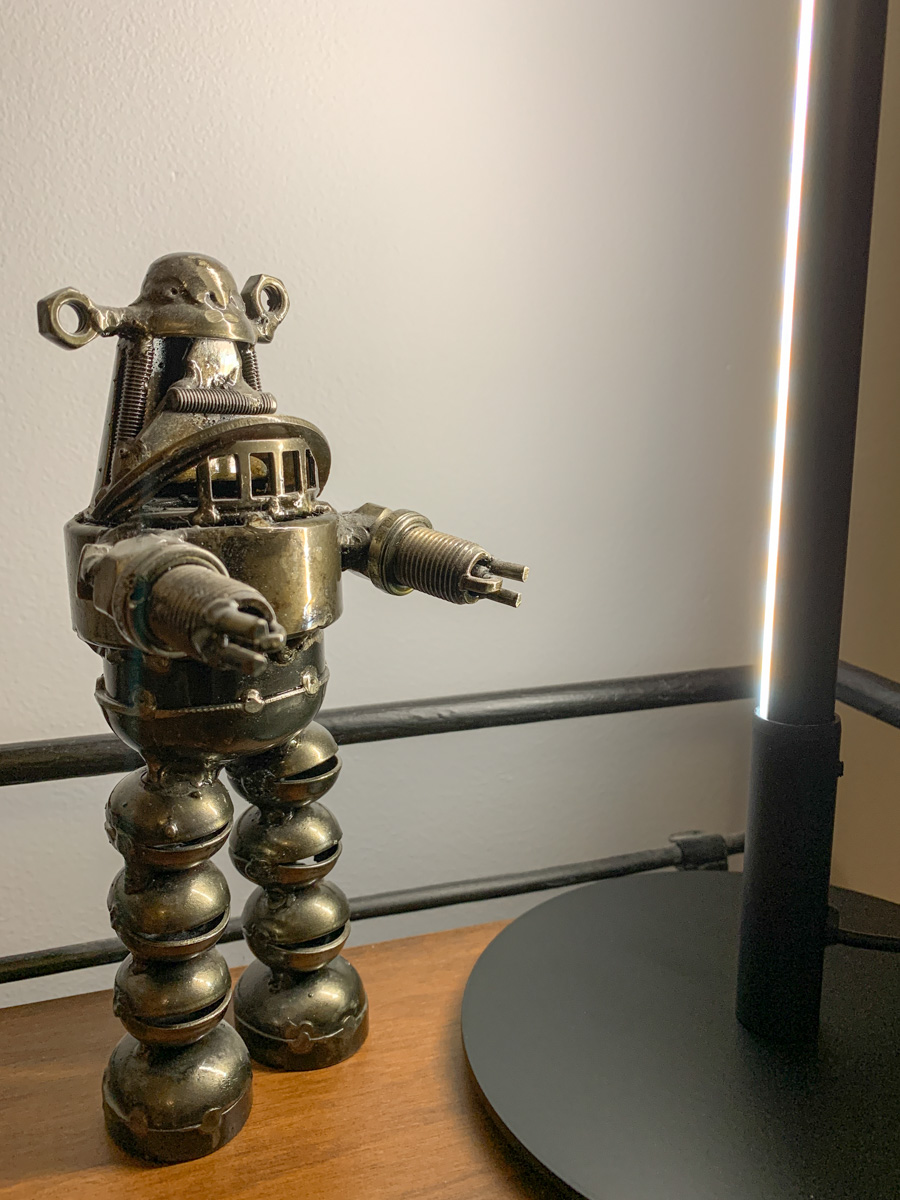
Making sure you’re properly lit in your Zoom shot isn’t always enough. What about the supporting cast in your webcam’s view?

It’s clear we’re at a point where participating in Zoom meetings is a permanent part of home life and a necessary tool to communicate with our world. So, it’s important to create a ‘remote video communications’ home set-up that really works for you and your viewers.

I hope most of us are beyond the chaotic experience of working from home and participating in meetings all day. During those early pandemic months, simply finding a quiet spot to open up your laptop for a Zoom, Skype or Teams meeting was a challenge.

How your shot looked understandably may not have been your priority.

Keeping it Real
But as we’ve settled into our new routines, many of us have improved our Zoom look.

I’m sure you know the basics by now:

  • Make sure you’ve got enough light on your face.
  • Don’t sit with a window behind you.
  • Position your webcam perpendicular to your eyes, not looking up your nose.
  • Declutter your background.

I know many folks are fond of using virtual backgrounds. While that’s okay, I like to keep my shot as authentic as possible.

I’ve tried digital and blurred backgrounds, but I always felt like I was in a science fiction movie.

Can you See my Robots?
So, even though my home office is hardly an ideal space to create the perfect video shot for my Zoom meetings, I’ve continued to tinker with my background throughout these many months.

Recently, I moved the furniture around in my home office, and to a certain extent I’ve created something of a blank canvas to work with.

I repositioned a short bookshelf into my Zoom background, and I used the top shelf to display a few robot statues I’ve collected over the years. (R2D2, C3PO, Robby the Robot and Robot from the original “Lost in Space”)

They’re also nice ice breakers as people sometimes ask about them when they spot my metal robots in my Zoom shot.

The only problem is my robots looked like shadows in my background. That’s because my back wall didn’t have a lot of light hitting it.

Time to Add More Light
Like any professional studio TV set, you’ve got to properly light your entire space, and that includes the background. Otherwise your environment will look drab, no matter what it contains.

And webcams are usually happier if your lighting is more even throughout the entire shot. That means you’ll look better and not over exposed.

So, I needed to figure out how to throw more light on that back wall and my little robot display.

Vertical LED Table Lamp
There are any number of ways to do that. A floor lamp next to the bookshelf would be an easy solution. That said, I didn’t want to clutter my background (or my home office). Instead, I looked for a lighting solution with a smaller footprint: some sort of lamp that could sit on the end of the book shelf just outside of my Zoom frame.

I found a small vertical LED table lamp made by Edishine on Amazon.
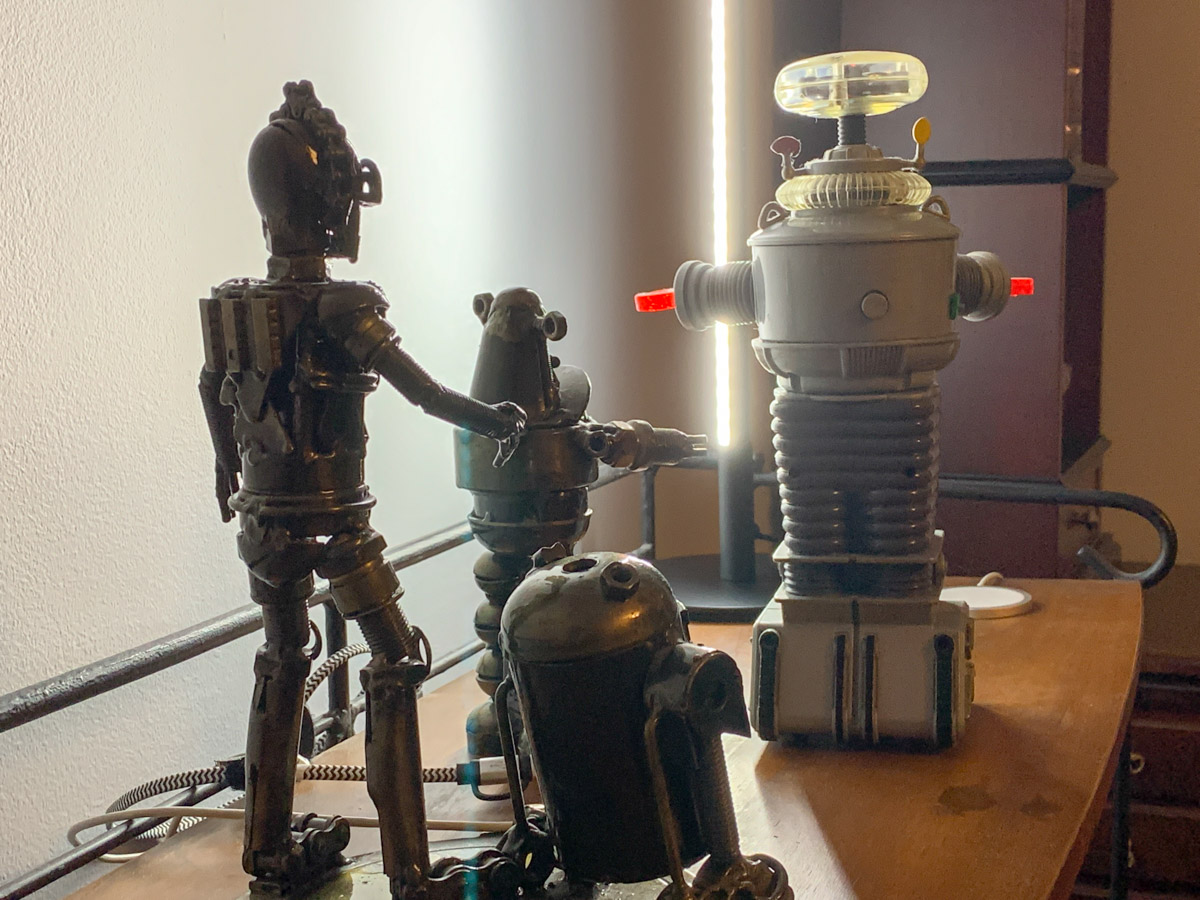
It was the perfect solution. It added the background fill light I needed without overwhelming my shelf. The lamp’s cold, minimalistic look also blended nicely with my little metal companions.

Think of it more like an under-cabinet lighting solution, but designed as a self-standing vertical glow.

Now, my robots are easy to spot in my Zoom background. Plus the extra light also helps my back wall pop.

Zoom-Optimized Rooms
If you want to really show up for your close up during Zoom meetings from home, you’ve got to do more than light your face and wear a nice shirt. Your environment is an extension of you, and it’s important to give it the same attention as you set up your webcam shot.

That means your whole room (or at least the part people see) needs enough light.

I know we don’t live in TV studios (well, most of us don’t). But I think it’s fair to say that when you think about how to decorate your living spaces moving forward, it’s not crazy to plan for the creation of Zoom-optimized rooms.

It’s not science fiction. Yes, reality has caught up.

Which Robot for Your Six Year Old?

Is it too soon for a first grader to receive a personal robot? Perhaps he/she could just build one. On the other hand, how many humans today can construct their own toy android? So this daddy has taken a different road to introducing robotics at home…

Is it too soon for a first grader to receive a personal robot? Perhaps he/she could just build one. On the other hand, how many humans today can construct their own toy android? So this daddy has taken a different road to introducing robotics at home…

My six-year-old son is really into robots these days. He’s especially fascinated with the Zane character in the Lego Ninjago universe.
(Technically, Zane is a ‘Nindroid’… but let’s not get tripped up over details…)

Last week, my boy declared he wanted to build his own Zane.

He walked up to me with his Ninjago book in hand. He opened up the book to a page with a blueprint of Zane and pointed.
in-the-workshop-building-zane


Uh oh.

I suggested using cardboard, paper and paint. My response was clearly way too simple and old fashioned for him…

He declared he wanted to build his Zane out of metal.

Uh oh.

Well, I didn’t happen to have any scrap metal lying around…
(And I typically don’t ‘work’ with metal… I tend to just buy gear made out of metal!)

Nevertheless, I decided to embark on a daddy/son mission, (admittedly half baked) and I took my young Frankenstein to Home Depot to get some small metal mending plates and nuts and bolts. I figured that might do the trick.

Note to other parents out there:
Don’t try this!
Ever!!

You’ll encounter sticker shock at the checkout register and end up becoming the proud new owner of lots of scrap metal. Sure, my boy had some fun screwing sharp metal parts together, but he didn’t create anything close to a robot.

The Influence of the Lego Universe
However, he did create a Ninjago ‘Shurikan’ by bolting together three pieces of metal into a large triangular ‘tool.’
(He actually made two.)

And in that moment, he couldn’t be more proud of himself.
So perhaps I shouldn’t dismiss the entire venture so easily…
a-shuriken-built-out-of-mending-plates


But as grand as this spontaneous creation was, it’s a little too real. Much like Shurikans in the mystical Ninjago story that were so powerful and originally banished, our newly created 3-D Shurikans will need to be dismantled and made into something else.
(The parts redistributed for less ‘impactful’ purpose)

And there’s another problem… Remember, we didn’t build a robot. Perhaps if I were an AI genius, I might have had greater success, but it was time to look for help with this quest elsewhere…

Time to buy a toy robot that some other AI genius built.

Welcome to the Commercial Lab of Creation
There are a variety of aspiring toy robots out there for kids, but I quickly focused on an established solution… one of the robot toys made by a company called ‘WowWee.’

WowWee’s designers have come up with a variety of tech toys since 2004, including their WowWee MiP Robot.

The MiP is a cute little balancing guy on segway-like wheels with ‘GestureSense’ technology that allows you to control its actions with your hands. Plus you can use an app on your smartphone to control it.

There’s also a newer WowWee Coder MiP Robot, which is translucent, sports a rechargeable battery pack and comes with a cool plastic ramp to play with.
wowwee-coder-mip


This ‘Coder’ version has every capability of the original MiP, but you can now also ‘code’ actions and sounds with the app based on how you interact with your MiP.
(It’s not really coding… it’s simply selecting your “when/then” choices.)

Whether my six year old is ready for even this basic kind of coding is questionable, but I figure the functionality will still be there for him in a year or two to explore.
(Assuming the Coder MiP is still a functioning member of the Lester family.)

Amazon has the Coder MiP for $44.90.
(MSRP is $99.99.)

That’s actually way less than my metal mission to Home Depot set me back.
(Let’s speak no more of that.)

Click.

Fueling the Mad Scientist
Okay. So I’ve checked the robot box.
But again I still haven’t solved the building need.

WowWee also makes mini versions of their robots, called RC Minis.
And they make sub versions of the mini robots called “Build-Up” editions.
(They come in pieces.)

There’s a small “Build Up” clone for the MiP and one for their ‘Robosapien.’

These “Build-Ups” are much simpler than their cousins, and you control forward and turning motion using an included remote.

Pretty basic.
But you do actually build them…

For my six year old, he may need some help getting it all together. So it’s probably going to be a family activity… but that’s just fine with me.
(That said, I don’t want to sell him short. He’s already a pro at building Lego Bionicles on his own.)

The WowWee Robosapien RC Mini Build-Up edition goes for $29.96 on Amazon.
Not a bad deal…
…If it gets the job done.

Click.

Daddy Time
The bottom line is there’s now a young tech builder in the family. So these two WowWee bots are just the beginning.

Any other ideas out there on technology-based building projects I can line up for my son? I’m thinking that this is where things can really start to get interesting…

Wow Wee!