At Home with Tech

Unlock the power of all your technology and learn how to master your photography, computers and smartphone.

Tag: wireless headphones

4 Smart Strategies for Buying Tech for Your Teen

A teenager wearing wireless headphones stares out of a window onto a city street.
How to go about buying expensive technology for your teenager can be confusing and often a challenge. Here’s what I do.

We all know how expensive personal tech can be. The price points don’t change for your kids and teens. Tech is tech.

As a parent of a teenager in high school, it’s already been a couple years since I faced the reality that toys are for kids, and he’s not really a kid anymore. When I shop for our son, he wants (and often needs) the same tech as I do.

That said, the gear we all use is often available at a variety of price points. So, when shopping for our teen, yes, I’m inclined to first look at the lower end, but I’m also mindful to get him something ‘good.’ 

I don’t want to fall for ‘a deal’ on a model that’s subpar. A bargain is not always good value in the name of trying to save a buck. Not for me. Not for my boy.

So, I do find it a complex balancing act as a parent, and I must admit I carry some baggage to this shopping equation.

My Father Got Me Used Tech
I recall the moments my own father gifted me the tech I craved when I was a kid… a stereo system for my room and later a cool Sony Walkman. What I also still remember was the stereo was in an already-opened box, and my Walkman had an annoying dent in its metal frame (but it worked fine).

Not to diss my dad, who passed away in 2022, but the memories of these slightly used gifts still kick around the back of my brain. 

Sure, he was probably going through the same questions as I am now as a father. And he made some choices. And just so you know, it wasn’t an affordability question. There are a few other details, but they don’t change the facts. Nor do they blunt these feelings decades later.

Finding a deal for yourself is one thing. Shopping for a discount for someone else’s gift can be entirely different. As we go through this topic, I just wanted to reveal this story as I share my own gifting strategies as a dad.

Of course, I look for reasonable and smart ways to buy tech more affordably for my son. But I also don’t want to repeat the gifting mistakes my father did.

So, all this said, here are four ways I’ve been trying to navigate this tech terrain as a father…

#1
Start at the Entry Level

As any number of tech product categories mature, less expensive versions eventually show up. They’re usually not as good. But sometimes… they’re almost as good and often in the ways that matter most. And that’s where I look for gifting opportunities.

I like this approach especially with the brands we already know and love. Apple’s iPhone SE is a great example, and yep, my son has one. I actually bought it for myself as a ‘transition phone’ after I drowned my old iPhone. (That’s a whole other story.) Later, the SE went to him.

Not every entry level choice is the right move. You’ve got to do some homework.

#2
Shop for Yesterday’s Best

Sometimes, last year’s model at a discount is still a great choice. How much better is the newest version really going to be?  

And most importantly, last year’s great model can be a much better choice than a cheaper model that’s brand new. Shopping for price is only one piece of the equation.

I recently applied this shopping strategy for a pair of noise-cancelling wireless headphones for our son.

I went with the older Bowers & Wilkins Px7 S2 Over-Ear Headphones. They received amazing reviews. But there’s a newer model: the Px7 Se. Yes, that’s the latest-and-greatest (unless you must have the even more expensive Px8).

But the discontinued Px7 S2 was still for sale and at a nicely discounted price. So, I bought it. 

I think the Px7 S2 was a really solid choice. And most importantly, my son loves his new headphones.

Always remember to take a look at yesterday’s best.

#3
Don’t Skimp on the Guts of a Computer

We’re an Apple family. So, of course my son has a MacBook. I got him the MacBook Air. No… not the more expensive MacBook Pro. But I made that choice also because the MacBook Air is so good. And I bought the current model at the time. 

Sure, I could have saved a couple hundred dollars on last year’s model. But in this circumstance, I didn’t follow my ‘yesterday’s-best’ strategy. I applied a different shopping strategy for computers. 

I always like to buy the current model with the newest chip. That choice can help the laptop last at least an extra year or more at the back end of its life cycle.

Same rule for me and our son.

#4
Brand Often Matters

Not every model that a well-known brand sells is going to be good. Again, you’ve got to do your homework. But if you’ve got to put your trust somewhere, I think it’s smart to stick with the brands you already know. 

This may seem like an obvious point when it comes to big-ticket items, but for any number of accessories, you’re going to come across plenty of manufacturers you don’t recognize.

Be careful. I’d say it’s not worth taking the risk to save a few bucks. Sure, there are exceptions, but there’s already a fair amount of playing the odds when you shop. Why not stack the odds in your favor?

Shop Smart
Buying tech for your teen should follow the same smart shopping strategies for any purchase:

  • Identify a quality product.
  • Only get the features you need.
  • Then find a good price.

Of course, there’s always the hand-me-down strategy (like My iPhone SE). Nothing really wrong with that (although teen Barrett would probably have taken issue with it).

But if you’re making a purchase, yesterday’s best is usually the perfect place to start your search.
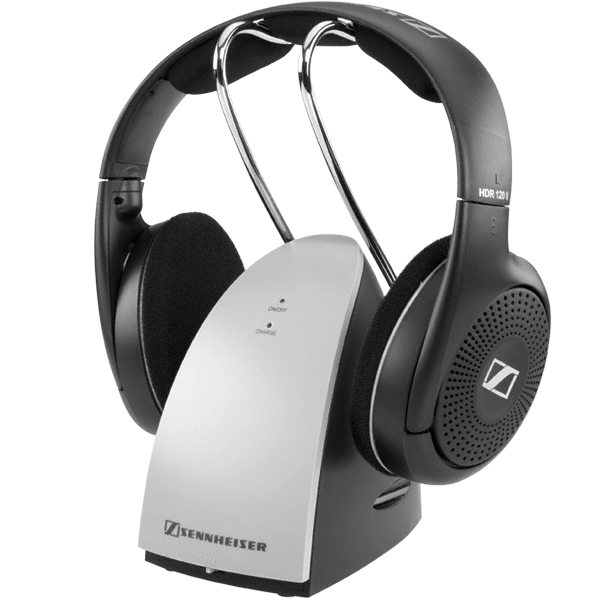
Extend your Personal Multimedia Bubble with Wireless Headphones

Warning: Your world is smaller than you think. If you can’t see it, and now you don’t hear it, does anything even exist outside your Sennheiser-induced Bubble?

Warning: Your world is smaller than you think. If you can’t see it, and now you don’t hear it, does anything even exist outside your Sennheiser-induced Bubble?

Once upon a time, I thought I knew what I wanted.
I craved tech that screamed bigger and louder.
Didn’t we all?

My dream was to create the ‘man cave’ where I’d have the biggest flat screen hanging proudly on my wall, bookended by some awesome surround-sound speakers.
What could be better than creating your own little movie theater from Elysium?

Then I became a parent, and of course my priorities shifted…
…along with how and when I consumed my media.

Good Bye Home Theater
Fast forward to three years later, and I’ve finally decided the only reliable way to consume a complete TV episode is to turn the whole equation on its head and forget about my aging 42” plasma screen.

The fickle fancy of consumer tech has been innovating in a different direction anyway.

Big is so yesterday…

Hello, Personal Multimedia Bubble
Today, it’s all about how small you can go!

  • Your shrinking smartphone
  • Your tiny music speakers
  • Your light laptop
  • Your pocket-friendly digital camera

This ongoing evolution of smaller tech allows your multimedia consumption to become ever more personalized ‘for your eyes only.’

The result is the creation of your own ‘Personal Multimedia Bubble.’

A good pair of noise-cancelling headphones, and you’re in your own world.

As a road warrior on my daily train commute, I’ve accomplished just that with my Bose headphones and iPhone.

Who needs a home theater, when you can watch whatever you want in your little mobile tech bubble wherever you go?

Extend Your Bubble at Home
And that Bubble has great value even when you haven’t left the house.

Today, people are consuming vast quantities of content on their smartphones and tablets from the comfort of home.

But the personalized multimedia experience served up for one isn’t a new concept.
Throw on a pair of earbuds and jack them into your computer, and you’ve got the same experience… just more tethered.

Which brings me back to the other immobile screens in your home.
Your TVs.
If they had feelings, I’m sure they’d be really lonely.
And very jealous of their tiny digital cousins you’ve been hanging out with lately.

I’ve got one little fellow to the left of my iMac in my home office.
He’s a cute, 21” Sony flat screen connected to my cable TV box.
I only have to swivel slightly to readjust my gaze between the two.

And he often sits there, dark… brooding… staring at my always-active iMac.

Even my three year old doesn’t ask to turn the Sony on.
He finds Disney programming on my iPad much more compelling.
(I’m not kidding.)

This TV’s only hope to avoid complete obsolescence is to join
the Barrett Bubble.

Wireless Headphones for your TV
Of course, the simple answer is just plug a pair of headphones into the TV.
That way, I won’t disturb the rest of my world when catching a noisy scene from The Bourne Legacy on HBO.

Here’s the problem:

  • My silly Sony TV doesn’t have a headphone jack.

The solution:

  • Time to buy a pair of wireless headphones.

How to Make the Connection
Cordless headphones usually roam free by relying on their transmitting partner/base to remain connected your audio source with an old-fashioned cable.

But without a headphone jack on the TV, you’ve got to access your audio source another way.
Typically, you can locate other audio outputs on the back of your TV or cable TV box via the following jacks:

  • Line audio outputs (2 RCA connectors)
  • Digital audio connections (Coaxial/Optical)

The Three Amigos of Wireless Headphones
Today, there are three wireless technologies to choose between:

  • Bluetooth
  • Infrared (IR)
  • RF

Bluetooth is all the rage, but the quality isn’t as good as the others.
IR is only a solid choice for shorter, direct line-of-sight distances
RF-based wireless technology is mature, but it can suffer from interference from other tech in your home.

All this said, RF appears to be the standard bearer if you want to own a great pair of wireless headphones.
(Supporting technologies like ‘Kleer’ enhanced sound quality have given RF wireless a boost of late.)

But it’s going to cost you…

There’s Always a Price to Pay
You can easily spend somewhere between $200-$600 for top-rated wireless headphones.
If you’re ready to break your piggy bank, there’s no shortage of suggestions listed on:

Baby Needs a New Pair of Shoes
I like great tech as much as the next nerd.
But let’s be honest here:
Extending my Bubble to include my little TV isn’t at the top of my tech budget.
But I also don’t want to buy a cheap pair of headphones that hardly work.

As I considered my conundrum, I kept coming across a pair of old 900MHZ RF Sennheisers online that were once at the top of their class, but have long been bested by newer versions.

Sennheiser Saves the Day
They’re the Sennheiser RS 120.

They retail for $99 on Sennheiser’s website.
(They used to cost more.)
But you can pick them up on Amazon for $79.95..

They still get great reviews
And at that price point, they’re hard to beat.

Sure, they can’t compete with Sennheiser’s top-of-the-line RS 220.
But I don’t need them to rock my world.

I’m not building a home theater.
An empty tin can with a string would probably do if I could figure out a way to connect it.

As Scotty liked to say on Star Trek,
“The right tool for the right job!”

Click.

Little Sony flat screen- welcome back into the Bubble.

Crank up the volume!
What are we watching tonight?