At Home with Tech

Unlock the power of all your technology and learn how to master your photography, computers and smartphone.

Tag: Working from home

Best Way to Quickly Reset your Zoom Shot after You’ve been Kicked out of your Home Office

Here’s a trick that can help you instantly relocate your laptop to another Zoom-friendly location at home when you’ve been unexpectedly banished from your usual room.

By now, we’ve all identified our preferred Zoom meeting locations at home where you can stream yourself to your world. Beyond finding a quiet space that’s not in the middle of your family’s normal traffic patterns, there are other factors that can make a particular corner Zoom/Teams/Google Meet-friendly.

For me, being close to natural light near a window is important. That’s an easy way to properly illuminate your face. That said, it’s not too hard to power up a small battery-powered LED light or a ring light.

Setting up in front of a relatively organized and clutter-free background is always a best practice to demonstrate some visual order and professional look in your shot. You probably don’t want to show off an unmade bed with unfolded towels and underwear fresh from the dryer heaped on top. (Of course, simply use a virtual background for an easy fix.)

The Most Important Detail in a Good Zoom Shot
Fundamentally, the one detail to nail when generating a flattering Zoom shot is to simply position your laptop where its webcam is at the same level as your eyes.

Your webcam should point horizontally to your eyes. It shouldn’t be focused up your nose towards the ceiling. (This unflattering angle is what you’d normally get if you’re sitting at your desk with your laptop). So, you need to somehow elevate your laptop.

One way to MacGyver that is to stack a few hard-cover books and then carefully place your laptop on top.

Always Have a Backup Plan
Angles. Books. Windows. Backgrounds. Who knew we’d be simulating TV live shots from home a few years back? But we’ve adapted.

The only problem is life invariably happens, and you may suddenly find yourself temporarily displaced from your normal Zoom set up. Then you’ve got to wing it and quickly find a flat surface somewhere else in your home to move your laptop for your next Teams meeting in three minutes.

And that can be harder to find than you may think, considering your family’s needs competing for the same spaces. (The inherent challenges of multiple concurrent remote meetings.)

Wouldn’t it be great if you could just magically plop your laptop wherever you wanted, even if there’s nowhere to put it?
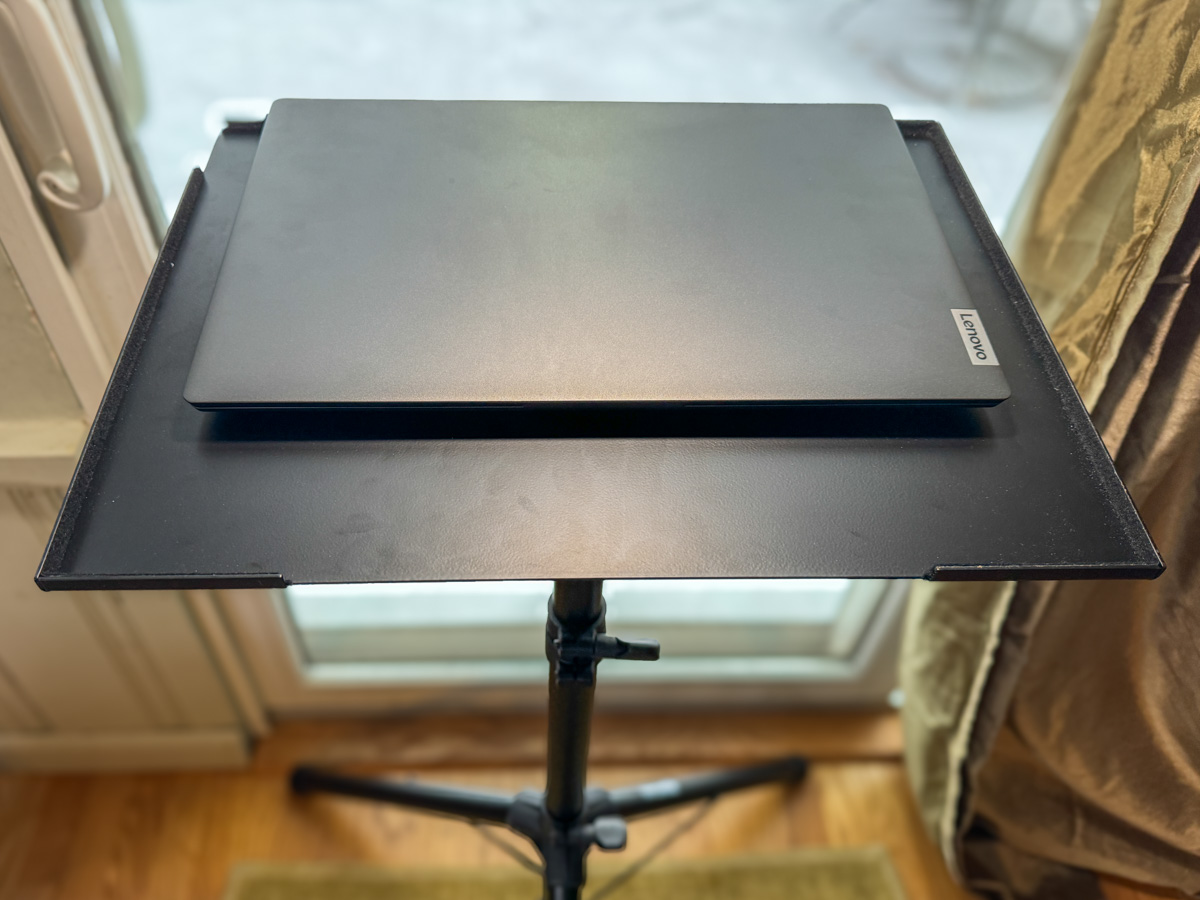
A portable floor laptop stand can do exactly that for you.

Portable Laptop Stand
It’s effectively an articulating standing tray that you can grab with one hand as you escape into another room with your laptop. Think of it as a tripod for your webcam and simultaneously a portable standing desk for your laptop.

Laptop stands are usually designed for presentations on stage or video/media production work, but why can’t you have the same access to this solution for home use?

Another superpower for this kind of stand is it will bring your laptop back to eye level wherever you go, because you can easily adjust its height. No more need to stack books.

And you can fold it up when you’re done.

Time to Choose
Buying one is simple. There are numerous choices online in the $40-$50 range. Some are more expensive, but I don’t think it needs it to be built like a tank to withstand abuse. I know I’ll treat it well at home. I just want it to be steady and not fall over. (That would be bad.)

Amazon has a variety of choices. Here are three options:

I bought the Amazon Basics model, not because the Amazon Basics brand screams ‘best quality,’ but because it’s the tallest. So, when I choose to use it while standing, that would be best for my height.
And it works just fine. In fact, it’s plenty beefy at over 10lbs. You can use it for your laptop, portable projector or any other piece of tech that needs a pop-up surface.

The Importance of Maintaining Visual Communication
Of course, you could always choose another path that sidesteps this entire challenge. Just don’t turn on your webcam. I know many folks follow this practice.

But I’ve said it before… If you want to stay connected to your world from the comfort of your home, you’ve got to show up for your close up.

Always keep your webcam on.

And a portable laptop stand can help make that all the easier no matter which room you’ve been banished to!

How to Easily Add More Light to your Home Office Desk

What do aging eyes wearing contact lenses need when trying to read a computer screen? Yes, a new LED desk lamp! Here’s how to do that when you don’t have a lot of extra space to work with.

The growing trend of working from home has clearly accelerated as a result of the pandemic. By now, I expect most of us have figured out which home spaces to convert for that purpose and have optimized them with extra gear like second monitors, Zoom lighting and ergonomic chairs. My favorite upgrade is my Uplift standing desk. (Standing through part of my day has done wonders for my lower back.)

But I’ve recently realized that I’ve not sufficiently replicated one important environmental workplace element… good lighting.

Feet Away but Miles Apart
Sure I’ve got plenty of light on my face for my Microsoft Teams meetings at work, thanks to a carefully positioned Generay PB-64A LED (providing gentle fill light) and my window’s organic key lighting. And my Uplift desk is bathed in light from a compact Uplift LED desk lamp.

But this work space is not my entire home office. It’s actually an add-on to my existing home-office desk. So when I’m working from home, the transition back to my home iMac at the end of the day from my work laptop simply requires a 90-degree right swivel of my chair. Yes, it looks a bit like one of the tech cubes in that endless work cube farm seen in “Andor” on Disney+ (though not nearly as cool).

How Many Fingers can You See?
It’s my legacy home-office desk space that I’ve suddenly realized offers insufficient lighting (and the ceiling fixture just isn’t enough).

Why now? Well, I think it simply has to do with a pair eyes that aren’t growing any younger. I spot our twelve-year-old-son reading in dim light all of the time. (I immediately turn into my mother and flick on an overhead light for him.) A long time ago in a galaxy far, far away, I could handle dim light too. Now, not so much.

And I’ve been really feeling it recently typing away at my iMac… in the early mornings and at night when I don’t have the benefit of the sun at my back from my window. And what’s really brought this problem into focus for me is I’ve recently been trying to wear contact lenses again.

The Complexity of Aging Eyes
Being nearsighted since I was a kid, I wore contacts through most of my adult life. (Loved them!) But then my eyes started to change, reading glasses showed up, and my vision just got more… complicated.

The bottom line was I couldn’t easily see into the distance and read a computer screen with my contacts any longer. (It’s a common problem I’m told for adults of a certain age.) I tried multifocal contacts, which are like progressive lenses that allow you to see both near and far. I’ve also tried a monovision solution which makes your dominant eye focus on distance and the other eye tackle your reading. That forces your brain to rewire itself, and the trick doesn’t always work. (It didn’t for me.)

I know I don’t need to give you a full medical history of my eyes (I’m now trying out hybrid multifocal/monovision lenses, which look promising). But there’s one detail that my eye doctor told me that has stood out and is worth sharing.

More light is better.

In my circumstance, multifocal contact lenses will work better if my pupils aren’t too large, trying to suck in more light.

But I think it’s a basic rule for everyone… More light is better.

But like my twelve year old who has the super power to read in the near dark, we don’t really pay attention to good lighting until we need… optimal lighting.

No Space for More Light?
Yes, simply adding a lamp to your desk is the easy solution. (It’s not a huge aha.) But there may not always be a lot of extra space available for that purpose.

So, you may have to go with a slim-profile lamp design.

And that’s exactly what I did.

TaoTronics LED Desk Lamps
There are any number of affordable LED task lights on the market. Amazon’s got loads of them.

But I ran across a brand that’s received positive call outs from a few different reviewers. It’s TaoTronics. So, I decided to check them out.

TaoTronics makes a seemingly gazillion LED desk lamps to choose from.

Their dimmable and color-temperature-adjustable desk lamps range from $20-$50, based on the style and features. Those are great price points, considering you can spend hundreds of dollars on a desk lamp.

So I picked out one for me and one for our son’s desk (not that he asked for it, but I couldn’t help myself).

I ordered the two lamps directly on the TaoTronics website. (Amazon doesn’t carry them.)

It took a few extra days for the package to show up, but upon arrival, I quickly set up both desk lamps.

The extra light is simply joyous. Even my son is enjoying his new lamp.

My Mother Told Me So
Are my eyes working better with my new contacts as I sit at my brighter desk?

You know it!

If my mom were around today, she would give me that “Are you kidding?” look. Of course, more light is better!

Put a lamp on your desk so you can see better? Wow, that’s so insightful.

She told me this when I was five.

I suppose sometimes you’ve just got to figure things out for yourself.

In hindsight, vision is always 20/20.

This Visual Upgrade will Instantly Improve your Experience Working from Home

It may be finally time to build out a multiscreen home office work space. Here’s what I did.

Ironically, working from home during the pandemic has contained some silver linings. But not having access to a fully decked-out office computer station with multiple monitors can be limiting.

So, I bought myself a new second monitor for my home office. It paired up with my work PC laptop’s screen to provide more room for all of the open windows that collect throughout the work day.

During the early months of the pandemic, I repurposed my old Sony 21” LCD TV and connected it to my laptop via an HDMI cable. I thought I was so clever MacGyvering it, but its non-HD resolution wasn’t doing me any favors. Sure, I could extend my laptop’s screen, but the clarity on the Sony wasn’t there. If I came across small text, I often had to move it over to my laptop screen to be able to read it.

Favoring one screen over another adds unnecessary complexity.

Though I did eventually have another monitor solution temporarily in place, it was clearly time to upgrade my own gear. Not to mention a long-overdue reset surrounding my mindset over these many months.

Post Pandemic Mindset
The pandemic forced me and so many others to instantly adapt to a 100% work-from-home lifestyle. There were inevitable compromises where functionality trumped form.

  • Were you connected?
  • Did you have a comfortable location to do your home video conferencing?
  • Could you simply get your work done?

It wasn’t perfect, but it didn’t matter. My laptop’s second screen wasn’t great, but I didn’t feel it was an important enough limitation. (So I needed to squint a little.)

But thankfully, we’re moving away from that bunker mentality as life begins to return to normal in the US. Coming back to the office is on the horizon for many. But it’s going to be different.

Band-Aid Solutions No Longer Needed
Hybrid work will include working from home as a new norm as opposed to an occasional convenience. Even though remote work existed long before the pandemic, I think many of us viewed it as an infrequent arrangement that didn’t require fully-built-out technical solutions. Again, function over form.

But the pandemic forcibly evolved the very concept of working from home as a new standard. New hybrid work schedules are on the horizon. So, if you haven’t already done so, it’s probably time to finally focus on form over function when working from home.

For me, that meant upgrading my second screen for today and into the future.

The Power of a USB-C Connection
My first thought was to simply purchase a computer monitor with 1080 HD resolution and connect it via HDMI. That’s a cost-effective strategy to get the job done. But it’s based on older tech.

Newer computer monitors include a USB-C connection. Sure, that makes the screen more expensive, but it opens up a huge opportunity for your computer.

Laptops are notorious for not having enough outputs for peripherals. But if there’s a UBB-C port, that connection can do much more than simply connect to a monitor.

You can multipurpose one USB-C connection:

  • Feed your second computer screen
  • Power your laptop through that same USB-C feed
  • Connect an external keyboard and mouse via the monitor’s USB-A ports

It’s a no-brainer.

After I came to that conclusion, my next challenge was figuring out which monitor to buy.

Billions of Choices
I’d like to say that I combed through every option on the market. I didn’t. That’s an overwhelming exercise. Instead, I called B&H and asked for some help. And I got it. The affable sales consultant and I agreed on these specs:

-27” screen size (based on my own workspace)
-4K (Future-proofing choice)
-USB-C input (the golden connection)

Then, he offered me a few options, and we quickly landed on this LG 27” 4K screen:

The LG had everything I needed, and I liked it because it has built-in speakers. (The B&H consultant also mentioned he was partial to LG monitors.)

I said, “Let’s do it!”

And my new LG screen arrived two days later.

You’ve Got to Have Some Trust
Now, I know what you’re thinking. Barrett blindly took a salesman’s recommendation. Ha!

Well, not entirely. The LG does get good reviews. But yes, I followed the salesman’s lead.

You can’t be an expert on everything. There’s simply not enough time. Instead you’ve got to find some trusted support systems to help you along with certain decisions.

B&H has always offered me great advice and customer service. I’ve been buying my tech there for years. I trust their recommendations.

Multi-screen Home Office for your Hybrid Future
Adding the right monitor for a multiple-screen setup instantly creates a more effective home office workstation.

After I plugged in my new 27” LG computer monitor and connected it via the USB-C port, I felt like I had just bought a new pair of glasses.

Perhaps it’s also time for you to have a larger and clearer digital canvas to work on at home, even if your new hybrid work schedule means it won’t be used every day.

Not to repeat the term, but consider all of this as part of the new normal.