At Home with Tech

Unlock the power of all your technology and learn how to master your photography, computers and smartphone.

Tag: Working from home

The Secret to a Successful Remote Work Experience

Here’s my #1 insight as an employee who never physically met a colleague during the pandemic.

I just left a great job where I worked with a lot of talented people. I always felt connected to those colleagues. We talked regularly, explored the creative process in real time and produced strong video storytelling together.

But I never met any of them in person. Not once.
(Well, I actually did meet one in the New York City office during my interview process right before the world shut down.)

That, of course, was due to the pandemic and some coincidental timing during this chapter in the journey of my career.

Connectivity Denied
I came on board a few weeks into the pandemic.

Like many employees during the forced separation of our Covid-19 experience, my colleagues and I worked from home and relied on the magic of technology to stay tethered.

In many ways, it was remarkably straightforward. Email and instant messaging have been in place for years as the main way to communicate in the corporate environment. So that translates perfectly into any work-from-home scenario.

Using the phone can certainly keep you connected, but the art of the phone call has been on the decline. Many people prefer not to use voice comms when tapping down their thoughts and using an emoji or two will do just fine.

But, of course, I experienced no in-person group meetings in corporate conference rooms. No one-on-ones in the same space. No water-cooler chats.

All of that in-person connection opportunity. The ton of visual communication cues. The raw physical experience. It never existed.

Initiating a video conference meeting (like Zoom, Teams or Webex) was really the only tech tool available to replace the massive gap.

The Power of Video Conferencing
It’s not like remote work and video conferencing from home never existed before. But often, there was an in-person meet-and-greet along the way.

But remote employees hired after March 2020 have been part of this unscheduled social experiment of extreme work isolation over these past fifteen months.

I was one too.

Regular webcam meetings were absolutely essential to building and maintaining my work relationships. And I’m not just talking about group video conference meetings that I hosted or attended. It’s often the impromptu chat that can make all the difference. And I believe that one-on-one conversations are most effective when you can see the other person on your computer screen.

A couple former colleagues liked to poke fun at me for my insistence at always having my webcam turned on during our meetings and impromptu conversations. That’s fine. That’s what I needed to do.

Interestingly, I ran across more than a few people who chose to never turn on their webcams. They existed to me only as disembodied voices. Some apologized for not being ‘camera ready.’

For those of you who have similar inclinations, I would say we’re all Zooming from home with limited conditions. No one lives in a professional TV studio with perfect lighting and an art-directed background.

Using a virtual background can help, but I gave up that imperfect trick months ago. I now prefer showing it like it is. My home office may appear a tad cluttered. So what? (Hey, I’m the parent of an eleven-year-old boy, and I’m the home IT guy. It’s my reality. It’s my authentic space.)

But if you feel that using a virtual background to mask ‘imperfections’ will help you to turn on your webcam, then I’d say it’s worth doing.

Can You See Me?
Call me old fashioned, but I prefer to see the people I work with. (Even projecting a photo icon helps.) Visual communication is so critical to build solid working relationships. And I think this is true for most of us.

For those people who I never got to see, I’m not here to judge their choice. I’m sure they have good reasons. (We were all struggling through a pandemic!)

That said, I must confess that I just couldn’t develop as strong a connection with those individuals as I wanted. Maybe that’s my own problem. But I do think we all need a little visual now and again to help make it real.

It Shouldn’t be a Secret
By now, I’m sure it won’t surprise you to read that my secret to a successful remote work experience…

…is to just turn on your webcam! The rest follows.

They say simply showing up is a key to success. If that’s true, then I think you’ve got to show up for your close up. It’s as easy as that.

This will apply beyond the pandemic. I’m sure video conferencing from home isn’t going away as the workplace shifts into a new post-pandemic norm.

And for those co-workers who don’t report to the same office, this best practice couldn’t be more relevant. (Lots of my former colleagues live in different cities.)

Day 1
And as I look forward, I take these important visual communication tech tips to the next chapter in my career.

I’ve got my webcam set, my lighting prepped and my audio triple checked.
(Yes, it’s important to be seen, but they’ve also got to hear you clearly!)

Testing. Testing. One… two… three.
Here we go!

My anticipation feels like the first day of school.

I love it.

How to Permanently Elevate your Laptop to Create a Better Zoom Shot

Do you suffer from ‘ceiling shot syndrome’ when using your laptop for video conference meetings? This solution will fix the problem.

If you’re Zooming all day from your laptop on your desk, your computer’s little webcam is probably looking up at you during your video conference meetings. That’s not good, because it’s an unflattering shot. The telltale sign of your up-angle live stream is when your viewers can see your ceiling behind your head instead of a wall.

I like to refer to that unfortunate webcam positioning as ‘ceiling shot syndrome.’

One way to fix the problem is to pile some books under your laptop to help elevate your webcam. Then, it will be able to point at you more horizontally. But that unstable solution is hardly a permanent fix.

It may be time to create a consistent and steady platform for your laptop’s webcam to see you at eye level.

Levitate your Laptop with a Desk Stand
Of course, a standing desk can do the trick. But if your laptop is stuck on a standard desktop, you need another way to bring your laptop up a foot or so.

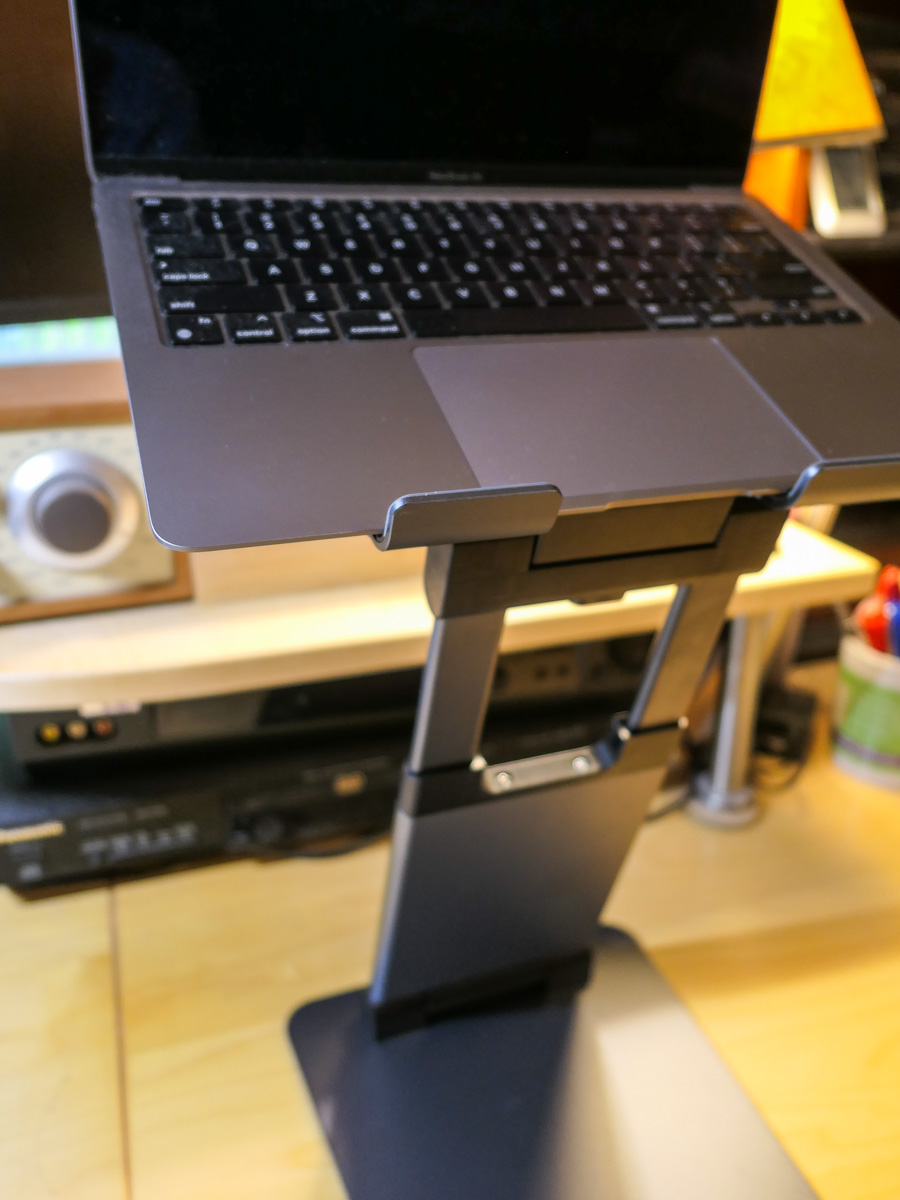
The solution is to add an adjustable-height laptop desk stand to your home office equation.

It’s important to find a stand that will reposition your laptop’s webcam high enough to meet your face. So, get a ruler and measure from your desk’s surface up.

In my own research, I found three choices that provide more height than most stands out there:

The Right Design
All three have a similar Z-frame design with a relatively compact base, a tilt-forward surface and an expandable mid-section. I like this design, because it gives you flexibility on how high you can position your laptop. And it doesn’t make a massive footprint on your desk.

Plus, it’s nice that they all can fold up for portability and storage.

They all have received really good reviews. So how do you choose? Well, I simply went with the lowest price.

It’s the Nulaxy.

Click.

Say Goodbye to Ceiling Shot Syndrome
Over the past fifteen months, I’ve been using an old printer stand that I’ve had for years. Its sturdy but clunky design appears inspired by 1940s technology. The bigger problem was that it was only able to elevate my laptop a mere six inches.

So, my printer stand was never quite able to succeed in its new mission. And though it gave my laptop some height, I still suffered from ceiling shot syndrome. (Yes, I admit it.)

My Nulaxy will be a big improvement, as the stand will more than double my laptop’s elevation.

It’s always important to be able to look at someone eye to eye… and on a level plane. With the right stand for your laptop, it’s much easier to do that during your Zoom meetings.

Why Zoom Meetings will be a Permanent Part of Home Life

It’s probably time to give your imperfect Zoom background another look, because you’re probably going to be using it… forever.

During one of my recent Zoom meetings, I received a comment about the old iMac in my home office. The white computer was sitting sidelined in the background on top of a short bookcase. I retired this 2004 iMac long ago.

But like some of my old tech, I never threw it away. Now, it sits like a museum piece, available for anyone to appreciate (or question) whose wandering eye might be checking out the details of my home office.

What’s That?
Don’t think for a moment that your Zoom-fatigued viewers aren’t looking around your Zoom box. They crave any opportunity to thaw their pandemic-frozen eyes, locked to their computer screen all day.

Anything of interest is an immediate target. And so was my ancient iMac.

It’s actually hard for people not to notice the details of the space you’re in. It’s natural.

Virtual isn’t Real
So, if you feel your room isn’t ready for prime time, should you simply activate a virtual background?

Easy, right?

That’s what many people have been doing during their Zoom meetings. But even though the functionality is there for that exact reason, I think it’s a bad trade-off.

The Value of Authenticity
Sure, it’s a one-click solution to hide your environment that could otherwise use a little more art direction. But it also erases any opportunity for your authentic living space to support your personal brand.

You can only work with what you’ve got. And I think your viewers will understand that. In fact, they’ll appreciate it.

Yes, you should remove any unnecessary clutter in your background. But if there’s an unusual object like an old Mac perched on a shelf, so be it. If you’re lucky, it may become a conversation piece during your next Zoom.

And that can really help to provide some context to your identity, especially when you’re meeting someone for the first time on a two-dimensional computer screen.

It’s Time to Build an Official Zoom Zone
Yes, thanks to Covid-19, our lives have become televised (well… streamed).

And when we eventually return to a post-pandemic existence, I think that new normal will still contain a healthy dose of Zoom meetings. Sorry to break it to you, but that’s not going away… ever.

Sure, you may be free to move about the cabin of life again, but video conferencing from home is an established norm that has taken off.

And this will bring up proactive decorating opportunities for spaces that you’ve designated as your Zoom zones. Perhaps you’ll consider a new framed print or painting on the wall behind you. A different piece of furniture? An arrangement of fresh flowers? A total redesign?

The same way that the family room became the next generation of the living room, I feel it’s inevitable that a Zoom zone or even a ‘Zoom Room’ will become a natural addition to our future homes.

Yes, people can always use a virtual background. But eventually, they’ll move out of their temporary Zoom mindset.

Sharing a more permanent reality is usually a much better long-term solution.