At Home with Tech

Unlock the power of all your technology and learn how to master your photography, computers and smartphone.

Technology Killed the Tollbooth

Nobody likes to wait on a tollbooth line. And even with E-ZPass, you’ve got to slow down. But bridges like the Tappan Zee have a little surprise for you…

Nobody likes to wait on a tollbooth line. And even with E-ZPass, you’ve got to slow down. But bridges like the Tappan Zee have a little surprise for you…

I commute over the Tappan Zee Bridge on many days, and I’ve been marveling at the day-by-day construction on the New NY Bridge project for the past year. It’s really cool to see this bridge going up over the Hudson River north of New York City.

The New NY Bridge Going Up


The Age of the Camera Gantry Begins
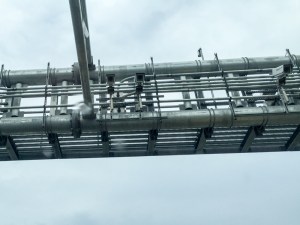
Some months back while I was driving home, I noticed a strange grid-based overhead structure going up on the Rockland County side of the southbound New York State Thruway. I could see multiple cameras on the top as cars whooshed by below.

Then, one day the Tarrytown toll plaza on the Westchester side just closed up shop.
(What?)

I thought for a moment,

So no more tollbooths?
(Manned or unmanned)

Did that also mean no more tolls?!
(No, that couldn’t possibly be true…)

The toll collection process of course was continuing…
What had happened is the giant gantry on the other side of the river had quietly been ‘activated,’ turning all of lanes into cashless toll lanes on steroids.

Now, it’s not like there wasn’t cashless tolling before at the old toll plaza via E-ZPass, but you still had to slow down while passing through.

With the new giant gantry peering at every car overhead, now you are free to maintain normal highway speeds.
(Eliminating the toll ‘slow-down dance’ will save drivers up to nine hours a year!)

Cashless Tolls


Tolls by Mail
The arrival of the giant gantry also ushered in a back to the future moment for drivers… the U.S. Postal Service.

If you don’t have E-ZPass, no problem…
One of those cameras living on the gantry will snap a photo of your license plate, and then you’ll get a bill in the mail.
(How quaint)

Sign for E-ZPass or Toll Billed by Mail


You can pay on New York State’s website or the old fashioned way with a stamp.

The Phantom Tollbooth
About 50 million vehicles drive over the Tappan Zee every year, and about 80% already use E-ZPass.

As for all the others, welcome to Tolls by Mail.
(That’s a lot of stamps!)

Or they can sign up for E-ZPass.
(Hint, hint)

Does the cashless tolling gantry foretell the end of the manned tollbooth?

Looks like it… eventually.
(This technology is already in use elsewhere around the country.)

And with it terminates the need to develop the mighty skill set of the ‘quarter throw.’
(My father was a master at winging quarters at toll baskets when I was a kid.)

Look at me, getting all nostalgic.
Then, I remember all those blasted toll lines in the pre E-ZPass days.
(Shudder)

Resistance is Futile
I think it’s also important to recognize we’re passing through another ‘big brother’ moment brought to life by technology.

Cameras for Cashless Tolls


Other gantries will be erected on highways to help speed your travel, but it’s another example of more patterns of your life being integrated into the ‘Borg collective.’

Is that a problem or just progress?

A conversation for another day…

Why Would Anyone Buy a Finally Bulb?

This new ‘Finally’ bulb promises to take you back to the future in a big way where LED bulbs have failed… finally. But is the LED bulb juggernaut already too far ahead?

This new ‘Finally’ bulb promises to take you back to the future in a big way where LED bulbs have failed… finally. But is the LED bulb juggernaut already too far ahead?

I know… It looks like I’m about to be particularly judgmental and disapproving. That’s not my intention. I’m just confused. Really.
(Admittedly, not the first time)

Here’s my back story…

Bumping into the Future?
So I was shopping at my local Ring’s End store last weekend for a replacement lawn sprinker.
(You may recall I had a meltdown last year when I realized that all of my garden hoses were very likely toxic… including the one that fed our vegetable garden.
So I replaced them all with hoses made by ‘Water Right.)

On my way out, I walked past a stack of boxed light bulbs on a table.

You know how I am about light bulbs.
(I’m like a moth.)

These were no ordinary LED bulbs.
No…

They were something new.

Newer than LED?
Well, I had never seen one before…

They were ‘Acandescent’ bulbs made by a Massachusetts company called
The Finally Light Bulb Company.
(No, not incandescent. ‘Acandescent.’)

I turned to the marketing rep, who was manning the table.

“What’s this?”

She explained to me that this new Finally light bulb used plasma to create its glow.

“Plasma?”

“Yes,” she explained.
“Finally emits a warmer light than LED bulbs, and it will help you sleep better at night.”

Uh huh.

“So this is a plasma bulb.”

She stared at me.

“That’s not the name of the bulb,” she responded politely.
(I actually think that would be an awesome name- the ‘Plasma Bulb!’)

And then she told me that Finally was running a promotion on its 100-watt model.
(Two for the price of one)

Well, I always love a deal. But I didn’t really need any extra 100-watt bulbs.

And then she told me that Finally bulbs can’t dim.
(That capability is coming next year.)

So I walked out on Finally, finally.
But I decided to do a little more research when I got home…

What is a Finally Bulb?
First off, the Finally bulb isn’t so new. This Acandescent bulb was introduced back in 2014 and released to the market in 2015.

Back then, I was still getting used to the mind-blowing introduction of LED bulbs.

Philips was one of the first out of the gate. Then Cree stormed the market.
(Other brands have also been showing up with lower price points.)

Beyond LED, I’ve had no clue there’s been a competing ‘breakthrough’ light bulb tech out there…

And what exactly is Acandescent technology?

Finally’s website describes it like this:

“Acandescence™ is a new lighting technology that utilizes induction to initiate and sustain a non-thermodynamic equilibrium plasma, coupled with state-of-the-art phosphors, to produce white light with the warm color of a typical incandescent light bulb.”

Make sense?
(Me neither.)

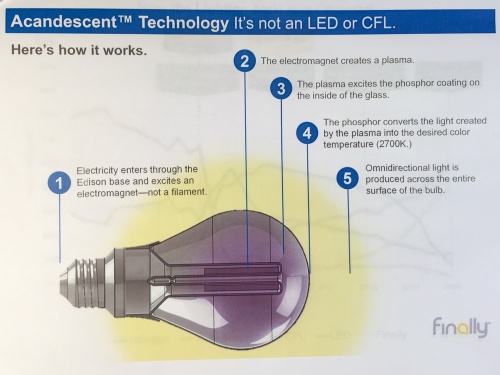
I think the bottom line is there’s a copper coil, a magnetic field and ‘plasma’ gas that together generate the light.

Here’s a page from Finally’s marketing materials that helps to explain…
How Acandescent Technology works

Acandescence Vs. LED
Okay… so we’ve got here another kind of light bulb.
Does the world really need it?
Is it going to topple the dominance of LED bulbs anytime soon?

Well, let’s look for a compelling reason to buy one…

Price

Ring’s End sells the 60-watt equivalent Finally bulb for $9.99.
So does Amazon Prime.
If you want to save a little bit, Amazon’s got the 6-pack for $53.94.
So that just breaks the $9 barrier.

And how does that compare to the competition?

Cree’s 60-watt Equivalent LED with the stripped-down 4Flow filament design is $7.97 at Home Depot.
Amazon Prime’s got it for $5.11 as an ‘Add-on’ item.

And Cree’s ‘Classic’ 60-watt LED is also currently available at Amazon as an Add-on item for $5.07.

So Finally isn’t your cheapest option, but depending on the brightness of the bulb you’re looking for, it’s not that much more expensive…

Energy Efficiency

Finally bulbs are fifteen times more energy efficient than incandescent bulbs. But LED bulbs took that prize years ago.
(And according to CNET, many LED bulbs today are slightly more efficient that Finally bulbs.)

Light Quality

This is the big selling point for Finally:
It’s supposed to replicate the look and omnidirectional light of incandescence. According to CNET, the Finally bulb does have even light distribution, but the quality of the light doesn’t live up to all of the hype.

Functionality

It can’t dim. (yet)
And it doesn’t actually pop instantly on.
(Takes a few seconds to get to full brightness)

Eh.

Mercury

Yes, you read correctly. There’s a small amount of mercury in the bulb’s plasma. Finally says the amount is small enough that it’s safe for landfills.
(I say… “Mercury?! Why would I want to bring any amount into my house?!”)

Size

The 60-watt models are physically smaller than the 100 watt, although they both have the same standard-size base. So if you’ve got a fixture with a tight squeeze, the 60-watt Finally could solve your problem.

Longevity

15,000 hours is great.
But some LEDs promise up to 25,000 hours.

Not Ready for Prime Time
I’m just not feeling it. Are you?

CNET’s 2015 review by Ry Crist totally hammered Finally.
He said it’s essentially CFL tech.
(Shudder)

And the bulbs aren’t as bright as advertised.

It’s almost a year later, and now Finally is suddenly showing up in stores like everything’s fine.
(Actually, I’m only seeing it for sale at Ring’s End and Staples.
…and Amazon.)

I feel like I must be missing something…

In Search of Tech Truth
I just don’t understand the glow of the Finally bulb.

To be totally transparent, I admit to firming up my point of view without actually having purchased or used a Finally bulb. But facts are facts… right?

Sure, maybe the light quality is better than the LED competition.
(Maybe.)

Even so… Will that make it competitive in the marketplace? Or will it end up being the Betamax to VHS’s crushing success.
(I know… an old reference for most of you)

I’ve been pretty happy over the past couple of years with my LED bulbs….

So I conclude this post inviting someone out there to set me straight.
Why buy a new Finally bulb instead of an already established LED bulb?

Please, help me to see the light.

And then maybe I’ll stop writing about light bulbs.

Finally.

Why You Should Bring Home a Nest Cam

Setting up your ‘android eye’ in the house when you’re not around certainly has its advantages. But getting your own personal HAL hooked into your smart-home’s ecosystem can sometimes be a challenge. Unless we’re talking about tech from the Nest family…

Setting up your ‘android eye’ in the house when you’re not around certainly has its advantages. But getting your own personal HAL hooked into your smart-home’s ecosystem can sometimes be a challenge. Unless we’re talking about tech from the Nest family…

My Foscam wireless IP babycam pooped out the other day. I think it was actually the power supply that blew. The Foscam had been working great for almost four years, and (disclaimer) I think the culprit was an AC surge caused by an electrician trying to replace a ceiling fan in my son’s bedroom.

Okay, he wasn’t officially an electrician…

Cutting Corners
This guy was a general handyman who was doing few other jobs around the house, and said he could handle the fan.

By the time it was clear he couldn’t, we no longer had power in half of the electrical outlets in the upstairs section of our house.
(And no, it wasn’t a popped circuit breaker.)

A few days later, an actual electrician came by to clean up my mess.
(I should thank him for not smirking even once after I told him my embarrassing story.)

Some of the old wiring in my house had been ‘fried’ due to ‘the incident,’ and he ended up having to replace all of the ruined wiring and then the electrical box in the ceiling to bring it all up to code.
(So yes, this homeowner’s original staffing ‘shortcut’ ultimately created quite the expensive repair.)

Lesson learned.
This cautionary tale has made me a true believer in the idea of not cutting corners to save a few bucks when it comes to home maintenance.
(That said, the original handyman was really nice and super apologetic.)

So there was however, one remaining problem….
Our babycam wouldn’t boot up.
Heck, it wouldn’t even blink at me.
It was now just a hockey puck.
(Coincidence? I think not.)

Time to Upgrade
I no longer had a working babycam, which when you think about wasn’t such a problem… My baby boy is now six years old.

Its only use over the past couple of years had allowed my wife and me to check in on him as he slept while we were out on one of our ‘date nights.’

Beyond that, I had used it more as a security cam when my family and I were on vacation to make sure everything appeared normal while we were away.
(Although a view into my son’s room isn’t exactly the best location for a general security cam)

I had actually been thinking of moving it downstairs to improve its view before the power surge…

And now the tech gods, after their big chuckle had given me the opportunity to start all over again.

Hello, Nest Cam
Should I get another Foscam?

Nah…

As much as I had enjoyed it over the years,
my Foscam was actually kind of complicated to set up.

Sure, maybe the newer models would be easier to work with. But I was already leaning in a different direction…

Wouldn’t it be great to simply add onto my growing smart home-by-Nest ecosystem?

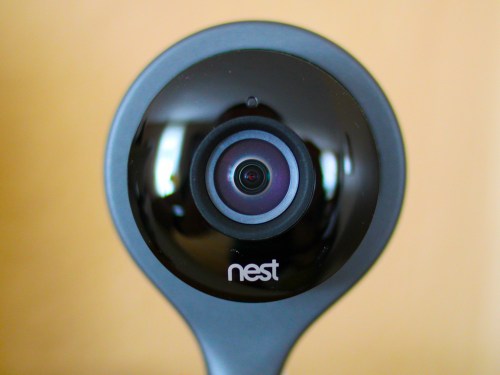
That’s right… I’m talking about the cute, 4 ½” tall Nest Cam security camera.

I already owned the Nest Learning Thermostat.
Installation was a cinch.
It’s been great for past three years, although
it did glitch out on me one time eighteen months ago.

Then came my Nest Protect in early 2015 to handle smoke and carbon monoxide detection.
(So far, so good.)

So why not add this little Nest security camera to my Nest family?
It seemed like the logical next step.

Plus, Nest happened to be running a Father’s Day promotion deal for its $199 Nest Cam.
(Nest’s marketing folks were kind enough to let me know via a well-timed email.)

Click.
(Amazon still has it at the slight discount of $193.)

Welcome Home
Installation was incredibly easy using the Nest app I already had on my iPhone:

  • In Settings, tap ‘Add product’
  • Scan the QR code (The app is already set up to do this.)
  • Name the location where your camera will live
  • Plug in the camera
  • Then connect it to your Wi-Fi network as you would with any device

Full directions are posted online at Nest Support.
But that’s pretty much it.

The camera took about 30 seconds to activate and boom!
There it was… fully functioning. I could both see and hear into my living room.

Plus it was both visible and controllable on my Nest app right next to its two Nest cousins.

The whole install took less than five minutes.
Seriously.

How great is that?

Setting Up Your Nest Cam

Once you’ve got your Nest Cam up and running, you’ve got a few more choices to think about…

-Placement
One consideration when deciding where to position your new Nest Cam is there’s no pan/tilt functionality like my old Foscam. For me, that’s not really a problem, because the Nest Cam offers a much wider field of view.

Also, you don’t have to worry about limited night vision. The whole room lights up via infrared when it gets dark.

-Motion Alerts
If your Nest Cam senses motion or sound, it can send you a push notification on your smartphone via the Nest app or an email alert… or both.

So if something happens that’s of interest to the camera, you literally know within seconds.
(As long as you’ve got your smartphone with you!)

-Do You Need Nest Aware?
This is Nest’s cloud-based video recording subscription that captures either the last ten or thirty days of your Nest Cam’s recordings.

You can review a moment that just happened or go back days in time with this little time machine trick.

Nest’s ten-day video history subscription costs $100/year or $10/month.
The thirty-day video history subscription goes for $300/year or $30/month.
(Ten days would be plenty for me.)

A really cool feature is you’re able to select a specific video section, save it, and then download it to your computer.
(You can also share it.)

While I initially thought I wouldn’t want/need Nest Aware, after spending a couple of weeks with the free month-long trial subscription, I was a believer.

Click.

I think the extra hundred bucks a year is a real value add. Plus, you’ve got to remember that most (hopefully all) of the moments you’re going to capture will be happy ones that are family or pet-based. Some of them will likely be worth saving.
(I’ve already downloaded a spontaneous family pillow fight.)

So your Nest Cam security camera will likely serve you more often as a family documentary device. Just don’t go overboard.
(I don’t think you want to start producing your very own, life-long TV series like in “The Truman Show.”)

-Video Quality
You can go with either 1080 or 720 HD video. While whopping 1080 HD sounds great, you don’t want to unnecessarily suck away too much bandwidth if you’re using Nest Aware and constantly uploading your video history to Nest’s cloud.
(Apparently 720p is the most commonly used format by subscribers.
It requires about 200 Kbps to upload, averaging about 60 GB of data per month.)

-Home/Away Assist
This is a feature that can identify when you’re around the house or not through your smartphone’s location tracker.
(So many other apps you’re using already know where you are. Is it really that big a leap to let Nest know too?)

Then, you can set up your Nest Cam to automatically stop recording when you and your smartphone come home.
(Unless you’ve got your own Truman Show going on.)

-Family Account
Of course, the Home/Away feature isn’t going to fully work like I’ve described above if you’ve got several family members coming and going all day long. The good news is you can also set up their smartphones on the Nest app using the ‘Family Account’ feature.
(You just have to invite them through your Nest app.)

So now, not only will your Nest Cam be able to know when everyone has headed out for the day, but they’ll also be able to have the same access to all of your cool Nest products as you do.
(Don’t worry… You still remain the ‘owner’ of the account and retain certain ‘admin’ powers.)

-Better Together
Another benefit to Home/Away Assist is it helps your other Nest gear know what’s going on.

The Nest folks really brag about how Nest Cam, Nest Learning Thermostat, and Nest Protect all work better together.

For me, the obvious upgrade is when my Nest Cam nudges my Nest Learning Thermostat to get with it and better recognize when I’ve left for the day.
(And that will save you a bit on home heating and air conditioning dollars.)

Smarter Home
So there you have it!
My Nest Cam security camera has joined the family.

Is it a total solution for home security?
Of course not.
That’s not why I got one.

But does it significantly add to my ability to remotely monitor and control the health of my home?

Absolutely.

Okay…Here comes the visual-
Light bulb pops on above my head.
And cue the sound effect-
“Ding!”

My house is now smarter.
(My cognitive status remains open for discussion.)

Sure, I needed a little zapping to get me there, but the silver lining was worth it.

Nest Cam… welcome home!