At Home with Tech

Unlock the power of all your technology and learn how to master your photography, computers and smartphone.

Where’s My Remote Control?!

Pop Quiz: Is this a photo of a alien sculpture on Mars or the power button on my useless Blue-ray player?  It seems if you lose the Blu-ray player’s remote with its magical ‘Enter’ button, you can’t run movies anymore.  Now what are you supposed to do…?

Pop Quiz: Is this a photo of a alien sculpture on Mars or the power button on my useless Blue-ray player? It seems if you lose the Blu-ray player’s remote with its magical ‘Enter’ button, you can’t run movies anymore. Now what are you supposed to do…?

It’s Saturday night.

Our three-year-old son has gone to sleep early, cozied up with his favorite Octonauts toys.

Downstairs, my wife looks at the clock, turns to me,, and she smiles.
She suggests… we may just have enough time to watch a Netflix movie.

We usually don’t get this opportunity, because we don’t want to risk going to bed too late…
Our little lad’s internal clock does not yet recognize the weekend, and his morning wake-up schedule is almost as dependable as an atomic clock.

I expect other parents will appreciate the difficulty finding enough time to consume an entire movie together without planning a formal ‘date night’ out.
(Let’s just say it’s been a while for us since we’ve tried this trick at home.)

Activate Movie Night
I rush over to the dormant media center, my pride and joy.
I swiftly open up the cabinet in the TV stand housing my four-year-old Samsung Blu-ray player (BD-P3600).

It’s quite dark inside, but there’s clearly a noticeable layer of dust accumulated on top of the Blu-ray unit.

Moon dust on Blu-ray player

Actual photo of my Blu-ray player’s surface

The shrouded device patiently awaits like Star Trek’s Guardian of Forever.

I luckily have a Netflix Blu-ray disk on hand that I think both of us will enjoy.
(Beasts of the Southern Wild)

Netflix Streaming isn’t an option, as it simply takes too much time to sift through to quickly find a good movie.

My wife sits down on the couch, and I pop the disk into the player.

Hollywood, We Have a Problem!
I reach up, and my hand misses its target.

Where’s the remote?

I quickly survey all the surfaces in the immediate vicinity.
The remote for the Blu-ray player is nowhere in site.

That’s really annoying…

I assure my wife it’s just an inconvenience.
Surely, the player will operate sufficiently from its onboard controls.

I get through the obligatory movie previews on the Blu-ray disk, and finally get to the “Play Movie” icon on the main menu screen.

I press the play button on the top of the device to begin our little Cinema Paradiso.

Nothing.

Then, I tap the ‘Next’ button.
Nada.

I frantically press all the available onboard buttons.
But there’s no matching ‘Enter’ button, which the missing remote possesses.

Nothing can kick our movie into gear…

I turn to my wife.

Uh… I think movie night is cancelled.

But she is not so easily deterred.
She suggests we do some catch-up ‘Mad Men’ viewing on our always-ready cable DVR.

And so we successfully switch to Plan B…

Eating Humble Tech Pie
So, hanging with Don Draper really wasn’t such a bad back-up plan, but I’ve got to admit I felt like a mad man for the rest of the night.

The IT Guy had failed at the most basic of tech tasks.
How embarrassing.
(Sure, I could blame the disappearance on my little adventurer asleep upstairs, but it really doesn’t matter how the remote vanished…)

I was also rather annoyed with the stunning realization that my missing remote could completely hobble the ongoing functionality of my Blu-ray player.
(Whose genius engineering idea was that?)

Why even have a play button on the unit, if it can’t get you past the main menu?!

Brain Replacement, STAT!
So now what?

I had a giant hockey puck under my TV that wouldn’t function without its missing remote brain.

And I don’t often get the opportunity to enjoy a joint movie night at home while my three-year-old snores upstairs.

So I pledged right there that next time, I’d better be prepared!

I had four choices to consider:

  • Find the missing remote
  • Replace the Samsung remote
  • Buy a universal remote
  • Purchase a brand new Blu-ray player

1.  Send Out the Rescue Party
I’ve gradually faced a new reality over the past year living with my son:

Things disappear.

  • Sometimes we find them.
  • Sometimes we don’t, and I chalk up the missing items to the mysteries of the universe.
  • Occasionally, the objects suddenly reappear, but often months later.

I carefully considered the odds,
and then I called off the full-house search…

2.  Replace the Remote
Fat chance, right?

Where would you even you go to buy a replacement remote for a discontinued model?
(more on this in a moment….)

3.  Go Universal
Universal remotes have been around forever.
I’ve owned my fair share over the years.
But they eventually get old and have trouble playing with the newer gear you eventually buy.

Fact Check: Currently, the Lester household is without a universal remote.

I am not proud to admit this, but I use five remotes to control the TV, cable box, Roku, Apple TV, and my formerly functioning Blu-ray player.

For some strange reason, my wife says this set up is a tad confusing.
I’m not sure I understand why.
(kidding)

I suppose the upside is whenever we lose a remote, my entire media display zone isn’t completely crippled…

I admit we’re due for a new universal remote.
I just haven’t gotten around to it…

So you might conclude this would be the perfect time for me to pick up a universal remote and regain control of our lobotomized Blu-ray player.

4.  Go Crazy and Start Over
Our disposable tech culture would say-
Just throw the problem in the trash and buy a shiny new one…

So let’s consider the option of picking up a new Blu-ray player…

Remember how much Blu-ray players cost just a few years ago?
This technology has really matured…
Now, it’s relative chump change!
(Too bad, Blu-ray disks are still so expensive…)

All this said, we’re still talking about replacing an old top-of-the-line model with a new bargain-basement afterthought. While it functionally meets my need, it’s not quite an apples-to-apples replacement option.

Is It my Birthday?!
So remember the ‘crazy’ option of simply replacing the remote?
What are the odds I’d find an exact duplicate of my four-year-old remote?

  • 1 in 100?
  • 1 in 5 trillion?

Guess what…?
Take the odds.

Amazon indeed has the replacement remote!
It’s the ‘Samsung Remote Control AK59-00104K’
for only $12.10 plus $4.95 shipping.
(No Amazon Prime is offered, but the vast majority of reviews were wicked positive…)

$17.05 to put my next movie night back on track?

Click.
(Amazon to the rescue!)

The Conundrum of Blu-ray’s Future
Sure, there’s nothing wrong with taking advantage of a little bad luck and upgrading your Blu-ray player for far less than your original investment.

But the fact that my current unit sports that unsightly layer of moon dusk is a clue to how much I’ve actually used it over the past couple of years.

You can blame this trend on my new-daddy schedule, but it probably also points to the stiff competition offered today from streaming technologies..
Plus, you know I’ve been consuming much of my media as a Road Warrior.

It all points to the basic question:
Do you even need a Blu-ray player anymore?
(That’s an especially painful question considering the prices I’ve been paying for my Blu-ray movies.)

So if 17 bucks can buy me a reprieve on an answer, I say that’s money well spent!

The Power of ‘Enter’
My ‘rescue’ remote arrived in the mail last week and its powerful ‘Enter’ button immediately reactivated my sidelined Blu-ray player.

The rescue remote arrives

Then I looked around the room to see if I was alone. There were no prying eyes lurking in the corner to observe my next little precaution…

I hid my new remote control away from my little Ethan Hunt.
(and where I hopefully won’t forget where its located)

Movie night at the Lester household is again open for business!

Popcorn for all!
More BlackBerry Blues

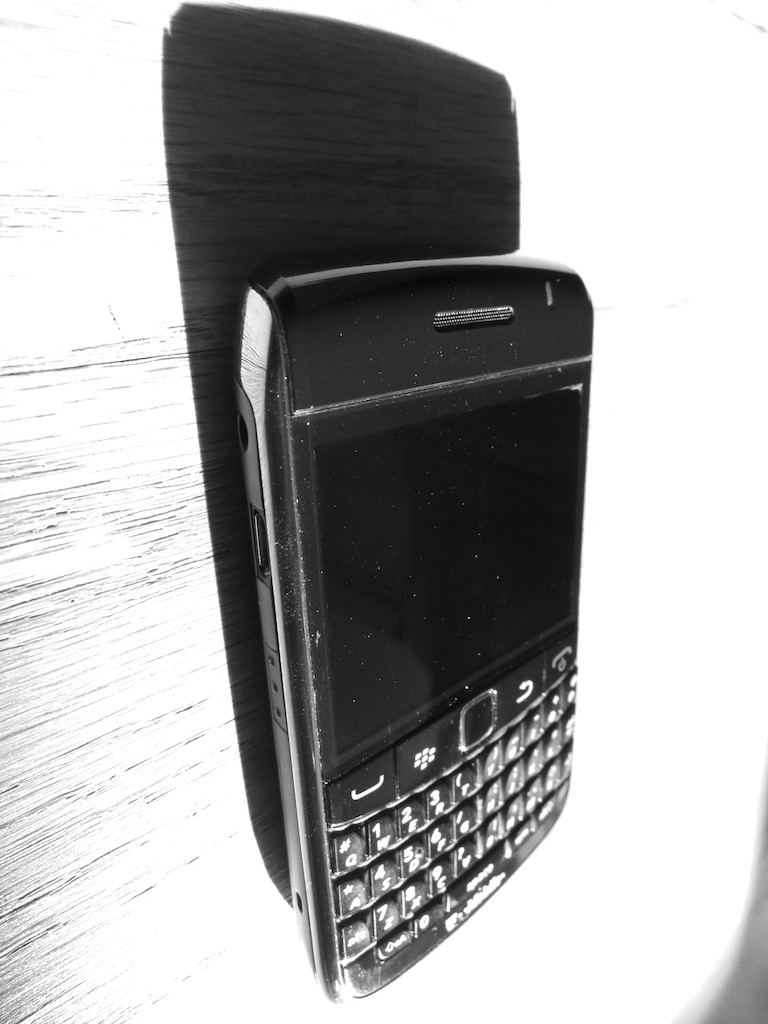
Last week, BlackBerry announced an almost billion dollar quarterly loss, fueling speculation that the fat lady has already sung.  I’ve been happily using a BlackBerry at work for the past nine years, and I’m not pleased at the prospect of losing my little buddy with its old-school keyboard buttons.  But what can one do to sooth the pain of this inevitable loss?  Of course… write a poem!

Last week, BlackBerry announced an almost billion dollar quarterly loss, fueling speculation that the fat lady has already sung. I’ve been happily using a BlackBerry at work for the past nine years, and I’m not pleased at the prospect of losing my little buddy with its old-school keyboard buttons. But what can one do to sooth the pain of this inevitable loss? Of course… write a poem!


Ode to the End of BlackBerry

A billion dollar loss
Who could guess?
The mighty BlackBerry
What a mess

It’s on my belt
Wherever I go
I’m on the job
It fuels my mojo

I tap away
My message clear
It is so fast
I have no fear

My iPhone’s great
But when I try
To send a text
Quick on the fly

The auto correct
It makes a mess
It sometimes says things
I must confess

When email’s the thing
BlackBerry can’t be beat
Those tactile buttons
They’re such a treat

But a simple machine
You don’t want anymore
It really has to do all
BlackBerry hits the floor

Kicked to the ground
Others are shining
There is no hope
Cause no one’s buying

I’m still a big believer
But this is not contemporary
There’s no denying the odds
You’ll soon see the obituary

The Borg will soon provide
Workers with their new tech
Corporations shall survive
But I’ll simply say ‘bleck’

Life was glorious
BlackBerry years happy
All good things must end
Time to call my Pappy

He tells me how
In the days before time
People just talked
Then had a glass of wine

Life was simpler he says
No tech was needed
Face to face was the way
To sow what you seeded

But I attribute it
To the gloss of the past
Just like his 8-track tapes
They were quickly outcasts

Survival of the fittest
It is not that existential
Evolution transcends all
No tech is forever special

Three Websites to Create and Mail a Card from Your Computer

This photo card I created at Paper Culture represents the end of a tech quest I’ve been on for my father: Type a card. Put it in the mail. Don’t get out of your chair.

This photo card I created at Paper Culture represents the end of a tech quest I’ve been on for my father: Type a card. Put it in the mail. Don’t get out of your chair.

My father asked me a couple years ago how to send out a letter from his computer directly to the mail.

I told him that was a service called email.

He gave me an annoyed look.
(My eighty-year-old dad is quite tech savvy for his generation.)

He politely replied that an email can get lost in the deluge people receive.
Plus they don’t carry the gravity of a physical piece of mail.
(He had a point.)

Dad is still quite focused on the golden days when telegrams ruled the world of instant communication!

The idea of creating and sending out a physical piece of mail through your computer may seem more quaint than critical, but it’s not an unreasonable request.

At the time, Apple’s Cards iOS app had just launched.
The service was designed to mail out customized cards with your photos via your iPhone/iPad as opposed to using a desk-bound computer.
Cards was a great idea and a nifty time saver, since you didn’t have to schlep to the post office. Apple did all the heavy lifting.

Suddenly ‘quaint’ became ‘cool.’
But it wasn’t quite right for my father, as he didn’t have an iPhone

So Cards was a near miss.

I think I then got consumed with my life as a new parent.
And I never did come up with an answer for my dad.

Fast-forward two years…

Cards… We Hardly Knew You!
Guess what?
Cards wasn’t that cool after all.

Amidst all the recent fanfare of the iPhone 5S and 5C launch,
Apple also killed off Cards.
What?!

Yes, On September 10, Apple quietly acknowledged its Cards service had been discontinued, pushing customers towards iPhoto instead.
…And also pushing people to get off their tushies to find a mailbox!
(iPhoto won’t mail out your cards for you.)

Three Choices Take Center Stage
Apple’s Cards obit got me thinking back to the unfinished project for my dad.

Today, there are plenty of ways to send out a greeting card online, even using photos you’ve uploaded.
The problem is the massive overload of design options and targeted ‘themes’ for your card.

You’ve got hundreds… sometimes thousands of choices.

My father is looking for something simple:

  • No anniversary
  • No graduation
  • No congratulations
  • No happy retirement
  • There’s no event to celebrate!

He wants to avoid all the fanfare and just write and send out his own little notes.

So I began my research again…

And with the vacuum created by Card’s departure, the competition was happy to remind everyone they’re out there…

Sifting though them to find the ones that still stuck to the basics wasn’t easy…
But I found three choices I think my father will like….

Shutterfly

So of course, I started with Shutterfly, because it’s such a well-known brand.

That said, I realized it’s become quite the sprawling mall of photo-related products.
Believe me, finding the right page to create and mail out a singular card wasn’t easy.

Shutterfly Photo Cards
Shutterfly doesn’t offer the option to mail out old-school post cards or individual single-sided photo cards.
(They only sell single-sided photo cards in bulk.)

Shutterfly Flat Stationary Cards
But wait… you’re suddenly in luck if you morph the aforementioned photo card into a ‘flat stationery card.’
Yes, Shutterfly will mail out individual flat stationery cards that you can customize with your photos:
(5 x 7, 5 x 5, 6 x 8, and 4 x 8…but not 4 x 5!)

The price:

  • $2.47 for most of the sizes (They’ve got a sale running.)
  • $2.44 for the 6 x 8 (They’ve got a bigger sale running.)
  • Plus 99¢ to mail ($1.49 for international)

The only downside, and it’s a big one is all of these cards are tied to a theme.
So you may have trouble making your simple message fit if its not tied to some big ‘event.’

Are you getting a headache yet?

Shuddering with Shutterfly
I’ve got to tell you all my Shutterfly research was exhausting.
I could have driven back and forth to the post office five times by now.

Touchnote

Touchnote comes closer to hitting the sweet spot.
Most importantly, it’s so simple by comparison.

  • You can quickly send out a postcard or greeting card
  • They also offer a mobile app for Android and iOS, so you can do all your work with your smartphone (like Apple’s former Cards app)
  • You can send your postcard anywhere in the world

And you can’t beat Touchnote’s pricing:

  • You pay in ‘Credits.’
  • It costs 1 credit to create and send a postcard
  • 2 credits for a greeting card
  • A credit costs $1.49
  • But it’s cheaper if you buy in bulk…
  • If you buy a pack of 5 credits, you get the 6th for free
  • If you go crazy and get the 50-credit pack, they give you 25 more for free, which brings the price down to the low/low price of 99¢/credit

I picked up the 5-credit pack, which meant I would be sending out my postcards for $1.25.

Not bad…

I only encountered one problem:

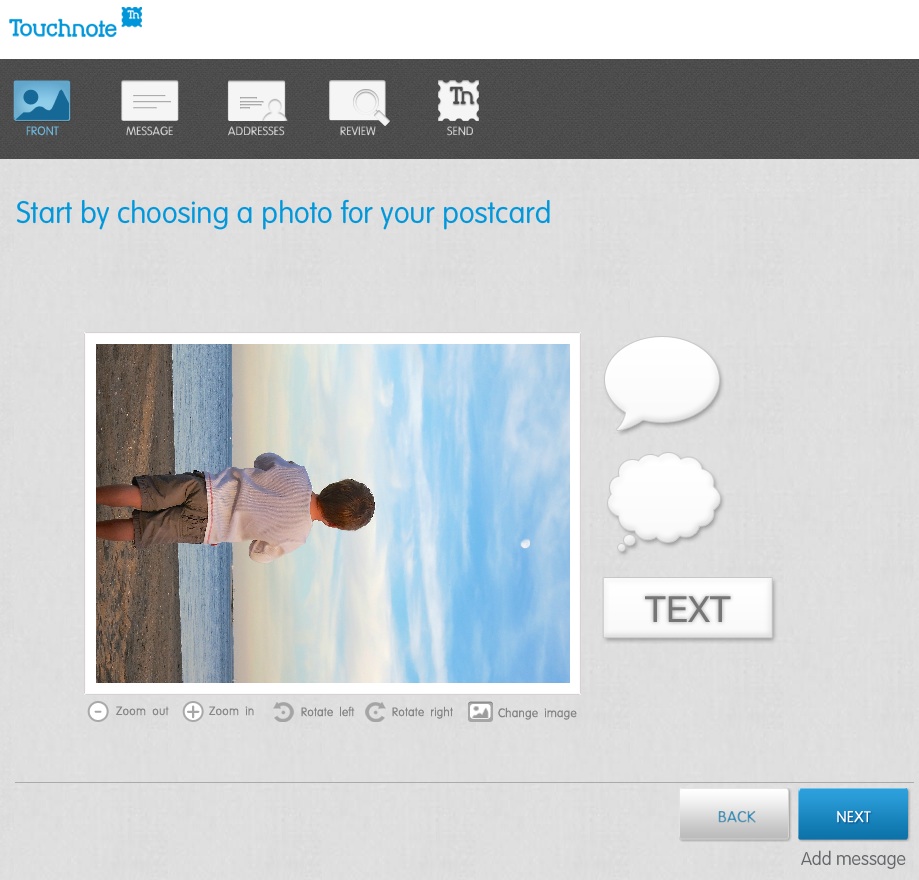
Touchnote 1
When I first loaded up my vertically oriented image, I rotated it into portrait mode from the default landscape setting.
But unfortunately, I realized you can’t use the clever text and thought bubbles they offer in portrait mode.
(disappointing)

Otherwise, it was a snap.

The postcard goes out the next working day, and they say it will arrive in 1 to 4 working days (within country).

Paper Culture

These guys are the green alternative.
They also promote the quality of their paper stock. But you’re not killing trees when you use Paper Culture.
In fact, quite the opposite…
All of their products are printed on 100% post consumer recycled paper.
Plus, a part of every order placed goes towards planting a tree.
(They’ve got a goal of planting 1 million trees, and they’re almost a third of the way there!)

Pricing:

  • $2.59 for a standard card (6 x 4.3)
  • $3.19 for a larger card

After that, they just charge the cost of the stamp to mail your card for you.

So all in, that’s $3.05.
(though I got a 15% discount on a deal that’s ending soon)

For your 3 bucks, they also provide free designer assistance and offer you up to 2 proofs for free.

And they’ve got a line of personal stationery that allows you to send out a classy-looking note (with a photo if you like), just like my father asked about!

What’s not to like?

Well I did run into one disappointing detail in the fine print on the final order page:

“If you approve your proof today, we will ship your card(s) no earlier than 6 calendar days before and no later than the date you select below.”

The earliest date I was allowed to select was a whole week out.

So that means they can take their time being all green.
And delay up to a week putting my card in the mail.

Hmmmm….

I just had a flashback to the old Orson Welles commercial.
“We will sell no wine before its time…”

Hallmark

Of course I checked out the grandfather of all greeting cards.
Hallmark offers a similar online card service that pops your card in the mail…

Their pricing structure is more complicated:

  • $1.29 for a 3.9 x 5.3 flat stationery photo card
  • $1.99 for a 3.9 x 5.3 folded stationery premium paper card
  • $3.49 for a 5 x 7 folded photo card
  • $5.99 for 5.5 x 5.8 folded song card
    Yes, the one with the little music chip and speaker
    (And yes, you can choose a song from their relatively extensive though super clichéd song library)

Like Paper Culture, they’ll mail out your card for the price of a stamp.
But they only mail to the U.S. and its territories.

I went with their simple flat stationery photo card for $1.75 all in.

Again, I ran into one little snag…

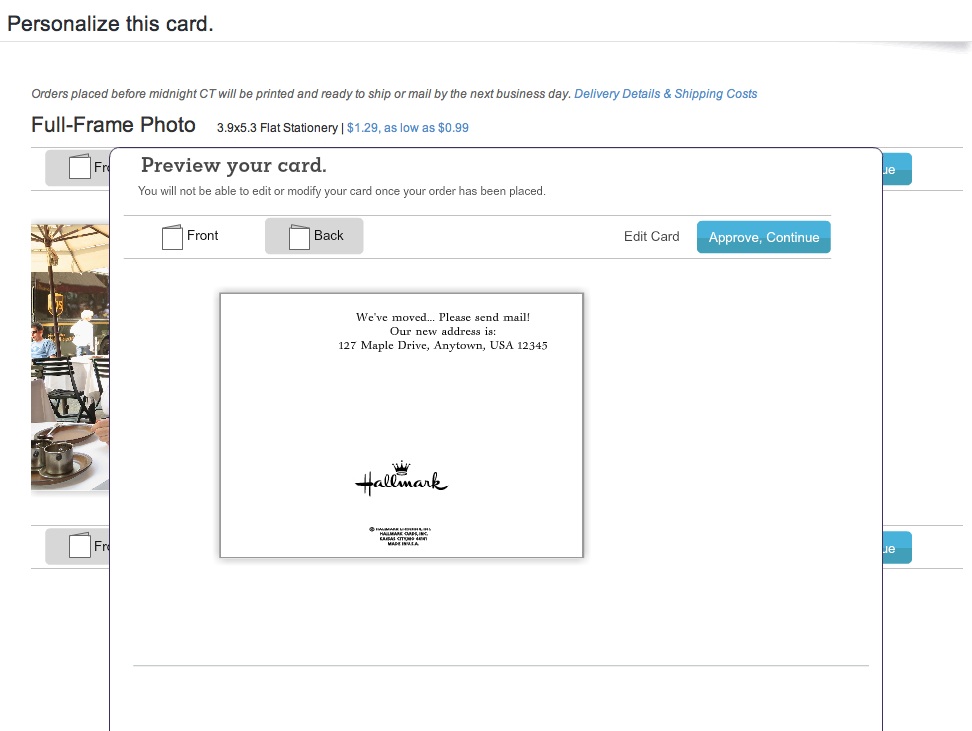
I first uploaded a photo of my father and me enjoying a Vietnamese coffee at an outside café in New York City.

Then, Hallmark’s spell check program went into Red Alert mode.
Something about ‘Anytown’ not being spelled correctly.
(That was strange, as I had not typed in any text!)

But then I realized the spell check was referring to the back of the card, which I hadn’t gotten to yet!
It had populated a default ‘Anytown’ address.

Hallmark
(How ironic Hallmark was questioning the spelling of its own default ‘Anytown’ word!)

The earliest mailing date Hallmark offered was two days off, which wasn’t bad compared to Paper Culture, but not as fast as Touchnote.

Survey Says…

So how do these competitors stack up?

I’d call it a relative draw.

All three online card services did a solid job.
Yes, they all had their own minor hiccups, but only deserving a minor ding.

Other points to consider:

Touchnote:

  • Easiest to use, but the others aren’t far behind

Paper Culture:

  • If you’re interested in helping Mother Nature

Hallmark:

  • You still can’t go wrong with a Hallmark card

Price (including stamp):

  • Touchnote: $1.25 (postcard)
  • Hallmark: $1.75 (flat stationery photo card)
  • Paper Culture: $3.05 (note card)

(Note: These aren’t entirely apples-to-apples comparisons, but they’re close.)

Dad- you really can’t go wrong with any of these services.
Just stay away from Shutterfly for this particular use.

Happy letter writing…

You’re welcome.

Follow my blog with Bloglovin