At Home with Tech

Unlock the power of all your technology and learn how to master your photography, computers and smartphone.

How to Help Your Computer Survive Software Updates

Do you feel like you’re playing Russian roulette whenever a message pops up to update your computer’s software?  Here are six tips to keep the odds in your favor…

Do you feel like you’re playing Russian roulette whenever a message pops up to update your computer’s software? Here are six tips to keep the odds in your favor…

You’re happily typing away at your computer with your cup of Joe.
All your software is functioning properly.
Your media is backed up.

It’s a moment of digital harmony.

Suddenly, a message appears in the center of your screen.
“New software is available for your computer. Would you like to install it now?”

Ooohh… free updates to make your Apple computer even better!

Endorphins get released at the mere thought of enhanced computer functionality, and your trigger finger quickly moves towards your keyboard.

Then your left brain screams, “Wait!!!”
Maybe tinkering with a good thing isn’t always such a good idea.

And even if the word “critical” is attached to the update, you should always think twice about when and how you do your updating.

Because the truth is….
Your computer and its software will probably perform the same after a recommended software update.
But sometimes, things aren’t quite the same.

My experience has run the gamut. It’s ranged from minor settings having to be reset to my computer not wanting to reboot!

Total disaster like that is rare, but there’s really no way to know for sure what’s going to happen.

It feels a little like Russian roulette.
(right?)

Six Tips to Promote Successful Software Updates

Here are a few tips to help ensure your software updating adventures go smoothly:

1.  Do Nothing
One thought is – If it “ain’t” broke, don’t fix it.
Close the update window and go about your digital day.

But if you fall too far behind in your software housekeeping, you’ll eventually end up with a different set of incompatibility problems generated by your neglected software.

And if the update is more about security than functionality, you’re leaving your computer in a vulnerable position.

So, sticking your head in the sand is a strategy you shouldn’t rely on for too long…

2.  Back It Up First
I know I’m not the first to mention this, but it bears repeating…
If you’re going to take the plunge and introduce new bits and bytes to your computer, no matter how few, you should make sure you’ve got yourself a fully updated back-up drive waiting in the wings.

Follow the same precautions as you would when downloading a brand new software package.

3.  Do Your Research
You really don’t have to be the canary in the cage.
Just Google the software update, and I promise you there will be lots of folks talking about their own experiences with the update.

4.  It Doesn’t Hurt to Wait a Bit
Even if your research fails to turns up any red flags, why not wait a week to make sure you’re not amongst the first to encounter a glitch?

5.  Close the Necessary Open Programs
Usually, Apple’s Software Update utility will prompt you to close the requisite programs before beginning the software update process.
A single click usually can perform this step.
(It really can’t get any easier!)

That said, I recently ran into a little roadblock while performing Microsoft Auto Updates. (which runs separately from Apple’s utility)

Two crafty Microsoft processes suddenly became stubborn and wouldn’t automatically close upon request with the rest of their cousins.

The offenders-

  • Microsoft Database Daemon.app
  • SyncServicesAgent.app

After some frustration, I eventually realized you need to call upon a more powerful utility to deal with these little critters…

Activity Monitor to the Rescue!
You can find this digital ally in your Utilities folder, which lives in ‘Applications.’
Open Activity Monitor, and it shows you everything that’s running on your computer.
(How cool is that?!)

Just locate your two unwanted guests and zap them away with the ‘Quit Process’ button.

The glitch is now gone, and your software update process is free to move about the cabin…

6.  Do the Updates on Your Own Schedule
You don’t only have to do the software updates when your computer asks you.  (and doesn’t that always seems to happen when you’re in the middle of a deadline?!)

You can call up the updates whenever you want and when you’ve got a little more time to consider these tips.

The Software Update utility is the second listing when you click on your Apple Menu on the very top left of your screen.

Whitewashing Your Digital Picket Fence
Performing software updates is a necessary chore that’s both a blessing and a curse.

It’s designed to be a no brainer, but leaving your housekeeping to an auto pilot program can easily lead to an unexpected crash.

Don’t pretend to be a digital Tom Sawyer. There’s never an easy way out…

Life is a hands-on experience.
Why should your digital life be any different?

The Second Best Father’s Day Deal

Just like our family, I bet you took a few great photos today, celebrating your awesome ‘Dadness.’  Now, it’s time to print them!  If you want to retain some of that ‘Dad of the Day’ afterglow, don’t pay top dollar to fill your printer’s empty photo paper tray.

Just like our family, I bet you took a few great photos today, celebrating your awesome ‘Dadness.’ Now, it’s time to print them! If you want to retain some of that ‘Dad of the Day’ afterglow, don’t pay top dollar to fill your printer’s empty photo paper tray.

As if life doesn’t already have enough opportunities,
certain ‘forces’ have added a few more ‘holidays’ to the calendar to challenge your photo-taking prowess…

That said, today is supposed to be the one day of the year you get to kick back as a father and not worry about any of that.

Ahhhh… Father’s Day… The day to put aside all your home tech worries.

You can just enjoy being a dad, and maybe take a few photos.
What could possibly go wrong?

Well, at day’s end you just might want to print out a photo or two…

Pop quiz:
Are you, by any chance, fresh out of photo paper?

I know… some of you luddites may still print your photos down at the local CVS.
(not that there’s anything wrong with that)

Other enlightened souls wisely invest their time in creating photo books online.

I’ve been having trouble lately bending space-time. So I’ve found myself short on the temporal interval it takes to create one of these clever books.

So as a backup, I’ve found myself drawn to the quickest photo-printing solution available.  I just perform the ‘click’ and let my Epson Artisan printer do the rest of the work…

Printing Your Photo of the Week
I’ve developed a most enjoyable habit over the past three years.
I print out a 5” x 7” photo from my son’s weekend adventures to take to work on Monday mornings.

Not only does this practice add a breath of fresh air to your daily routine, but this ‘photo of the week’ printing structure will organically grow your own
5” x 7” collection of amazing prints.

Plus, these photos will probably become the keepers my decedents pull out of a long-lost shoebox a hundred years from now.
(Like anyone’s digital back up plan has half a chance of making it into the next century!)

So it makes sense to print with the best quality photo paper stock available.

I usually go for Epson’s ‘5 star’ Ultra Premium Glossy stock if I can find it, even though it’s more expensive than their standard photo paper.

In fact, I’ve generally found locating any Epson photo paper in the brick and mortar stores not that simple a task.

Whenever I frequent Staples, they seemingly have a warehouse full of HP photo paper, as the HP logo dominates Aisle 6 as far as the eye can see.
In the corner, a few Epson photo packages huddle together for warmth.

So I’m always on the lookout for my Epson paper supply and a deal to boot…!

News Flash: Epson.com Sells Paper!
Shortly after buying and registering my second Epson Artisan printer,
(my first was hobbled last year by the attack of my son’s killer penny)
I received an email from the Epson Store suggesting I check out their photo paper online.

I’m not one to eagerly begin a new relationship with another web vendor,
(I usually stick to Amazon, B&H Photo, and Diapers.com)
…but I decided to take a look.

It was the logical thing to do.

You know what I found?
Some reasonable pricing on their website… but nothing to really blog about.

Epson’s Ultra Premium Photo Paper Glossy:

  • $18 for 60 sheets of 4” x 6”
  • $25.20 for 100 sheets of 4” x 6”
  • $9 for 20 sheets of 5” x 7”
  • $15.30 for 20 sheets of 8” x 10”
  • $36 for 50 sheets of 8.5” x 11”

You ‘Amazon-a-philes’ out there should be quick to point out that Amazon can still beat the cost on some of these items. (as long as you’ve got Amazon Prime)

And B&H Photo’s website also has Epson beat.
(Don’t they always?)

But that’s not the only email I ever got from Epson…

The Second Best Deal for Father’s Day
The best deal on Father’s Day is spending time with your family.
(D’uh!!!)

But I think Epson has the second best deal…

Two weeks ago, I received another email from Epson.
A magical email.
It said, “Guess what? We don’t need to make any money this week… so here’s a ludicrous discount for you!”
(not quoting them quite the way they wrote it…)

This email gave me a 40% discount!
Whoah!! It’s like finding the last golden ticket hidden in a Wonka Bar!

All right. I decided it was time to run the numbers again against Amazon and B&H Photo.

Yep. Epson officially rocks.
Their discounted pricing, coupled with their current free ground shipping offer makes them the best deal in town!

It was time to pull the trigger.

And so today… I am prepared.
My Epson photo printer is loaded and ready for action!

My tech is fed.
Now, it’s time to chill out…

Good Things Come to Those Who Wait
So yes, you’ve got to play Epson’s little game…

  • Register your email with Epson
  • Wait for their email with the insane sales code
  • (These actually show up several times a year)
  • Order your photo paper whether you need some or not
  • Believe, me you’ll use it…eventually

Let me be the first to congratulate all you prepared dads on a
Happy Father’s Day…
2014.

I Dropped My Camera. Now What?

Your pocket camera is on the floor and now a useless brick. In our disposable society, do you just buy another? Or do you navigate a repair?

Your pocket camera is on the floor and now a useless brick. In our disposable society, do you just buy another? Or do you navigate a repair?

My little boy was so delighted to be in the caboose!
The mini choo-choo train was about to begin its ‘extensive’ journey
around Mathews Park.
He was so excited!
And there I was, squeezed into the caboose, sitting right next to him.

A father and son moment.
My three year old beamed at me.
I had to have a picture.

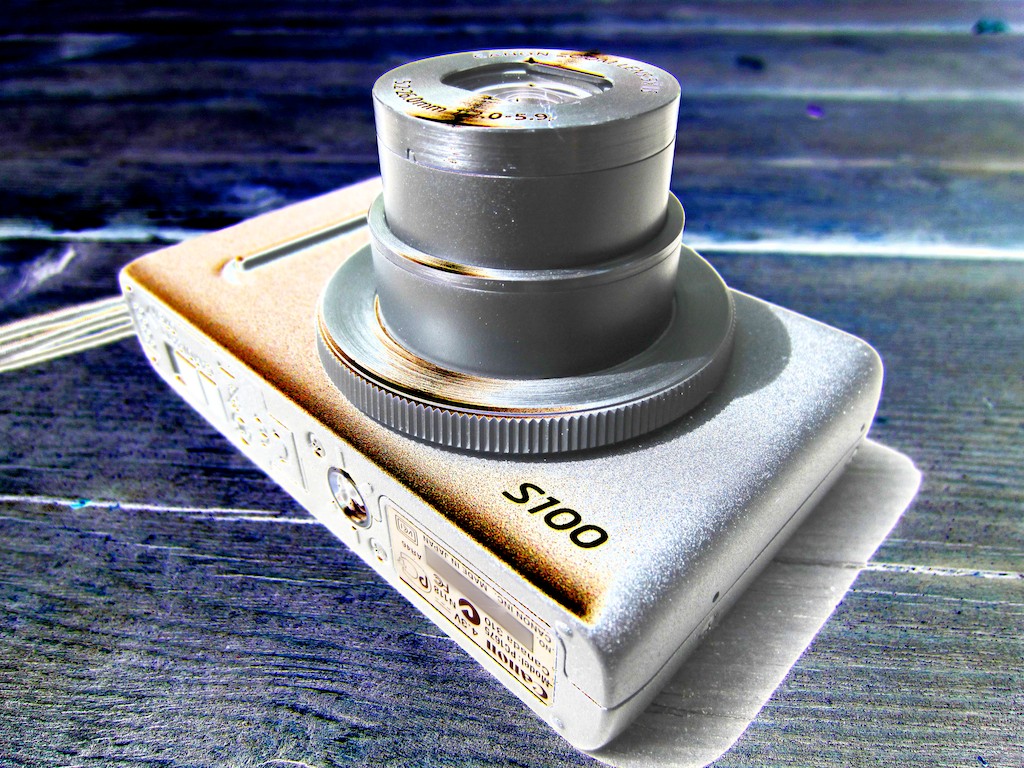
So I carefully pulled out my Canon PowerShot S100 camera, just like I had done a hundred times before.
I turned it on and placed it on my lap.
And then I inexplicably lost my focus…
…for a millisecond.

Maybe my adventurer whispered, “Wow!”
Maybe the sun was a distraction.
Maybe aliens were trying to contact me.

But my little camera…
It just slid off my lap.

In the blink of an eye, it was on the wooden floor!

The fall couldn’t have been more than two feet.
But it fell… lens first.

I picked up my camera quickly, as if to erase the last ten seconds.

It seemed fine.
Intact.

No battery and chip guts spewed all over the floor like many a dropped BlackBerry…
(Don’t deny it…I know that’s happened to you at least once!)

My camera’s screen was still illuminated and seemingly ready for action.
I turned the device off to ensure it was still fully operational.

It was not.

The lens began to slowly recede into its body.
(It usually whisks shut.)
And then the lens just… stopped.

Frozen in its ‘on’ position.
I looked at the screen.

The dreaded “Lens Error” displayed.
And then the camera shut itself down.

I rebooted my precious machine several times, hoping to breath some life into its injured extension.

No such luck.

The power came on, but the camera just freaked out as soon as it realized the lens was immovable.

My camera was officially broken.

The train began to pull away, and my three year old squealed with glee.
Chugga-chugga, choo-choo!

I put the camera away and turned my full attention to enjoying the train ride.
Self-recriminations would have to wait till later.

Looking for the Easy Fix
That night, I went online and Googled how to repair a Canon S100, hoping to find some magic ‘reset’ solution.

The first page was filled with a recall notice from Canon.

What?!

Apparently there was a problem with the lens motor, and Canon had offered to repair the problem for free…

Yes!

…on a specific batch of the cameras identified through a range of serial numbers.
My serial number was not included.

No!!!

The Choice
So I was faced with ‘the choice.’

  • Was it worth paying to have my camera fixed?
  • Or should I walk away from my hockey puck and buy a new camera?
    (I’m sure ‘The Fall’ would void any warrantee.)

Today, the economics of repairing your gadgets can get really confusing.

They’re often cheap to buy.
And relatively expensive to repair!

I bought my S100 on Amazon last Black Friday.
So it’s only six months old.

It was a sweet deal at $229 (including an 8 GB memory card), partially because its newer cousin, the S110 had already been released.
(The S110 usually runs $399, although it’s now on sale for $349.)

How much would you pay to repair a $229 item?
It was time to find out…

I went online to find an old-school camera store that also does repairs.
Yes, they’re still out there. Just not on every corner, like Starbucks.

I decided to pay a visit to Camera Land in New York City.
(relatively close to my daily commuting route)

Entering Camera Land
I pushed open the door like it was the Wild West and sauntered over to the counter to see Reggie, the repair manager.
He looked up, barely interested.

I wanted to say, “Give me a shot of whiskey.”
Instead, I slid my metallic carcass over to him.

He picked it up and tried to turn it on.
He looked liked he’d been doing this kind of thing for a hundred years.

He spent a little more time with my dead camera and then leaned forward.

Some deactivated DNA popped on and I suddenly wanted to reach for an imaginary holster in a ‘fight or flight’ response.

The rest of me told these cranky genes to simmer down…

Reggie proclaimed if they could fix my camera in the store,
it would cost me $80.
(Okay… that seemed reasonable.)

But if the in-house repair attempt failed, he would need to send the camera to Canon’s repair center…in Canada.

Canada?!

Now we were talking $109… at least.
Maybe more…

Crossing into three digits, not to mention another country?!
That’s almost 50% of what I paid for the camera!
Those pesky genes urged me to walk out while I still had my hat on.

But buying a replacement camera was no more attractive.

The deal on the S100 was long gone.
(and now officially discontinued by Canon)
And the current sale on the S110 isn’t that compelling.

The math boiled down to this:
Buying a replacement camera would cost me at least three times the $109 repair price.
So trying for the mend seemed relatively clear.

I left my camera behind, uncertain of its future.
(Remember, Canada wouldn’t commit to a $109 lock, sight unseen.)

Later that day, Reggie called. It was bad news.
The operation was a success, but the patient died.
(His camera doctor managed to get my lens to retract.
But then it wouldn’t open!)

My camera’s only hope was to seek treatment out of country.
I gave my consent and prayed the Canucks to be kind!

Two Weeks Later…
I called Camera Land and spoke to someone new.
The guy shouted over to Reggie, who yelled back…
“It’s not ready yet!!”

I asked the big question: “How much is it going to be?”

“$109!”
(Phew)

So I gave it another week.

Eight days later Reggie called.

“Hello?”

“Your camera is ready!”

“What?”

“I said your camera is ready!!”

“I’ll be right down!!!”
(I realized I was yelling as loudly as he was.)

Two hours later I walked in.
Reggie proudly handed me the camera.

“They replaced the whole lens.”

I pressed the power button, and the lens popped to attention.
Looked good to me.

And yes, it was only $109.
(plus tax)

I asked, “What kind of warrantee do I get with this?

“Come see me…
…just don’t drop it.”
(The ‘again’ was left out, but understood.)

I walked out.

For the record, Reggie was a really nice guy.
If you decide to revive your own broken camera, and you frequent Midtown Manhattan, I recommend you pay him a visit…

Buy the Service Contract?
So you might have been asking why didn’t Barrett just buy himself a protection plan with the camera?

Well, I usually don’t buy service plans for my tech, with the major exception of my Apple gear.

I figure most service plans are overpriced, and I won’t need them…
But maybe with my evolving life as a parent, it’s time to take another look.

It’s easy to by a protection plan if you buy your tech at a big-box store. In fact, it’s hard not to. Someone from the Geek Squad usually approaches you at the cash register and tries to beat you into submission.
You have to say no about five times before your transaction is done.

But what do you do if you buy your tech online?

SquareTrade to the Rescue
Ever hear of SquareTrade.com?

You mail them your injured tech, and they claim they’ll repair or replace your item in five business days or less.
And it doesn’t matter what you did to it.
They say, “ Drop it? Spill on it? Run over it? No worries.”

Sounds pretty compelling.

And the cost?

For a camera in the $300-399 price range, the plan costs:

  • $59.99 for two years
  • $79.99 for three years

B&H Photo offers its own discount if you buy the SquareTrade plan through them:

  • $44.99 for two years
  • $62.99 for three years

That’s not bad!
You’ve just got to sign up your tech within 30 days of purchase.

The Cost of Documenting your Life
Now to the guilt factor…

I broke my camera in the line of duty as a father and amateur photographer.
(and a clumsy one, at that)

Guilt says I should have kept my camera in my pocket and avoided the risk altogether…

A couple years back, I wouldn’t take a camera to the beach,
because I feared the sand would destroy my gear.
(A gust of wind and a few grains of sand wedged into a camera lens can kill your camera faster than you can say, “Can’t wait till Cyber Monday!”)

But recently, I’ve come to embrace a different philosophy.

You’ve got to make a choice:

  • Do you take some risk and bring your camera to live your life with you?
  • Or do you play it safe and do your best to protect your camera?
    (Translation- Leave it home when the going gets tough.)

I say… Go live your life!
Enjoy it.
Document it.

Yes, that means you might break a camera or two along the way.
So be prepared.

Note to self:
My next new camera will come with its own protection plan.

And remember, whether you intentionally put your camera in harms way or not, Fate still has its own way of messing with you.

Chugga-chugga, choo-choo can happen to anyone!

My conscience is clear.

But Fate… if you can, please be kind to my Canon S100.
It’s only got two lives!