At Home with Tech

Unlock the power of all your technology and learn how to master your photography, computers and smartphone.

Why Isn’t Standard Definition Dead?

Anyone need a flowerpot?  I’m sorry, little Sony Trinitron TV, but it’s over.  Now, why can’t Hollywood just say the same thing about selling expensive standard definition media when high definition is clearly the standard?

Anyone need a flowerpot? I’m sorry, little Sony Trinitron TV, but it’s over. Now, why can’t Hollywood just say the same thing about selling expensive standard definition media when high definition is clearly the standard?

The revolution has come and gone.
The Borg won.
It’s 2013 and everything is HD now.

Every new TV or computer screen is HD capable with a film-like 16×9 screen.

Can you even remember what ancient TV sets look like with their 4×3 aspect ratio screens?
I’m sure your wallet does, after you emptied it when you bought your first HDTV.

But guess what?
You don’t have to penny pinch anymore to assimilate in our all-HD world.

HD Screens at the Bottom of Your Cracker Jack Box
I did some quick research at bestbuy.com.
Their cheapest TV set is a 19” 720p Coby HDTV for $99.99.
Granted, 720p is yesterday’s HD, but it’s still HD.

Yes, it’s a wicked small screen.
(Double your investment and you can get a respectable 32” 720p HDTV for $199.00!)

So if you haven’t gotten the memo yet, HDTV is officially cheap.

The same goes for computer monitors-

I saw a 19” LCD Planar for $107.84.
(Resolution: 1366×768)
Sure, I’ve never heard of Planar.
(Is it an alien planet six light years away?)
…But if you want the cheapest monitor in the store, even that one is HD.

Franken-DVDs
So why then are old-school standard definition DVD players still for sale if every new screen out there is HD capable?

DVD players range from a cookie cutter Coby for $26.98 to HD upconversion tech for a whopping $48.00.
(Upconversion means they’ll play Blu-ray Discs at a weakened resolution.)

Yes, they’re ridiculously inexpensive, but what’s the deal?
Shouldn’t we be living in an all Blu-ray world by now?

Consumer Tech is all HD
If you haven’t gotten the memo yet, let me break it to you gently…
All your home tech can play and record video in HD too!

Smartphones like the iPhone 5 and Samsung Galaxy S3?
Check.

All digital cameras and camcorders?
Yup.

Hello!!!?

Buying Digital Downloads in SD is Silly
So if HD is a standard option in all consumer tech today,
why is HD still considered a premium option in all the digital content you buy??

When you click to download a TV episode or movie on Amazon or iTunes, you’re offered the choice to pay the standard price for SD or the higher price for HD.

What’s up with that?!

Why is Standard Definition Still Around?
There’s absolutely no reason to mention the term, ‘standard definition’ ever again when describing current technologies.
But for some reason, the League of Consumer Tech Robber Barons…
(Is there such a group?!)
…just won’t let SD die…

I’ll give you three guesses why…

Support Legacy Tech
Sure, I’ve got my old 13” Sony Trinitron hanging out in our guest room.
(not that a guest will ever want to turn it on!)
But when was the last time the tech industry paid attention to supporting legacy technology for consumer convenience?
Exactly.

I can barely stare at my computer or smartphone for two minutes before they prematurely age to the point they can no longer keep up with the newest OS or IOS.
(only a slight exaggeration)

Sometimes You Just Don’t Need a Huge Digital File
Maybe you want to protect your portable media player from huge HD files filling up its relatively small hard drive. So you ‘compromise’ by loading up inferior SD movie files so you can jam more flicks in.

Or if you want to email out a home movie clip and don’t want to use a file sharing service like Dropbox, your QuickTime or Windows Media file had better be compressed to something much smaller than hulking HD.

But these issues are really more about personal file management…
Let’s move on.

When You Hold the SD Price Point, HD Can Always Cost More!
BINGO!!

If you want to check out “Argo,” the newly anointed Best Picture of 2012, you can go to iTunes.
Once there, you’ll have the choice to buy the HD file for $19.99 or $14.99 for SD.

And what exactly do you get for the $5 difference?
In most ways, they’re exactly the same.

They both display in the 16×9 aspect ratio.
It’s just that the HD version is a larger file with more lines of resolution…
…which yes, looks much better on a big HDTV.

The SD version has simply been compressed down more and doesn’t offer those precious lines of resolution to fit the HD category.
(at least 720 x 1280)

How Much Does a Line of Resolution Actually Cost?
I don’t mean to be thinking ‘different’…
But how much does a few thousand extra bytes really cost?

An HD movie file with more lines of resolution may look sharper to the eye,
but does it really cost any more to create and distribute?

I’m not so sure…

“Argo’s” master digital movie file is sitting somewhere in Hollywood on some well-protected computer or server. I bet the file is pretty massive.
Some tech nerd had the job to create several lower resolution versions for consumer use, including HD and SD.

That process involves compression technologies and time on a powerful computer.  The smaller the file size you’re shooting for, the harder the computer actually has to work to reduce the size and maintain quality.

So if you follow that logic, SD movie files should cost more than their HD cousins.
But of course they don’t…

I think the economics just boils down to this:
If it’s a better product, it’s simply going to cost more… regardless if it’s more costly to create.
(I learned that freshman year in Econ 101.)

So if SD is being kept on life support to help HD make more money,
I say let’s start saving some money with SD, while it’s on sale!

Watch Your Movies on your iPhone or iPad in Standard Definition
If that’s where you’re going to be watching your downloads, save your $$$ and go with the SD file. It’ll look just fine.
These tiny screens are really too small to justify paying 33% more for HD.
And think of all the hard drive space you’ll be saving…

But if you’re going to use those files on your massive HDTV, then you’ll definitely need to pony up the five extra bucks.

End the SD Subsidy!
One day, this standard definition subsidy will become a moot point, the same way I imagine black and white TVs originally propped up their pricier new color TV cousins.

SD still has its uses, but not as a wedge to artificially increase HD content pricing.

And with ultra high definition technologies around the corner, your may soon find your pride and joy HDTV that originally cost you two paychecks on the discount shelf at Best Buy for $19.99.

Progress.

That Bad Photo You Took May Be Your Best Yet

You may not know it, but some of your best photos are slipping through the cracks.  Maybe they first struck you as flawed or you didn’t recognize their hidden value.  Time to recognize your ugly ducklings!

You may not know it, but some of your best photos are slipping through the cracks. Maybe they first struck you as flawed or you didn’t recognize their hidden value. Time to recognize your ugly ducklings!

“A picture is worth a thousand words.”
We all know that saying.

But I‘m sure there’s a qualifier buried in the manual of sayings.
“The photo has to be pretty good!”

I know of two strategies to take a great photo:

  1. Have a good eye and follow the rules of photography.
  2. Just shoot lots of pictures and pray one or two come out right!

I’m no professional photographer.
So I mostly subscribe to the second plan.
When you take as many photos as I do, you’re bound to come up with a few winners here and there.
It’s simply the law of averages.

And it’s easy to pick your best photos, because they immediately stand out.

So the inverse to this equation means you’re inevitably creating a mountain of mediocre pictures along the way.
(which fortunately carries no cost in this digital era other than to your pride)

Stop! Don’t Delete That Bad Photo Yet!!
Yes, no one else should ever see your losers.
But you should also spend a little time thinking out of the box about what constitutes a great photo…

Before you mark your failed photographic attempts for your trash bin, you might want to take another look through a different lens.

You may have missed a hidden gem or at least one worth five hundred words!

Beauty Is in the Eye of the Beholder
I’m often guilty of being too narrowly focused on how I set up a photo.
I usually go for the “Say Cheese!” right-down-the-middle shot.
It’s the easy way out.

Sure, I also try for those more ‘natural’ moments, but with a speedy toddler around, it’s hard to get a crisp image.
(even with my new DSLR lens and Canon S100)

What’s the exact definition of a great photo, anyway?
I suppose a blurry blob is a worthy image if that’s what you’re going for.
(or if it’s ‘first contact’ with a friendly alien)

You don’t always have to be shooting for mass appeal.
Sometimes a photo can be a success if it connects with just one person!

If a bad picture can still evoke a positive response, well then…
Who cares what it really looks like, right?!

One of my favorite recent bad pictures is the first shot my son took when he was eighteen months old. His thumb covered most of the lens, but it’s still a masterpiece to me!

Make Room on the Podium for Second Place
And what about all your photos that are pretty good shots, but still fall short?
They don’t get to cross the finish line, either.

I’ve talked before about being ruthless when rating your photos to separate the wheat from the chaff.

But maybe there’s hope for your runner-ups, if you give them a little special sauce and take them in a different direction.

Winning Bad Photos

I present to you some of my best bad family photos….
(and some home-grown tips I’ve figured out along the way)

Embrace the Blur!
A little motion-induced blur can enhance a photo and capture the energy of the moment.

The Spinning Game

My friend mostly froze this wonderful moment while I was spinning my son last summer on vacation. I love it. Who cares if it’s a little blurry?

My friend mostly froze this wonderful moment while I was spinning my son last summer on vacation. I love it. Who cares if it’s a little blurry?


Black and White Likes the Soft Shot

Often, if I have an otherwise great shot, but it’s a little soft, I turn it to black and white. To my eyes, a black and white image is more forgiving of a bit of blur.
Plus, my friends then think I’m so artsy!

On Hike

This slightly soft shot of my wife and son pondering the pond’s beauty works much better in black and white.

This slightly soft shot of my wife and son pondering the pond’s beauty works much better in black and white.

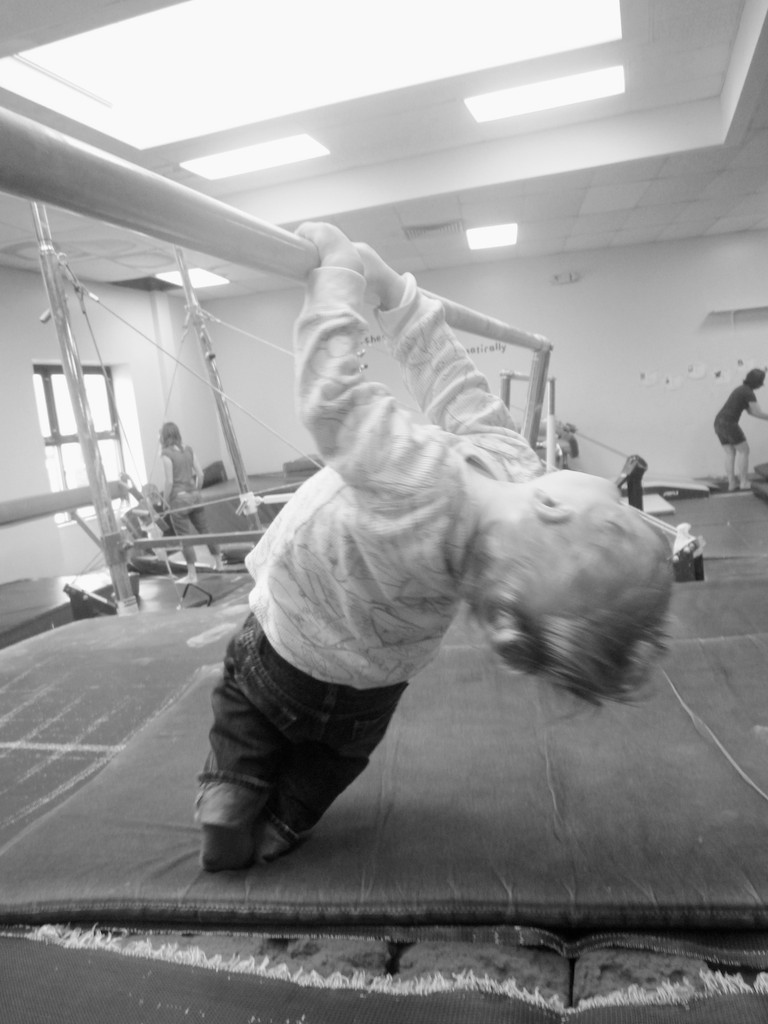
Hanging at the Gym

This one totally failed to freeze the action. But in black and white, it really doesn’t matter so much!

This one totally failed to freeze the action. But in black and white, it really doesn’t matter so much!


Turn the Photo on Its Head

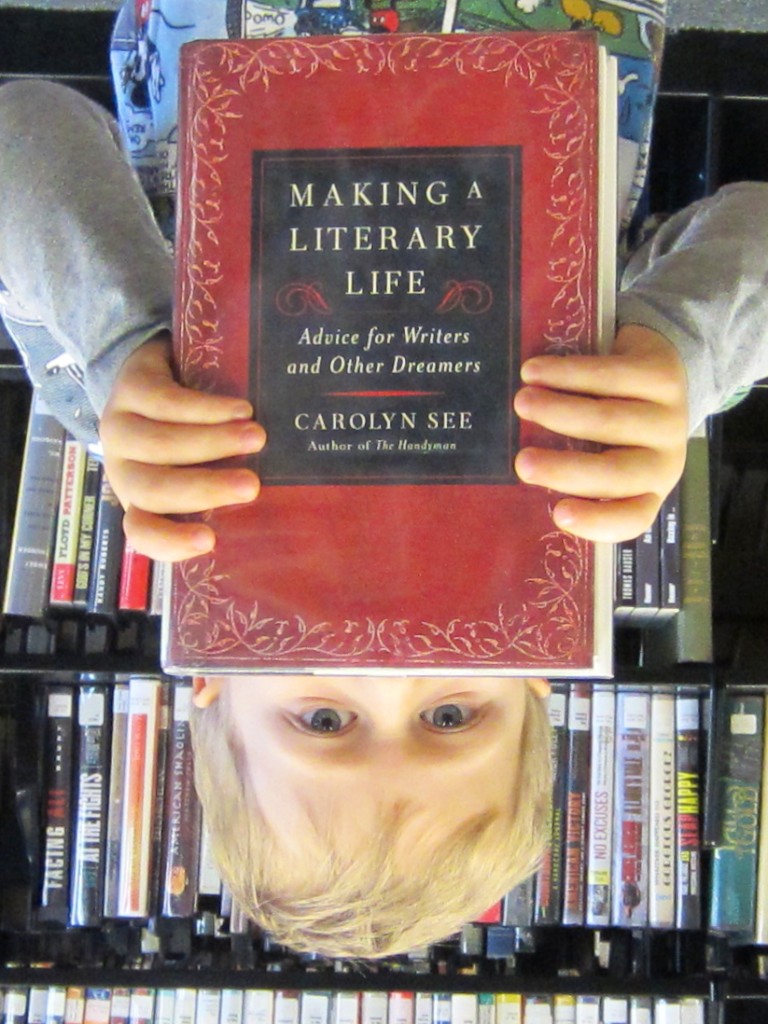
Sometimes the picture just looks better upside down.

An Average Library Moment

Nothing wrong with this one, but it’s not one of the winners.

Nothing wrong with this one, but it’s not one of the winners.


A Good Book Can Turn Your World Upside Down

Turning it upside down gives it the special sauce it needs!

Turning it upside down gives it the special sauce it needs!


It’s the Action that Matters

Capturing movement can be difficult, but sometimes it presents itself when you least expect it.

Climbing Driveway Snow Summit

After the big snowstorm last month, I wanted to get a head-on shot of my son climbing the snow. But he wouldn’t wait for me to get ahead of him. All I could get off was this one from the back. The summit shot works, right?

After the big snowstorm last month, I wanted to get a head-on shot of my son climbing the snow. But he wouldn’t wait for me to get ahead of him. All I could get off was this one from the back. The summit shot works, right?


Keep Zooming

Sometimes you don’t get the chance to get in close enough when you’re taking the shot. As long as you’ve got enough pixels to spare, crop your photo to feature what you really want!

Swimming Pool Peekaboo

This is a cute shot of my son drying off after swim class, but you can’t really see his face.

This is a cute shot of my son drying off after swim class, but you can’t really see his face.

The Eye

But the peekaboo eye is really what’s happening here!

But the peekaboo eye is really what’s happening here!


Let the Camera Find its Own Moment

Even if the focus ends up on the wrong part of the picture, that mistake can still create its own magic.

Speeding Down Slide

This one is all about my son’s hair going twenty miles per hour down the slide!

This one is all about my son’s hair going twenty miles per hour down the slide!


Nobody Cares What It Looks Like

Just like all the masterpiece toddler drawings you’ve got hung up on your refrigerator, when he takes his own first snapshots, they’re gold!

Self-Portrait at 18 Months

My son’s first self-portrait. Need I say more?

My son’s first self-portrait. Need I say more?


From Ugly Duckling to Swan

Once upon a time, I might have passed by or deleted these photos altogether, not recognizing their potential.

As you can see, it’s always worth giving your average or failed photos a second look.
You never know what underdog you’ll discover…

I’m rooting for all your ugly ducklings to get the attention they truly deserve!

Eight Steps to Better Home Video Production

Once upon a time, you were pretty special if you shot and edited video as a hobby. The gear was expensive. The technology was limited. And it was hard to do a good job. It was truly a labor of love.
(I can only imagine how difficult it was during my father’s generation, shooting home movies with Super 8 film.)

Today, all that’s changed.
Shooting a video is as easy as turning on the kitchen faucet.
Every camera and smartphone you buy has HD video capability.

And who needs to edit anymore?
If your device has web connectivity, just upload a clip instantly to your favorite social media site.

Bam!
You’re done.

So it’s no surprise that home-generated content is gushing like a geyser into YouTube every day.

Technology has democratized the video medium.
Even my toddler knows how to shoot a video.
(Just push the red button.)

The Red Button
It’s amazing that pressing the record button is now really all you need to know.

But maybe you’d like to create a video that doesn’t look like my toddler shot it.  Sure, there are tried-and-true production tips to follow, but today, most everyone has thrown the rulebook out the window.

‘Experts’ say today it’s all about the content.
Nobody cares if the shot’s a tad shaky and out of focus.
A little cinema vérité is good for the soul.
If it’s funny… or compelling… or goes viral, who cares what it looks like?!

That said…
There are still people who have this crazy notion to create a more professional-looking product.

I’m one of the few, because of my background in video production.
I can’t not try for the perfect shot.

Last night at dinner, I watched my toddler help himself to two huge servings of greens out of our big salad bowl, using oversized wooden spoons.
I whipped out my pocket camera and started shooting, but missed a good portion of the moment.

I stood there in anticipation of round two.
He usually likes to repeat new accomplishments.
(What toddler wouldn’t want to keep piling it on?)
He grinned at me as I pointed the camera at him.
Nothing.

I said, “Would you like to give yourself more salad?”
His smile broadened, because he knew what I was doing.
“No!!” He chirped with glee.
I would have to be satisfied with the ‘one-take’ moment.

..but I digress.

The Eight Steps To Improving Your Home Video Production

In what appears like a natural backlash to the ‘anything goes’ video mindset,
some of my friends are suddenly more serious about creating better videos.
(for both personal and professional use)

Here are a few production tips and shortcuts, as well as some home-grown suggested purchases to amp up the quality of your little cinematic masterpieces.

1.  Pocket camera or DSLR?
Either will get the job done from a visual standpoint, unless for artistic reasons you need the better lens on a DSLR.
The question is which camera gives you the best audio?
If you plug in an external microphone, that choice will easily give you cleaner sound.
But unless you’re using a newer DSLR, you probably don’t have an audio input on your camera to connect your microphone.
So in that case, just go with the better onboard camera mic.

2.  Audio
As I just said, using an external microphone will get you the best audio.
But don’t worry if you can’t do it.
Just keep your camera close to your subject and make sure there’s not a lot of extraneous noise about.
(example: toddler singing “Take Me Out To The Ball Game” in the hallway)

3.  Tripod
Unless your video is an action-oriented vignette with lots of movement,
please use a tripod.
I know many people don’t, but trust me… your video will look better if your camera isn’t bouncing about in your hand.
You can pick up a little desk tripod for less than twenty bucks.
(I’m partial to Joby Gorillapods.)

4.  Lighting
This is a really big issue to keep in mind…

Always keep the main light in front of you.
If you’re inside and there’s a window behind your subject, that will create a giant bright spot.
(That’s bad.)
((Move your shot away from the window.))

Beware of shadows.
If you’re just using an overhead light, that scenario will create deep shadows under your subject’s eyes.
(That’s also bad.)
((Remember, keep the light in front of your subject!))

If you want to get fancy, move your front-facing light source off to the side a bit.
This will create a soft shadow on one side of the face.
(That’s usually a good thing.)
Totally even lighting can look flat.

The good news is your lighting source doesn’t have to be high-end professional gear.
All consumer cameras today do much better in low light than their analog ancestors. That said, you’ve got to give your camera some light to work with. Otherwise, your image will look noisy as your camera struggles to compensate.

A garden-variety bright light bulb with decent white diffusion is a good place to start. But remember to keep your lighting ‘soft.’ No spot lights, please.
(I picked up a simple $14.99 lamp from Bed Bath & Beyond.)

Another option is to use the natural light from that window I just told you to keep out of your shot.
(which means flipping your set-up, so the window is in front of your subject)

Finally, don’t combine both indoor and outside light.
It’s like ‘crossing the streams’ in the movie “Ghostbusters”
Without going into a much longer discussion, just know that using both light sources will confuse your camera and mess up the colors in your shot.

5.  Background
If you’re shooting a talking head, you’ve got to choose something for your background that’s appropriate to the topic.
While inside your home, you should select a neutral space that’s not overly busy.
A messy bookcase is not a good example.
(unless you’re talking about messy bookcases)
An easy solution around this problem is to buy a large roll of paper for your background.
(Think of it as the ultimate in neutral!)
I bought a five-foot roll of white paper for $22.50 to obscure an otherwise unattractive home office shot.

6.  Teleprompter
For most people, talking naturally, clearly and concisely to the camera is not an easy task.
Instead of struggling through multiple takes till you get it right, I suggest writing down what you want to say and then using a tool used by both TV pros and politicians alike… a teleprompter!

Now, I know professional teleprompter systems cost thousands of dollars, but don’t despair.

If you’ve got an iPad, you’re only a few dollars away from owning your very first teleprompter.

There are numerous software choices available in Apple’s App Store.
I invested $2.99 on Quick Teleprompter.

There are more expensive options out there as well as a few free ones.
But shouldn’t you always have to spend a few bucks on good utility or business app?
(‘Free’ makes me wonder what the catch is.)

‘Quick Teleprompter’ gets the job done just fine!

There is one caveat to this particular production shortcut…
The way $2.99 and an iPad get you a working teleprompter is by placing your iPad just underneath your camera and then reading your script near the top of the iPad screen.
(This technique reduces the distance between the words and the camera lens.)

It’s a critical issue, because the further your eyes are from the camera’s lens, the more obvious it is you’re reading a script.
(It’s also annoying to watch someone when they’re not talking directly to the camera.)

Professional teleprompters use glass and mirror systems that place the script directly in front of the camera’s lens. So viewers always feels you’re looking right at them, and most don’t even realize you’re reading.

All this said, the iPad teleprompter solution works reasonably well, as long as you don’t forget to keep your eyes as close to the camera lens as possible.

7.  Length
This is easy.
Just keep your video short.
Assume the entire world has a very short attention span.
It does…
(So you’re likely going to need to do some editing.)

8.  Content
If you’re the star of your show, you’ll need to demonstrate some interest in your topic… and don’t overdo it. Just be yourself.
And if you can enjoy yourself a bit, all the better.
I guarantee your audience will pick up on your good vibes.

Practice Makes Perfect
Like most anything else, you’ll learn by doing.
And a $44 production budget shouldn’t burst your bank account!

Here’s your shopping list:
Gorrllia Pod Tripod -$18.25
Quick Teleprompter – $2.99
White Seamless Roll – $22.50

Now get to work…

Lights, Camera, Action!