At Home with Tech

Unlock the power of all your technology and learn how to master your photography, computers and smartphone.

Category: apple

Why I Replaced My OtterBox iPhone Case with a Pelican
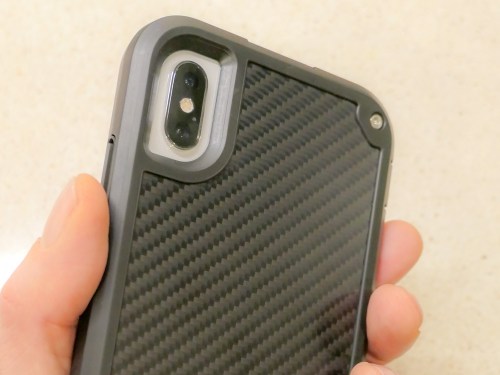
I’ve said goodbye to my Otterbox Symmetry case and turned to the Pelican Shield to protect my iPhone XS Max. Here’s why…

When I bought my iPhone XS Max, I was consumed with the idea of showing off its beauty with a clear case. So, I tried to maintain both its glamor and safety by buying an OtterBox Symmetry Series Clear Case.

Yes, the Symmetry had a slim profile (for an OtterBox). And it offered the legendary drop protection OtterBox cases are known for. I thought I was covered… until I actually started using it.
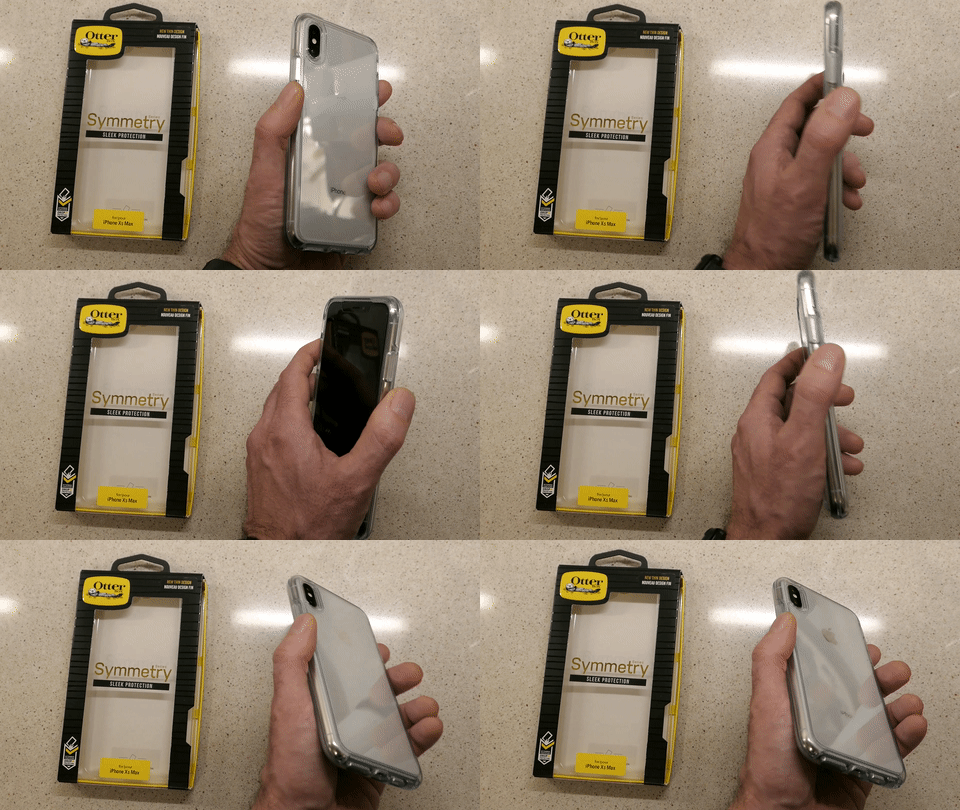
Holding My OtterBox Symmetry Case for iPhone XS Max
That’s because the clear plastic-like construction of the case didn’t provide enough… grip.
(Though it did attract plenty of finger prints)

Whenever I pulled my iPhone out of my pocket, I never quite felt that I had a firm hold on it. Several times, I experienced that micro-bobble moment where you feel like you don’t have total control of what’s in your hand.

That’s not good.

Sure, I knew my OtterBox could likely handle a drop or two. But I really didn’t want to test that capability on my precious new iPhone.

Plus, whenever I placed my iPhone on a table, it felt a bit like it was resting on ice. That said, the designers of this Symmetry did give the case some rubbery grip on the circumference of the front edge. So, when I placed my iPhone on a flat surface facing down, the Symmetry was much more likely to stay put.

…But then I couldn’t see my iPhone’s screen and notifications.

The evidence was mounting that it was probably smart to get another case. Sure, that created some frustration around my original purchasing decision. But when you consider the larger cost of dropping an expensive smartphone (regardless of how much protection any case provides), it’s the right choice to find another case you feel totally comfortable holding.

Goodbye OtterBox
I had to secure my iPhone in a more ‘grippy,’ non-clear case. Sure, I could easily go with another OtterBox model, but my irrational ‘id’… still in search of a ‘fresh design’ pointed me away from the proven safety but sometimes bulky world of Otterbox.

Yes, I wanted rugged protection… and an appropriately distinctive look too.

It was time to give it another shot…

Hello Pelican Shield
There are the usual suspects of well-regarded tough iPhone cases out there that reviewers talk about beyond OtterBox.
(Such as Supcase, Urban Armor Gear, Spigen and Lifeproof)

But I couldn’t quite ‘connect’ myself to the designs of any of them.

Then, I came upon the Pelican Shield.
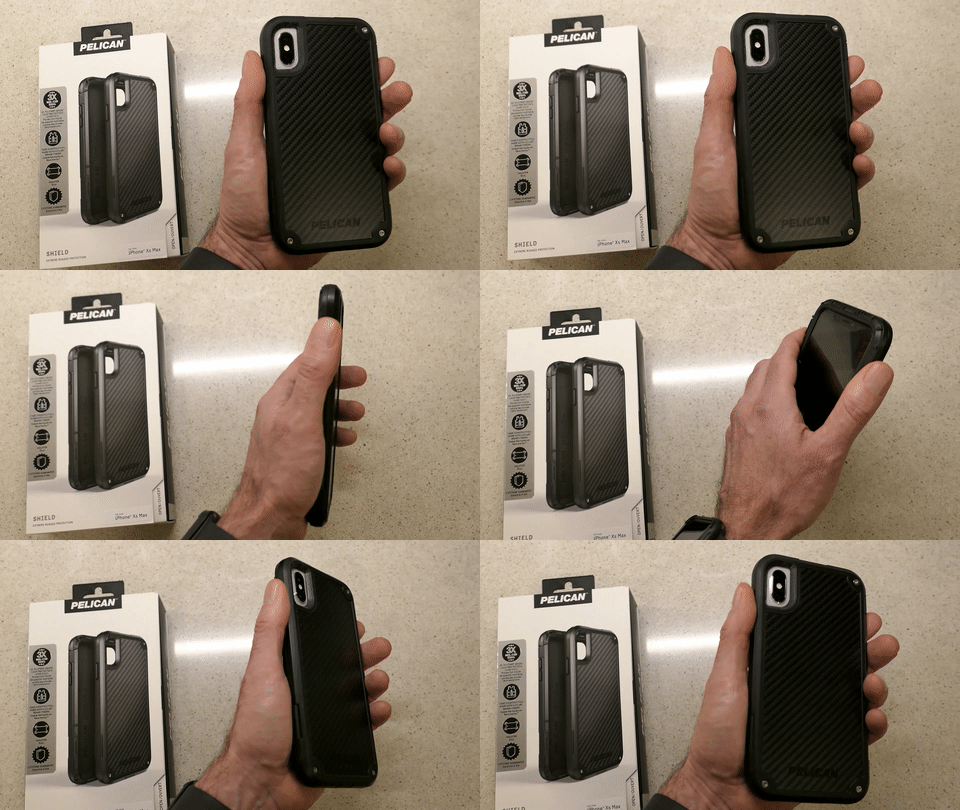
Holding My Pelican Shield Case for iPhone XS Max
I’m not sure if fatigue was beginning to wear me down or whether I actually liked the Shield’s look more than the competition.

It didn’t hurt that its drop protection capability won a three way tie in a CNET drop-test competition at CES 2018. Maybe I gravitated to it, because it’s made with Kevlar fibers in its back.

It wasn’t so much ‘sleek’ as it was noticeably ‘different’… with the tops of tiny screws embedded and glinting in three of the back corners. Its armor looked like something you might see if you traveled to the alternate universe of the TV series, “Fringe.”

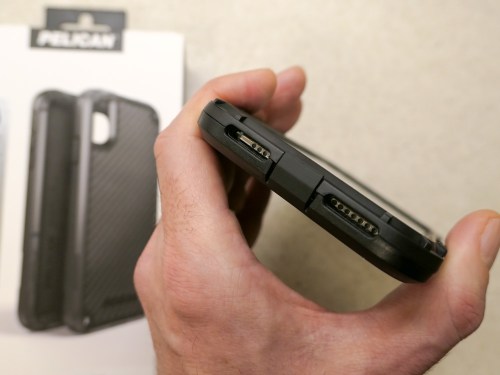
The Shield is also built with a cover protecting the iPhone’s lightning port. That’s there to keep dirt out. But I recognized a long time ago the danger that simple pocket lint accumulating inside the port can pose to iPhones. A port cover greatly reduces the need to clean out nasty pocket lint with a pin. Otherwise, it’s a real nuisance that needs addressing every couple of months.
The Power of a Good Brand
But ultimately, I think what got me across the finish line was the brand… Pelican.

They’re the folks who make those indestructible cases and luggage for outdoor enthusiasts and professionals who travel with delicate gear. And of course, that includes the world of video production equipment.

That’s how I know Pelican.

When you marry a third-party case to your iPhone, there’s usually a logo in plain sight. Maybe that brand in your hand doesn’t say quite as much as your choice to own an iPhone.
(And that isn’t so much a statement anymore either…)

But it says something. Maybe it’s just a fashion statement. Ultimately, I think it boils down to what ‘feels right’ to you… how it complements your own identity.

I think the simple idea of holding a Pelican product in my hand was appealing to me, because it successfully connects back to my professional video world.

All of the other factors follow after that…

Two Choices
So, that’s the psychology of how I landed on my Pelican Shield decision.
(I’ve got to make use my Psych degree sometimes, right?)

Pelican offers an all-black Shield model or black with a white edging.

I went all black.
(It has a black/grey pattern on its back.)

The Pelican Shield for the iPhone XS Max lists for $59.99.
$42.87 on Amazon Prime

Click.

First Impressions
Two days later, I received my Pelican Shield…

The two-piece design secured itself around my iPhone with three latches. How logical it that?!
(It’s not like the one piece design of the Otterbox Symmetry where you have to apply what feels like an unhealthy amount of force to jam all four corner in.)

The Shield’s raised front edging protects the iPhone’s screen when you place it face down on a smooth surface, and the back design protects the camera lenses in the same fashion.

Interestingly, the Shield has a rubbery edge on its back side… so that give you better surface grip when the iPhone is facing up. This is opposite to the OtterBox Symmetry’s design. And while I would ultimately prefer some grip on both the front and back edges, the Shield’s design is more practical…

  • It allows my iPhone to face up and not slide around when it sits on my desk.
  • It provides more grip in my hand, because the back edge and my index finger make full contact.

And beyond the rubbery back edge, the Shield’s overall design has more bumps and edging that definitely provide additional grip opportunities for your hand.

The Pelican Shield is a little bigger than the OtterBox Symmetry.
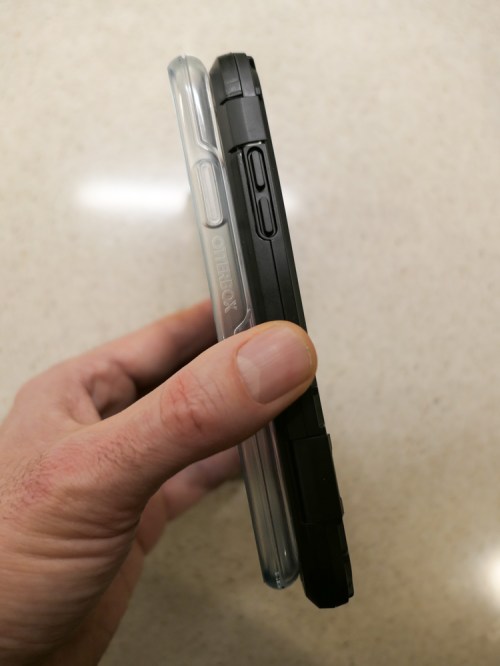
And you can see that the Shield’s extra quarter inch in overall size enables the inside construction design to offer an extra layer of rubbery protection.
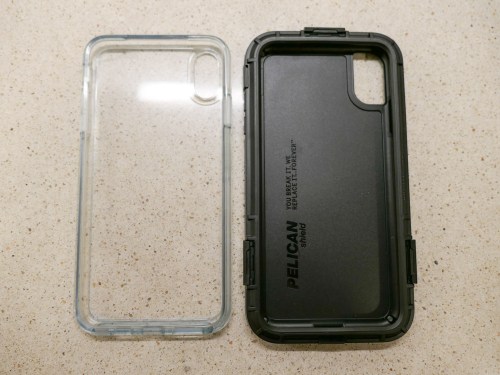
I should also mention that the Pelican Shield also comes with a belt holster, which doubles as a kickstand. I don’t need it, but you never know what the future might require.

The Importance of Finding the Right Fit
The parameters of my journey wasn’t to find the toughest case out there… but to locate protection with appropriate balance between ‘rugged’ and ‘attractive.’

The OtterBox Symmetry clearly attempted to maintain my iPhone’s beauty. It was slim and sleek…but ultimately too slippery for me.

The black Pelican Shield morphed my iPhone into something entirely new… a more angular device that you might expect Walter Bishop from “Fringe’s” more sinister alternate universe to be carrying.

It almost flaunts its utilitarian structure, seemingly designed to disdain the silly notion of maintaining iPhone beauty.
(It even strangely sports a tiny part number on the side of the front edging… MIL-STD 810G.)

But I still like the look.

For the record, I believe OtterBox makes great cases for smartphone protection. There’s even the Defender series, which more directly competes against the Pelican Shield. But this fickle human simply wanted to go down a different path.

And Pelican fit the bill.

Prepare Your iPhone to Travel in Any Universe
I’m happy to report that my Pelican Shield is doing its job quite nicely, but not because I’ve dropped my iPhone (well, not yet). My objective was simply to gain a better grip when holding it.

Goal… accomplished.

As for the design, the Shield certainly focuses more on protection than beauty. But it also manages a unique look that I enjoy.

Now, you must excuse me… I’m late for a conference call in the alternate universe.

Try This Instead of Revealing Your Wi-Fi Password to Friends

If you feel like you’re divulging something secret when a guest asks for your home Wi-Fi password, well… you are. You may think you only have two choices in how to respond, but, in fact, there is a third option…

How many times has a guest in your home asked you for the password to your Wi-Fi network? And how many times have you coughed it up? If you’re like me, that’s usually a one-to-one relationship, right?

And when I haven’t, let me tell you, the response always creates an awkward moment.

I call it the ‘Wi-Fi Faux Pas.’

It’s simply a little rude to refuse someone access to your internet connection for their smartphone. What are they really going to do with it that’s so nefarious?

The answer is… probably nothing, but you don’t really know what could come from the password travelling forever on that mobile device. And over time, and depending how many friends and acquaintances come to visit, your private Wi-Fi password will get entered into more and more smartphones that you don’t control.

How does that feel?

One choice in trying to stem that flow is to simply say that you forgot your Wi-Fi password. I must admit I’ve done that. The irony, of course, is that I actually do sometimes forget the password… especially when I need to log into my own network.
(Don’t worry. I’ve got it written down on a fraying piece of paper.)

The Solution to Keep Your Party Happy
So, why have I really become the ‘Wi-Fi Grinch…?’

Inviting in an ever-growing number of mobile devices to feed off of your Wi-Fi bubble must carry its risks. I don’t really know the cumulative negative effect on my Wi-Fi network security. And yes, I worry about it. There’s a lot of scary news out there about internet security.

And changing my Wi-Fi password every so often as a precaution is time consuming with so much tech in my ‘connected home.’
(In fact, it’s a major project, even to remember all of my hungry IoT devices that will need reconnecting!)

There’s got to be another way to address this issue.
Well, there is!

…Create a guest Wi-Fi network.

Guest Wi-Fi for Your Visitors!
I was so excited when I upgraded my old Apple Airport Extreme to the Netgear Orbi RBK50 mesh Wi-Fi router ($298.97 on Amazon) and then realized I had the option to create a guest Wi-Fi network. My guest Wi-Fi would live right alongside my main web bubble.

That sounds useful, right?

Being able to create another access point with a different login password that I could easily change (once and done) was the perfect solution to my ‘Wi-Fi Grinchness.’

So, I quickly set up my guest network on the Orbi app on my iPhone, and I was in business and ready to handle “the question.”

I’ve got to admit it does feel a bit like I’m running my own B&B, but I certainly feel much more comfortable now sharing my guest network password along with crudités.

Etiquette problem solved.

No More ‘Wi-Fi Faux Pas’
At the end of the day, I’m not so sure my home Wi-Fi network is technically any more or less secure with the addition of my guest Wi-Fi.

My online research turned up several heated Orbi conversations about the guest network option led by clearly knowledgeable IT types. They all expressed different concerns… all of which included geeky details I couldn’t follow.
(The essence of the threads question how ‘separate’ the guest network is from the main network.)

For me, the giant leap forward is to simply hand out a separate password to my guests. I know that’s just scratching the surface when it comes to truly maintaining a secure network, but it’s an important start.

And for now, I’m also avoiding the ‘Wi-Fi Faux Pas’ with my family and friends.

My visitors are happy.
I’m less nervous.

Let the party continue…

How to Give Money to a Friend Using a P2P Payment App

If you want to pay back a friend but you don’t have cash or a check, don’t despair. Here are a couple of ways to do it using a digital wallet in your iPhone….

Isn’t it a drag when you have to write a check to pay back a friend if you don’t have cash? Perhaps that’s okay if you carry around your checkbook. Otherwise, it becomes at least a two-step process that can really linger…

You’ve got to go home… write the check… put it in the mail… or have to wait until you see your friend again to hand over your money.

There’s got to be a better way through technology.

Well, of course there is…

Peer to Peer Transactions
Welcome to the world of peer to peer (P2P) money transaction services… a cashless way to electronically transfer money to family and friends through a mobile app on your smartphone.

I haven’t had the need for this type of financial person-to-person interface… until one day I suddenly felt like I had transported to an alternate universe where cash and checks never existed…

Where’s Your Digital Wallet?
My wife and I were offered a payment by another family to split the cost of swim lessons for all of the kids as part of an ongoing group playdate.
(Yes… swim lessons that are baked into a playdate… how efficient of all of us!)

And the payment offer was via the Venmo app.

Huh?

Sure, I had my iPhone XS Max in my pocket.
I was proudly wearing my Apple Watch Series 4.

And I was blindly holding onto the false impression that I’m up to speed on all of the current tech trends.
(Pop)

So, with my little bubble burst, I went home to do a little homework.
I knew I had some catching up to do…

Venmo
Venmo is the well-known P2P mobile payment service owned by PayPal and has about 27 million users.

Signing up was a snap.

And if you just want to receive money and then use those same digital dollars to pay someone else, that’s also super simple.

But if you need to pull some of your own money into Venmo, then you have to link your Venmo account to your bank account, credit card or debit card.

While that’s not technically difficult to do, there’s sometimes a fee attached…

  • Bank account – free
  • Credit card – 3% fee
  • Debit card – free

When you want to transfer money out of Venmo into your checking account, there’s also a 1% fee if you chose the ‘Instant Transfer’ option.
(minimum- 25¢, maximum- $10)

Otherwise, it’s free. But you’ve got to wait a couple of days, just like waiting for ‘an old-school check to clear.’

My First P2P Payment
The next step was to ‘friend’ people you want to pay in Venmo.
(It’s always a good idea to only friend folks you actually know.)

I searched for our swim class friends who got me started down this relatively shallow rabbit hole. I sent out my invite. And faster than you can say PayPal three times… we were “Venmo’d” together.
(Is that a verb? Quick… someone find me a Millennial!)

But I wasn’t over the finish line quite yet. I had to actually use the technology. As if connected by the Force, my friend sensed my need and sent me a prescient Venmo message…

It was a $1 “friend tariff.”

I stared at my iPhone.
Okay… I guess this was the final quiz for my Venmo 101 elective.

I tapped and paid the buck.

It was official.
I had joined the P2P payments world.
Yay, me.

To celebrate, my friend paid me a dollar.
It was very exciting.
(And there was no disturbance in the Force)

In case you’re worrying about the swim lessons payment, my wife had already taken care of that particular Venmo transaction.
(Yes, I must admit that I often rely on “Mrs. More-at-Home-with-Tech.”)

How Social Do You Want to Be?
There’s also a social media component to Venmo. You have the choice to ‘share’ your Venmo activity…
You can post your activity to the Venmo world or just to your Venmo friends.

Or you don’t have to share it at all.

I know I might be revealing a wildly out-of-touch perspective here…
But why would I want to tell the world that I paid out money?
Is that really a social moment I’d want to share… with anybody?

For me, that information only belongs with me and the person I’ve paid.

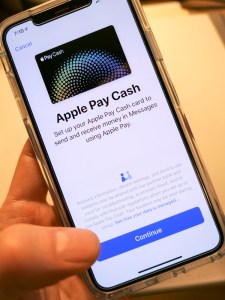
Apple Pay Cash
A funny thing happened on my way to Venmo. I realized I already had access to another P2P payment app.

It’s Apple Pay Cash, and it works very much the same as Venmo.
And it was living right next to Apple Pay in my iPhone.

Apple Pay Cash is turned off by default… You’ve got to go into ‘Wallet’ app in your iPhone to simply turn it on.


Once you’ve activated Apple Pay Cash, then you’ve just got to fund it, again much like Venmo.

And just like Venmo, you can transfer your Apple Pay Cash balance into your checking account.

You can also initiate an Apple Pay Cash payment by simply sending an iMessage.
(That almost feels a little too easy.)

One limitation to using Apple Pay Cash is both parties need to be in the iOS ecosystem.

Cash is So Yesterday
My alternate universe existence had quickly evaporated, and I was now armed with both Venmo and Apple Pay Cash and fully functional in the P2P payments game.

Sure, there are competing P2P money transfer systems out there, like Google Pay, Zelle, and Square Cash. But for now, I am satisfied with my choices.
(Which apps do you prefer? Any recommendations out there?)

I’m not so sure this particular form of financial enablement is a game changer for me right now, but at least I can play in the P2P payments’ pond when others insist.

And my toe-in-the-water mentality could change.
(It hasn’t been long since I’ve been actively using Apple Pay at stores instead of my credit card.)

But to simply have the capability to receive money from more ‘enlightened’ humans who want to pay me from their digital wallet…

I am now ready.

(P.S. I still accept cash.)