At Home with Tech

Unlock the power of all your technology and learn how to master your photography, computers and smartphone.

Category: family

How your Timelapse Videos will Reveal a Different Reality
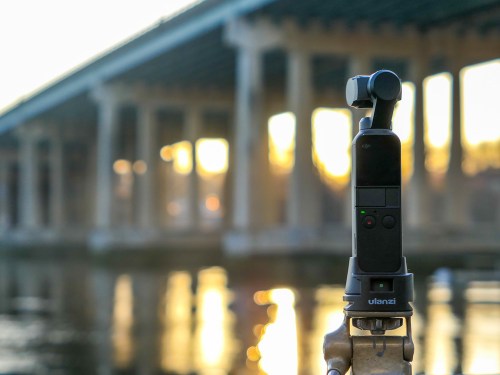
Shooting timelapse videos will remind you about the very nature of existence. Here are a few of the ways they can expand your perspective.

Capturing that perfect moment with your camera can be a life-long ambition. Along your photographic journey, you might want to also consider the opposite exercise. Explore the opportunity to scoop up the ever-changing landscape in front of you… across time.

Use Your Camera as a Time Machine
Many cameras and smartphones today can act as a time machine and perform the trick of timelapse video capture. You’ve just got to give some thought to which environments you’d like to explore and how they might look when you squeeze twenty minutes down to twenty seconds.

Shooting timelapse videos is easy to do. You’ve simply got to keep your camera steady and allow it to slowly snap a frame of video every two or three seconds. Along the way, it stitches the frames together to generate a scene that moves at lighting speed when you play it back.

Beyond the exploration of timelapse video as an art form, this technology is also exciting, because it bottles up time and then reveals your world in ways you’ve never experienced before. It’s a whole new way to experience reality.

Here’s what I’ve learned from these timelapse videos I’ve recently shot.

So Many Rushing Clouds
I’m always impressed by the hidden intensity of ‘normal’ weather conditions in timelapse mode.

Clouds Timelapse at Calf Pasture Beach
Clouds do not lumber along. Here on a beach, I see that they are clearly on a mission to quickly reach some important destination.

Our Fleeting Existence
When you speed up time, people become momentary blips. While this video’s final form creates a dance of frenetic fun in a snow storm, it’s also a sobering reminder of our own brief presence in space and time.

Snowy Day Timelapse at Cranbury Park
So, always remember to enjoy the dance.

Your Own Sunrise
Capturing a quickly-moving sun at dawn is hardly an original concept. It’s a scene we’ve all be exposed to countless times on TV and at the movies. Still, there’s always a way to make a sunrise your own.

Sunrise Timelapse by Saugatuck River and Route 95
Where you choose to experience your sunrise is always the unique factor.

Adding Motion
You may have noticed the panning movement in my time-lapse video examples. This trick is courtesy of the ‘motionlapse’ mode in my DJI Osmo Pocket Gimbal camera. After every snapped frame, the gimbal auto-pans a wee bit as part of a preprogrammed move. And that creates the effect of a smooth pan across the shot.

Patience
Timelapse videos are fun to do and usually generate amazing results. Just don’t forget one important variable. These videos will take a while to shoot. So plan ahead.

Capturing time takes time.

How to Walk Across the Hudson River with Your Family

Where can you get this spectacular view of the Mid-Hudson Bridge in Poughkeepsie, New York? You’ve got to hoof it to the middle of the Hudson River. Here’s how…

Yesterday, my family and I jumped in the car for a fun day trip. We went to Poughkeepsie, New York to walk across the Hudson River (and back).

We drove to the ‘Walkway Over the Hudson,’ the world’s longest elevated pedestrian bridge, which was originally built in 1889 as the Poughkeepsie-Highland Railroad Bridge.

After a 1974 fire destroyed the tracks, the steel cantilever bridge was eventually transformed into a pedestrian walkway and re-opened in 2009 as the
Walkway Over the Hudson State Historic Park.

Walking Across the Walkway Over the Hudson
We drove to the bridge’s parking entrance at 61 Parker Avenue in Poughkeepsie. We found an unpaved lot, and it was free to park.
(There’s a sister parking lot across the river at 87 Haviland Road in Highland, New York.)

My wife, nine-year-old son and I jumped out of the car, and we began our trek. It was a 1.28 mile walk across the bridge each way. (You can also bike or jog across.)

There was barely a cloud in the sky, and it was quite simply an exhilarating experience. The views up and down the Hudson River were spectacular.


The Value of No Destination
I should admit my better half put this inspiring family activity together.

At first, I didn’t quite connect to the attraction of driving for an hour and twenty minutes to walk across a repurposed train bridge on a frigid February day. And then… walk back again.

Throughout my life, I’ve sometimes had to be reminded that the journey is often more important than the destination.

When I was a kid growing up in New York City, my parents would occasionally rent a car from the Hertz garage down the street to go for a drive for the day. I would ask them where we were going, and my dad would say, “nowhere.” And I absolutely couldn’t understand the value of driving around without a destination in mind.

Sure, I was just a kid, and I didn’t comprehend getting out of Dodge for the day and simply driving in the countryside. It seemed pointless. And of course, I was missing the whole point.

Fast forward to adulthood.

Walk across a bridge. Walk back.
Why?

Well, I still needed to actually do it. But this time, I got it.
It’s all about the experience.

Never Forget Your Journey
Walking across The Walkway Over the Hudson is a must-do activity for kids of all ages. It’s certainly invigorating in the cold, and I look forward to the opportunity to also experience it in warmer weather.

The exercise is also a valuable reminder that destinations can often be fleeting. Instead, it’s the experience of the journey that we should always hold onto.

Will Your Tech Survive the Next Snowstorm?

You can’t capture cool pictures of winter if your battery is dead. But when the power goes out, your camera may be the least of your problems. I’ve got six ways to give your tech a fighting chance…

A windy snow event or ice storm will likely create stress that you can’t control. Fortunately, if you’re prepared, you can protect your precious tech from getting zapped by a brownout or worse.

Here’s my six-step checklist to prevent ‘techtastrophy’ when a storm plays havoc with the power grid.

#1
Avoid Direct Connections to Wall Outlets
First off, just don’t plug your electronics directly into the wall. If you expect the power to fluctuate, that could also include a power surge. Why take the chance of frying your gear? You should always plug your power supplies and chargers for your delicate tech (smartphones, laptops) into surge-protector power strips.

If you happen to have a whole-house surge protection system, then good for you. Otherwise, invest in a few good power strips with surge protection.

#2
Get a UPS for Your Computer
A power strip isn’t going to cut it if you’re using a desktop computer that requires a constant flow of electricity. Any irregular (dirty) power is bad, but when a blackout hits, you don’t want to be working at your computer without some power backup. So, you’ll need a more advanced solution…

Your desktop should always be plugged into an uninterruptable power supply. A ‘UPS’ is essentially a battery backup unit with surge protection and automatic voltage regulation. So, during bad weather, you can type away in relative peace.

I bought a great UPS for my iMac.
It’s made by CyberPower (model CP 1350PFCLCD) and goes for
$189.95 on Amazon.

#3
Turn Off Your Desktop During Stormy Overnights
Even with a UPS in place, I’d still recommend you turn off your desktop overnight during a big storm instead of just putting your computer into sleep mode.
(Why take any chances?)

#4
Activate Your Portable Power Generator
A battery-powered UPS can only handle your computer for a short while- enough time to finish up what you’re doing and then safely shut down. If you need a more powerful solution, then you’ll have to invest in a portable power generator for your house that can run for hours or days (depending on your fuel reserves).

I own a liquid propane portable generator (which of course, I’ve never had to use since the day I bought it). But I’m happy it’s in place to keep the essentials going during a blackout.

#5
Juice the Backup for Your Smartphone
If you don’t have any beefy power creation solutions in place, then at least invest twenty bucks on a pocket-sized battery power bank. It will give your smartphone an extra charge or two while the rest of your home waits in the dark.

I carry around an Anker Portable Charger.
($25.99 on Amazon)

But a little power stick can’t come to your rescue if it’s not charged! So, make sure it’s juiced up before the snow hits.
(And it wouldn’t hurt to top off your smartphone either)

#6
Keep Your Smartphone Warm
Your particular smartphone model might be water resistant, but its battery is still sensitive to winter. It will drain down faster when exposed to frigid temperatures.
(And that’s why you shouldn’t keep your AA batteries in the refrigerator)

So, if you’re out and about after a storm, try to keep your smartphone as warm as possible. Otherwise, you may find it suddenly needs a recharge.
(Then, please see tip #5!)

Power Up!
Sure, it’s hard to function in the dark. But it’s easier if your critical tech isn’t down for the count. Here’s hoping you successfully weather the next ‘Snowmageddon’ along with your gear!