At Home with Tech

Unlock the power of all your technology and learn how to master your photography, computers and smartphone.

Category: family

This App-Controlled Smart Watering Timer Saved My Lawn
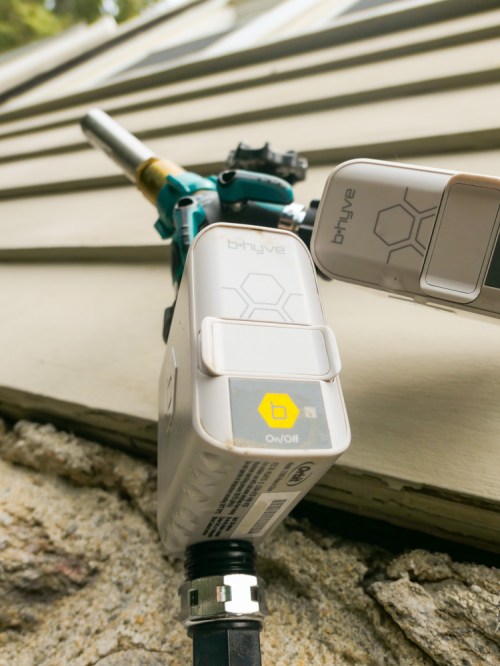
Do you need a ‘smart’ watering system to run your lawn sprinklers the next time you’re away on vacation? Let’s take a look at what I did…

I’ve always dreaded one part of going away for a week on a summer vacation. It’s coming back to see if my lawn has survived all of those days without being watered. For years, my outdoor water faucet that fuels my lawn and garden sprinkler via a non-toxic hose was always shut tight as my family frolicked at some faraway beach. And all my outdoor green suffered the consequences…

The Risks of a Simple Solution…
Sure, I considered buying a battery-operated programmable hose faucet timer. You pop one of them on between your faucet and your hose, program the timer, turn on the faucet… and then walk away. What’s wrong with that?

Well, there’s an image in my head that I could never shake…
Remember… the batteries control the open/close valve. What happens if the battery dies when the valve is open?

Right.
Your sprinkler will run non-stop until you return home. That’s a nightmare that I just didn’t want to carry around with me while trying to relax during my time away.

Of course, the odds of that happening aren’t huge. If you put in fresh batteries right before you head out, you’d probably be fine.

But still…

Human Intervention
A neighbor could certainly help you out by simply turning off the faucet.

I actually ran into one of our neighbors when I was shopping for my lawn solution at Home Depot. It was so weird… I was standing in the aisle talking with one of the specialists, and I was literally at the point where I was saying that a neighbor could help out if my HAL-sprinkler was flooding the street.

And then my neighbor actually walked by!

He chuckled at my scenario.

The Home Depot specialist laughed too.

Then, I felt obliged to laugh at my absurd scenario.

Ha ha ha ha.

And it was right then that I realized what I needed…

Smart Sprinkler
I wanted a ‘smart’ sprinkler that could reach out to me wherever I was via my iPhone to let me know that my lawn was happy.

The system would need to connect to my home Wi-Fi and then communicate via a smartphone app while I was away on vacation.

And guess what…
That technology exists!

Hello, Orbit B-hyve
I decided to go with a solution made by Orbit called the “B-hyve Smart Hose Faucet Timer with Wi-Fi Hub.”

Admittedly, part of my B-hyve decision was based on the reality that I was leaving for vacation in less than a week, and my local Lowe’s carried it.
(Of course, I wanted to test out my $70 investment for a few days to ensure it would operate properly.)

If you’re not in such a rush, the B-hyve costs slightly less on Amazon Prime at $67.79.

My disclaimer aside, I really didn’t find a lot of other Wi-Fi watering choices out there for systems that aren’t permanently installed.

So, I opened up my B-hyve box and got to work…

The Set Up
The first step was to download the B-hyve app to my iPhone. As with many IoT devices today, you control this smart timer via the app.

Next, I plugged in and paired the little Wi-Fi hub to my home Wi-Fi network.
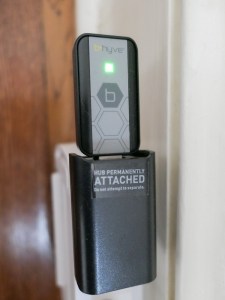


The hub needed to be positioned relatively close to where the on/off timer would be located outside, because the timer and hub communicate via Bluetooth.

The final step was to power the timer with 2 AA batteries, screw it onto my outdoor faucet and pair it to the hub via the app.

I wouldn’t say the final step was exactly seamless, and it took me a few tries to figure the whole configuration out.

I think part of my problem was the app wasn’t entirely intuitive… but it eventually worked for me.

Exploring Manual Override
Once everything was connected, I eagerly set up my watering schedule on the app.

You can also manually activate the timer by holding down its one little button for a few seconds. Tap it again to turn it off. Alternately… using the app, you’re able to schedule a specific number of minutes for the water to flow.
(Nice)

There’s also the option to manually activate the timer via the app.
(Even nicer!)

Look Out for Water Hammer
The one plumbing challenge I encountered was a loud ‘bang’ in my water pipes every time the B-hyve turned off. That stress effect is called ‘water hammer,’ and it’s the result of the flow of water suddenly hitting the little wall of the timer in off mode.

The solution is to add in a screw-on water hammer arrestor between the faucet and timer to absorb the water hammer effect.
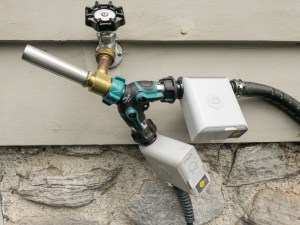


That’s what I did, and it made a big difference.

Message Received!
My Orbit B-hyve system passed my pre-vacation tests, and I’m happy to report it operated flawlessly while my family and I were away.

One of app’s best features was how it reminded me that it was actually operating… It sent me notifications that confirmed when scheduled watering has completed.
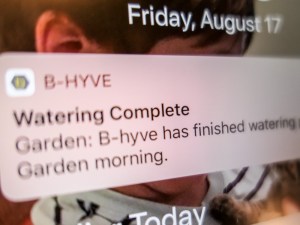


How’s that for vacation peace of mind?!

Water-Saving Option
The B-hyve app has other more advanced features that I didn’t activate… like a 24-hour rain delay mode that will cancel a scheduled watering session when there’s bad weather in the forecast.

That’s nifty, but I just wanted to use the basics for this first-time use.

Fail-Safe Mode
So, you might be thinking that the B-hyve’s Achilles heel is if your home Wi-Fi goes down when you’re away on vacation. The good news is the timer keeps operating on its last-known schedule.

I ran into this scenario a week after we got back from vacation…
I think the Wi-Fi hub got knocked askew during one of our son’s playdates, and it lost power.

The app actually notified me the next day that it had lost the connection. I didn’t pay attention, because my sprinkler was still hitting its schedule.
(Silly human)

I finally noticed the problem by accident when I was picking up a piece of LEGO on the floor near the Wi-Fi hub and didn’t see the blue glow of the hub.

So Helpful… Even When You’re Home!
My Orbit B-hyve is a welcome addition to our growing smart home and has solved my lawn watering dilemma while we’re away. Plus, it’s also added a certain ‘regularity’ to my lawn watering when I’m home.
(Not that I’ve ever forgotten to water the lawn in the morning, before I head out to work…)

Happy lawn.
Happy homeowner.
Thank you, B-hyve.
Has this GoPro App Revealed the Future of AI Video Editing?

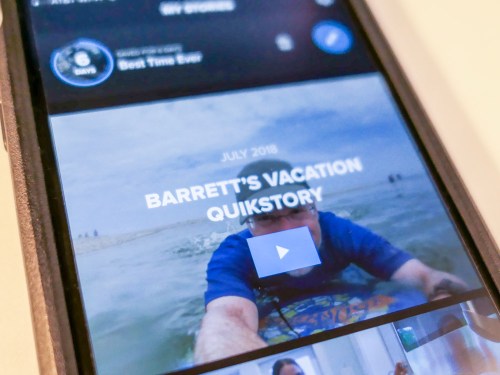
QuikStories is a GoPro video-editing app that you can download to your smartphone. It will independently edit together a slick movie from your GoPro’s vacation photos and videos. How quick and useful is it? Here’s my experience…

I recently returned from a wet and sandy family beach vacation to the North Fork of Long Island. Last week, I wrote about how I captured amazing wide angle shots of my son in the ocean using my new GoPro Hero6 Black.

Another benefit of playing in the GoPro universe is the opportunity to use GoPro’s QuikStories app to quickly generate edited videos of your vacation highlights using just a smartphone.

How quick?

A Video a Day
Well, I challenged myself to create a QuikStories video for each day of our vacation and immediately share it with our extended family. One ground rule was not missing any part of the daily fun, because I was too busy editing…

Here’s how I did it…

Every night, I snuck in fifteen minutes of ‘media management’ as our eight-year-old boy was reading before his bedtime… I wirelessly downloaded that day’s photos and videos from my GoPro to my iPhone’s GoPro app. Then, I activated the companion QuikStories app, which immediately began cooking up a little movie all on its own.
(Hello, HAL.)

From there, I began inserting a bit of my own creative direction, which included adding a title at the top, choosing different edit points for the video clips and deleting photos that weren’t necessary.

Editing Videos in the Palm of Your Hand
I found that I was able to quickly rough the videos together in the early evening and then pick up the project the next morning with my cup of Joe and finish tweaking. I easily got these little bursts of video fun out the door before anyone else was up.

My first videos took a little longer to generate, because I was trying to figure out the app’s interface. But once I knew what I was working with, I was able to complete each video in not much more than half an hour…

And that’s me being picky. I’m sure the target audience probably gets it done in 15 minutes or less…

Here are a couple of tips for new users:

  • You only get seven days to finish each project. After that, the GoPro app deletes your unused media to make room for more content on your smartphone. So, you’ve really got to be quick!
    (All of your photos and videos remain on your GoPro’s microSDXC card.)
  • You need to activate 1080p and 60fps in the app’s settings to export your final videos at that quality. Otherwise, it will default to just 720p and 30fps.
  • You can instantly share your new videos with GoPro-hosted video links, which remain active as long as long as you don’t delete your original project.
    (I think it’s also a good idea to also export and save your videos elsewhere for long-term storage.)

Check Out My QuikStory
For the purposes of this post, I quickly whipped up this 22-second video using a bit of my vacation content to show off what a QuikStory looks like…

Nifty… right?

The End of Video Editing as We Know It
Guess what? Through my QuikStories experience, I think I’ve seen the AI future of video editing…

QuikStories can edit photos and video action to a musical beat like magic. It’s pretty amazing.

If you’re just working with twenty or so photos, the app is fully capable of quickly taking an edit to the finish line.

But when you’re adding in videos with ‘sound bites,’ that where the app can hit a brick wall. You’ve got to go in and edit the beginning and ending of a spoken sentence manually. And that’s fine, until you realize you don’t have any of the flexibility of Final Cut Pro or Adobe Premiere Pro…

Sure, you can easily slide to the beginning of an edit point and watch that, but you’ve got to play it through to hear the ‘out point’ to make sure it’s right.
(Frustrating)

My insistence on perfect audio contrasted with the focus of the QuikStories platform… which is to give you something fun, rough and quick!

Everything was so much easier when I didn’t force the use of ‘nat’ sound.

There are predesigned editing style templates you can choose between. Many of them weren’t so useful.
(Ugly transitions)

But a few of them got the job done for me…. I particularly liked ‘Snappy.’

Quik is Quick… and Pretty Good
As someone who understands how to edit video as a profession, the experience of working with QuikStories was entirely imperfect. At best you’re able to nudge the software to only approximate what you really want to do.

And if you try too hard, you end up defeating the intended simplicity of the entire product.
You’ve really just got to let go…

The fact that one or two taps can get you a finished video (though hardly what you might consider ‘polished’) is pretty incredible…

And so I successfully completed my video-a-day challenge while drinking my cup of coffee and watching the sun come up over the water.

  • It was quick.
  • It was ‘easy.’
  • I wouldn’t say it was exactly ‘good.’
  • But it was fun!

The videos were what they were… and everyone loved them.
(I really had to wrap my head around that reality.)

The Future of the Video Editing Profession
To all of you professional video editors out there… I don’t think your jobs are going to be taken over by computer software anytime soon…

But if you’re just starting your career, I’d pay attention to this particular disruptive piece of digital evolution.

This software can already edit to music. It’s only a matter of time until future upgrades will be able to accurately spot clean in and out points for sound bites.

IBM Watson has already demonstrated the ability to select the scenes for a movie trailer.

If you’re planning out your next few decades, you might want to think about other career options…

GoPro has Ushered in a New Reality
When someone asks me what I did on my summer vacation, I could say that I’ve stumbled upon an impossible future that’s already here.

Being able to capture cool photos and videos…anywhere in the field or underwater with a device that fits in the pocket of your swimsuit…
And then quickly activating an app on your smartphone to create and share a slick video…

To me… that’s crazy.
And so delightful.

Soon enough.. that will just be the norm.

And I know for many of us… it already is.

How a GoPro Opens the View on Family Life

My new GoPro was so much more than a little tank of a camera. It changed my whole view as the family photographer. Here’s how…

All of this time I thought it was about how to capture a tight family photo. Or how to freeze the action of my speedy 8-year-old boy with better lenses and bigger sensor sizes…

Last year, I invested in the high-end Panasonic LUMIX LX-10 compact camera in the hopes of really improving the quality of my family photos. But I was often forced to keep it packed in my beach bag on vacation to protect the camera from the damaging effects of salt water and sand. (Those little grains can easily fly right into the crevices of a motorized zoom lens and jam the mechanism.)

This summer, I decided I needed a different plan.
And yes, a different camera…

So, last month I bought a GoPro, because I was tired of worrying about ruining my gear during our beach vacations and not taking the photos I really wanted.

Worry-Free Durability
Using a GoPro easily solves the problem of taking your camera into all the action at the beach. It doesn’t have a moving lens to ruin, and the whole thing is waterproof. It’s actually designed for a little abuse.

No, I didn’t really need an ‘action cam’ to replay and slow down any crazy stunts my son was practicing (at least not yet). But the idea of more freely following his action with more ‘durable’ gear in the outdoor elements was totally appealing.

Selecting the Right GoPro Model
I bought the more expensive GoPro Hero6 Black as opposed to the older ‘Hero5’ or the newer (but stripped-down) entry-level ‘Hero’ in an attempt to future-proof my investment. That’s usually my strategy with these types of tech purchases. If I end up using the gear for an extra year or two before wanting an upgrade, I feel that makes it worth the extra upfront cost.

Even though I don’t currently need all of the frame sizes and high-speed frame rates that the Hero6 Black offers, I’m generally committed to capturing content in 4K. And the Hero6 is much more capable living in 4K.

The Parent Test
So, I’m just back from a week at the beach in the North Fork of Long Island, and I’m happy to report that the maiden voyage of my new GoPro was a big success.
(And by ‘voyage,’ I mean… full water immersion!)

I didn’t use my GoPro in the ‘traditional’ ways by bolting it somewhere ahead of an impossible athletic stunt. Instead, I carried the tiny device in my swimsuit pocket throughout the week, as a traditional dad… ready to start capturing family photos and videos at a moment’s notice.
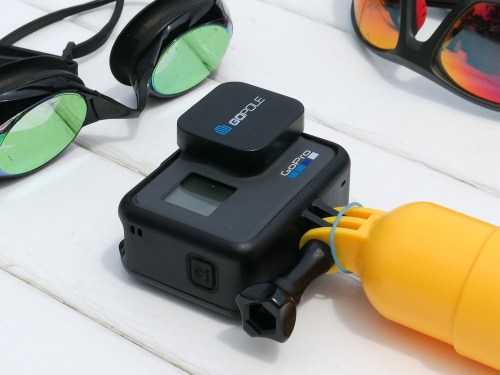
(Yes, I also attached a little floating hand grip to prevent my GoPro from sinking into the ocean if dropped.)

And I’ve got to tell you…safely snapping away at those ‘found moments’ was like being a kid in a candy store.

And my GoPro’s ability to capture my son underwater was impressive… most impressive.

Wow

Your Family’s Life in Wide Angle
But I realized something unexpected as soon as I started working with my GoPro Hero6 Black…

The wide-angle orientation of the camera’s lens opened up a whole new view on my family’s life…

First off… the wider range made it so simple to shoot family selfies. Then, using the GoPro ‘3-Way’ selfie stick/tripod helped to eliminate the prominence of my arm in the selfies. And saying, “GoPro, take a photo!” to the camera’s voice sensor was wicked cool.

Although once my son learned my Jedi voice trick, he thought it was so much fun to take over the camera’s functions with his own voice right as I was crafting the perfect selfie.
(Note to GoPro designers: I think the next GoPro model needs person-specific voice recognition!)

A New Angle on Storytelling
More importantly, using the wide angle lens for front-facing photography reveals a whole new side to family storytelling. It provides more context with the entire environment enveloping your subjects.

So, your goal is no longer about how tight you can shoot. It’s about how wide!

And don’t worry… you’ve already got thousands of tight shots of your family!

In fact, I enjoyed my newly found perspective so much that I shot my family vacation almost entirely in wide angle!

The GoPro Hero6 Black can also shoot in a more ‘linear’ format without the edge distortions that wide angle brings, but I rarely chose the traditional view.

I was loving seeing the world (and my family) in wide angle… all of the time, baby!
(Moving forward, I’m sure some balance will return to my photography.)

Expand the Edges of Your Photography
I know I’m just scratching the surface of what my GoPro can really do. But it’s already taken me to so many new places and empowered me to snap away without fear….

  • On the windy beach
  • Underwater as my boy explored unusual rocks (Yes, a bit like a Jacques Cousteau documentary)
  • “Hauling” in our first snapper on our little fishing excursion

Note to other ‘boring’ parents out there – Using a GoPro can also make you feel like the coolest kid on the beach.
(After I spent 20 minutes videotaping our son underwater, my wife walked up to me and mentioned that she overheard another parent on the beach whisper to her spouse, “That’s a GoPro.”)

Clearly, I’m on to something…

Sharing Your Media ‘In the Field’
The Hero6 Black is also designed to enable quick and easy sharing of all your cool content…

It has the capability to generate a little ‘hotspot’ and tether to my iPhone… and then wirelessly hand over all of my photos and videos via the GoPro app. From there, I was able to quickly upload a few of my best pics to my shared Apple ‘Photos’ album.

But that was only the first part of GoPro’s one-two punch when it comes to clever media management. GoPro also offers a companion QuikStories app for smartphones, which can whip up a complete music video with your photos and videos in minutes.
(What?)

Well, sure… It takes some time for any smartphone to render out video transitions and the final video to share, but the whole app interface is designed for minimal human involvement. And I mean minimal.

Stand By for QuikStories
How good is this little video editing platform that lives in your pocket? Was I as blown away as I was with the photos and videos generated by my Hero6 Black camera?

Let’s find out next time on At Home with Tech!