At Home with Tech

Unlock the power of all your technology and learn how to master your photography, computers and smartphone.

Category: family

Don’t Ask My Mommy. Ask Google.
How are you supposed to survive in a computerized world? If you’re a seven year old, ask a computer… of course! If this gives you a little agita as an adult human being in the real world, you might want to read on…

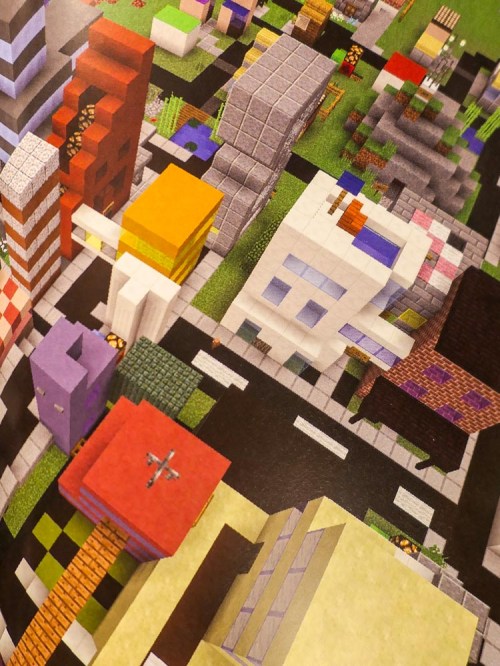
So, my wife and I were visiting another family’s house to pick up our seven-year-old son from his play date the other day. The adults were chatting a bit before the handover as the kids wrapped up their activity, which happened to be playing Minecraft, a popular videogame where you create your own worlds.

Then I noticed the kids ran into some kind of challenge in the game, and this is what I overheard…

Human child #1:
“How do you build the portal to the End in Minecraft?”

Human child #2:
“I don’t think my mommy knows how to do that…”

Human child #1:
“Don’t ask my mommy. Ask Google Home. Maybe… Siri.”
(They didn’t have an Alexa in this particular home. But I don’t want to leave Amazon out of the conversation.)

A.I. Always has an Answer
All right. Let’s pause right there to discuss the significance of this interchange. A couple of seven-year old-boys have decided to bypass their parents (moms) and go right to today’s A.I. to solve their problem.

Hey, it’s not like I don’t Google questions all of the time at my computer, but I was a little shocked at how flesh and blood parents were suddenly and completely eliminated from the equation.

Now granted, in this particular situation, these adults wouldn’t have known how to get to the ‘End.’ So, you’ve got to give the kids some points for their instincts.
(That night, after Googling ‘the End,’ I learned that it’s the third and final dimension in Minecraft.)

Okay… the kids were trying to figure out a shortcut to the end of the game.
(Is that cheating? Or is it simply being innovative… like beating the Kobayashi Maru test?)

Anyway…

Google Home couldn’t articulate a useful answer, but the young hackers-in-training got some traction with Siri on the resident iPad. Siri opened up a wikiHow page for them, which held some key details.

Apparently, getting to the End requires you first to go to the Nether.
(I have no idea what I’m talking about.)

The Lesson of the Journey
Guess what… their little online research project worked! The wikiHow page contained instructions on how to build a portal to the Nether, which the kids promptly executed.

I heard… “OMG… we’re going to the End! This is so great!!”

For the record, their progress halted at the Nether. The map to the End remained out of reach. But my son was super excited by the prospect that they were moving in the right direction.
(He really loves exploring this vast digital world. He also enjoys reading Minecraft adventures in physical books and looking through how-to-build Minecraft books.)

Discounted Daddy
To be honest, I felt a little schadenfreude to observe their quest for the End not end in total success.

Because as a parent of a seven year old, I thought Daddy was still perceived as all knowing. Did you notice that neither boy even mentioned his father during the tech query?

No… I didn’t have the answer. And I don’t think the other daddy would have had it either… without Googling a bit.
(That said, he’s very much at home with his tech.)

And no… this is not a gender thing about why the kids bypassed their daddies.
It’s a species thing about why the human adults were circumvented to quickly get to preferred artificial intelligence.

And that seven year olds already expects today’s A.I. to be able to correctly answer any question.

What’s the Truth?
Okay, Daddy…
I suddenly realize this is going to require some immediate focus as a parent.

Because even though yes… there’s an answer to any question you pose to a search engine, there’s actually a thousand answers, if not more.

As an adult, it’s your job to figure out the ‘truth’ on any number of topics.
(And that’s harder today than ever.)

And that’s going to remain an ongoing challenge for every human for the foreseeable future.

For an elementary school-aged child who can now simply project a question into a room, and an A.I. enabled speaker immediately responds, that’s a resource that really needs some adult-level perspective.

Otherwise we won’t have to wait until advanced artificial intelligence or the singularity arrives for humans to hand over all of the keys to knowledge and independent understanding.

Wow.
I’ve got some work to do.

Daddy (human) is on it.

CrashPlan is Breaking Up with Me

If you prefer the occasional peace of mind as the ‘IT Guy’ at home, well… guess what? Here’s another reason why you might not get that anytime soon. If you’re a CrashPlan customer, you’ve got some work to do…

I’m crushed.

CrashPlan for Home has been wonderful as a Cloud backup solution at home for disaster recovery. We’ve had a great relationship for the past five years. The cost was $60/year for my iMac for unlimited backup. It was pretty much… set it and forget it.

Done.

But recently, I received a little email from Code42’s CrashPlan service. In fact, we were done. CrashPlan is breaking up with me!

The email explained that over the next 18 months, Code42 will exit the consumer market for online backup. Instead, Code42 will focus on its “enterprise and small business segments.”

But I’m only getting three months, because my renewal is coming due.
(Customers get an additional two free months to help with their ‘transition.’)

I guess it was good while it lasted.
(sniff)

So, what are the options?
Whatever, I do, I’m still looking for a long-term relationship.
(I know, I’ve already been burned once. But, you can dream, right?)

CrashPlan for Small Business
As a current CrashPlan customer, I can migrate to the CrashPlan for Small Business plan.
That’s $10 per device each month for 5TB of storage.
So, $120/year for my iMac.
(Double what I was paying)

But, CrashPlan is offering me 75% off for the next 12 months.
That makes it only $30 for the first year.
(Half what I was paying)

Not bad… but remember, I’m looking at the long-term costs.
And I’m not longer getting ‘unlimited’ backup anymore.
Hmmm… That’s okay.
5TB is plenty.

Bottom line: CrashPlan will cost me twice as much moving forward.
(The first-year discount aside)

The Carbonite Choice
Code42 has struck a deal with Carbonite as CrashPlan’s ‘exclusive partner for home users’ with a 50% discount when switching over to Carbonite.
(How ironic that they were competitors once upon a time.)

When I clicked on the link in my Code42 email, I was sent to the following Carbonite offer:

Carbonite Core
It’s for unlimited computers. (Nice!)
With only 250GB of backup (What?!)
And costs 134.99/year (50% off the $269.00 price)
I don’t know if this discount holds after the first year.

You can purchase additional storage in chunks of 100GB
$79.99/100GB (20% off $99.99)

Whoa! This is way more expensive.
Plus, I’m only starting with 250GB? That’s a deal breaker right there!
The ‘unlimited computers’ piece is cool, but there’s not enough storage in the plan to make it worthwhile.

Why is Carbonite in the mix at all? I must be missing something…

Carbonite for Home
So, I went back to Carbonite’s website to look around as a ‘new customer.’

What I found was confusing…
Just showing up as a new customer and not attached to all of my CrashPlan baggage, I found an alternate Carbonite universe…

It’s called Carbonite for Home. And in this universe, you get unlimited backup for one computer in three flavors:

  • Basic for $59.99/year
  • Plus for $74.99/year (on sale from $99.99)
  • Prime for $149.99/year

The differences have to do with the features.
Plus provides external hard drive backup and automatic video backup.
Prime includes a courier recovery service.

The Plus plan seems like it would be the best option for me with its flexibility on including external drives.

Something’s Not Right
If you’re shopping for price, just showing up as a new Carbonite customer gives you the best deal.

But I was still confused why Code42 was giving me such a bum ride with Carbonite.
The Core plan really stinks.

Then, I ran across this TidBITS! article, which mentioned that CrashPlan ‘family’ users were only being offered a discount off of Carbonite’s business plan (Core) as opposed to Carbonite’s ‘Home’ plans.

Did that mean I had a family plan?
No… I checked.

So, was I being offered the wrong discount?

If so, then Carbonite for Home would be an even better deal.
(Assuming the 50% discount held more than the first year)

Looks like I’d have to reach out to Carbonite to investigate.

Rebound Options
So, the way I see it, I’ve got three choices….

  1. Stick with CrashPlan and pay double. ($120/year)
    But remember, “The devil you know…”
    (And only get 5TB vs unlimited… which is actually fine with me.)
  2. Move to Carbonite Plus and pay $75/year.
    (Or try to convince Carbonite to give me the 50% discount off of this plan as a CrashPlan reject)
  3. Start all over and look around for another choice.
    As it turns out, Joe Kissell from The Wirecutter doesn’t like Carbonite for Macs.
    He prefers Backblaze for an Apple ecosystem.
    And Backblaze only costs $50/year.
    (Here’s Backblaze’s invitation to CrashPlan customers.)

Back in the Game
Wow…I thought I was done with all of this.
Guess not.

I’ve got a little time before my CrashPlan breakup is official, and I need to pull the trigger on another choice.

Any relationship advice out there for Cloud backup at home?

I Taught My Son to Fish

As a parent, there are moments you’ll remember for the rest of your life. Some are big. Others are small. But you know when they’re happening…

This is not a story I should really brag about. But I’m a city boy who grew up on the gritty streets of New York City in the 70’s.
(Okay… it was on the upper east side of Manhattan… it wasn’t that bad.)

My grandfather was a big fisherman. I remember a time when I was around seven or eight sitting in the back seat of my uncle’s station wagon as he drove me, my dad and grandfather to some secret fishing spot on Long Island. It was early in the morning. I don’t remember the fishing so much, but I remember the driving. And the cigar stump my uncle clenched in his mouth as he drove.

But I know we fished. Well, they fished. I can vaguely visualize having a pole in my hand, but I wasn’t the one who pulled in the big one that day. I would have remembered that.

As a younger adult, I went on a few afternoon fishing cruises in New England as an anonymous member of a touristy crowd. I recall not catching a lot of fish and getting a little sea sick.

Prepping Your Gear
I share all of this as background to suggest I was not especially well prepared to introduce my seven-year-old son to the sport of fishing on our recent beach vacation to Peconic on Long Island.

We’ve been going to Peconic for years, and the idea of fishing naturally evolved after several years of exploring the local marine life with little ‘kid-friendly’ nets near the inlet where we stayed.

It was simply time to try some fishing with a rod.

So, I went to DICK’S Sporting Goods to pick up a couple of inexpensive fishing rods with reels. I have to give a huge shout out to Dick’s, because an especially knowledgeable salesman helped me pick out what I needed and even showed me how to tie a hook and bobber to both fishing lines.
(Okay… he did it all for me.)

Beginner’s Luck?
I walked out of DICK’s Sporting Goods ready to fish.

But I wasn’t really prepared.

The good news is there was a local bait shop in Mattituck near where we were staying. That place was my home base/repair station to keep me going. Because fishing with kids isn’t easy.
(Yes, that’s plural… more on that soon.)

On our second beach day, I pulled out the two poles from the back of
my Toyota RAV4 and handed one to my boy. He was beaming with excitement.

We walked down to the shoreline, and I put a little frozen shiner from the bait shop on my son’s hook. It took a couple of tries for my son to get the casting thing going, but within a few minutes, he had his line successfully in the water, about thirty feet out.

And then the magic happened. He caught a fish! It was a little snapper. He pulled it in and couldn’t believe his accomplishment.

I got the snapper off of the hook without harpooning a finger and plopped the fish in our bucket of water. I wanted to call out to my wife to start to pack up.
Because I felt it couldn’t get any better than this.

I knew that sooner or later, my general lack of fishing skills would be tested.
And believe me, they were…

But the good news is over the next few days… I learned a lot about fishing.

A Few Fishing Tips for Parents
If you’re a fishing newbie like me, I’ve got a few pointers to share.
(The rest of you are welcome to stay if these obvious revelations somehow amuse you.)

  • First off, you’re not going to do much fishing of your own.
    Between untangling my son’s line and putting more bait on his hook, I could barely get my own line in the water.
    (Next year, he’ll bait his own hook!)
  • Bring an extra fishing rod and reel. Maybe two.
    Your line is going to get completely tangled sooner than later, and even if you can cut and quickly tie everything back together, you’re still probably not going to have enough time to keep up with the kids.
  • So, I keep saying ‘kids’ in the plural. That’s because I felt like a pop-up kiddie camp out there.
    Children ran up and wanted to watch. Then, they asked to try it out. This is another reason why I didn’t get a lot of fishing in. And why your line is going to get hopelessly tangled, and yes… another reason why you should bring a spare rod or two.

The upside is we pulled in over a dozen snappers. And my son’s delight continued to grow.
He’s hooked.

Living off of the Land
And what did we do with all of the snappers we caught?


We brought them home and cooked them up!
(Pan fried them with flour and olive oil.)


No, I wouldn’t say they were especially filling. The fish were all pretty small. But the meat was tasty. Think of them more like an hor d’oeuvre.

But the experience of catching and then eating your own food for dinner was transformative.
It felt so natural. So… independent. So… empowering.

Eventually, we even used little minnows we caught as bait.
Yes, we became entirely self-sufficient in our ‘food-acquisition process.’

Which is a terrible way to say we fished for our dinner.

At Home with Fishing?
I know fishing is a skill which is hardly rare, even in today’s technology-infused culture.
But for a city boy from the 70’s and a nerd who prides himself for being at home with tech… (usually)
…it’s a significant step.

And I think my grandfather would be proud.

More importantly, I taught my son to fish.

#ProudParent