At Home with Tech

Unlock the power of all your technology and learn how to master your photography, computers and smartphone.

Category: Tech How To

One Way to Handle the Isolation

It’s time to take a breath and focus on staying centered while we travel through these uncharted waters of the coronavirus pandemic. A good step is simply to look up. Here’s why…

This existence is hard to imagine. You’re supposed to stay at home. Everything is shut down. Don’t touch anything. If you’re outside, don’t get near anyone. And never touch your face. This all sounds like a premise for a sci-fi flick.

It’s barely more than a week since COVID-19 has radically changed life in the greater New York City area. Even a trip to the grocery store feels like you’re taking a risk.

And I know that we’re just getting started.

Maintain Virtual Connections
Our sudden new norm is extreme physical isolation. And except for the truly dedicated introverts amongst us, that’s hardly a normal state.

The good news is there are still lots of ways to stay connected… virtually. Even if you can’t reach out and touch someone, you can still pick up the phone. (That old AT&T marketing campaign now feels so prescient.) And for those today who despise old-school phone use, video chats are great. Suddenly, I’ve seen Zoom become a common household tool for group video calls with family and friends.

It’s bad out there, but technology has certainly cushioned the blow from necessary social distancing. I can’t fathom what true isolation really felt like back in 1918 without smartphones and web connectivity.

Find the Beauty That’s Still There
As I write this, it’s still okay to go outside for a walk, as long as you avoid others. If you’re close enough to nature, that’s always a great destination to visit. Beyond the obvious physical and emotional benefits of hiking in a park or walking on a beach, these locations can offer other opportunities.

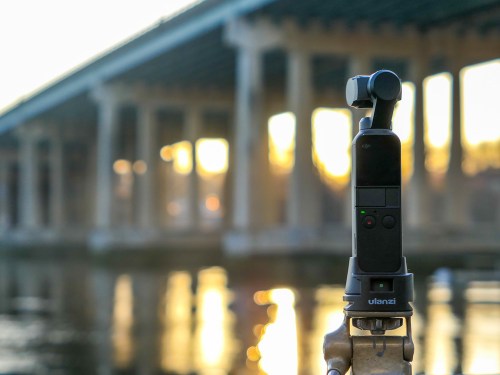
I’ve brought along my tiny DJI Osmo Pocket camera to shoot time-lapse videos of some of the beautiful environments I’ve passed through recently during my walks. I’ve found it to be an especially calming practice.

Take a look at these nature shots with three sunrises…

Stay Centered
Nature doesn’t skip a beat. Time flows. And if you look closely, people are still around. Many patterns continue as before.

Our daily routines have been shattered. No doubt. But I find it nourishing to observe some of the larger norms of existence still firmly in place.

So, If you can, it’s time to go out and take a walk.

Why Does my iMac Turn Itself on at Midnight?

If your Apple computer independently starts its day in the wee hours of the morning without your involvement, you should check this setting.

I was out late the other night, and when I got home around midnight, I walked into in my home office before I headed off to bed. All was quiet. Then, I heard a sudden but familiar brief whooshing sound from the direction of my desk. I instinctively turned my head.

My iMac was booting up as if Skynet had taken over.
It was pretty freaky.

I glanced over at my Marathon clock that was positioned close to my iMac, and it eerily displayed 12:00am… on the dot.

Hmmm. That was interesting.

I took a breath and looked at my clock again. I felt that this clearly wasn’t some random moment where my iMac had decided to misbehave.

Turn Off the Schedule Mode
Was there a hidden setting in my iMac’s System Preferences that was telling my iMac to independently boot up?

I took a look, and in fact… there was. My iMac was ‘scheduled’ to turn itself on at midnight.

So, here’s what I did to turn that off:

  • Click on System Preferences
  • Click on ‘Energy Saver’
  • Click on ‘Schedule’ on the bottom right
  • Unclick ‘Start up or wake’
    (which had defaulted to 12:00am)

Problem solved.

Living with your Gremlins
I suppose the lingering question is why that scheduled action was clicked in the first place.
I certainly hadn’t done it.

It’s an issue for another time.
For now, my iMac should behave…as directed.

Thank you, HAL.

How your Timelapse Videos will Reveal a Different Reality

Shooting timelapse videos will remind you about the very nature of existence. Here are a few of the ways they can expand your perspective.

Capturing that perfect moment with your camera can be a life-long ambition. Along your photographic journey, you might want to also consider the opposite exercise. Explore the opportunity to scoop up the ever-changing landscape in front of you… across time.

Use Your Camera as a Time Machine
Many cameras and smartphones today can act as a time machine and perform the trick of timelapse video capture. You’ve just got to give some thought to which environments you’d like to explore and how they might look when you squeeze twenty minutes down to twenty seconds.

Shooting timelapse videos is easy to do. You’ve simply got to keep your camera steady and allow it to slowly snap a frame of video every two or three seconds. Along the way, it stitches the frames together to generate a scene that moves at lighting speed when you play it back.

Beyond the exploration of timelapse video as an art form, this technology is also exciting, because it bottles up time and then reveals your world in ways you’ve never experienced before. It’s a whole new way to experience reality.

Here’s what I’ve learned from these timelapse videos I’ve recently shot.

So Many Rushing Clouds
I’m always impressed by the hidden intensity of ‘normal’ weather conditions in timelapse mode.
Clouds Timelapse at Calf Pasture Beach
Clouds do not lumber along. Here on a beach, I see that they are clearly on a mission to quickly reach some important destination.

Our Fleeting Existence
When you speed up time, people become momentary blips. While this video’s final form creates a dance of frenetic fun in a snow storm, it’s also a sobering reminder of our own brief presence in space and time.
Snowy Day Timelapse at Cranbury Park
So, always remember to enjoy the dance.

Your Own Sunrise
Capturing a quickly-moving sun at dawn is hardly an original concept. It’s a scene we’ve all be exposed to countless times on TV and at the movies. Still, there’s always a way to make a sunrise your own.
Sunrise Timelapse by Saugatuck River and Route 95
Where you choose to experience your sunrise is always the unique factor.

Adding Motion
You may have noticed the panning movement in my time-lapse video examples. This trick is courtesy of the ‘motionlapse’ mode in my DJI Osmo Pocket Gimbal camera. After every snapped frame, the gimbal auto-pans a wee bit as part of a preprogrammed move. And that creates the effect of a smooth pan across the shot.

Patience
Timelapse videos are fun to do and usually generate amazing results. Just don’t forget one important variable. These videos will take a while to shoot. So plan ahead.

Capturing time takes time.